Table of Contents
Chapter I General Description.....................................................1
1.1 Description............................................................................ 1
1.2 Model.................................................................................... 1
1.3 Features................................................................................. 1
1.4 Keyboard Layout .................................................................. 1
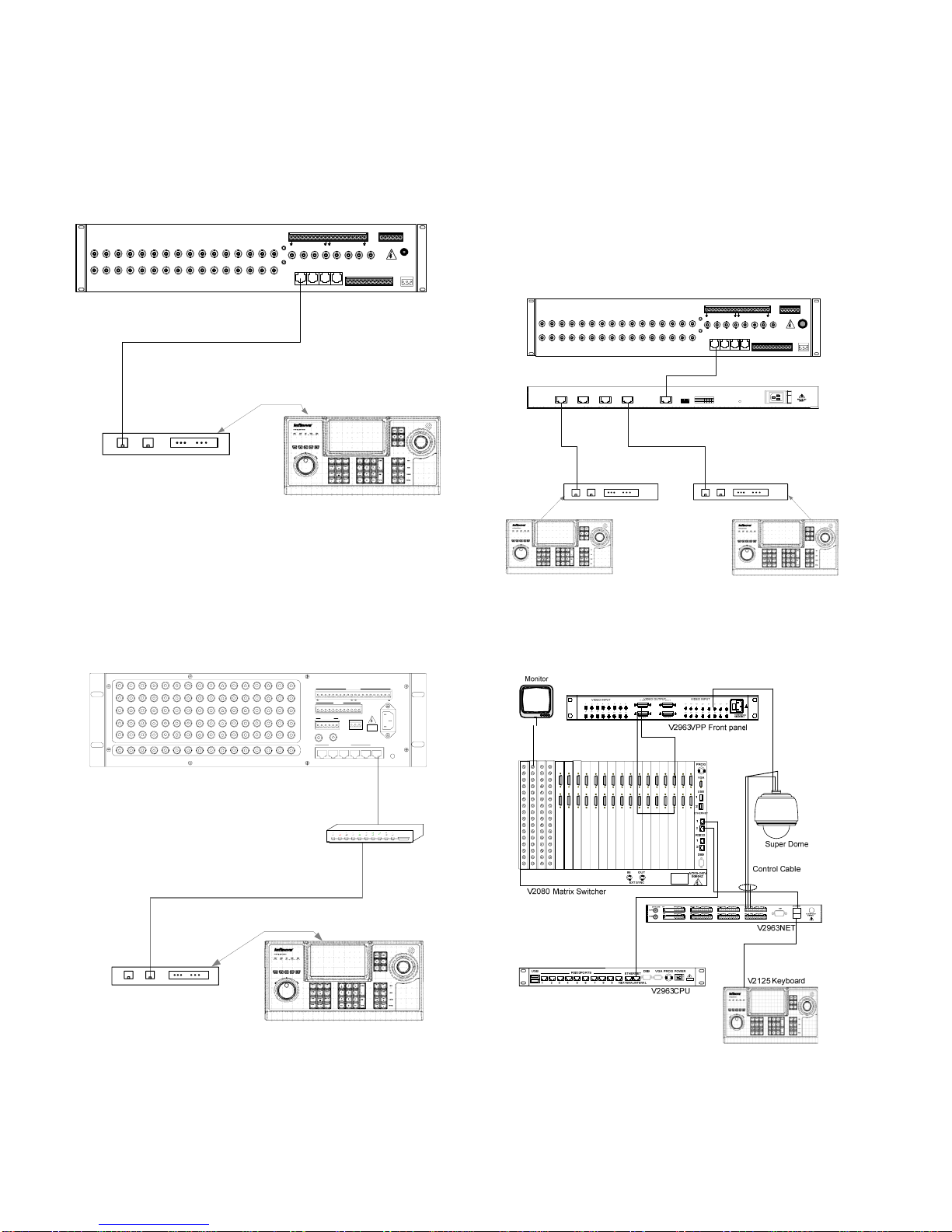
Chapter II System Connection.....................................................2
2.1 V2125 Keyboard Controls Super Domes .............................. 2
2.2 V2125 Keyboard Controls Receivers.................................... 3
2.3 RS-232 Communications ...................................................... 4
2.4 Ethernet Communications..................................................... 4
2.5 Using Port Expanders ........................................................... 4
2.6 Typical System Connections ................................................. 4
Chapter III Menu Description and Setup....................................5
3.1 LCD Display ......................................................................... 5
3.2 System Parameter Setup........................................................ 6
3.2.1 Basic Parameter Setup................................................... 7
3.2.2 Input Mode .................................................................... 7
3.2.3 Matrix Control............................................................... 8
3.2.4 Dome/DVR Control ...................................................... 8
3.2.5 System Time.................................................................. 9
3.2.6 Audio/Video.................................................................. 9
3.2.7 Calibration................................................................... 10
3.3 History Record .................................................................... 10
3.4 Virtual Keyboard................................................................. 10
3.5 WEB Page Configuration.................................................... 11
3.5.1 WEB Login ................................................................. 11
3.5.2 WEB User Management.............................................. 11
3.5.3 Upload and Backup ..................................................... 12
Chapter IV Matrix Controlling..................................................13
4.1Communication between Keyboard and Matrix................... 13
4.2 User Login .......................................................................... 13
4.3 Matrix Mode Switch ........................................................... 14
4.4 Video Switching.................................................................. 14
4.5 Screen Splitting and Calling Sub-screen ............................. 14
4.5.1 Screen Splitting ........................................................... 14
4.5.2 Select Sub-screen ........................................................ 14
4.6 Operation Mode of Matrix .................................................. 14
4.6.1 Camera Control ........................................................... 14
4.6.2 Running a Tour ........................................................... 14
4.6.3 Calling a Preset ........................................................... 15
4.6.4 Calling a Salvo ............................................................ 15
4.6.5 Calling a Pattern.......................................................... 15
4.6.6 Activating Auxiliary Relays........................................ 15
4.6.7 Acknowledging an Alarm ........................................... 15
4.7 Program Mode of Matrix .................................................... 16
4.7.1 System Reset ............................................................... 16
4.7.2 Arranging Monitor Display ......................................... 16
4.7.3 Programming Monitor Tour ........................................ 16
4.7.4 Setting Date Format .................................................... 17
4.7.5 Version Number Checking.......................................... 17
4.7.6 Programming Preset .................................................... 17
4.7.7 Programming Pattern................................................... 17
4.7.8 Camera Lockout .......................................................... 17
4.7.9 Monitor Arming/Disarming ........................................ 17
4.8 Menu Programming ............................................................ 18
4.9 Macro Setting...................................................................... 18
4.9.1 Brief Introduction to Macro ........................................ 18
4.9.2 Macro Application in V2125 Keyboard ...................... 18
4.9.3 Macro Programming Method ...................................... 18
4.9.4 Macro Command Upload ............................................ 19
Chapter V DVR Controlling.......................................................20
5.1 Parameters Setup ................................................................ 20
5.2 System Connection ............................................................. 20
5.3 DVR Operation................................................................... 20
5.3.1 Select the Controlled DVR.......................................... 20
5.3.2 Switch PTZ Status....................................................... 21
5.3.3 Control DVR by Shuttle Roller................................... 21
Appendix I Specifications ........................................................... 21
Appendix II Cable Diameter Calculation and Lightning &
Surge Protection..........................................................................22