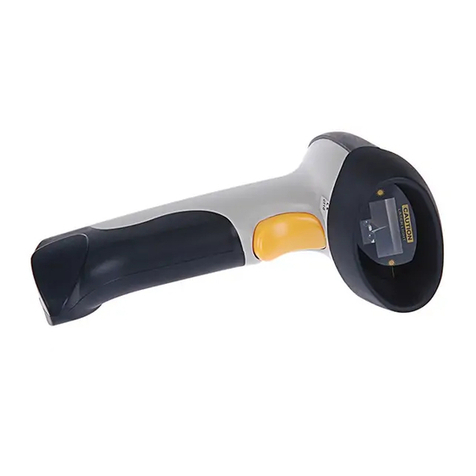
Inateck BCST-20 User manual

www.inateck.com
Instruction Manual
BCST-20
Barcode Scanner

IMPORTANT NOTICE
Safety Precaution
* DO NOT disassemble the scanner, or place foreign
matter into the scanner causing a short circuit or circuit
damage.
* DO NOT expose the scanner or battery to any flammable
sources.
Maintenances Precaution
* Use a clean cloth to wipe dust off the body of the
scanner.
* If you find the scanner abnormal, write down the specific
scenario and consult the maintenance person.
2

Contents
IMPORTANT NOTICE........................................................................2
Safety Precaution........................................................................2
Maintenances Precaution............................................................2
Contents.............................................................................................3
Overview of BCST-20 Barcode Scanner............................................5
Features of the Scanner..............................................................5
Appearance.................................................................................5
Introduction of Key Function........................................................6
Specifications...............................................................................6
Correct Aiming.............................................................................7
Incorrect Aiming...........................................................................7
QUICK START....................................................................................7
Enter the Setting Mode................................................................9
Exit the Setting Mode with Save..................................................9
Exit the Setting Mode without Save.............................................9
Restore Factory Defaults...........................................................10
Check Software Version............................................................10
Save Custom Settings...............................................................11
Chapter 1 Features and Basic Setups.............................................12
1.1 Battery..................................................................................13
1.1.1 Mounting the battery(charging)...................................13
1.1.2 How to operate BCST-20 Barcode Scanner...............13
1.1.3 Auto Power Off............................................................13
1.2 Transmit Buffer.....................................................................14
1.2.1 Inventory Mode...........................................................16
1.3 LED Indicator.......................................................................17
1.4 Beeper.................................................................................17
1.4.1 Beeper Volume...........................................................18
1.5 Scan Modes.........................................................................19
1.5.1 Manual Mode..............................................................19
1.5.2 Continuous Mode........................................................20
1.5.3 Auto Power Off Mode..................................................21
1.5.4 Auto-induction Mode...................................................23
1.6 Symbologies Supported.......................................................24
1.7 USB Wired Data Transmission............................................24
1.8 Digit capacity Setting...........................................................25
3

Chapter 2 How to Connect with USB receiver.................................26
Chapter 3 Symbology Settings........................................................27
3.1 Codabar...............................................................................28
3.1.1 Start/Stop Transmission..............................................29
3.2 Code 25 : Industrial 25.........................................................30
3.3 Code 25 : Interleaved 25......................................................31
3.4 Code 25 : Matrix 25..............................................................32
3.5 Code 25 : Standard 25.........................................................33
3.6 Code 39................................................................................34
3.6.1 Start/Stop Transmission..............................................35
3.6.2 Checksum Verification.................................................36
3.6.3 Standard/Full ASCII Code 39......................................37
3.7 Code 93................................................................................38
3.8 Code 128..............................................................................39
3.9 EAN-8...................................................................................40
3.9.1 Convert to EAN-13......................................................40
3.9.2 Checksum Transmission.............................................41
3.10 EAN-13...............................................................................42
3.10.1 Convert to ISBN........................................................42
3.10.2 Checksum Transmission...........................................43
3.11 UPC-A.................................................................................44
3.11.1 Checksum Transmission...........................................44
3.12 UPC-E.................................................................................45
3.12.1 Checksum Transmission...........................................45
3.13 MSI......................................................................................46
3.14 Code 11...............................................................................47
Chapter 4 Defining Output Format...................................................48
4.1 Code ID.................................................................................48
4.2 Suffix Code of Barcode Settings...........................................49
Appendix I........................................................................................50
4

Overview of BCST-20 Barcode Scanner
Features of the Scanner
* Small size, portable.
* Supports three scan modes, including Continuous Mode, Manual
Mode, Auto-off Mode.
* Supports most popular barcode symbologies.
* User feedback via LED indicator and beeper
* The voice volume of scan barcode successfully could change via
setting barcode.
* Provides 256 KB memory for reserve buffer while 2.4Ghz
connection interruption, which can store up to 2600 scan barcodes.
* Programmable parameters include data output format, editing
format, symbologies, etc.
★Abundant decoding symbologies
★Whole body shockproof and drop resistant design
★Proprietary intellectual property rights
★Comfortable operating feel
★Button life up to 3 million times
★1500mAh large capacity lithium battery
★Long working hours
Appearance
Power
USB port
Bluetooth Wireless mode USB Wired mode
Scan Window
5

Introduction of Key Function
* Long press Scan button 3 seconds will turn on the BCST-20
scanner.
* Long press Scan button 3 seconds will turn off the BCST-20
scanner.
* Flip the Scan button can read the barcodes.
Specifications
PHYSICAL CHARACTERISTICS
Material
Size
Color
Power supply
Weight
PERFORMANCE CHARACTRISTICS
Sensor
Decode Capability
Light Source(Laser)
Resolution
Nominal Working Distance
Decode Rate
Scan width
Decode mode
Scan mode
Print Contrast Minimum
Scan angles
Cylinder Horizontal Scan
Indication
Radio Range
Interfaces Supported
POWER
Voltage
Laser Safety
EMC
standby Current
Operating current
ABS+TPU
Length 167mm*Width 70mm* Height 85.5mm
White, Black
Built-in rechargeable lithium battery
150g(With battery)
2500 pixels
Codabar, Code 11, Code 93, MSI, Code 128,
UCC/EAN-128, Code 39, EAN-8, EAN-13,
UPC-A, ISBN, Industrial 25, Interleaved 25,
Standard 25, 2/5 Matrix
Laser LED 650+/-20nm
5mil
6~30cm
200 decodes per second
30mm=Scanner Window
Single-Line Aiming
Auto off mode / Manual mode
30%
Roll30¡ Pitch75¡ Yaw65¡
Diameter 35mm
Beeper, LED
10m Visual range
USB
DC 5V
Accord with national level two laser safety
standards
CE & FCC DOC Compliance
35mA
60mA
6

USER ENVIRONMENT
Operating Temp.
Storage Temp.
Operating Humidity
Storage Humidity
Drop Specifications
Accessories
0 to 50. ¡C / 32 to 122¡F
20-85% ( non-condensing )
Free fall of 1.5m air drop
USB receiver, USB data cable, Manual
Correct Aiming
Incorrect Aiming
QUICK START
The setting of the BCST-20 Barcode Scanner can be changed by
reading the setup barcodes contained in this manual. This section
describes the procedure of setting the BCST-20 Barcode Scanner
by reading the setup barcodes and provides some example for
demonstration.
Step 1: Turn on BCST-20 Barcode Scanner. It will response with a
long beep(high tone), it's LED shows red and with Intmt
twinkle.
Note: How the BCST-20 Barcode Scanner establishes a
connection with computer or other compatible device,
please refer to Chapter 2.
Step 2: Enter the Setting Mode. The BCST-20 Barcode Scanner
will response three beeps (tone descending from high to
low), and its LED indicator will flash purple.
7

Step 3: Read a Setup barcode. The BCST-20 Barcode Scanner
will response three beeps (tone ascending from low to
high), and its LED indicator will flash purple.
For Example:
Step 4: Exit the Setting Mode. The BCST-20 Barcode Scanner will
response three beeps (tone descending from high to low),
and its LED indicator will not flash purple and power off.
Note: When any setup error occurs, the BCST-20 Barcode
Scanner will respond with a long beep (low tone), and its
LED indicator will flash purple.
Steps of Setup
Enter Setup
Details (eg: Enable/Disable a Barcode)
Exit Setup
Enter Setup
Exit with Save
Enable Codabar
8

Enter the Setting Mode
For the scanner to enter the setting mode, you must have it read the
"Enter Setup" barcode, which will be located at the bottom of almost
every page of this manual.
The BCST-20 Barcode Scanner will respond with three beeps (tone
descending from high to low), and its LED indicator becomes purple
and go off quickly after reading the barcode.
For setting scanner parameters, see "Read a Setup Barcode" below.
Exit the Setting Mode with Save
For the scanner to exit the setting mode, you must have it read the
"Exit with Save" barcode, which will be located at the bottom of almost
every page of this manual.
Just like reading the "Enter Setup" barcode, the scanner will respond
with three beeps (tone ascending from low to high) after reading the
barcode.
Exit the Setting Mode without Save
If you want to exit the setting mode without saving any changes, you
must have the scanner read the "Exit without Save" barcode.
Just like reading the "Enter Setup" barcode, the scanner will respond
with three beeps (tone ascending from low to high) after reading the
barcode.
Enter Setup
Exit with Save
Exit without Save
9

Restore Factory Defaults
"Restore Factory Defaults" is a special barcode. The BCST-20
Barcode Scanner will respond with a short beep (high tone) after
reading this barcode. At this time, the scanner system could restore
factory defaults, and no need to read "Exit with Save" barcode again.
Note: Most of setting mode have restore factory defaults selection.
The factory default value for each setting is indicated by an asterisk
"*".
You could use this barcode at the following status:
1. The scanner doesn’t work. For example, it can not read barcodes.
2. You forget the settings what you did to the scanner before, and you
don't want to be affected by the settings when you use the scanner.
3. After using a function which is not to be used usually in the scanner.
Check Software Version
If you want to know the software version of BCST-20, should read the
‘Enter Setup’ and ‘Output Software Version’ barcode:
Checking the software version is done at the enter setup mode, so
after output the software version, need to read ‘Exit without Save’
barcode.
Restore Factory
Enter Setup
Output Software Version
Exit without Save
10
Other manuals for BCST-20
2
Table of contents
Other Inateck Barcode Reader manuals

Inateck
Inateck BCST-54 User manual

Inateck
Inateck P6 User manual

Inateck
Inateck P7 User manual

Inateck
Inateck BCST-54 User manual

Inateck
Inateck BS02004 User manual

Inateck
Inateck P6 User manual

Inateck
Inateck BCST-20 User manual

Inateck
Inateck BCST-71 User manual

Inateck
Inateck P7 User manual

Inateck
Inateck BCST-10 User manual

Inateck
Inateck BCST-70 User manual

Inateck
Inateck BCST-54 User manual

Inateck
Inateck BCST-20 User manual

Inateck
Inateck BCST-33 User manual

Inateck
Inateck BCST-40 User manual

Inateck
Inateck BCST-51 User manual

Inateck
Inateck BS02001 User manual

Inateck
Inateck P6 User manual

Inateck
Inateck BCST-55 User manual

Inateck
Inateck BCST-43 User manual