iHome iBN97A User manual

iBN97 (USA)
iBN97A (Canada)
instruction manual
iBN97 IB (cost down version)
Size: 153mm x 120mm
Printing color: Black
Jan. 6, 14. P1
NFC Bluetooth Wireless
FM Clock Radio
with USB Charging

iBN97
Introduction
Thank you for purchasing the iHome iBN97. This product is designed to provide high quality wireless
sound for your iPad, iPhone, iPod, computer, or other Bluetooth audio device.
The dual alarms on this iHome clock radio can be set and used independently, so you can program each
alarm to wake you up to a paired Bluetooth device, 4 separate alarm tones, the FM stereo radio, or a
buzzer alarm. You may set each alarm for weekday, weekend, or everyday operation, and even adjust
the alarm volume separately from your normal listening volume. And best of all, even if the power is out
at your selected wake up time, the SureAlarm battery backup system will still activate the electronic buzzer
alarm to get you up on time.
Along with the included Quick Bluetooth Connection Guide this instruction booklet explains the basic
operation and care of the unit. Please read them carefully and keep for future reference.
This unit features NFC (near field communication) technology which allows you to
wirelessly connect your NFC–enabled device to instantly ‘pair and play’. See your
device’s user manual for details on how to interact with NFC devices.
If your Bluetooth device does not support NFC, you can pair it manually with this
unit.
• Place the unit on a level surface away from sources of direct sunlight or excessive heat.
• Protect your furniture when placing your unit on a natural wood and lacquered finish. A cloth or other
protective material should be placed between it and the furniture.
• Clean your unit with a soft cloth moistened only with mild soap and water. Stronger cleaning agents,
such as benzene, thinner or similar materials can damage the surface of the unit.
P2
Maintenance

iBN97
FCC Information
P3
FCC ID: EMOIBN97A
IC: 986B-IBN97A
• Warning: Changes or modifications to this unit not expressly approved by the party responsible for compliance could
void the user’s authority to operate the equipment.
• NOTE: This equipment has been tested and found to comply with the limits for a Class B digital device, pursuant to
Part 15 of the FCC Rules.
These limits are designed to provide reasonable protection against harmful interference in a residential installation. This
equipment generates, uses and can radiate radio frequency energy and, if not installed and used in accordance with
the instructions, may cause harmful interference to radio communications.
However, there is no guarantee that interference will not occur in a particular installation. If this equipment does cause
harmful interference to radio or television reception, which can be determined by turning the equipment off and on, the
user is encouraged to try to correct the interference by one or more of the following measures:
• Reorient or relocate the receiving antenna.
• Increase the separation between the equipment and receiver.
• Connect the equipment into an outlet on a circuit different from that to which the receiver is connected.
• Consult the dealer or an experienced radio/TV technician for help.
CAN ICES-3 (B)/NMB-3(B)
This device complies with Part 15 of the FCC Rules, operation is subject to the following two conditions:
(1) This device may not cause harmful interference, and (2) this device must accept any interference
received, including interference that may cause undesired operation.
FCC Radiation Exposure Statement
This equipment complies with FCC RF radiation exposure limits set forth for an uncontrolled environment. This transmitter
must not be co-located or operating in conjunction with any other antenna or transmitter.
This device complies with Industry Canada licence-exempt RSS standard(s). Operation is subject to the following two
conditions:
(1) This device may not cause interference, and
(2) This device must accept any interference, including interference that may cause undesired operation of the device.

iBN97
Table of Contents
P4
Meet Your iBN97.......................................................................................................... 1-3
The Display/Setting Up the Unit ..........................................................................................4
Setting the Clock/ FM Radio..............................................................................................5
Setting and Using FM Presets..............................................................................................6
Setting and Using the Alarm ............................................................................................ 7-8
Previewing and Turning Alarm Off/Setting Gentle Wake Timer ................................................8
Snooze/Dimmer Button/Sleep and Nap Modes ..................................................................9
Using Bluetooth: Pairing & Playing Your Device Using NFC ....................................................10
Pairing Your Device Using Standard Bluetooth.......................................................................11
Playing Audio Via Bluetooth/Using the Speakerphone...........................................................12
Playing Audio Via Aux-in/Charging Devices via USB Port .....................................................13
Using FM Radio in Other Countries....................................................................................14
Replacing and Installing Clock Backup Battery ....................................................................15
Troubleshooting..............................................................................................................16
Consumer Product Safety Guide................................................................................... 17-18
Warranty......................................................................................................................19
iBN97
1
P5
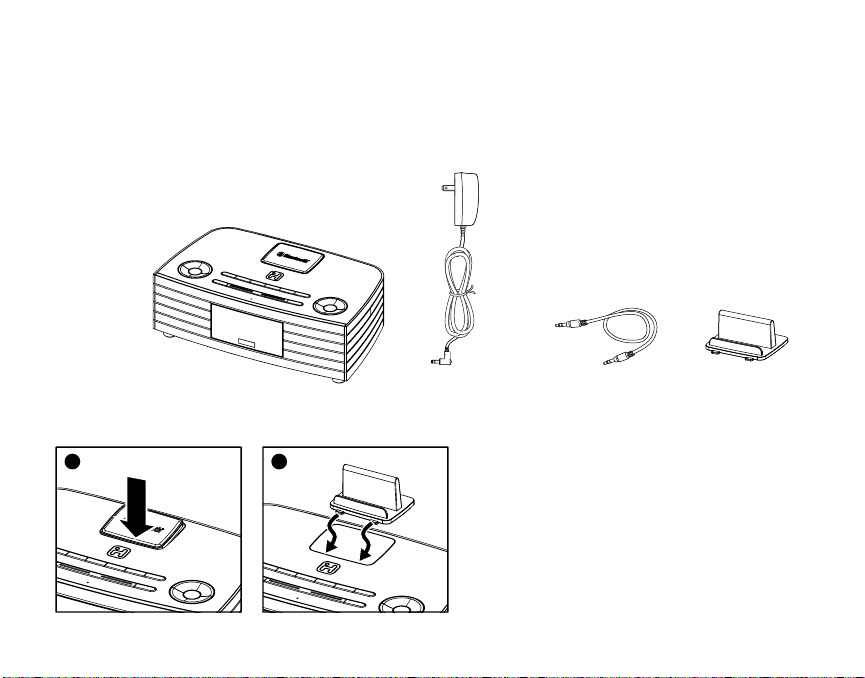
Included
• iBN97 system
• 100V-240V universal AC adaptor
• 3.5mm audio cable
• Backrest
power adaptor audio cable backrest
iBN97
A removable backrest is included with the unit
for best stability when resting a device on top
of the unit in either portrait or landscape
orientation.
1. To remove the flat rubberized rest, press
down on the front of the rest and remove it.
2. To place the backrest, gently slide the front
tabs into place.
*Note: There are two versions of this
product. One uses a 12V 2.5A adaptor, and
the other a 12V 1.6A one. Only use the
correct adaptor. If ordering a replacement,
identify the correct adaptor by checking the
DC jack rating on the back of unit.
12

iBN97
2
P6
Meet Your iBN97
Top
Nap/Clock
Set Button
Mode Button
Power Button
Talk/End Buttons
Plus/Minus
Settings Buttons
Volume Up Button
EQ/Pairing Button
Volume Down Button
Play/Pause and
Presets Button
Wakeup/Alarm Skip
Button
Sleep Button Snooze/Dimmer
Button Microphone
Alarm 1 & Alarm 2
Buttons
Backrest/Landscape insert
NFC Antenna Area

DC Jack USB Charging Port Aux-in Jack
iBN97
P7
Meet Your iBN97
Back
Bottom
3
usb
charging
DC 12V
1.6A
FM Antenna
Backup Battery
Compartment
Remove the pull tab
before initial use to
activate the SureAlarm
battery backup system.
Remove before use
Pull Tab

iBN97
Using the
Setting Up the Unit
The Display
Connect the included AC adaptor to the DC jack
located on the back of the unit and connect the
other end to a working wall outlet.
4
P8
Alarm Active Indicator
Bluetooth Indicator
PM/AM
Indicators
Date, Alarm time, Mode Indicator: Radio, Bluetooth, Aux-in
Time Display
Low Backup
Battery Indicator
usb
charging
DC 12V
1.6A
RESET
RESET
TEST
TEST

iBN97
Using the
5
Setting the Clock
FM Radio
P9
1. Press and hold the Nap/Clock Set Button for 2 seconds until the clock display flashes and unit beeps.
2. Press the –or +Buttons to adjust the clock to the current time (hold for rapid setting).
Make sure you set the correct AM/PM time. The AM and PM indicators appear to the left of the
display. To toggle the clock display between standard 12 hour time and 24 hour (“military”) time
display, press the Alarm 1 or Alarm 2 Button during time setting.
3. Press the Nap/Clock Set Button again to confirm the time. The year will flash. Press the –or +
Buttons to adjust the display to the current year (hold for rapid setting).
4. Press the Nap/Clock Set Button to confirm the year. The date will flash. Press the –or +Buttons
to adjust the display to the current month and date (hold for rapid setting).
5. Press the Nap/Clock Set Button to confirm the time and exit clock setting mode. 2 beeps will confirm
clock setting is complete.
1. Press and release the Mode Button as needed until the current FM radio station appears on the
display.
2. Press the –or +Buttons to tune the radio to the desired station (hold for 2 seconds to search for
the next clear station). Extend the FM antenna for best reception.
(Continued on next page)

3. Press the or Buttons to adjust the volume on the unit. To adjust the tone, press and release the
EQ Button as needed to cycle to Treble, Bass or Balance, then press the –or +Buttons to adjust
for best sound.
4. When you are through listening, press the Button to turn the unit off.
6
Setting and Using FM Presets
FM Radio (cont’d)
iBN97
Using the
P10
The unit allows you to store up to 6 FM radio station presets
1. Press and release the Mode Button as needed until the current FM radio station appears on the
display.
2. Press and release the /Presets Button as needed until the preset number (P1- P6) you wish to sets
is displayed, then press and hold the /Presets Button to enter setting mode. One beep will sound.
3. Press the –or +Buttons to tune the radio to the desired station (hold to scan for the next clear
station).
4. Press and release the /Presets Button to confirm. 2 beeps will sound to confirm the preset has been
assigned. Repeat steps 2 - 4 until you have set up to 6 preset stations.
5. To listen to a preset FM station at any time, press and release the Mode Button as needed to turn on
FM radio mode then press and release the /Presets Button as needed to cycle to the desired
preset.
This manual suits for next models
1
Table of contents
Other iHome Clock Radio manuals

iHome
iHome IP43 IP43 User manual

iHome
iHome iDL45 Installation and maintenance instructions

iHome
iHome iHM28 Technical manual

iHome
iHome iD83 User manual

iHome
iHome iHome iBT20 User manual

iHome
iHome iH110 User manual

iHome
iHome iHM50R User manual

iHome
iHome IA100 User manual

iHome
iHome HBN22 User manual

iHome
iHome Hello Kitty Si-B62 User manual