
ICA SIN-1100C User manual

Uninterruptible Power Systems
USER MANUAL
(BUKU PETUNJUK PEMAKAIAN)
ICA
SIN1100C
SIN1500C
SIN2100C
SIN3100C
Rev. 00 481-11500Y0-141

VIII.
IX.
INTRODUCTION / PENDAHULUAN
SAFETY NOTES / CATATAN KESELAMATAN
TECHNICAL SPECIFICATION / SPESIFIKASI
TEKNIK
FRONT PANEL & REAR PANEL VIEW / TAMPAK
PANEL DEPAN & PANEL BELAKANG
3
1
Page /
Halaman
5
6
UPS INSTALLATION / PEMASANGAN UPS
UPS START UP / MENGHIDUPKAN UPS
OPERATION PROCEDURE / CARA
PENGOPERASIAN
9
11
12
TABLE OF INDICATOR STATUS / TABEL STATUS
INDIKATOR
TROUBLE SHOOTING / PETUNJUK KETIDAK
NORMALAN
13
14
II.
I.
III.
IV.
V.
VI.
VII.
CONTENTS / DAFTAR ISI

I. SAFETY NOTES / CATATAN KESELAMATAN
1
I.1. Electrical Safety
I.2. Deenergizing Safety
● If the UPS has an internal energy source (battery), the output may be energized when
the unit is not connected to a utility power outlet.
● To deenergize a pluggable UPS, press the OFF button or switch to shut the equipment
off. Unplug the UPS from the utility power outlet. Disconnect the external batteries
where applicable and disconnect the internal battery. Push the ON button to deenergize
the capacitors.
I.1. Keselamatan Listrik
● .Jangan bekerja sendiri dalam situasi berbahaya
● .Tegangan tinggi melalui bahan konduktif dapat menyebabkan luka bakar
● .Periksa agar kabel listrik, fiting, dan soket berada dalam kondisi baik
● Bila grounding tak dapat diverifikasi, putuskan hubungan peralatan listrik dengan
keluaran listrik AC sebelum memasang atau menghubungkannya dengan peralatan
lain. Hubungkan kembali dengan kabel listrik hanya jika seluruhnya selesai
dihubungkan.
● Hubungkan peralatan ke keluaran listrik AC tiga kabel (dua kutub dan ground). Soket
penerima harus terhubung secara benar melalui sirkuit cabang/pelindung utama
(sekring atau pemutus arus). Hubungan ke soket penerima dalam bentuk lainnya dapat
menyebabkan bahaya sengatan listrik.
● Jika alat memiliki sumber energi internal (batterai), output mungkin masih
mengandung arus listrik walaupun unit tidak terhubung dengan tegangan listrik AC.
● Untuk membuang arus listrik dari UPS yang terhubung, tekan tombol OFF untuk
mematikan alat. Putuskan alat dari outlet listrik AC. Lepaskan batterai dan putuskan
batterai internal. Tekan tombol ON untuk membuang listrik di dalam kapasitor.
I.2. Keselamatan Saat Membuang Arus Listrik
● ot work alone under hazardous conditions.Do n
● .High current through conductive materials could cause severe burns
● (s), plug(s), and socket are in good condition.Check that the power cord
● , disconnect the equipment from the utility power When grounding cannot be verified
outlet before installing or connecting to other equipment. Reconnect the power cord
only after all connections are made.
● two pole plus ground). The Connect the equipment to a three wire utility outlet (
receptacle must be connected to appropriate branch circuit/ mains protection (fuse or
circuit breaker). Connection to any other type of receptacle may result in risk of
electrical shock.

I.3. Battery Safety
I.3. Keselamatan Baterai
● .Repair are to be performed only by qualified personnel
● Do not dispose of batteries in a fire. The batteries may explode.
● Do not open or mutilate batteries. They contain an electrolyte that is toxic and harmful
to the skin and eyes.
● Replace batteries with the same number and type of batteries as originally installed in
the equipment.
● .Perbaikan hanya dilakukan oleh seorang teknisi yang memiliki kualifikasi
● Jangan buang batterai ke dalam api, dapat meledak.
● Jangan membongkar batterai. Batterai mengandung elektrolit yang beracun dan dapat
merusak kulit dan mata.
● Ganti batterai dengan nomor dan jenis yang sama seperti aslinya terpasang dalam alat.
Jangan buang sisa kemasan produk ini sebagai limbah rumah tangga: Bawa ke tempat
pengumpulan untuk didaur ulang.
Untuk informasi tentang tempat daur ulang terdekat, hubungi petugas pembuangan limbah
setempat.
Pembuangan produk
UPS berisi bahan internal yang (dalam kasus pembuangan) dianggap LIMBAH
BERACUN dan BERBAHAYA, seperti papan sirkuit elektronik dan baterai. Perlakukan
bahan-bahan ini sesuai dengan undang-undang yang berlaku dengan merujuk pada
personel servis yang berkualifikasi. Pembuangan yang tepat berkontribusi untuk
menghormati lingkungan dan kesehatan manusia.
Disposing of the product
The UPS contains internal material that (in case of disposal) are considered TOXIC and
HAZARDOUS WASTE, such as electronic circuit boards and batteries. Treat these
materials according to the laws applicable referring to qualified service personnel. Their
proper disposal contributes to respect the environment and human health.
Do not dispose of leftover packaging for this product as household waste: Take it to a
collection point for recycling.
For information about the nearest recycling facility, contact your local waste disposal
authority.
2

The ICA Uninterruptible Power Supplies is an advanced true on-line sinewave with
technology high voltage PWM (Pulse Width Modulation) and static transfer switch. The
UPS can provide reliable, regulated, transient free AC power to sensitive equipment
ranging from computers & telecommunication systems to computerized instrument.
The UPS has high non-linear load current capability (crest ratio 3:1) and this is
suitable for powering special loads such Switching Power Supplies or load high
capacitive.
The systems static transfer switch (STS) provides bypass power as its standby source.
Upon inverter failure or overload, the STS will switch the output power Bypass (if the
power line exists) within 0 ms. The STS can retransfer back to inverter automatically
when the system is restored to normal condition within 2 ms.
This UPS is also provided completed by interface for communication with computer,
with operating system Windows and Linux. Information from UPS to Computer is
power fail and battery low.
UPS ICA adalah Uninterruptible Power Supplies jenis tidak terputus dengan output
sinusoida yang menggunakan teknologi high voltage PWM (Pulse Width Modulation)
dan dilengkapi dengan static transfer switch. Sehingga UPS ini menghasilkan sumber
daya output yang sangat stabil dan bebas dari tegangan transient, jadi sangat baik untuk
digunakan pada peralatan yang sensitif seperti komputer, sistem telekomunikasi, dan
peralatan canggih lainnya.
UPS ini mempunyai kemampuan beban non-linier yang tinggi (crest ratio 3:1),
sehingga memungkinkan untuk digunakan pada beban-beban seperti Switching Power
Supply atau beban kapasitif tinggi.
Sistem static transfer switch (STS) merupakan suatu sistem dimana output UPS
berasal dari inverter di by-pass ke Input PLN pada saat kondisi overload (bila PLN ada)
dengan waktu transfer 0 ms dan Static Transfer Switch secara otomatis akan kembali
memindahkan output UPS ke Inverter, bila sudah tidak terjadi Overload.Bila terjadi
kerusakan pada Inverter, output UPS melalui STS juga akan di bypass ke Input PLN
dengan waktu transfer hanya sekitar 2 ms.
UPS ini dilengkapi juga interface untuk berkomunikasi dengan komputer, baik dengan
sistem operasi Windows dan Linux. Informasi yang diberikan ke komputer adalah saat
PLN mati dan pada saat baterai hampir habis.
II. INTRODUCTION / PENDAHULUAN
3

RECTIFIER INVERTER
INDICATOR
&
CONTROL
CHARGER
BATTERY
TO COMPUTER
NETWARE
AC OUTPUT
AC INPUT
RECTIFIER INVERTER
INDICATOR
&
CONTROL
CHARGER
BATTERY
TO COMPUTER
NETWARE
AC OUTPUT
AC INPUT
EXTERNAL BATTERY
(OPTION)
RECTIFIER INVERTER
INDICATOR
&
CONTROL
CHARGER
BATTERY
TO COMPUTER
NETWARE
AC OUTPUT
AC INPUT
EXTERNAL BATTERY
(OPTION)
UPS SIN1100C, UPS SIN1500C
EXTERNAL BATTERY (OPTIONAL) UPS SIN2100C
EXTERNAL BATTERY (OPTIONAL) UPS SIN3100C
II.1. DIAGRAM BLOCK VIEW / GAMBAR BLOK DIAGRAM
4

SIN1100C SIN1500C SIN2100C SIN3100C
1600 /
1040
2500 /
1625
185 ~ 250
50 ± 5%
220 ± 2%
50 ± 1%
± 85
0
Intermittent Sound with 4 seconds Interval
2 ms from Inverter to Bypass, 0 ms back to Inverter
10
Intermittent Sound with 1 second Interval
0 ~ 40
No Fuse Breaker
No Fuse Breaker
Switching Regulation
Sinusoida
< 3% THD
Pulse Width Modulation (PWM)
120
135
10 x 12V, 7Ah
192
216
16 x 12V,
7Ah
84
94,5
510 x 205 x
450
64 80 104 123,5
610 x 230 x
475
630 x 265 x
610
630 x 265 x
690
7 x 12V,
7Ah
3100 /
2015
5000 /
3250
REMARKS
Sealed lead acid
battery
Load from 0 ~
100%
At full load
On-Line /
Continuous
At nominal load
AC input loss or
less than 185V
D x W x H
Gross
Internal
Battery
Frequency
Frequency
Efficiency
Static Transfer
Switch
Transfer Time
when AC Input
Loss
Back Up Time
Operation
Temperature
Dimension
Weight
Low Battery
AC Input
Abnormal
Protection
Protection
Topology
Topology
Floating
Voltage
Wave Form
Distortion
AC
IN
PUT
DC
IN
PUT
CHG
BUZ
ZER
I
N
V
O
U
T
UNITS
VA/W
MODEL
CAPACITY
ITEM
V
V
V
V
Hz
%
ms
min
0C
mm
kg
ms
Hz
SPECIFICATION
Voltage
Voltage
Voltage
5
III. TECHNICAL SPECIFICATION / SPESIFIKASI TEKNIK

1
2
2
5
3
6
8
9
2
5
3
12
6
8
11
10
2
5
6
7
3
4
12
8
11
10
REAR PANEL VIEW
UPS SIN1100C, SIN1500C
REAR PANEL VIEW
UPS SIN3100C
REAR PANEL VIEW
UPS SIN2100C
FRONT PANEL VIEW
IV. FRONT PANEL & REAR PANEL VIEW / TAMPAK PANEL
DEPAN & PANEL BELAKANG
6

1. Panel Monitor
2. Ventilation / Lubang Angin
3. MCCB 1
4. MCCB 2
5. Communication port / Port Komunikasi
6. Fuse Output
7. Fuse Static Switch
8. Outlet / Stopkontak Output
9. Input AC Cable / Kabel AC Input
10. Cable Hole / Lubang Kabel
11. Input Terminal / Terminal Input
12. Output & Battery Terminal / Terminal Output dan Terminal Baterai
7
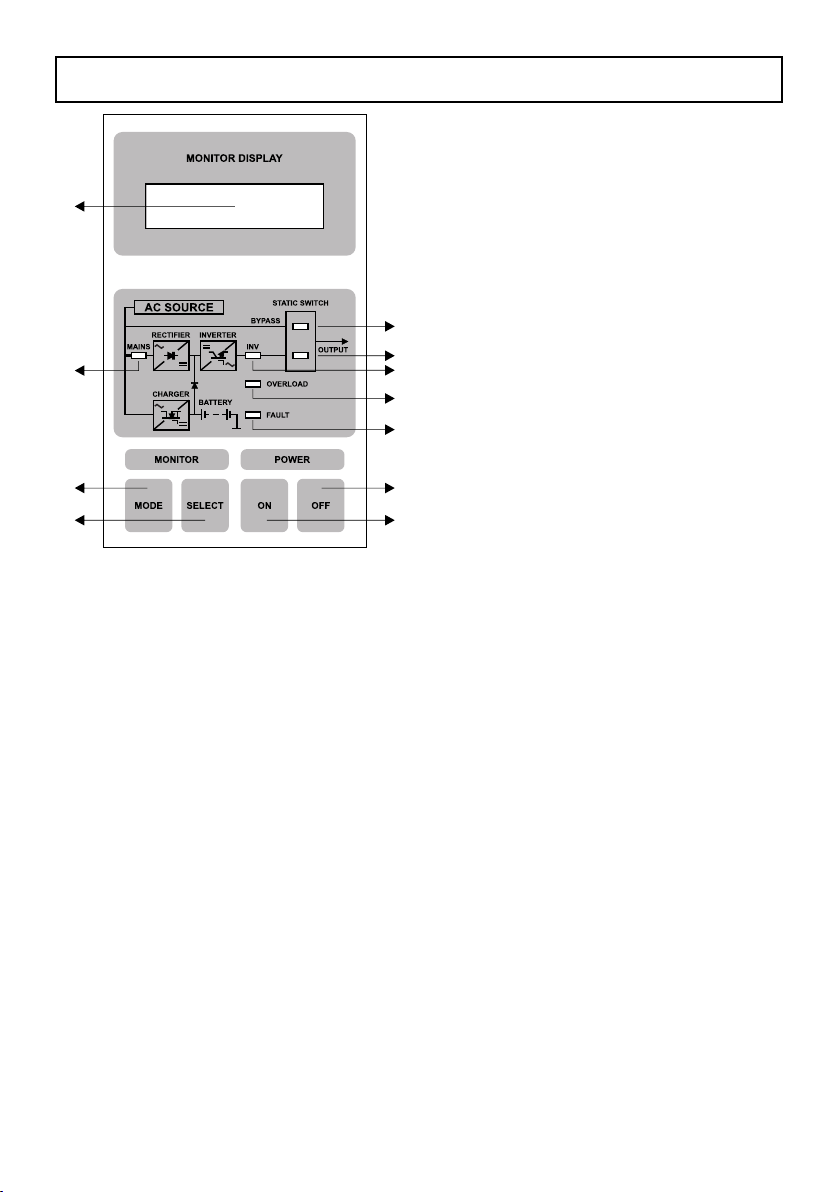
1. Mains : Green led, indicate AC
Power ON / Led hijau,
menunjukkan PLN ada.
2. Inverter On : Green led, indicate
Inverter ON / Led Hijau,
menunjukkan Inverter
bekerja.
3. Bypass Output: Yellow led, indicate
output from AC input
through Static Transfer
Switch / Led Kuning,
menunjukkan output
berasal dari PLN
melalui static transfer
switch.
4. Inverter Output:Green led, indicate
output from Inverter /
Led Hijau, menunjukkan
Output berasal dari
Inverter.
5. Overload : Red led, indicate overload / Led Merah, menunjukkan keadaan beban
lebih.
6. Fault : Red led, indicate inverter failure / Led Merah, menunjukkan adanya
gangguan pada Inverter.
7. Switch ON : Switch for “ON” UPS / Switch untuk menghidupkan UPS setelah main
switch (MCCB) dihidupkan.
8. Switch OFF : Press 1 time for power “OFF” UPS, press and hold ±10 seconds to reset
LCD display / Tekan 1 kali untuk mematikan UPS, tekan terus ±10
detik untuk reset display LCD.
9. Switch Mode : Switch for viewing main menu on LCD display / Switch untuk melihat
Menu Utama pada display LCD .
10. Switch Select: Switch for viewing UPS status and setting LCD display / Switch untuk
melihat status UPS dan merubah display LCD.
11. LCD Display : LCD display can showing time, various of measurement and UPS
status in alternately with pressed monitor mode switch (9) and monitor
select switch (10) / Display LCD ini dapat menunjukkan waktu,
bermacam-macam pengukuran dan status UPS secara bergantian
dengan menekan tombol monitor switch mode (9) dan tombol monitor
switch select (10).
Notes / Catatan :
If error in LCD display, push the SELECT button during ±7 seconds or until LCD display
return to normal. /
Jika display LCD error, tekan tombol SELECT selama ± 7 detik atau sampai LCD kembali
normal.
11
1
9
10
3
4
2
6
5
7
8
IV.1. PANEL MONITOR
8
This manual suits for next models
3
Table of contents
Other ICA UPS manuals










