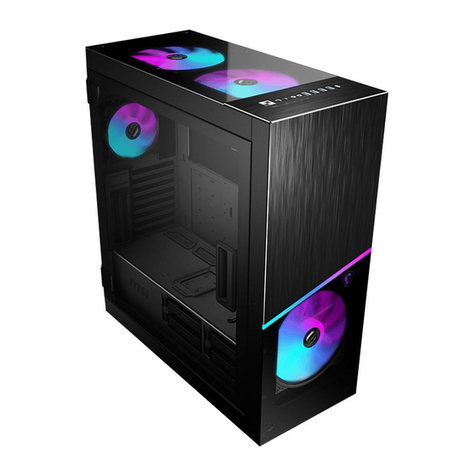
iBUYPOWER HYTE Revolt 3 User manual

E X P E R I E N C E P L A Y
Premium ITX Case
R E V O L T

• Revolt 3 Case
• Instructions
• PC Headset Adapter
• Accessory Box
(A) 4x Motherboard Screws (M3)
(B) 4x HDD Screws (6-32)
(C) 4x PSU Screws (6-32)
(D) 8x SSD Screws (M3)
Zip Ties
Aluminum, Steel, ABS
Black, White
253 x 178 x 409mm (9.9” D x 7” W x 16.1” H)
ITX
120, 240, 140, 280mm up to 35mm thick
Graphics Card: Most cards up to 335 x 140 x 58mm*
Power Supply: SFX, SFX-L (700w 80 Plus Gold SFX-L Optional)
CPU Cooler Height: Up to 140mm
Handle Weight Limit: 30lbs. (14kg)
* See list of compatible graphics cards on HYTE.com
3
1
2
USB 3.2 Gen 2 Type-C x1, USB 3.2 Gen 1 Type-A x2,
Audio/Mic Combo x1
Front (metal mesh), Top, Sides, Rear (magnetic)
Specs & Compatibility
A
x4
B
x4
C
x4
D
x8
HYTE Revolt 3 Small Form Factor ITX Case
Contents
Material
Color
Dimensions
Motherboard Size
Radiator Support
Clearance
Expansion Slots
Internal 3.5 Bays
Internal 2.5 Bays
Front Interfaces
Dust Filters

Assembly Instructions
Revolt 3 is designed to be easy to build, but it is still a small form factor case which means not every
step is obvious. We've included the most important steps in this manual as a quick start guide, but for
more detailed instructions, scan the QR code or check out Revolt 3's page on HYTE.com.
For more detailed instructions, scan the QR code
Remove Side Panels - Start by removing the rear panel by pulling from the bottom. The 4 side panels can be
removed easily by hand, the top panel is secured by 4 screws.
1
Install Power Supply - Skip these steps if your Revolt 3 comes with its power supply pre-installed.
2
ENG GER FRE SPA RUS

Remove GPU Cable Cover and Open Radiator Door
3
Pre-Assemble and Install Motherboard - Install CPU, RAM, and M.2 before installing motherboard
into case.
Cable Manage Motherboard - Complete as much cable management as possible before installing CPU cooler.
5
4

Install Storage and Cable Manage
6
Install CPU Cooler
7
Install Graphics Card - The top panel can be removed for extra-large graphics cards over 320mm.
8
ENG GER FRE SPA RUS

Safety and Regulations
Compliance applies to models with
pre-installedSFXL-A700GD-IBPpower supply
FCC
• CFR Title 47, Part 15, Subpart B. ANSI
C63.4-2014.
CE
• EN 55032:2015+A11:2020
• EN 61000-3-2:2014
• EN 61000-3-3:2013+A1:2019
• EN 55035:2017+A11:2020
CTUVus
• UL 62368-1:2014
• CAN/CSA-C22.2 NO. 62368-1-14
CB
• IEC 62368-1:2014
TUV
• EN 62368-a:2014+A11
The devices within the HYTE Revolt 3 case with
included power supply comply with Part 15 of the
FCC Rules individually.Operation is subject to the
following two conditions: (1) This device maynot
causeharmful interference, and (2) this device must
accept any interference received, including
interference that may cause undesired operation.
Caution: Electrical Shock Hazard!
1. Install in accordance with all manufacturer instructions
and safety warnings. Failure to do so may result in damage
to your power supply orsystem, andmay cause serious
injury or death.
2. High Voltages are present in the power supply. Do not
open the power supply case or attempt to repair the power
supply; there are no user serviceable components.
3. This product is designed for indoor use only.
4. Do not use the power supply near water, or in high
temperature or high humidity environments.
5. Do not install near any heat sources such as radiators,
heat registers, stoves, or other apparatus that produce heat.
6. Do not insert any objects into the open ventilation or fan
grill area of the power supply.
7. Do not modify the cables and/or connectors included
with this power supply.
8. If this power supply uses modular cables, use only
manufacturer supplied cables. Other cables may not be
compatible and could cause serious damage to your system
and power supply.
9. The 24-pin main power connector has a detachable 4-
pin connector. This 4-pin connector is not a P4 or ATX 12V
connector. Do not force this cable in the P4 or ATX +12V
socket on the motherboard.
10. Failure to comply with any manufacturer instructions
and/or any of these safety instructions will immediately void
all warranties and guarantees.

Warranty Length for Parts
Revolt 3 Computer Case - 3 Years
SFXL-A700GD-IBP Power Supply - 10 Years
HYTE Limited Warranty
This product is covered by a limited warranty, please visit
HYTE.com to obtain a full copy of the written warranty or
contact us using one of the methods below.
Support@HYTE.com
HYTE by iBUYPOWER | 529 N Baldwin Park Blvd.,
City of Industry, CA 91746, USA
ENG GER FRE SPA RUS

• Revolt 3 Gehäuse
• Handbuch
• PC-Headset-Adapter
• Zubehör-Paket
(A) 4x Motherboard-Schrauben (M3)
(B) 4x HDD-Schrauben (6-32)
(C) 4x PSU-Schrauben (6-32)
(D) 8x SSD-Schrauben (M3)
Kabelbinder
Aluminium, Stahl, ABS
Schwarz, Weiß
253 x 178 x 409mm (9.9” D x 7” W x 16.1” H)
ITX
120, 240, 140, 280 mm bis zu 35 mm dick
Grafikkarte: Die meisten Karten bis zu 335 x 140 x 58 mm*
Netzteil: SFX, SFX-L (700 W 80 Plus Gold SFX-L optional)
CPU-Kühler Höhe: Bis zu 140 mm
Gewichtsbegrenzung für den Griff - 14kg
* Siehe Liste der kompatiblen Grafikkarten auf HTYE.com
3
1
2
USB 3.2 Gen 2 Typ-C x1, USB 3.2 Gen 1 Typ-A x2, Audio/Mic
Combo x1
Vorne (Metallgitter), oben, seitlich, hinten (magnetisch)
Spezifikationen & Kompatibilität
A
x4
B
x4
C
x4
D
x8
HYTE Revolt 3 Small Form Factor ITX-Gehäuse
Lieferumfang
Material
Farbe
Abmessungen
Motherboard-Größe
Radiatorgrößen
Freiraum
Erweiterungssteckplätze
Interne 3.5 Einschübe
Interne 2,5 Einschübe
Frontanschlüsse
Staubfilter

Einbauanleitung
Das Revolt 3 ist mit Fokus auf einfachen Zusammenbau konzipiert, jedoch ist es ein Small-Form-Factor-
Gehäuse, wodurch nicht jeder Schritt offensichtlich ist. Die wichtigsten Schritte sind in dieser
Kurzanleitung zu finden. Bei Bedarf kann die detailliertere Anleitung durch Scannen des QR-
Codes oder Besuchen der Revolt 3 Seite auf HYTE.com bezogen werden.
Für eine detailliertere Anleitung scannen Sie bitte den QR-Code
Entfernen der Seitenteile - Als erstes muss die Rückwand entfernt werden, indem sie von unten abgezogen wird.
Die 4 Seitenteile lassen sich leicht von Hand entfernen. Das obere Panel ist mit 4 Schrauben gesichert.
1
Netzteileinbau - Überspringen Sie diese Schritte, wenn Ihr Revolt 3 mit einem vorinstallierten Netzteil geliefert wird.
2
ENG GER FRE SPA RUS

Grafikkarten-Kabelabdeckung entfernen und Radiatortür öffnen
3
Motherboard vormontieren und installieren - Installieren Sie CPU, RAM und M.2-Laufwerke, bevor
Sie das Motherboard in das Gehäuse einbauen.
4
Motherboard verkabeln - Schließen Sie das Kabelmanagement so weit wie möglich ab, bevor Sie den CPU-
Kühler einbauen.
5
Table of contents
Languages: