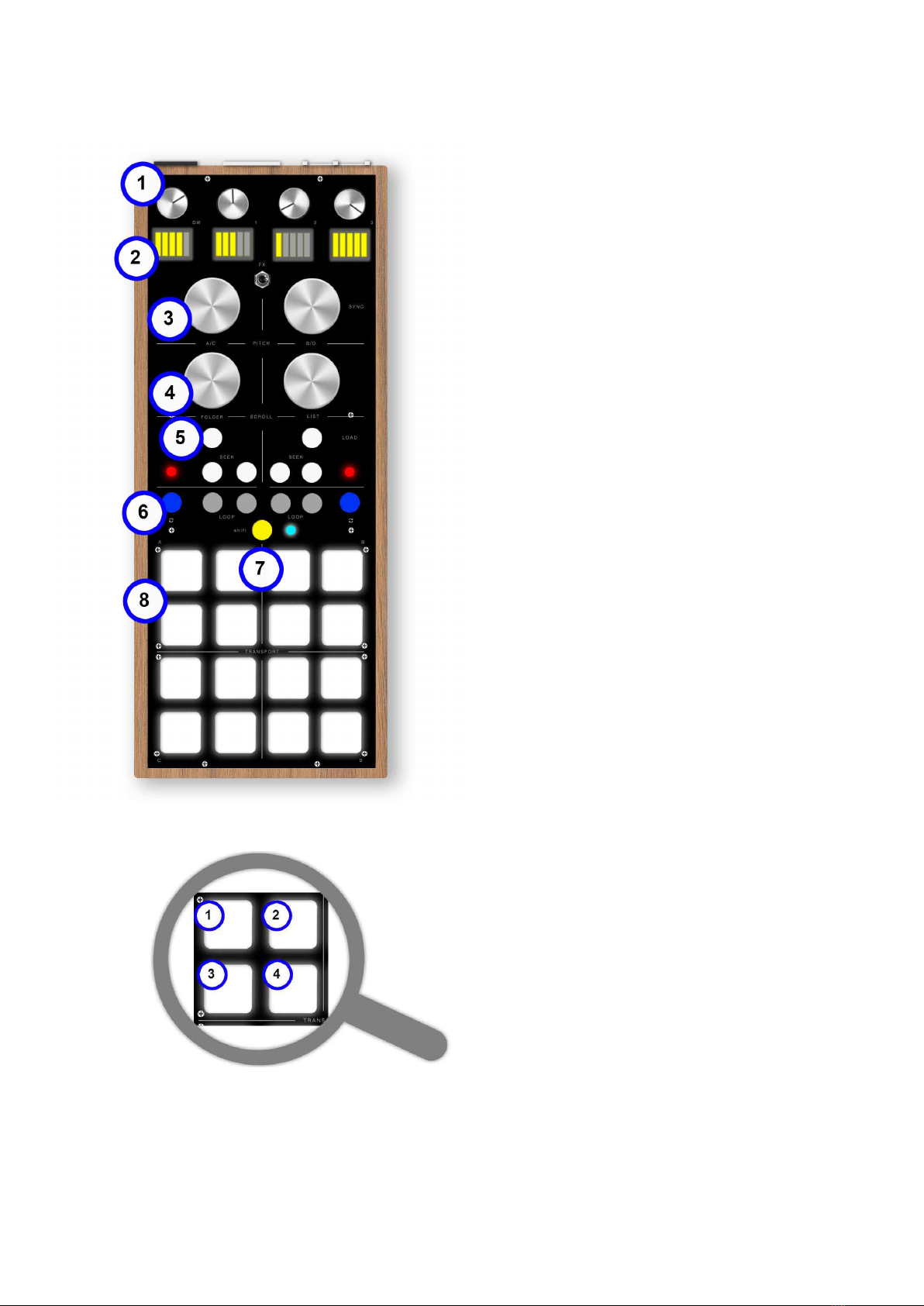
1.0 FRONT PANEL
1. ALPS potentiometers. (Traktor: functions of
effects’ workbenches DW, Knob 1, 2, 3).
2. LED indicators on potentiometer’s use.
(Traktor: The central toggle switch commutes the
effect’s workbench FX1 and FX2).
3. Infinite Encoder with pressure switch.
(Traktor: it edits BPM and if pressed it activates the
Sync).
4. Infinite Encoder with pressure switch.
(Traktor: the left encoder runs between the folders and,
if pressed, it can open them. The right encoder runs
between the tracks and, if pressed, it opens the
browser view).
5. Tactile buttons and LED indicator.
(Traktor: LOAD charges tracks in the corresponding
deck. SEEK activates the “Time Bend” function moving
the track forward or backward), the LED indicators
indicates an active LOOP on the corresponding active
deck.!
6. Tactile buttons. (Traktor: the button with the
loop’s logo activates or deactivates a selected loop in
the corresponding deck. The buttons with the item
“loop” move the active beats’ selection).
7. Switch button with LED indicator. It
activates the additional functions, if pressed it
changes the MIDI channel of all the tactile
buttons. The MIDI channel nr. #8
corresponds to the blue led. The MIDI
channel nr. #9 corresponds to the green led.
For additional functions look at sections
“sequencer mode” and “battery”.(Traktor: It
allows the switch of all tactile buttons from DECK A/B to
the C/D one).
8. PAD LED RGB. In the controller mode, it
has normal functions of command. (Traktor: the
16 pad are subdivided in 4 sections. The two upper
sections command the A/B Deck. The two lower
sections command C/D Deck. As shown in the picture
1. it activates/deactivates the scratch mode (if the
scratch mode is active, it lights green) 2. it runs through
the cue positioning in the following cue (if the track of
the relative deck is going to end, it lights red) 3. play/
stop of the relative deck (if the track is playing, it lights
green) 4. it runs through the cue positioning in the
previous cue).!
In the sequencer mode, it is highlighted
indicating the scrolling point of the pattern and, if pressed, it activates and memorizes the note
for the next passages.