
HP Pavilion FX75 User manual

Filename: fx75UGrw.doc Title: Book Title
Template: HP-Print.dot Aut or: WASSER, Inc. Last Saved By: WASSER, Inc.
Revision #: 30 Page: 1 of 43 Printed: 10/16/00 03:31 PM
HP Pavilion FX75
Flat Panel Display
User’s Guide

Filename: fx75UGrw.doc Title: Book Title
Template: HP-Print.dot Aut or: WASSER, Inc. Last Saved By: WASSER, Inc.
Revision #: 30 Page: 2 of 43 Printed: 10/16/00 03:31 PM
T e information in t is document is subject to c ange wit out notice.
Hewlett-Packard® Company makes no warranty of any kind wit regard to t is material, including, but not
limited to, t e implied warranties of merc antability and fitness for a particular purpose.
HP s all not be liable for errors contained erein or for incidental or consequential damages in connection
wit t e furnis ing, performance, or use of t is material.
HP assumes no responsibility for t e use or reliability of its software on equipment t at is not furnis ed by HP.
T is document contains proprietary information t at is protected by copyrig t. All rig ts are reserved. No part
of t is document may be p otocopied, reproduced, or translated to anot er language wit out t e prior written
consent of HP.
Hewlett-Packard Company
Home Products Division
P.O. Box 4010
Cupertino, CA 95015-4010
© Copyrig t Hewlett-Packard Company, 2000. All rig ts reserved.
Hewlett-Packard is a registered trademark of Hewlett-Packard Company in t e United States of America and
ot er countries.
Windows is a registered trademark of Microsoft, Inc.
PerfectColor and IQSync are trademarks of Arit mos Corporation.
Ot er brand or product names are trademarks of t eir respective olders.

Contents iii
Filename: fx75UGrw.doc Title: Book Title
Template: HP-Print.dot Aut or: WASSER, Inc. Last Saved By: WASSER, Inc.
Revision #: 30 Page: 3 of 43 Printed: 10/16/00 03:31 PM
Introduction ........................................................ 1
For Your Safety....................................................................................................... 2
Installation......................................................... 4
Unpacking t e Display...................................................................................... 5
Positioning t e Display ..................................................................................... 5
Connecting t e Power and Video Cables ................................................6
Connecting t e Stereo Speaker System................................................... 8
Using t e Display............................................10
Turning t e Display On and Off...................................................................11
Tilting t e Display...............................................................................................12
Setting t e Video Mode....................................................................................13
Setting t e Refres Rate.................................................................................. 14
Minimizing Energy Use.....................................................................................15
Caring For and Cleaning t e Display .......................................................15
C anging Display Settings............................17
Using t e Control Buttons..............................................................................18
Displaying t e OSD Window.........................................................................18
Selecting Options in t e OSD Window...................................................20
Using Auto Setup.................................................................................................21
Adjusting t e Image..........................................................................................22
Troubles ooting..............................................32
Tec nical Information................................... 34
FX75 Display Information ..............................................................................34
FX75 Video Modes..............................................................................................35
Unknown Video Modes ...................................................................................35
Regulatory Information ................................36
Declaration of Conformity............................................................................36
FCC Statement.....................................................................................................37
General Notice.....................................................................................................38
Contents

iv HP Pavilion FX75 Flat Panel Display User’s Guide
Filename: fx75UGrw.doc Title: Book Title
Template: HP-Print.dot Aut or: WASSER, Inc. Last Saved By: WASSER, Inc.
Revision #: 30 Page: 4 of 43 Printed: 10/16/00 03:31 PM
Introduction 1
Filename: fx75UGrw.doc Title: Book Title
Template: HP-Print.dot Aut or: WASSER, Inc. Last Saved By: WASSER, Inc.
Revision #: 30 Page: 1 of 43 Printed: 10/16/00 03:31 PM
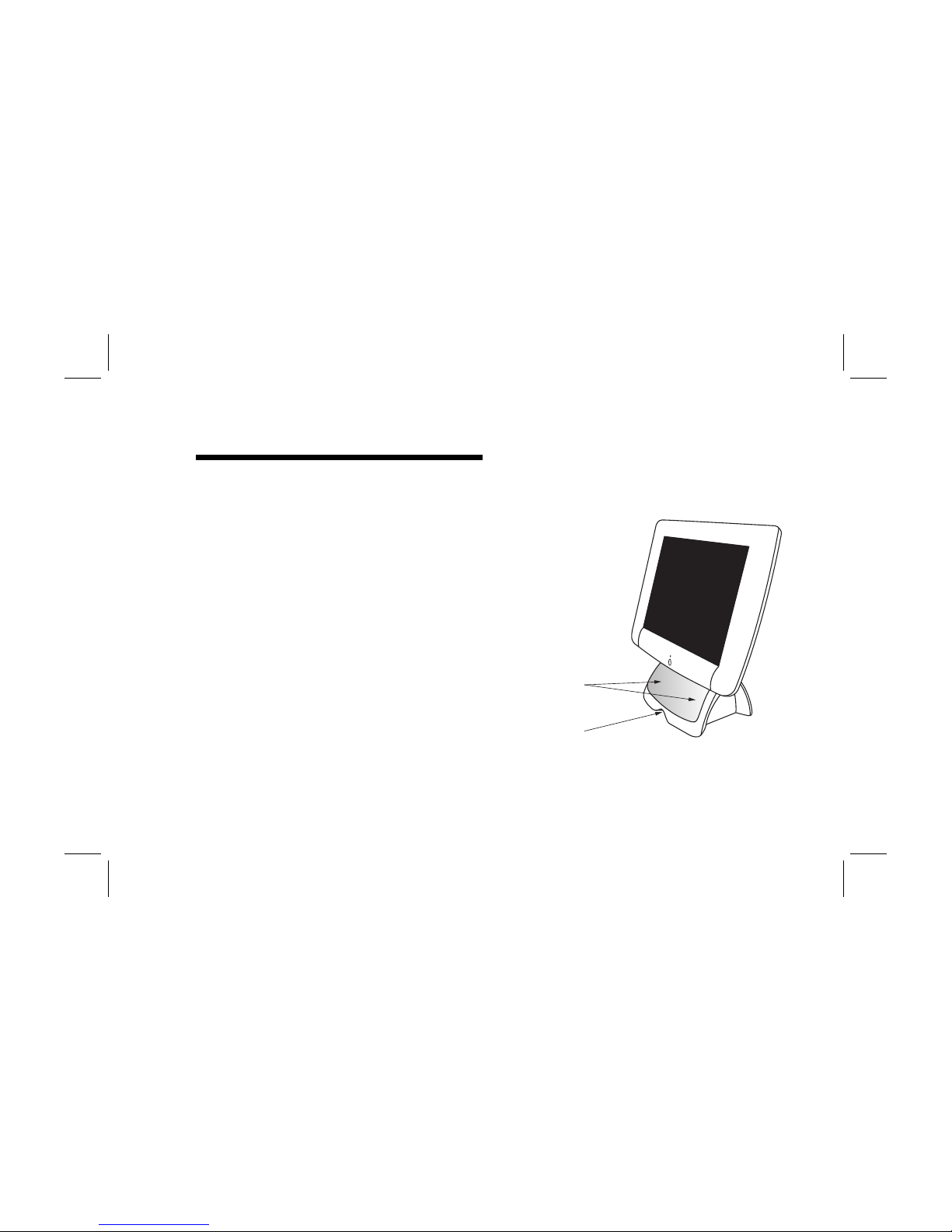
Congratulations on your purc ase of t e HP Pavilion
FX75 Flat Panel Display. T is display as a 15-inc
active matrix TFT (t in film transistor) liquid crystal
display module. It is designed for use wit HP
Pavilion PCs and is compatible wit ot er Windows®-
based computers. T e display’s compact footprint,
wit t e integrated stereo speaker base, provides
great space savings on your computer desk.
Ot er features include:
N
Automatic adjustment for video mode c anges
N
Automatic configuration to t e PC video settings
N
On-screen adjustment of display settings wit
instant feedback
N
Support for analog or digital video input
N
A tilt feature to optimize viewing position
Stereo
speakers
Cable
tunnel
N
An anti-glare coating on t e panel to reduce t e
reflection of ambient lig t
Introduction

2HP Pavilion FX75 Flat Panel Display User’s Guide
Filename: fx75UGrw.doc Title: Book Title
Template: HP-Print.dot Aut or: WASSER, Inc. Last Saved By: WASSER, Inc.
Revision #: 30 Page: 2 of 43 Printed: 10/16/00 03:31 PM
N
A unique system for desktop cable management:
a cable tunnel t at goes under t e base and a
cable claw be ind t e display
N
Flicker-free performance across all
recommended video modes
N
Support for ig refres rates up to 85 Hz for
analog video input
N
Premium color performance using PerfectColor™
tec nology
N
State-of-t e-art IQSync™ tec nology t at
sync ronizes t e display to any known video
mode
N
A power-saving feature t at is compatible wit
Microsoft® Windows
N
Compliance wit Swedis MPR II guidelines for
reduced electromagnetic emissions
For Your Safety
For your safety and t e protection of your display,
follow t ese precautions:
N
Use only t e factory-supplied power cord.
Warning: To completely disconnect power rom
the display, you must remove the power cable rom
the power socket and the display.
N
To prevent electrical s ock, do not disassemble
t e display. T e cover s ould be removed only
by qualified service personnel.
N
Do not cover t e air vents.
N
To avoid t e risk of damage to t e display and
electrical s ock to yourself, do not expose t e
display to rain or moisture.

Introduction 3
Filename: fx75UGrw.doc Title: Book Title
Template: HP-Print.dot Aut or: WASSER, Inc. Last Saved By: WASSER, Inc.
Revision #: 30 Page: 3 of 43 Printed: 10/16/00 03:31 PM
If any of t e following conditions occur, unplug t e
display and contact a qualified service tec nician:
N
T e power cord or plug is frayed or damaged.
N
You ave spilled liquid into t e display.
N
T e display as been exposed to rain or water.
N
T e display does not operate correctly w en t e
operating instructions are followed.
N
T e display as been dropped or t e cabinet as
been damaged.

4HP Pavilion FX75 Flat Panel Display User’s Guide
Filename: fx75UGrw.doc Title: Book Title
Template: HP-Print.dot Aut or: WASSER, Inc. Last Saved By: WASSER, Inc.
Revision #: 30 Page: 4 of 43 Printed: 10/16/00 03:31 PM
N
Unpacking t e display
N
Positioning t e display
N
Connecting t e power and video cables
N
Connecting t e stereo speaker system
Installation

Installation 5
Filename: fx75UGrw.doc Title: Book Title
Template: HP-Print.dot Aut or: WASSER, Inc. Last Saved By: WASSER, Inc.
Revision #: 30 Page: 5 of 43 Printed: 10/16/00 03:31 PM
Follow t e instructions in t is c apter to install your
HP Pavilion FX75 Flat Panel Display.
Note: Be ore connecting your display, irst read through
the instructions in this chapter and the sa ety
precautions in the previous chapter.
Unpacking t e Display
W en you unpack t e display, make sure t at you
ave t e following items:
N
T e display
N
A/C power adapter wit attac ed power cable
N
A power cord
N
Analog video signal cable
N
Audio cable
N
Driver diskette
Positioning t e Display
Place t e display on a flat, sturdy surface. C oose
an area free from excessive eat, moisture, and
sunlig t. Avoid possible sources of electromagnetic
interference, suc as transformers, motors, and
fluorescent lig ting.
6HP Pavilion FX75 Flat Panel Display User’s Guide
Filename: fx75UGrw.doc Title: Book Title
Template: HP-Print.dot Aut or: WASSER, Inc. Last Saved By: WASSER, Inc.
Revision #: 30 Page: 6 of 43 Printed: 10/16/00 03:31 PM
Connecting t e Power and
Video Cables
Before connecting any cables, make sure t at t e
computer and display are turned off.
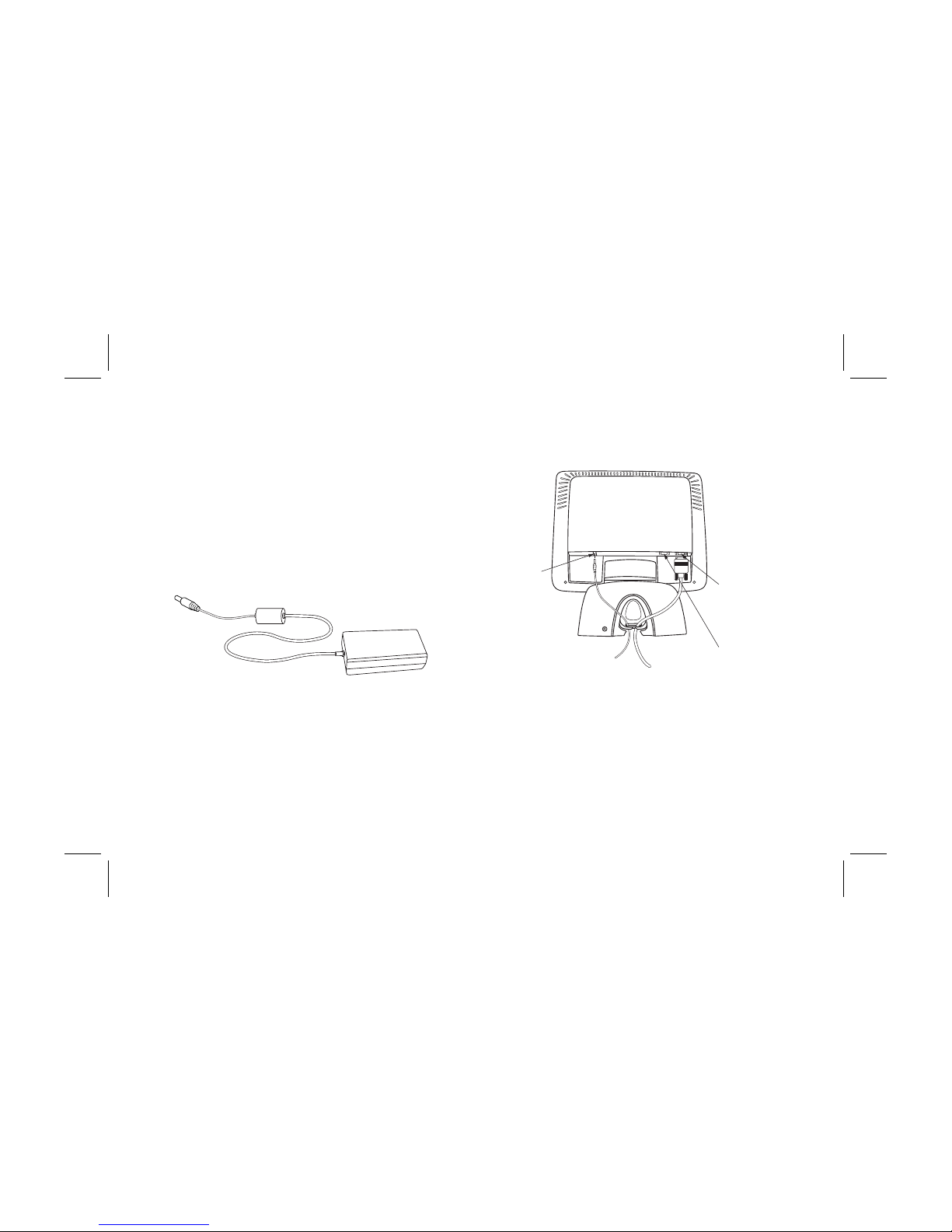
To connect t e power and video signal cables:
1Locate t e A/C power adapter wit attac ed
power cable.
2Connect t e power cable to t e power jack on t e
back of t e display.
Power jack
Analog
Video
Input
port
Digital
Video
Input
port
Other manuals for Pavilion FX75
1
This manual suits for next models
3
Other HP Monitor manuals

HP
HP Compaq L2206tm User manual

HP
HP LP2480zx - DreamColor - 24" LCD Monitor User manual

HP
HP E24i G4 Assembly instructions

HP
HP 24 Manual

HP
HP 3535437 User manual

HP
HP OMEN X 27 Manual

HP
HP elitedisplay e230t User manual

HP
HP w19e - Widescreen LCD Monitor User manual

HP
HP L6015tm User manual

HP
HP EliteDisplay LED Backlit Monitors User manual






