Hobot LEGEE-D7 User manual
- 1 -
User Manual
VACUUM MOP 4
-
IN
-
1 ROBOT
LEGEE SLAM
TALENT CLEAN
TANGLESS SUCTION

- 1 -
This appliance can be used by children aged from 8 years and above and persons
with reduced physical, sensory or mental capabilities or lack of experience and
knowledge if they have been given supervision or instruction concerning use of the
appliance in a safe way and understand the hazards involved. Children shall not play
with the appliance. Cleaning and user maintenance shall not be made by children
without supervision.
Table of Contents
Important Safety Instructions - 1 -
Laser Safety - 3 -
Copyright & Trademarks - 3 -
Disclaimer - 3 -
Limited Warranty - 3 -
Product Overview - 4 -
Product Specifications and Accessories - 6 -
Installation - 7 -
Start Cleaning - 8 -
App Instructions - 9 -
Maintenance - 10 -
Common Issues (FAQ) - 13 -
Important Safety Instructions
When using an electrical appliance, basic precautions should always be followed, including
the following:
READ ALL INSTRUCTIONS & SAVE THIS USER MANUAL
WARNING
Do not attempt to repair your LEGEE-D7 yourself. Disassembling the device may cause
injury to you. Unauthorized repairs or modifications could result in permanent damage
to the device and may affect your warranty coverage and regulatory authorizations.
Any service other than regular cleaning should be only performed by an authorized
service representative. Contact your local waste management authority to follow local
disposal regulations and never dispose the device and rechargeable batteries with
normal household waste.
GENERAL
This product is designed for indoor floor cleaning only, do not use it outdoors, on
greasy surfaces or any uneven surface (such as a sofa), or for commercial or industrial
purposes.

- 2 -
Do not fill the water tank with any liquid other than pure water or the LEGEE
detergent. Other detergents are not allowed.
Keep the device and accessories away from children.
Keep the device in dry and cool place, away from direct sunlight, naked flames, heat,
humidity, water and any other liquids.
Do not store the device near oil, combustible spray or flammable materials.
Product operating temperatures: 0°C ~40°C (32°F ~104°F)
Product storage temperatures: -10°C ~50°C (14°F ~122°F)
Do not use the device if any part or any accessory is damaged or defective.
Before using the device, clear away as much objects as you can from the floor
especially electric cords, glass pieces or any other objects that could tangle, block, or
damage the device.
Do not use the device on the shag/frieze carpet, the device could be trapped and wet
or damage the carpet.
The device may not work properly on the dark-colored carpet.
Do not leave any fragile objects at the edge of tables and cabinets where they could be
easily knock down by the device during cleaning.
Keep your children and pets away from the cleaning path.
Switch off the power and disconnect the power plug before dismantling, assembling or
cleaning the device, power adapter and charging station.
Do not clean the device by spraying water on it or immersing it in water. The device is
not waterproof.
BATTERY & CHARGING STATION
Connect the power adapter to a power source that matches the specifications. The
power adapter is designed for connection to hazardous electrical voltages. Do not
attempt to repair the adapter. Replace the whole unit if it is damaged or exposed to
high moisture. Consult local HOBOT dealer for help and maintenance.
Make sure the device, power adapter and charging station are not trapped under
heavy objects.
Allow adequate ventilation around the device, power adapter and charging station. Do
not cover them with objects.
Do not use the device, power adapter and charging station in a strong magnetic field,
humid or high heat environment.
Use the original power adapter, battery and charging station that came with the device.
Use the third-party components may result in damage, malfunction and/or danger.
This device contains batteries that can only be replaced by professionals.
Battery can explode, catch fire, and/or cause burns if disassembled, crushed, cut,
punctured, short-circuited, incinerated, recharged (disposable cells), or exposed to
water, fire, or temperatures above 60°C (140°F).
If the device is not in use for a long period of time, store it in a dry and safe location.
The battery will need to be charged every 3 months to maintain battery life.
Never operate this device if the cord or power adapter is damaged. Ensure the power
cord is not stretched or exposed to sharp object or edges.

- 3 -
Laser Safety
The laser distance sensor of this product meets the standards for Class I Laser Products in
IEC 60825-1:2014 and will not generate hazardous laser radiation.
Copyright & Trademarks
Copyright © 2022 by HOBOT® Technology Inc. All rights reserved. No part of this
publication may be reproduced, transmitted, transcribed, stored in a retrieval system or
translated into any language or computer language, in any form or by any means,
electronic, mechanical, magnetic, optical, chemical, manual or otherwise, without the
prior written permission of this company. All other logos, products, or company names
mentioned in this manual may be the registered trademarks or copyrights of their
respective companies, and are used for informational purposes only.
Disclaimer
HOBOT Technology Inc. makes no claims or warranties, either expressed or implied, with
respect to the contents hereof and specifically disclaims any warranties, tradability or
suitability for any particular purpose. Furthermore, HOBOT Technology Inc. reserves the
right to revise this publication and to make changes from time to time in the contents
hereof without obligation of this company to provide notification of such revisions or
changes. The user should follow the instructions provided in this user manual, but is
ultimately responsible for assessing placement and safety when using this cleaning tool.
Limited Warranty
If there are defects in your LEGEE due to faulty materials, poor workmanship, or
malfunction within the warranty period from the date of purchase or delivery, please
immediately contact a local retailer or local authorized dealer for repairs or replacement.
This limited warranty does not cover:
Normal wear and tear, including parts that might wear out over time (side brush,
brushroll, cleaning cloth, caterpillar belt, spray nozzle and filter, etc.)
Reduction in battery runtime due to battery age or use, as the life of the battery and
number of times the device is used.
Transit, delivery or accidental damage or misuse and abuse that is not in accordance
with the instructions.
Faults or damage caused by:
- Negligent use, misuse, abuse or careless operation of the device.
- Use of the device which is not in accordance with this manual.
- Use of anything other than normal domestic household purposes in the country in
which it was purchased.
- Use of parts not assembled or installed in accordance with this instruction.
- Use of any unauthorized parts and accessories. Please contact a local retailer or local
authorized dealer for spares and accessories.
- Faulty assembly or installation.
- Repairs or alterations carried out by parties other than HOBOT authorized dealer.

- 4 -
Product Overview
TOP VIEW
Trash Bin
LiDAR Sensor
Water Tank Lid
Orange Battery Charging
Orange Flashing
Low Battery
Green Battery Fully Charged
Blue Wet Mopping
White Dry Mopping
White Flashing Connecting
White & Blue Spraying Water
Orange & Blue Search for Charging Station
O
range & Green
Child Lock Engaged
LED Indicator
Start/Pause Cleaning
Return to Charging Station
Stop Cleaning/Child Lock (press 3 sec.)
Switch Cleaning Mode
Water Tank
Cleaning Tool
Control Buttons
Bumper
Power Switch
- 5 -
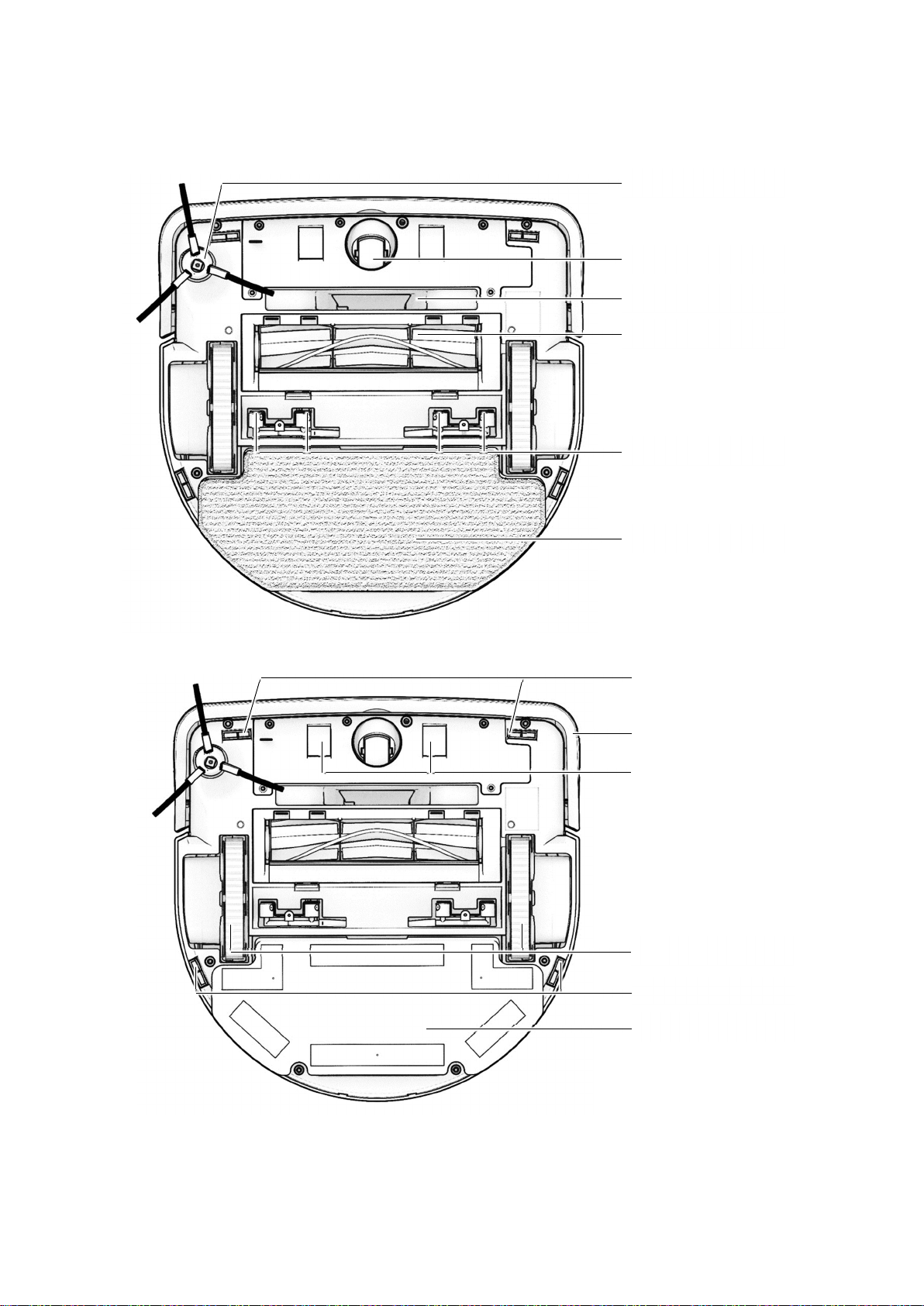
BOTTOM VIEW
Side Brush
Front Suction
Spray Nozzles
Brushroll
Universal Wheel
Cleaning Cloth
Front Cliff Sensors
Mopping Pad
Bumper
Rear Cliff Sensors
Caterpillar Belts
Charging Contacts

- 6 -
TRASH BIN
CHARGING STATION
Product Specifications and Accessories
Model LEGEE-D7
Wi-Fi 802.11a/b/g/n/bt
Dimensions (L × W × H) 340 × 339 × 97.5 mm
Li-ion Battery Rated Capacity: 4400mAh
Cell Capacity: 4900mAh
Charging Station
Dimensions (L × W × H) 160 × 147 × 110 mm
Input Voltage 100~240 VAC, 50~60 Hz
Power Consumption 19V/1.05A, 19.95W
High Efficiency Filter
Screen Filter
Dust Sheet
Charging Contacts
Charging Indicator
Blue Stand-by
Blue Flashing Charging
Wire Storage
DC Jack
LEGEE-D7
Charging station
AC adapter
Water bottle
Microfiber cleaning cloth
Spray nozzles pack
Side brushes
High efficiency filter
User manual

- 7 -
Installation
Important Notes Before Cleaning
Put away objects including wires, cloths, slippers, fragile objects…etc. on the floor to improve cleaning
efficiency and safety.
1. Position the Charging Station
Peel off the backings paper from the bottom of
the charging station and keep the charging
station on a level surface, flat against a wall.
Clear the objects around the charging station.
Connect the power cord to the charging station
and tidy wires from the floor.
To ensure a better user experience of the App,
place the charging station in an area with good
Wi-Fi coverage.
2. Power on & Charge your LEGEE
Plug power adapter into the charging station and
place the flat end of the robot against the charging
station.
Before the first time of use, fully charge the
battery for at least 6 hours until the LED indicator
green light is ON.
To maintain the performance of the Li-ion battery,
keep your LEGEE charged.
3. Install the Side Brush
Press down the side brush until you hear a click sound.
- 8 -
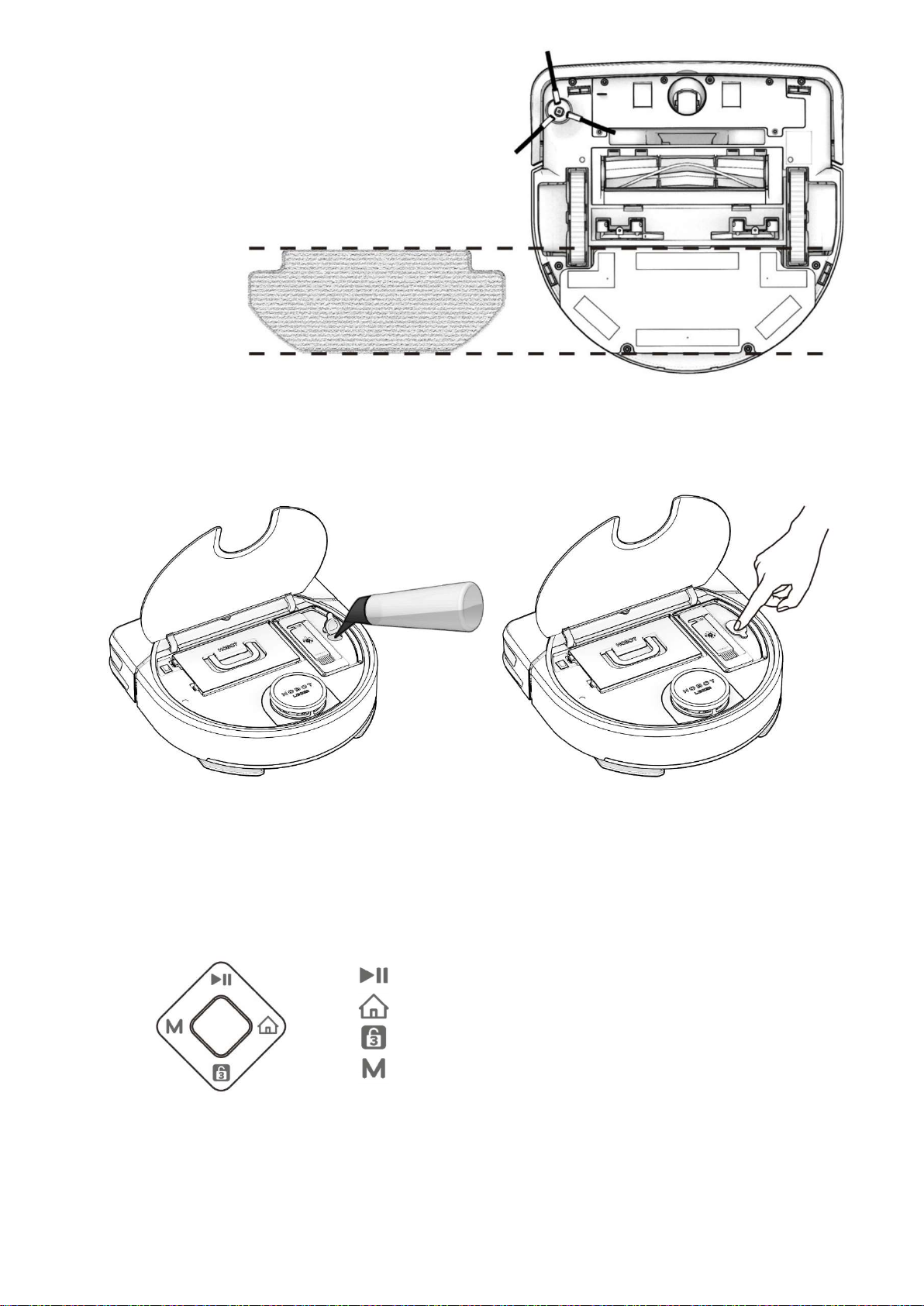
4. Attach the Cleaning Cloth
Attach the cleaning cloth flatly to the mopping pad.
5. Fill the Water Tank
1. Open the water tank lid, fill it with pure water
or LEGEE detergent.
2. Close the lid tightly.
*DO NOT use any other detergent or liquid to prevent blockage of the pipes and the spray nozzles.
Start Cleaning
Switch on LEGEE. You can control in two ways: with the buttons on the device or with the LEGEE App.
Control your LEGEE with the buttons on the device
Start/Pause Cleaning
Return to Charging Station
Stop Cleaning/Child Lock (press 3 sec.)
Switch Cleaning Mode
Control your LEGEE with the LEGEE App
Please see “App Instructions”

- 9 -
App Instructions
1. Download the LEGEE App
LEGEE-D7 can be dynamically controlled by the App
through Wi-Fi or Hotspot. Search for “LEGEE” in the
App Store or Google Play or scan the QR code on
the right to download and install the App.
2. Create a HOBOT Account/Quick Login
HOBOT account
Create your HOBOT Account and control your LEGEE with different devices. The only thing stored in
your HOBOT Account is the device’s initial name. All customized settings are stored on the device
and will never be accessible via HOBOT account. When you log in to your HOBOT account on another
smartphone, HOBOT account will help you to link to the devices associated to your account and
retrieve the data stored on your device for you.
Quick Login
Login to your social media account and start using the App in just a few seconds.
3. Start Cleaning with the LEGEE App
1. Select a cleaning mode from the Talent Clean menu.
2. Tap to proceed.
3. Tap to start cleaning.
4. When cleaning is completed, save the map to create a default map.
LEGEE supports
5G/2.4G Wi-Fi
Turn on the
Bluetooth and Wi-
Fi on your phone
Other manuals for LEGEE-D7
1
Table of contents
Other Hobot Vacuum Cleaner manuals

Hobot
Hobot LEGEE-668 User manual

Hobot
Hobot HOBOT-R3 User manual

Hobot
Hobot LEGEE-688 User manual

Hobot
Hobot WINBOT 68 User manual

Hobot
Hobot HOBOT-188 User manual

Hobot
Hobot 388 User manual

Hobot
Hobot Legee-669 User manual

Hobot
Hobot LEGEE 7 User manual

Hobot
Hobot LEGEE-688 User manual

Hobot
Hobot HOBOT-298 User manual