Hawking HWPS12UG User manual


FCC Warning
This equipment has been tested and found to comply with the limits for a Class B digital device,
pursuant to subpart J of Part 15 of the FCC Rules. These limits are designed to provide
reasonable protection against harmful interference when the equipment is operated in a
commercial environment. This equipment generates, uses, and can radiate radio frequency
energy and, if not installed and used in accordance with the instruction manual, may cause
harmful interference to radio communications. Operation of this equipment in a residential
area is likely to cause harmful interference in which the user will be required to correct the
interference at their own expense.
CE Mark Warning
This is a Class B product. In a domestic environment, this product may cause radio interference, in
which case the user may be required to take adequate measures.
VCCI Mark Warning
LIMITED WARRANTY
Hawking Technology guarantees that every HWPS12UG 1 Parallel Port Plus 2 USB Ports Wireless
802.11g 10/100M Print Server is free from physical defects in material and workmanship under
normal use for two (2) years from the date of purchase. If the product proves defective during this
two-year warranty period, call Hawking Customer Service in order to obtain a Return Authorization
number. Warranty is for repair or replacement only. Hawking Technology does not issue any
refunds. BE SURE TO HAVE YOUR PROOF OF PURCHASE. RETURN REQUESTS CAN NOT
BE PROCESSED WITHOUT PROOF OF PURCHASE. When returning a product, mark the
Return Authorization number clearly on the outside of the package and include your original proof
of purchase.
IN NO EVEN SHALL HAWKING TECHNOLOGY’S LIABILTY EXCEED THE PRICE PAID
FOR THE PRODUCT FROM DIRECT, INDIRECT, SPECIAL, INCIDENTAL OR
CONSEQUENTIAL DAMAGES RESULTING FROM THE USE OF THE PRODUCT, ITS
ACCOMPANYING SOFTWARE OR ITS DOCUMENTATION. Hawking Technology makes no
warranty or representation, expressed, implied or statutory, with respect to its products or the
contents or use of this documentation and all accompanying software, and specifically disclaims its
quality, performance, merchantability, or fitness for any particular purpose. Hawking Technology
reserves the right to revise or updates its products, software, or documentation without obligation to
Trademarks
NetWare is a registered trademark of Novell Inc. and Windows 95/98/Me and Windows NT/2000/XP are
registered trademarks of Microsoft Corp. All other brands and product names are trademarks of their
respective companies.
Copyright
No part of this publication may be reproduced in any form or by any means or used to make any derivative
(such as translation, transformation or adaptation) without the express written consent of the manufacturer
as stipulated by the United States Copyright Act of 1976.

Table of Contents
1. INTRODUCTION TO THE HWPS12UG ................................6
1.1 Product Introduction..................................................... 7
1.2 Product Package ........................................................... 9
1.3 Network Printing Architecture ................................... 10
1.3.1 Print Server Network Functions................................................... 11
1.3.3 Network Printing Functions for a Network Server...................... 14
1.4 Network Printing Environment .................................. 15
1.5 Contents of the User’s Manual................................... 17
1.6 Firmware & Printing Function ................................... 18
2. HARDWARE INSTALLATION .........................................19
3. WINDOWS PEER-TO-PEER NETWORK ........................20
3.1 System Architecture ................................................... 21
3.2 Administrator Installation and Setup.......................... 23
3.3 Administrator Utilities................................................ 32
3.4 Client Installation and Setup ...................................... 33
3.5 Client Utilities ............................................................ 37
3.5.1 Network Ports Quick Setup ......................................................... 37
3.5.2 Remote Ports (Utility).................................................................. 39
4. WINDOWS NT/2000 NETWORK......................................42
4.1 System Architecture ................................................... 43
4.2 Windows NT/2000 Server Installation and Setup ...... 44
4.3 User Installation and Setup ........................................ 46
5. NETWARE NETWORK ....................................................47
5.1 System Architecture ................................................... 48
5.2 NetWare 3.x/4.x/5.x Installation & Setup .................. 50
5.2.1 Installation Using PSETUP.......................................................... 50
6. UNIX SYSTEM NETWORK ..............................................55

6.1 Introduction ................................................................ 56
6.2 Enable The HWPS12UG’s TCP/IP Support .............. 57
6.3 Setup the HWPS12UG’s IP Address.......................... 58
6.3.1 DHCP........................................................................................... 58
6.3.2 BOOTP ........................................................................................ 58
6.4 Verify the HWPS12UG’s IP Address ........................ 61
6.5 Configure Remote lpd Printing on the Host............... 62
7. CONFIGURATION UTILITY .............................................65
7.1 Introduction ................................................................ 66
7.2 Search – Search for All Available Print Servers ........ 68
7.3 Status - Print Server Status......................................... 69
7.4 Setting up the Print Server ......................................... 71
7.5 AppleTalk Configuration ........................................... 72
7.6 General Configuration................................................ 74
7.7 Netware Print Server Configuration........................... 75
7.8 System Configuration................................................. 77
7.9 TCP/IP Configuration ................................................ 79
7.10 Wireless Configuration .............................................. 81
7.11 Wizard ........................................................................ 89
7.12 Report......................................................................... 95
8. WEB MANAGEMENT.......................................................96
8.1 Introduction ................................................................ 97
8.2 Web Management of Print Server.............................. 98
8.2.1 Login............................................................................................ 98
8.3 Device Status.............................................................. 99
8.3.1 System.......................................................................................... 99
8.3.2 Printer......................................................................................... 100
8.3.3 TCP/IP........................................................................................ 101
8.3.4 NetWare ..................................................................................... 102

8.3.5 AppleTalk .................................................................................. 103
8.4.1 Wireless Setup ........................................................................... 104
8.4.2.1 General Wireless Settings........................................................ 105
8.4.2.2 Encryption................................................................................ 107
8.4.2.3 Site Survey............................................................................... 109
8.5 Setup Wizard............................................................ 110
8.5.1 System........................................................................................ 110
User Name / Password is used to authenticate the administrator through
the Web administration tool.................................................................... 110
8.5.2 TCP/IP........................................................................................ 111
8.5.3 NetWare ..................................................................................... 113
8.5.4 AppleTalk .................................................................................. 115
8.5.5 System Configuration ................................................................ 117
8.5.6 Restart ......................................................................................... 117
8.6 System Tools............................................................ 119
8.6.1 Load Default .............................................................................. 119
8.6.2 Upgrade Firmware ...................................................................... 120
9. IPP PRINTING .................................................................122
9.1 Introduction ................................................................ 123
9.2 System Setup.............................................................. 124
9.2.1 Print Server Side ......................................................................... 124
9.2.2 Client Side.................................................................................... 125

1. Introduction to the HWPS12UG

1.1 Product Introduction
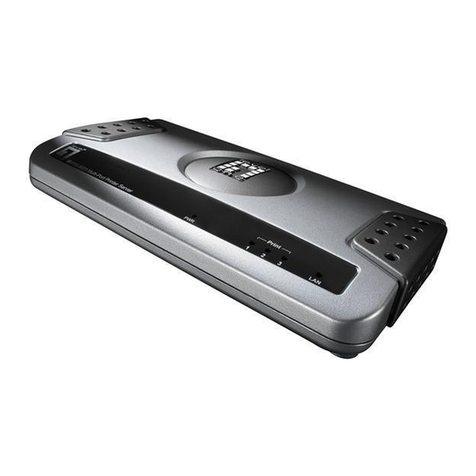
Congratulations on purchasing Hawking’s
HWPS12UG 2 USB + 1 Parallel Port Wireless G
Print Server. The Hawking HWPS12UG is a powerful
and convenient network printing solution that will
connect your USB and parallel printer(s) to a
wireless 802.11b or 802.11g network. The
HWPS12UG can connect with a 802.11b or 802.11g
wireless network and has a 10/100Mbps auto-sensing
port, allowing you to attach it to a 10Base-T or
100Base-TX network without the need for a
dedicated PC print server. The HWPS12UG also
supports multiple servers and multiple protocols,
providing you with the capability to print from
anywhere, from any computer and from any
application.
The HWPS12UG print server supports IPX, TCP/IP,
and AppleTalk protocols. It also supports the most
common network operating systems and protocols
including Windows 95/98/Me, Peer-to-Peer Printing,
Windows NT/2000/XP, NetWare, Unix/Linux, MAC
OS X, etc.
With the HWPS12UG Installation Wizard for
Windows, you can easily and instantly adjust the
HWPS12UG’s settings for your printing environment
and start enjoying the fantastic features provided by
this print server.
In the following chapters, we will introduce in detail
the printing features, installation methods, and

system configuration for different network
environments.
If you would like to set up and install print server
quickly, please refer to the Quick Installation Guide
that comes along with this print server.

1.2 Product Package
Package Contents
The following items are packaged with your HWPS12UG 2 USB + 1 Parallel Port
10/100M Internet print server:
HWPS12UG Print Server One CD-ROM Quick Installation Guide One power adapter

1.3 Network Printing Architecture
This section illustrates how a print server functions
over a network environment. Before you install and
use the HWPS12UG print server, it is strongly
suggested that you read this section completely and
select only the chapters that pertain to your specific
operating system.
Below is a diagram of a typical network with a print
server installed. There is a main server, several
client computers, print server, along with an optional
network server. Below are the three components of
this diagram:
Print Server
Client User
Network Server (optional)
Windows NT Server
NetWare Server
Windows 98Windows NT
Workstation
Windows 2000
Unix Print Server
Network Printing Environment
Print Server
Client User
Network Server
Other manuals for HWPS12UG
2
Table of contents
Other Hawking Print Server manuals

Hawking
Hawking HPS3P User manual

Hawking
Hawking HWPS12UG User manual

Hawking
Hawking WA739P User manual

Hawking
Hawking HMPS1U User manual

Hawking
Hawking PS12U User manual

Hawking
Hawking HMPS1U User manual

Hawking
Hawking HPS3P User manual

Hawking
Hawking HPS1P User manual

Hawking
Hawking WA739P User manual

Hawking
Hawking PN6125 User manual

Hawking
Hawking HMPS1A User manual

Hawking
Hawking HPS1U User manual

Hawking
Hawking HPS1U User manual

Hawking
Hawking HWPS1UG User manual

Hawking
Hawking PN7337P User manual

Hawking
Hawking HMPS1U User manual

Hawking
Hawking PN7127P User manual

Hawking
Hawking HMPS1U User manual

Hawking
Hawking PN7117P User manual

Hawking
Hawking HMPS1U User manual