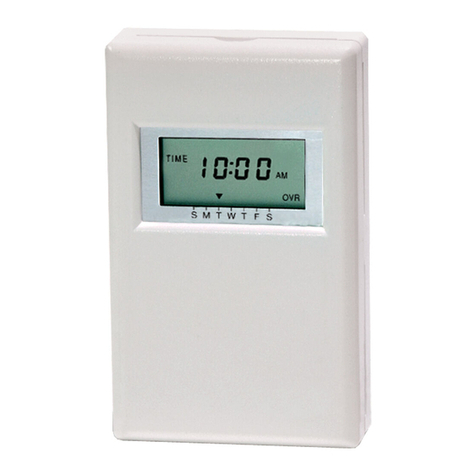
Haier YCS-A001 User manual

Manual of Weekly Timer
No.0010573289
Please read this operation manual carefully before using the appliance.
Keep this manual in a safe place.
Contents
Safety Precautions------------------------------------1-2
Function Introduction--------------------------------3-4
System Outline----------------------------------------5-8
Operation instruction--------------------------------9-12
Maintenance--------------------------------------------13
Appearance/Dimension/Interface--------------------14
Installation and Debugging------------------------14-17
Performance Parameter and Fittings-----------------18
User's Self-provide Parts ------------------------------18
Detector--------------------------------------------------19
Central Controller---------------------------------------20
YCS-A001

Warning:Improper use may cause death or serious injury, etc. serious
consequences.
Notice:Improper use may cause body injury or unit damage; in some cases,
it may cause serious consequences.
Any contents marked with this "Prohibition" symbol are the actions
must be prohibited. Otherwise, it may cause unit damage or
endanger the body safety of user.
*
*
Safety Precautions
Warning
If finding abnormal phenomenon (e.g. smell of fire), please cut the
power immediately and contact our after-sale service staffs for the solvent.
In this case, if you still use the unit, it will be damaged and
electric shock or fire accident may be caused.
The installation work shall be done by a qualified person and what the
manual specified. If installation is not proper, water leakage, electric shock,
fire and other accidents will occur.
1
Any contents marked with this "Force" symbol are the actions
must be force done. Otherwise, it may cause unit damage or
endanger the body safety of user.
The following lists four kinds of safety precautions and recommendations:
The following safety precautions must be observed.
These safety precautions should be kept in hand to consult it when needs.
If the air conditioner is resold to a new customer, this manual also should be
given to him.
Power
off

Notice
Do not operate the manual with wet hands. Do not
use water to clean the manual. Otherwise, electric shock may occur.
2
Safety Precautions
Warning
Please let the after-saleservice staffs do the job when the manual must
be removed, reseted. Imporper installation may cause water leakage,
electric shock and fire accident.
Do not alteration the manual by yourself, the improperty
alteration may cause electric shock and fire accident.
When needing repairing, please contact our after-saleservice staffs to
do it. Imporper repairing may cause electric
shock and fire accident.
Do not put or use any flammable spray liquid near the
manual. Otherwise, electric shock may occur.
Do not press the manual and switch with acuminate object. Otherwise,
electric shock may occur. Cleaning
Do not use the thinner, benzine, or chemical dishcloth
cleaning the manual . Otherwise, discolourment or
coating desquamation may occur.
If it is very dirty, dissolve neutral detergent in the lukewarm water and
make the colth wet with the water. After wiping, clean off the detergent
using clean water. Clean with soft and dry dishcloth.
Turn off the power supply switch before cleaning or abnormality occur
The power supply : 220VAC

Function Introduction
The weekly timer is a special functional part for Haier Commercial Air Conditioner's remote
monitoring system-group control function network (hereinafter abbreviated as group control network)
and the user's optional part. Remote central controller (hereinafter abbreviated as central controller)
achieves the coding and display of control data by its keystroke and LCD screen; connected to
bus and executes the control to the air conditioner's basic functions by detector. Remote detector
(hereinafter abbreviated as detector) is used to transform the standard digital interface to realize
the communication of bus code sub-address; connected directly to air conditioner to execute local
operation and collection to the control information and working information of air conditioner and
to transmit the control and information data. Network air conditioner (hereinafter abbreviated as
air conditioner) means the air conditioner, which indoor PCB possesses remote control interface.
Only the network air conditioner can cooperate with detector, central controller and weekly timer,
etc. parts to form the remote monitoring system-group control network and fulfill data exchange
and monitoring function.
The function level of weekly timer and the central controller is the same. It can be checked
by detector and displayed by LCD screen the trouble state and timing setting of air conditioner. It
also can set the timing settings of the air conditioner within a week by keystroke input cooperating
with LCD display. Weekly timer can be either used together with central controller or used
independently (the detector is the essential part). Additionally, the weekly timer is equipped with
24-hour real-time clock system to unify the clocks in the group control network (the clocks in group
control network and air conditioner are respectively independent and do not interfere with each
other). The brief introductions are as follows:
1.Communication Function
3
Week
Time
Min.
HolidayProgram
Hour Cancel
Confirm
Number
ON/OFF
PROGRAM NO.
1 2 3 4 5 6 7
1 2 3 4 5 6 7
SET 1 ON OFF
SET 2 ON OFF
NO.

Communication with the detector of the group control network.t
Executing communication with detector by RS-485 bus (A, B). The weekly timer sends
a control command and communicates according to unified address; the execution of
the command is delayed. The weekly timer can simultaneously monitors the trouble
information sent from detector.
2.LCD function:
The LCD can display the weekly timing settings of the air conditioner (7 days a
week and each day can set max two times of timer on and timer off),
The LCD can display the trouble code information of the air conditioner with trouble,The
LCD can display the current time of the clock and weekday's information,
The LCD can display holiday setting, which is used to temporarily cancel the On
function of the air conditioner.
3.Keystroke input function:
The keys used in normal state to adjust and confirm the clock and weekdays-
time, Confirm, Cancel,
The key used for enter and quit from timing setting program state-program.
The keys used to switch programmed contents-Date, Hour, Minute.
The keys used to adjust the program contents-- ,
The keys used to whether accept the programmed contents or not-tConfirm, Cancel.
The key used in normal state to temporarily cancel the special date timing function-
Holiday.
4.Unit number setting function:
In order to rich the control function of Haier Commercial Air Conditioner's remote
monitoring system and be able to set multiple controllers combined use to fulfill the
combination of multiple functions, the weekly timer is configured with two dial-code
switches used to set the controller's addresses (the controller's addresses cannot be
repeated in the same control network). 4
Function Introduction

System Outline
5
The weekly timer has its independent own power supply. Its communication interface
is RS-485 interface, and the two-core screw fixed terminals (A, B) is connected with
shielded twisted pair communication bus and set the address number different from those
of other controllers.
1. Use weekly timer to realize weekly timing function:
The detector is connected with one air conditioner by the 4-core screw fixed terminals
A+ and A- of air conditioner interface, then accordingly set the dial-code switch of the
detector in single unit working mode; the address number setting shall be performed
according the planned program, for specific setting and corresponding address, please
refer to the dial-code switch setting in detector's operation manual; use weekly timer to
fulfill weekly timing function, the system needs to be connected with weekly timer; each
detector and weekly timer is connected with shielded twisted pair communication bus
by the 2-core screw fixed terminals (A and B) of its RS-485 interface; the communication
bus must be shielded and grounded, and the resistors in its two ends shall be suited.
Week
Time
Min.
HolidayProgram
Hour Cancel
Confirm
Number
ON/OFF
PROGRAM NO.
1 2 3 4 5 6 7
1 2 3 4 5 6 7
SET 1 ON OFF
SET 2 ON OFF
NO.
Power cord
Power on/off
View of the instrumentation
interface
Indoor unit
Outdoor unit
Air Conditoner HMI
Resetting

6
System Outline
2. Use weekly timer to realize two units auto-changeover function:
The detector is connected with two same model air conditioners by the 4-core
screw fixed terminals of air conditioner interface; then accordingly set the dial-code
switch of the detector in double units working mode, and the double units switch time
is default 24 hours; the address number setting shall be performed according the planned
program, for specific setting and corresponding address, please refer to the dial-code
switch setting in detector's operation manual; use weekly timer to fulfill double units
switch weekly timing function, the system needs to be connected with weekly timer;
each detector and weekly timer is connected with shielded twisted pair communication
bus by the 2-core screw fixed terminals (A and B) of its RS-485 interface; the
communication bus must be shielded and grounded, and the resistors in its two ends
shall be suited.
Week
Time
Min.
HolidayProgram
Hour Cancel
Confirm
Number
ON/OFF
PROGRAM NO.
1 2 3 4 5 6 7
1 2 3 4 5 6 7
SET 1 ON OFF
SET 2 ON OFF
NO.

7
System Outline
3. Use central controller + weekly timer to realize the group control function +
weekly timing function:
The detector is connected with one set of air conditioner by the 4-core screw fixed
terminalsA+ andA- of air conditioner interface, then accordingly set the dial-code switch
of the detector in single unit working mode; the address number setting shall be performed
according the planned program, for specific setting and corresponding address, please
refer to the dial-code switch setting in detector's operation manual; use group controller
and weekly timer to fulfill the group control function with weekly timing function, the
system needs to be connected with group controller and weekly timer; each detector,
group controller and weekly timer is connected with shielded twisted pair communication
bus by the 2-core screw fixed terminals (A and B) of its RS-485 interface; the
communication bus must be shielded and grounded, and the resistors in its two ends
shall be suited.
RS-232 A RS485 B
Week
Time
Min.
HolidayProgram
Hour Cancel
Confirm
Number
ON/OFF
PROGRAM NO.
1 2 3 4 5 6 7
1 2 3 4 5 6 7
SET 1 ON OFF
SET 2 ON OFF
NO.

8
System Outline
4. Use central controller and weekly timer to realize auto-changeover + group
control + weekly timing function:
The detector is connected with two same model air conditioners by the 4-core
screw fixed terminals of air conditioner interface; then accordingly set the dial-code
switch of the detector in double units working mode, and the double units switch
time is default 24 hours; the address number setting shall be performed according
the planned program, for specific setting and corresponding address, please refer
to the dial-code switch setting in detector's operation manual; use central controller
and weekly timer to fulfill double units switch group control function with weekly
timing function, the system needs to be connected with central controller and weekly
timer; each detector, central controller and weekly timer is connected with shielded
twisted pair communication bus by the 2-core screw fixed terminals (A and B) of
its RS-485 interface; the communication bus must be shielded and grounded, and
the resistors in its two ends shall be suited.
RS-232 A RS485 B
Week
Time
Min.
HolidayProgram
Hour Cancel
Confirm
Number
ON/OFF
PROGRAM NO.
1 2 3 4 5 6 7
1 2 3 4 5 6 7
SET 1 ON OFF
SET 2 ON OFF
NO.

9
Instruction:
1-PROGRAM-the display
shows the weekly timer timing
setting state, and in setting state,
the timing information can be
adjusted.
2 - No:8-timing group number:
when it is not set timing, there
is no timing group number; after
setting timing, it will
automatically form a group
number according to each kind
of setting combination, so that
in the sequent timing setting, it
can execute instant setting by
using timing group number.
3 - Setting state and holiday functional area-1 (MON), 2 (TUE), 3 (WED), 4 (THU), 5
(FRI), 6 (SAT), 7 (SUN) are used to indicate the 7 days in a week; the symbol of this
part will display after powered on; after set the corresponding weekday's timing function,
the ON symbol under the corresponding symbol will display, if not set timing, there will
be no display; if not set Holiday function, the OFF symbol on the upside of the indicating
symbol will not display, after set Holiday function, the OFF will display and at the same
time temporarily the previous timing setting and turn off the air conditioner.
4 - No. 1 group and No.2 group timing setting display area-when entering timing setting
state, the contents of timing will flash; choose Date, Hour and Minute to perform increase
and decrease adjustment by the adjusting key.
Operation Instruction
Week
Time
Min.
HolidayProgram
Hour Cancel
Confirm
Number
ON/OFF
PROGRAM NO.
1 2 3 4 5 6 7
1 2 3 4 5 6 7
SET 1 ON OFF
SET 2 ON OFF
NO.
2
1
3
4
5
6
7
8
9
14
16
10
15
17
11
13
12
18

Table of contents