Haier LTF47K1a User manual

LCD TV RECEIVER
USER’S MANUAL
MODEL:
LT26K1,LT32K1
LTF37K1, LTF42K1
LTF47K1
Please read this manual carefully before
using your television and keep this manual
In a good place for future reference.

CONTENTS
IMPORTANT SAFETY INSTRUCTIONS........................................................ p.01
REMOTE CONTROL...................................................................................... p.03
KNOW YOUR MACHINE................................................................................ p.06
WALL MOUNTING.......................................................................................... p.08
ANTENNA CONNECTION.............................................................................. p.10
TUNING MENU OPTIONS.............................................................................. p.11
OTHER CONNECTIONS................................................................................ p.13
BASIC OPERATION....................................................................................... p.18
MENU OPERATION........................................................................................ p.22
TELETEXT...................................................................................................... p.35
COMMON INTERFACE MODULE.................................................................. p.37
OAD OPERATION.......................................................................................... p.39
TROUBLESHOOTING.................................................................................... p.40
SPECIFICATIONS........................................................................................... p.41
APPENDIX...................................................................................................... p.42
INFORMATION............................................................................................... p.44

p.01
IMPORTANT SAFETY INSTRUCTIONS
Read all instruction before use and keep for future
reference.
WARNING
• Misuseormodicationofthisappliancemayresultinbreakdownorinjury.
• Toreducetheriskofreorelectricshock,donotexposethisappliancetorainormoisture.
IMPORTANT INFORMATION
• The appliance is intended for household use only.
• TheapplianceshouldalwaysbeturnedtoOFFbeforepluggingorunpluggingfromsocket.Never
yank cord to disconnect from socket; instead, grasp plug and pull to disconnect.
• CheckthattheVoltageontheratingplateofyourproductcorrespondswithyourlocalelectricitysup-
plywhichmustbeA.C.(AlternatingCurrent).
• Ifthemainssocketsinyourhomearenotsuitablefortheplugsuppliedwiththisproduct,checkwith
aqualiedelectricianforreplacement.
FOR OPTIMUM PERFORMANCE
• Donotuseinenvironmentswhichareextremelyhot,cold,dustyorhumid.
• Keeptheunitfreefromdustandcleanwithadrycloth.
• Donotuseinareasexposedtodirectsunlightorwhereitcanbecomeextremelyhot.
• Keepawayfromsourcesofstrongmagnetism-suchasspeakers.
• Avoidplacementwherethereisalotofmovement,vibrationoronanunstablesurface.
• Toreducetheriskofreorelectricshock,theequipmentshallnotbeexposedtorainormoistureand
objectslledwithliquids,suchasvases,shallbeplacedontheapparatus.
• Theequipmentshallnotbeexposedtodrippingorsplashing.
• Toavoidre,nonakedamesource,suchaslitcandles,shouldbeplacedonoraroundtheunit.
• For ventilation, leave at least 10 cm free all around the TV. Do not place the TV on a carpet.
• The ventilation holes must be kept clear from obstructions.
• Incaseofsmoke,orunusualnoisesorsmellscomingfromtheunit,switchitoff,unplugitfromthe
wallsocketandcontactyourdealerorservicecenter.
• PlacetheTVinsuchapositionthatthescreenisnotexposedtodirectsunlight.Itisbesttohave
softindirectlightingwhilstwatchingTV.Avoiddarkenvironmentsandscreenreectionasthesemay
cause eye fatigue.
• WhentheTVhasbeenmovedfromacoldplace,itwillneedtimeforthemoisturefrominsideto
evaporate.
• The appliance coupler is used as the disconnect device of this apparatus, the disconnect device shall
remain readily operable.

p.02
IMPORTANT SAFETY INSTRUCTIONS
Read all instruction before use and keep for future
reference.
FOR SAFETY
DO NOT:
• Attempt to disassemble this unit or carry out repairs.
• Attempttomodifytheunitinanyway.
• Makesurethatforeignobjectsdonotgetinsidetheunit.
• Placenakedamesources-suchaslitcandlesonorneartheunit.
• Placeobjectslledwithliquids-suchasvases,onornexttotheunit.
• Covertheunit-allowtheunittobewellventilated.
• Droptheunitorsubjectittostrongshocks.
• Attempttoservicethisproductyourselfasopeningorremovingcoversmayexposeyoutodanger-
ousVoltageorotherhazards.Referallservicingtoqualiedservicepersonnel.
CHILDREN
• Childrendonotalwaysunderstandthedangersassociatedwithoperatingelectricalappliances.
Neverallowchildrentousethisappliance.
LISTENING WITH EARPHONES
• Listen at moderate Volumes to avoid hearing damage.
• If you hear no sound during playback, do not turn the Volume up as the music may suddenly begin at
ahighVolume.Excessivesoundpressurefromearphonesandheadphonescancausehearingloss.
• Toavoiddamagingyourears,adjusttheVolumetothelowestlevelbeforeplayback,andturnupto
thedesiredlevelwhenplaybackhasstarted.
CAUTION: TO REDUCE THE RISK OF ELECTRIC SHOCK DO NOT REMOVE COVER (OR
BACK), THERE ARE NO USER SERVICEABLE PARTS INSIDE, REFER SERVICING TO
QUALIFIED SERVICE PERSONNEL.
Theequipmentshallbeusedatmaximumambienttemperatureof35°C.

| HD Ready LCDTV | User Manual | p.03
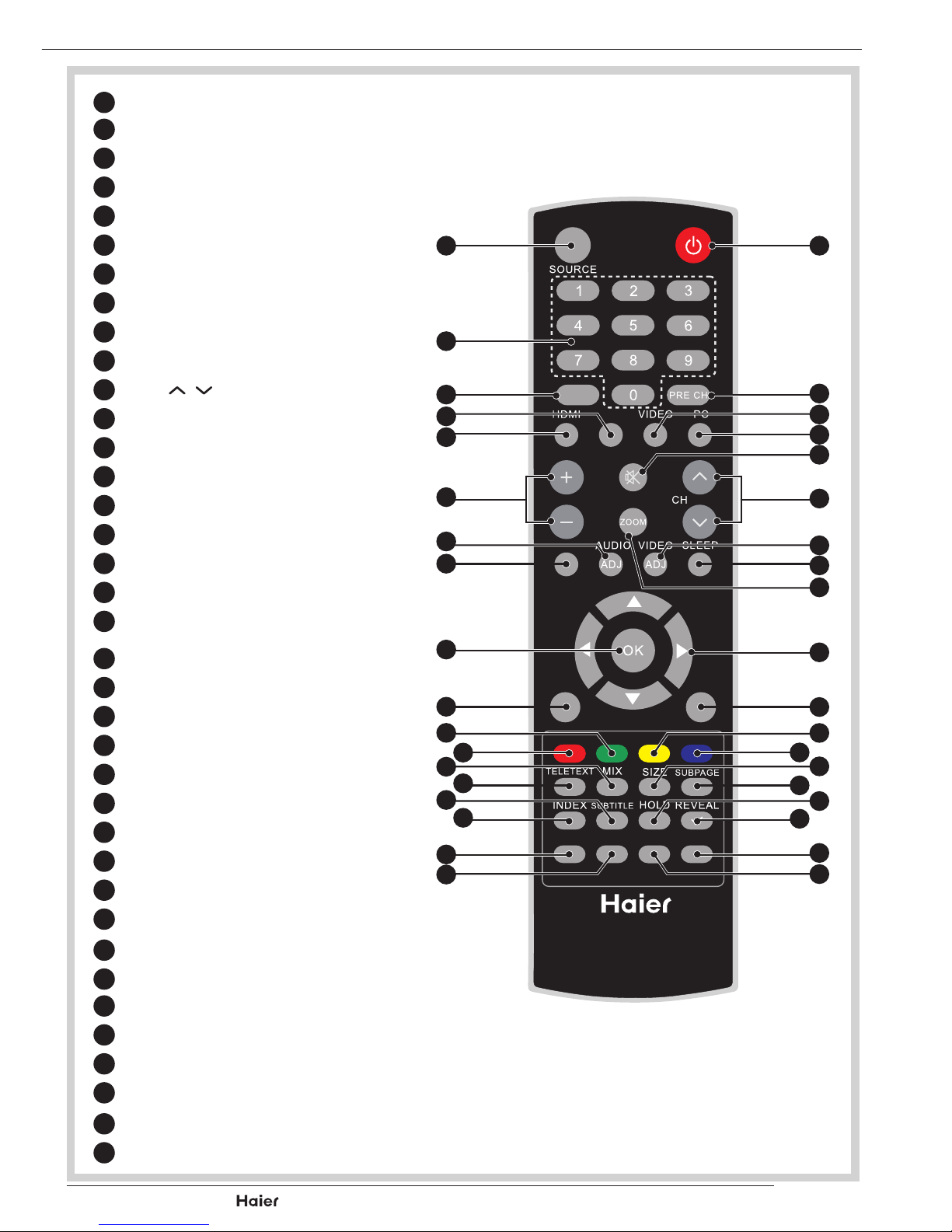
REMOTE CONTROL
APOWER
BSOURCE
CNumerical Keys
DPRE CH
EEPG
FVIDEO
GYPbPr
HPC
IHDMI
JMUTE
KCH .
LVol + -
MVIDEO ADJ
NAUDIO ADJ
OSLEEP
PDUAL
QZOOM
XCURSOR
YOK
aINFO
bMENU/EXIT
c YellowButton
dGreen Button
eBlue Button
fRed Button
gSIZE
hMIX
iSUBPAGE
jTELETEXT
kHOLD
lSUBTITLE
mREVEAL
nINDEX
oFREEZE
pFAV
qUSB
xCH-LIST
FAV
DUAL
EPG
YPbPr
CH-LIST USB FREEZE
MENU
/EXIT INFO
Vol
D
A
F
J
H
K
M
O
Q
X
a
c
g
e
i
m
k
o
q
B
C
E
G
L
I
P
N
d
h
l
p
x
Y
b
f
j
n

| HD Ready LCDTV | User Manual |
p.04
REMOTE CONTROL
NOTES:
- Please read the important safety
instructions before use.
REMOTE CONTROL
1. Unclip the Battery Cover from the Remote Con-
trol.
See g. 1.
2. Inserttwonew1.5VsizeAAABatterieswiththe
+and –marks correctly aligned.
See g. 2.
HANDLING THE REMOTE CONTROL
Donotusecausticcleaners(porcelain,stainless
steel,toilet,orovencleaneretc.)ontheremote,as
it may suffer damage:
• Nevermixusedandnewbatteriesinthedevice.
• Replace all the batteries in a device at the same
time.
• Remove the batteries if the remote control is not
working.
• Toavoidpossiblefailure,readthefollowing
instructions and handle the remote cont.
• Do not drop or cause impact to the remote con-
trol.
• Donotspillwateroranyliquidontheremote
control.
• Donotplacetheremotecontrolonawetobject.
• Do not place the remote control under the direct
sunlight or near heat sources.
Remove the battery from remote control handset
whenitisnottobeusedforalongperiod.Other-
wiseitcouldcausecorrosionorbatteryleakageand
mayresultinphysicalinjuryand/orpropertydam-
age includingre.
fig. 1
Battery
Compartment
Cover
fig. 2
2 x AAA Battery

| HD Ready LCDTV | User Manual | p.05
REMOTE CONTROL
3. Carefully close the Battery Cover.
See g. 3.
PRECAUTIONS:
To obtain the best performance from your
remotecontrol,pleaseconsiderthefollow-
ing:
• Ensurethereisnoobstructionbetween
remote control and TV set.
• Bright sunlight may affect the remote
control performance.
• Alwaysensurethatbothbatteriesare
replaced at the same time.
fig. 3

| HD Ready LCDTV | User Manual |
p.06
KNOW YOUR MACHINE
A
C
D
E
F
G
H
B
1 x LCD TV Front View
Side Connections
Rear View
Control Panel
Rear Connections
I
W
X
V U T
Q
R
S
J
K
L
M
N
O
P
APowerLED:IftheLEDcolorisBlue,meanstheTVsetispoweron.IftheLED
colorisRed,whichmeansthisTVsetisinstandbymode.
BWallMountHole:Forwallmountuseonly.
CSource:Usethisbuttontotogglebetweenvideoinputsources.
DMENU: Press to open the on-screen menu.
EVol +: Press to increase the Volume. In Menu mode, functions as the right ar-
rowtogotothenextmenuorincreaseasetting.

| HD Ready LCDTV | User Manual | p.07
KNOW YOUR MACHINE
FVol -: Press to decrease the Volume. In Menu mode, press to decrease a set-
ting.
GCH+:Presstogotothenexthigherchannel.InMenumode,functionsasthe
uparrow.
HCH-:Presstogotothenextlowerchannel.InMenumode,functionsasthe
downarrow.
IPowerButton:UsethisbuttontoswitchyourLCDTVon/off.
JCommonInterfaceSlot:FunctionwhenPCCardorExpressCardisinCOM-
MON INTERFACE slot of the set. Please refer to your plug-in card manual for
detail information.
K/LAVinput:connecttheVIDEOrecordersorDVDplayerswithstandardcom-
posite output and audio output signal.
MS-videoInput:ConnectthevideoforaS-Videodevicetothisjack,andcom-
patiblewithcomposite/audioinput.
NUSBInput:ThisTVsetcansupportMultimediainputfor.MP3and.JPEGle.
OHeadphoneOutput:Connecttoheadphones(32Ω).
PHDMIInput:HighDenitionMultimediaInterface.Connecttodeviceswith
digitalsignalsandcanbeusedwithPCorHDTVvideosignals.
QVGA Input: Connect to VGA analog signals sources.
RComponent Input: The YPbPr video signal can be used if connecting through
thecomponentvideoport.ForexampleProgressiveScanDVDplayers,
HiscaleHDTVDecoders,andsatellitereceivers,obtainvideowithmaximum
resolution using YPbPr and L/R audio signals.
SSPDIF: SPDIF is highly recommended for high quality digital sound output.
TAntennaInput:ConnectstoTVRFsignals(antenna/CATV).
USCART:TheleftoneisFullSCARTwithtransmitsRGB,S-VideoandCVBSin
andCVBStunerout,therightoneishalfSCARTwhichtransmitsS-Videoor
CVBS in and CVBS monitor out.
VPowerConnector:ConnectthepowercordintotheACINsocketfoundatthe
back of the TV.
WPCAudioInput:PCaudiosupports3.5mmJack.
XHDMIInput:HighDenitionMultimediaInterface.Connecttodeviceswith
digitalsignalsandcanbeusedwithPCorHDTVvideosignals.

| HD Ready LCDTV | User Manual |
p.08
WALL MOUNTING
NOTES:
- Please read the important safety
instructions before use.
WALL MOUNTING (Optional)
IMPORTANT: When drilling into walls always check that there are no hidden
wires or pipes etc. Make sure that the screws and wall plugs supplied are
suitable for supporting the unit. Consult a qualied tradesperson if you are
not sure.
NOTE: It would be useful to ask someone to help you at this stage.
For 26”/32” TV
1. Puttheunitfacedownonasafe,atsurfacethatiscoveredbyasmoothcloth.
Removethescrewsofthestand.See g 4 and 5
Stand
fig. 4
Screws
fig.5
For 37”/42”/47” TV
1. Puttheunitfacedownonasafe,atsurfacethatiscoveredbyasmoothcloth.
Removethescrewsofthestand. See g. 6.
Install the cover at the bottom of the TV. See g.7.
fig. 6
Screws
Stand
This manual suits for next models
9
Table of contents
Other Haier LCD TV manuals

Haier
Haier LTF42M1C User manual

Haier
Haier L22M3 User manual

Haier
Haier L20AV6-A0 User manual

Haier
Haier TFT L32C1180 User manual

Haier
Haier L22T3W User manual

Haier
Haier HL32XK2 User manual

Haier
Haier 22T32 User manual

Haier
Haier LE43K6000 User manual

Haier
Haier LE40K6600G User manual

Haier
Haier HL22F2 User manual

Haier
Haier HL26P2 User manual

Haier
Haier LV1508 User manual

Haier
Haier LE32K6600GA User manual

Haier
Haier HL22XSLW2 User manual

Haier
Haier HL22K3 User manual

Haier
Haier L24B2120 User manual

Haier
Haier LY19R1CWW User manual

Haier
Haier HL26K1 - K-Series - 26" LCD TV User manual

Haier
Haier HL32P2 User manual

Haier
Haier L1949 User manual