Haier HLA15 User manual

Please read this manual carefully
before using this TV set and keep it
for future reference.
LCD TV
USER MANUAL
HLA15/HLA19
WARNING AND CAUTION
CAUTION:
TO REDUCE THE RISK OF ELECTRIC SHOCK, DO NOT REMOVE
COVER (OR BACK). NO USER SERVICEABLE PARTS INSIDE.FOR
ANY PROBLEM, REFER SERVICING TO QUALIFIED SERVICE
PERSONNEL.
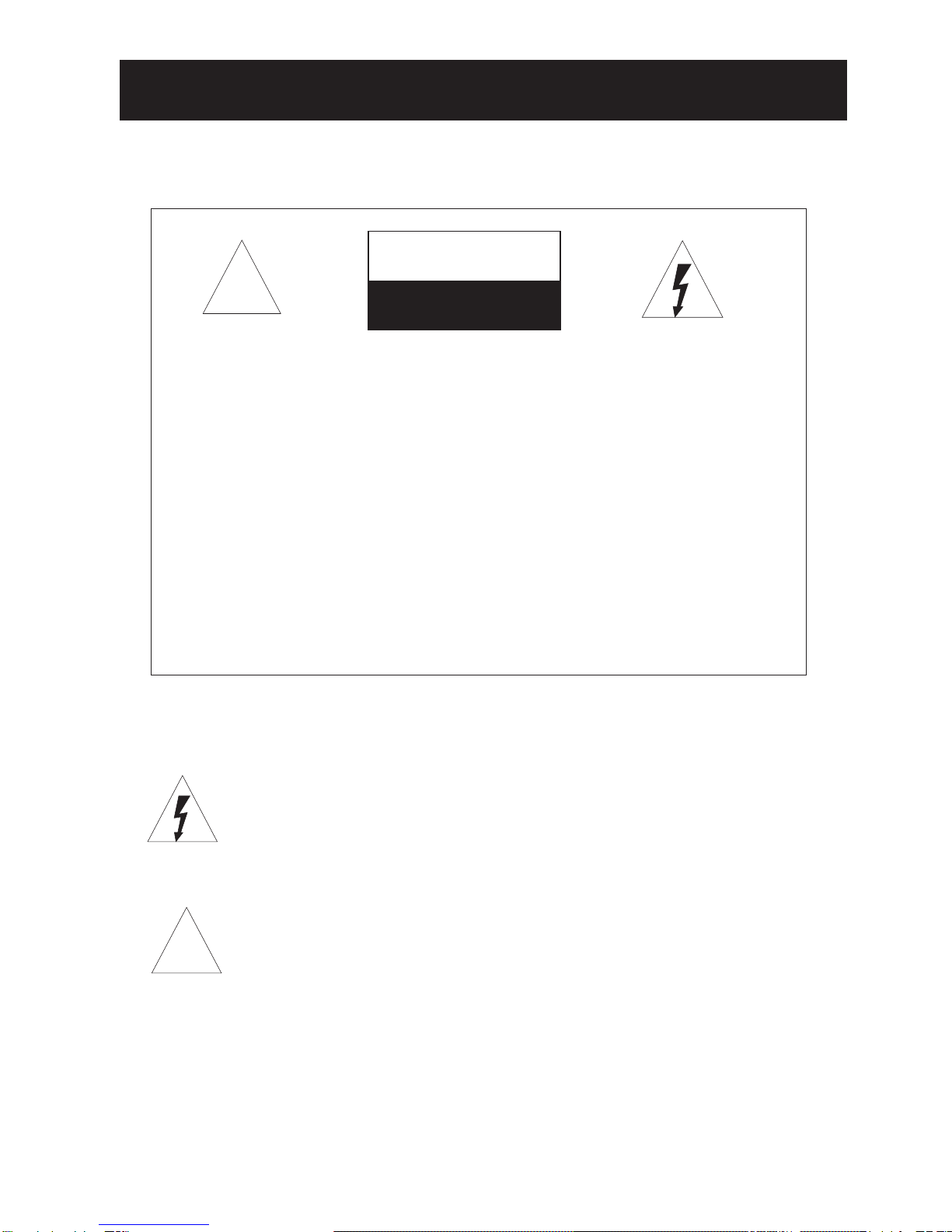
THERE IS A LIGHTNING ARROW SYMBOL IN THE TRIANGLE:
THIS SYMBOL INDICATES HIGH VOLTAGE IS PRESENT INSIDE.
IT IS DANGEROUS TO MAKE ANY KIND OF CONTACT WITH ANY
INSIDE PART OF THIS PRODUCT.
THERE IS A MARK IN THE TRIANGLE: THIS
SYMBOL ALERTS YOU THAT IMPORTANT LITERATURE
CONCERNING. OPERATION AND MAINTENANCE HAS BEEN
INCLUDED WITH THIS PRODUCT.
EXCLAMATION
CAUTION
DO NOT OPENDO NOT OPEN
RISK OF ELECTRIC SHOCKRISK OF ELECTRIC SHOCK
!!
!!
CAUTION:
TO REDUCE THE RISK OF ELECTRIC SHOCK AND FIRE,
DO NOT PUT THE TV SET NEAR SOURCES OF HUMIDITY.
DO NOT USE ANY ABRASIVE CLEANSERS WHICH MAY
SCRATCH OR DAMAGE THE LCD SCREEN. AVOID CONTACT
WITH OBJECTS THAT MAY SCRATCH THE LCD SCREEN.
NOTE: SERVICING THE UNIT YOURSELF IS UNAUTHORIZED
AND COULD LEAD TO INJURY OR PRODUCT DAMAGE.

CONTENT
To users:
Thank you for our LCD-TV.purchasing
Before connecting the LCD-TV and turning on the power, please
read this book carefully. Please keep this book for later use.
If the unit is disabled by an electrostatic discharge, please turn off
the power to the unit and turn it back on to reset.
Safety Notice Items...................................................................................
Front Panel Controls..................................................................................
Connection Options...................................................................................
Remote Control Key Functions...................................................................
Remote Control ..................................................................................
Installing Batteries..................................................................................
Connection Instructions.............................................................................
Grounding..............................................................................................
External equipment Connections..............................................................
Antenna Connection.............................................................................
PC Setup.............................................................................................
VCR Setup...........................................................................................
Cable TV Setup....................................................................................
External AV Source Setup......................................................................
Basic Operating Instructions.......................................................................
Turn on the LCD-TV.................................................................................
Audio Control..........................................................................................
Mute......................................................................................................
Select the TV Channel You Want...............................................................
Picture Mode...........................................................................................
Program Scan.........................................................................................
Sleep......................................................................................................
Menu Operations.......................................................................................
Picture Menu Options...............................................................................
Picture Menu Options Continued...............................................................
Sound Menu Options................................................................................
Sound Menu Options Continued................................................................
Function Menu Options.............................................................................
Function Menu Options Continued.............................................................
Adjust Menu Options................................................................................
Tuning Menu Options..............................................................................
Tuning Menu Options Continued..............................................................
Parental Menu Options.............................................................................
Parental Menu Options Continued.............................................................
Troubleshooting Guide...............................................................................
Specifications...........................................................................................
1
2
3
4
5
5
6
6
6
6
7
8
9
9
10
10
10
10
11
11
11
11
12
12
13
13
14
15
16
16
17
18
18
19-21
22
23

Safety Notice Items
Incorrect usage maycause fire orelectric shock.
Please keep this manual for later use;
Please comply strictly with the warning instructions on the machine and
in this book;
Before operation, please make sure that the operating voltage of your unit is
correct;
Do not remove the back cover. If service is needed, please contact an
Authorized service technician.
To prevent this, please do as
required when youare installing, usingand cleaning thismachine. To ensure
your safety and extend the life-span of LCD-TV, please readthe following items
carefully before using:
lPlease read and understand all the instructions before operation;
l
l
lPlease comply with the instructions provided;
lPlease do not use additional devices that are not recommended by
manufacturer:
l
lDo not placethe unit onunstable, dusty andhumid places;
lNever put theunit in directsunlight or nearheat sources;
lAllow enough space for proper ventilation;
lPlease keep water away from the LCD-TV . If water comes in contact with the
LCD-TV, disconnect the power cord from the power source, then wipe the set
with a dry soft cloth;
l
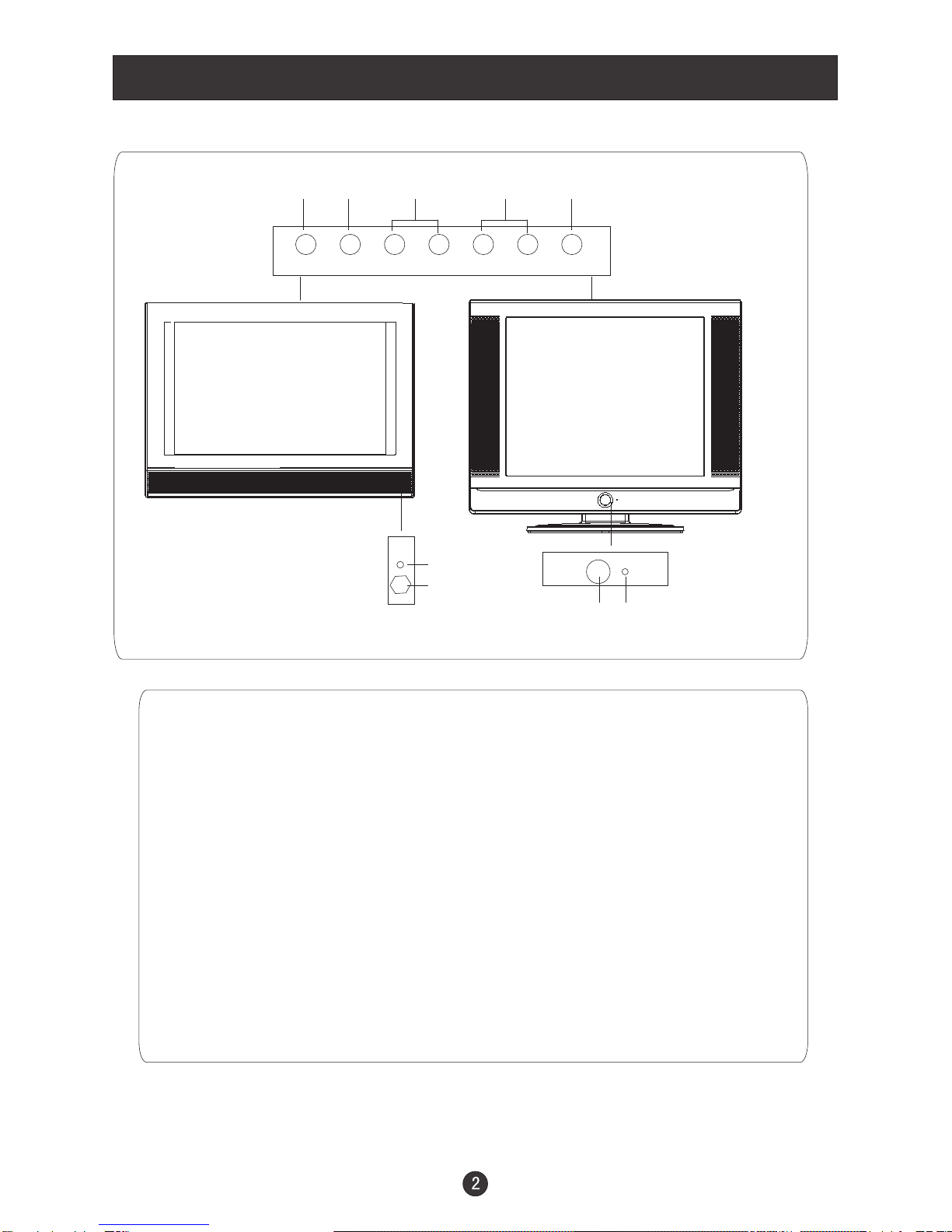
Front Panel Controls
Control Panel Function
TV/AV MENU VOL- VOL+ CH- CH+ POWER
2345
1. Power supplyswitch
2. TV/AV TV/AV/S-VIDEO/PC/
COMPONENT
3. MENU Press to select the main menu
4. VOL- Volume down/ Left orientation to adjust the item in the OSD
VOL+ Volume up / Right orientation to adjust the item/Press to enter
5. CH- TV channel down / to select the item in the menu
CH+ TV channel up / to select the item in the menu
6. Power indicator
Illuminates red in standby mode, illuminates green when the display is
turned on
7. Remote Sensor
Selects the input signals:
Receives the signals from the remote control
1
6
7
HLA15
6
7
HLA19
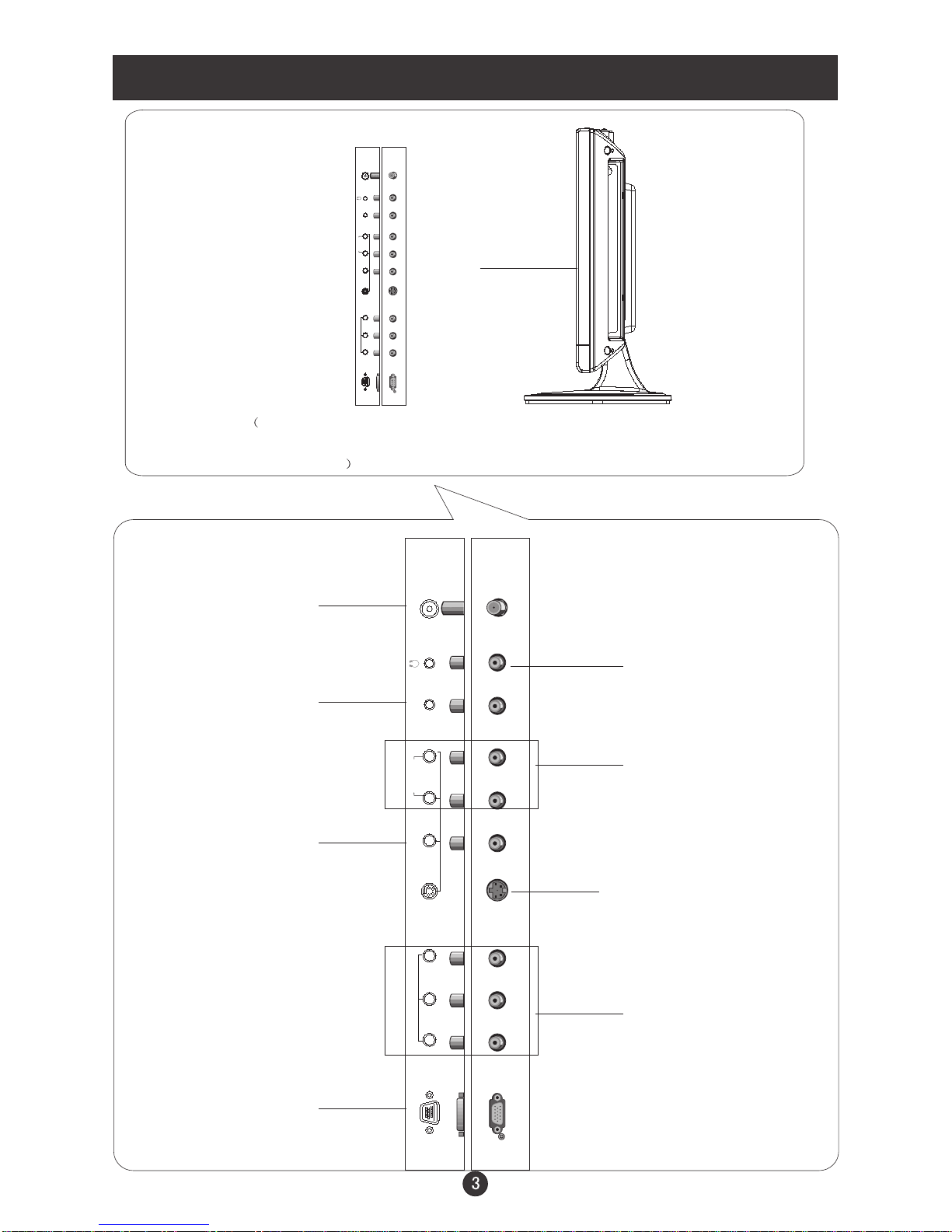
Connection Options
The above figure is for reference only,
connections may differ depending upon
the models
VGA Input
Connect to theVGA
15PIN analog output
connector of aPC
display card to use set
as a PC display
DVD/DTV Input
Connect a component
video/audiodevice to
these jacks
Video Input
Connect video output
from an external
device to thisjack
AV/S-VIDEO/
COMPONENT Audio
Input
Connect audio output
from an externaldevice
to these jacks
PC Audio Input
Connect the audio
output from the pc
to the audio input port
Earphone port
Antenna Input
Connect cable or
antenna signals to
the TV, either direc-
tly or through your
cable box.
S-Video Input
Connect S-Video out
from an S-Video device
to the jacks.
ANT IN S-VIDEO VGA IN
PC AUDIO IN AUDIO IN
R L
VIDEO IN
V
Pb
Pr Y
COMPONENT IN
ANT IN S-VIDEO VGA IN
PC AUDIO IN AUDIO IN
R L
VIDEO IN
V
Pb
Pr Y
COMPONENT IN
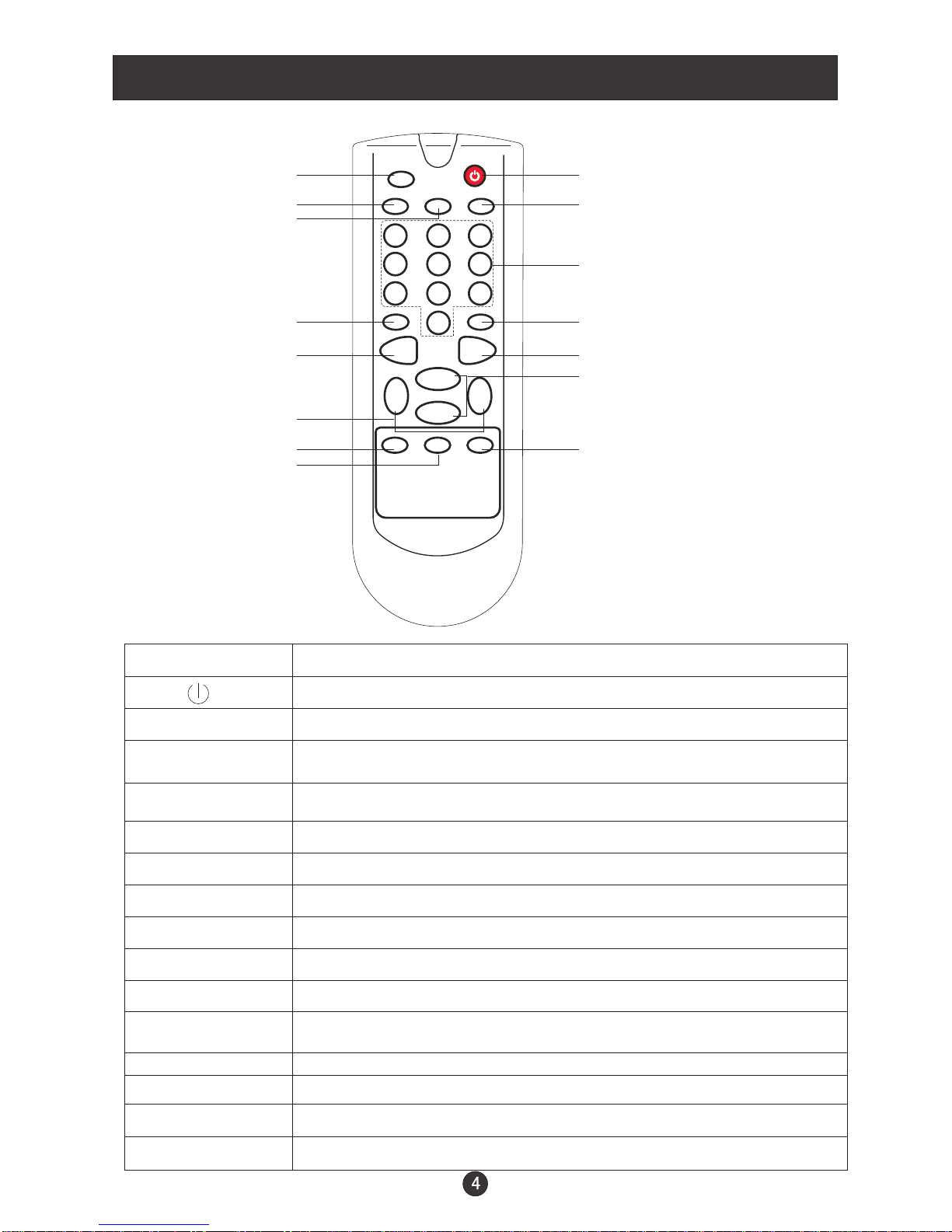
Remote Control Key Functions
When using theremote control, aimit towards the remote sensor on the TV
2. Press to turn the TV on and off
9. MENU
To display/exit the main menu
11. CH+/CH-
TV channel up/down or select the item of the menu
12. VOL+
Volume up/ to selectthe main menu/ to adjust the item/ to
enter the submenu.
VOL- Volume down/ to select the main menu/ to adjust the item
6. 0-9 TV channel numberselect
3. RECALL
While in TV mode, press to return to the previous channel
10. TV/AV Select TV/AV/S-VIDEO/PC/ COMPONENT
7. MTS/SAP Select MONO,STEREO, SAP in NTSC system
1. MUTE Press to mute the sound
8. P.STD Select picture mode:PERSONAL/STANDARD/MILD/FRESH
5. DISPLAY Display current input signal information
4. EXIT Press to turn off the on screen display
Illustration of the keys on the remote control:
MUTE
RECALL DISPLAY EXIT
123
456
789
MTS/SAP P.STD
MENU TV/AV
CH+
CH-
VOL
-
VOL
+
CCD SLEEP SCAN
0
12
34
5
6
78
910
11
12
13 14
15
13. CCD
Closed caption on/off
14. SCAN
Press to scan through memorized TV channels
15. SLEEP
Press to set the sleep timer
Remote Control
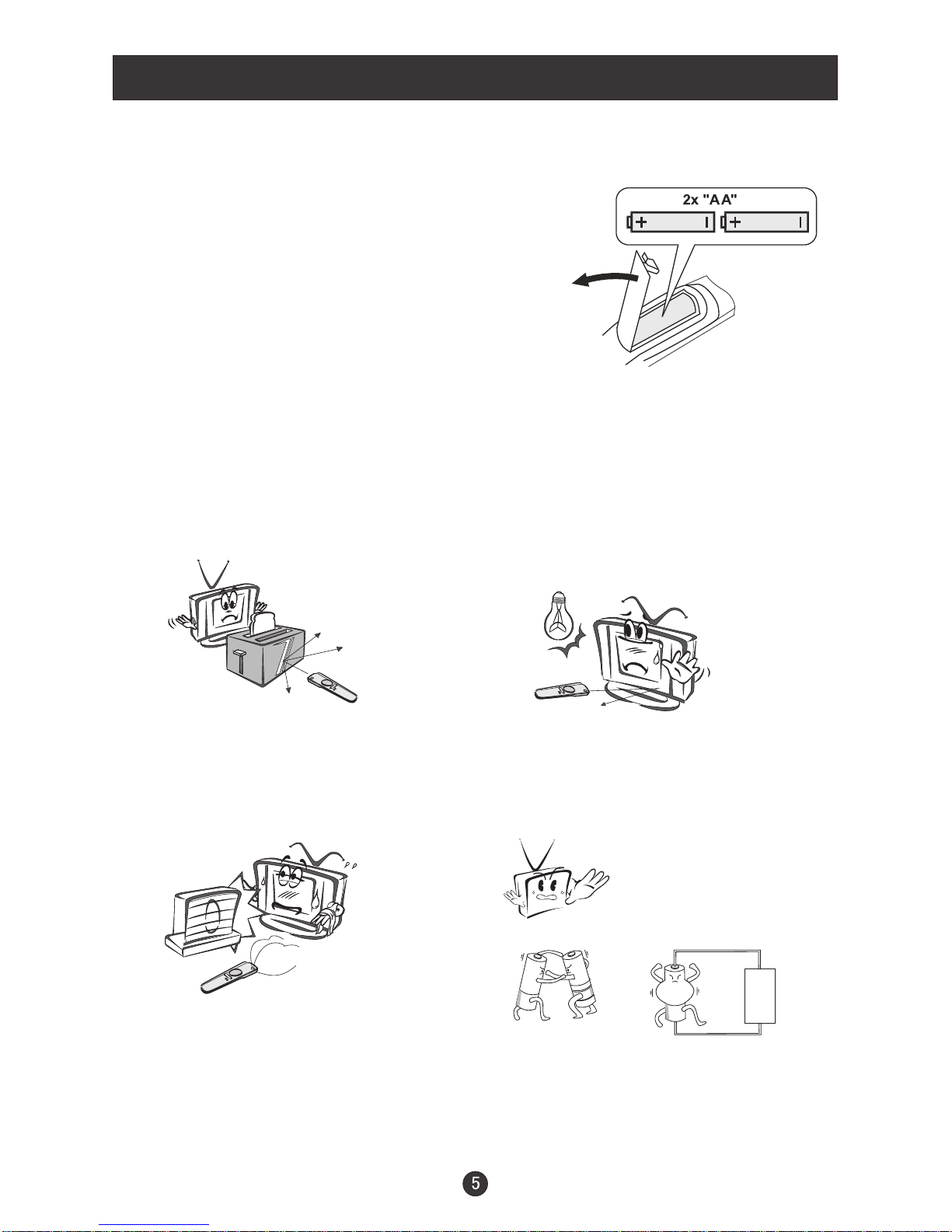
Installing Batteries
Remove the battery cover.
Insert two size AA batteries matching
the +/-polarities of the battery to the +/-
marks inside the battery compartment.
!
!
Precautions
Make sure that there is no
obstacle between theremote
controller and televisionset.
As strong light may interfere with the
signals, change yourposition to
operate the remote control if
the television cannot be turned
on or off as expected.
Keep the remote control
away from heat sources or
humid areas toensure
effective performance of
the remote.
Make sure that two AA1.5V alkaline
batteries are loaded. The batteries
must be of the same type, must be
inserted properly, and must not be
rechargeable.
Connection Instructions
Ensure that you connect the grounding / earth wire to prevent possible
electric shock. If grounding methods are not possible, have a qualified
electrician install a separate circuit breaker. Do not try to ground the
unit by connectingit to telephone wires, lightening rods, or gas pipes.
Grounding
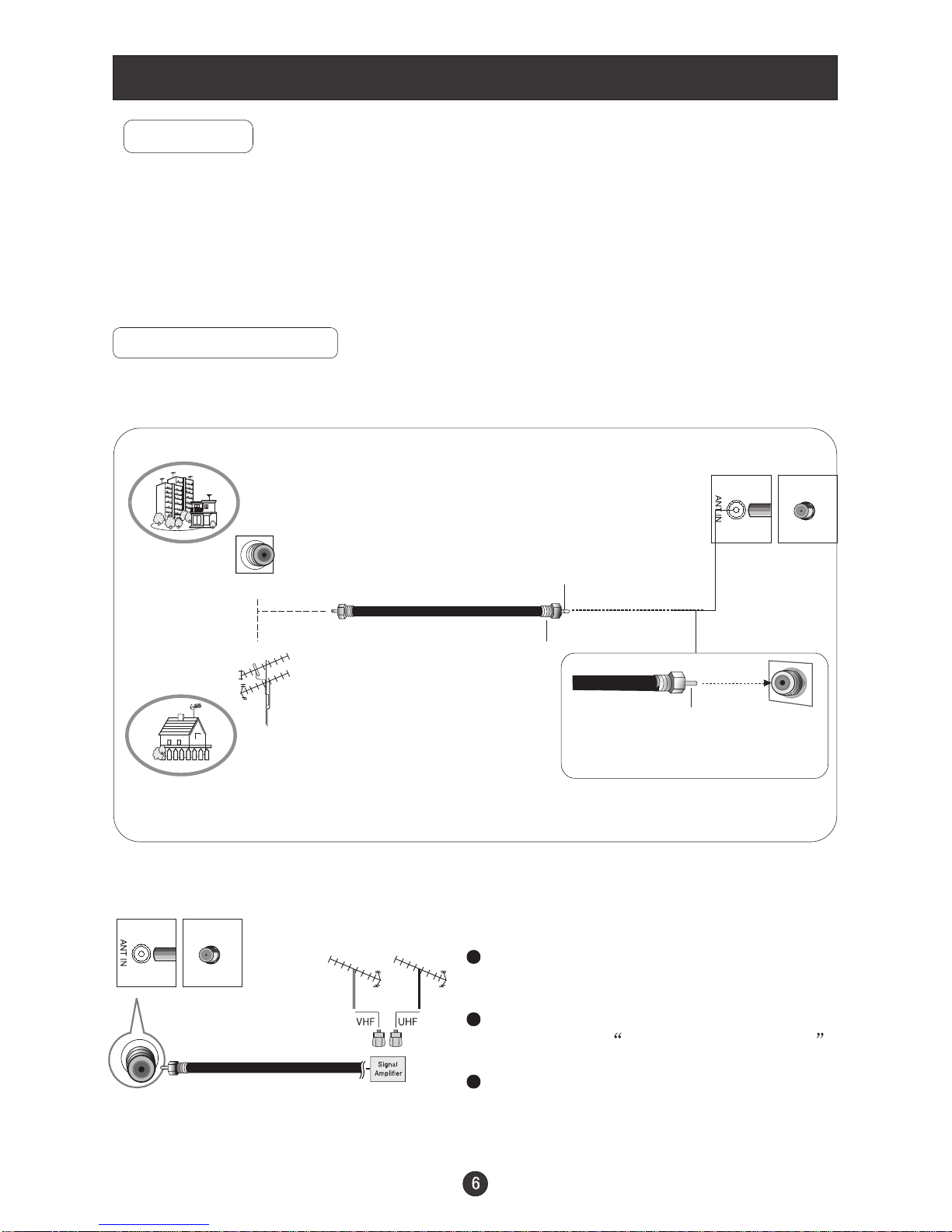
External Equipment Connections
Antenna Connection
- Antenna or Cable Service with a Cable Box Connections
- For optimum picture quality, adjust antenna direction if needed.
Multi-family Dwellings/Apartments
(Connect to wallantenna socket)
wall antenna
socket
VHF antenna
UHF antenna
outdoor
antenna
Single-family Dwellings /Houses
(Connect to walljack for outdoorantenna)
Bronze Wire
Be careful notto bend thebronze
wire when connectingthe antenna.
Bronze Wire
Turn clockwise to tighten.
RF coaxial wire(75 ohm)
To improve picture quality in a poor
signal area, purchase and install a
signal amplifier.
If the antenna needs to be split for two
TVs, install a 2-Way SignalSplitter
in the connections.
If the antenna is not installed properly,
contact your dealer for assistance.
NOTE: Cables shownare not included with the TV
Connection Instructions
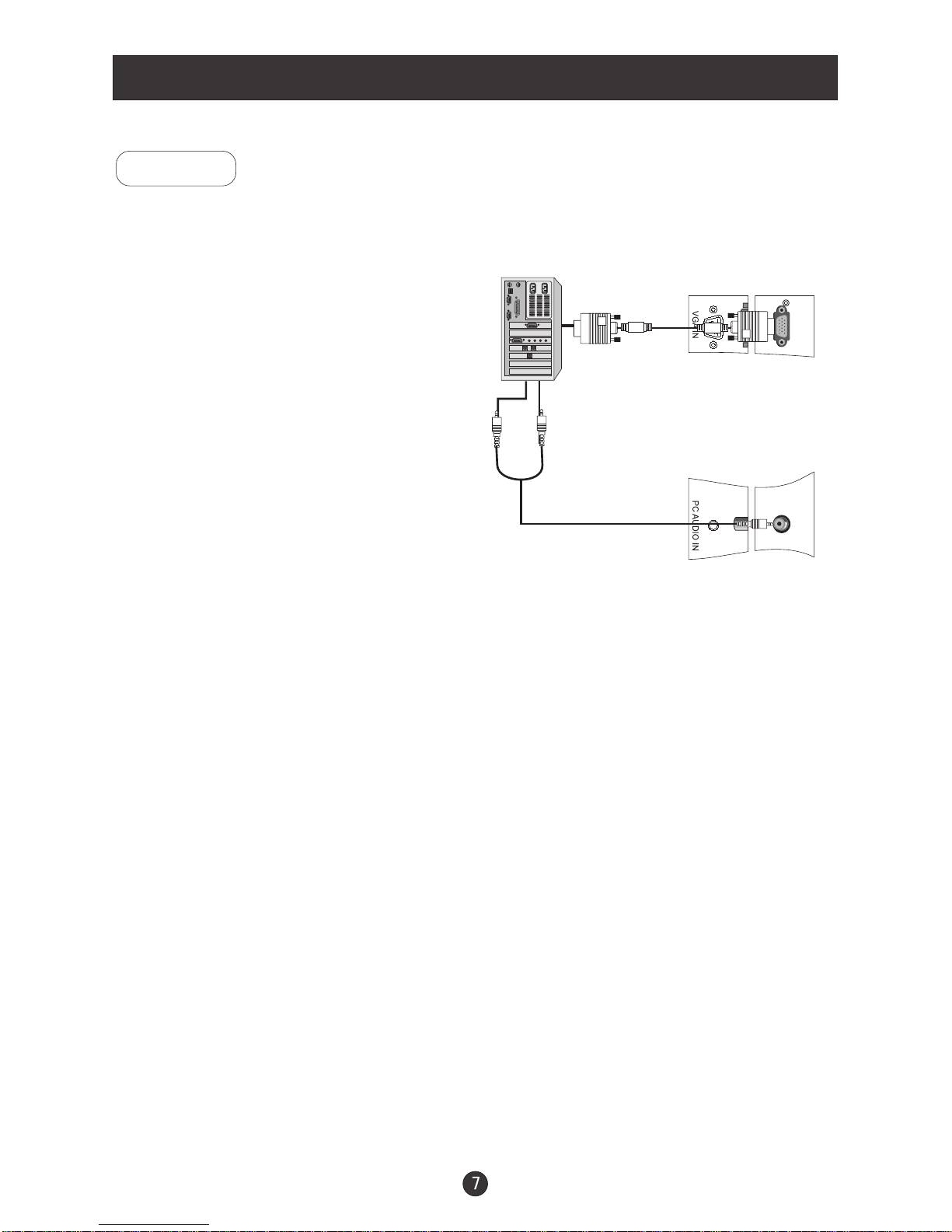
You can use your LCD-TV as a monitor for your personal computer using a VGA
cable (not supplied).
PC Setup
Connection and use steps:
1.Read the userguide supplied with
your computer and ensure that it has
a VGAconnector;
2.Make sure that the power of the LCD
-TV and thePC are off;
3.Connect a Dtype 15-pin VGAinterface
cable ( not supplied ) to the VGA video
interface connector on the PC. Then
connect the other end to the VGA video
interface connector on the back of the
LCD-TV.Tighten the screws on the VGA
connectors once they are firmly
connected;
4.Turn on the power of the LCD-TV first ,
and then turn on the power of the PC;
5.Press the INPUT button to set the video
input mode ofthe LCD-TV toPC-RGB;
6.Check the image on your TV. There may be noise associated with the resolution,
vertical pattern, contrast or brightness in PC mode. If noise is present, change
the PC mode to another resolution, change the refresh rate to another rate or
adjust the brightness and contrast on the menu until the picture is clear. If the
refresh rate of the PC graphic card can not be changed,change the PC graphic
card or consult the manufacturer of the PC graphic card.
This manual suits for next models
1
Table of contents
Other Haier Flat Panel TV manuals

Haier
Haier L32H8 User manual

Haier
Haier HL37B - 37" LCD TV User manual

Haier
Haier L15D2-A0 User manual

Haier
Haier HL40B User manual

Haier
Haier HTF21S32 User manual

Haier
Haier 0090504932V User manual

Haier
Haier HTF20R21 User manual

Haier
Haier LEC19B1320 Assembly instructions

Haier
Haier HLE20BB User manual

Haier
Haier L19B1120 User manual

Haier
Haier LE55B1381 Assembly instructions

Haier
Haier L37A9-AK User manual

Haier
Haier L37A9A User manual

Haier
Haier HTF20R21 User manual

Haier
Haier L32K3 User manual

Haier
Haier LED19 User manual

Haier
Haier 15HL25S - 15" LCD TV User manual

Haier
Haier HL37E User manual

Haier
Haier LE22C2380 Assembly instructions

Haier
Haier HL26B User manual