HAGENUK Classico User manual

1
User Manual
and
SafetyPrecautions
Cordless DECT - telephone
with caller ID 10/04hj
Classico / Duo
2
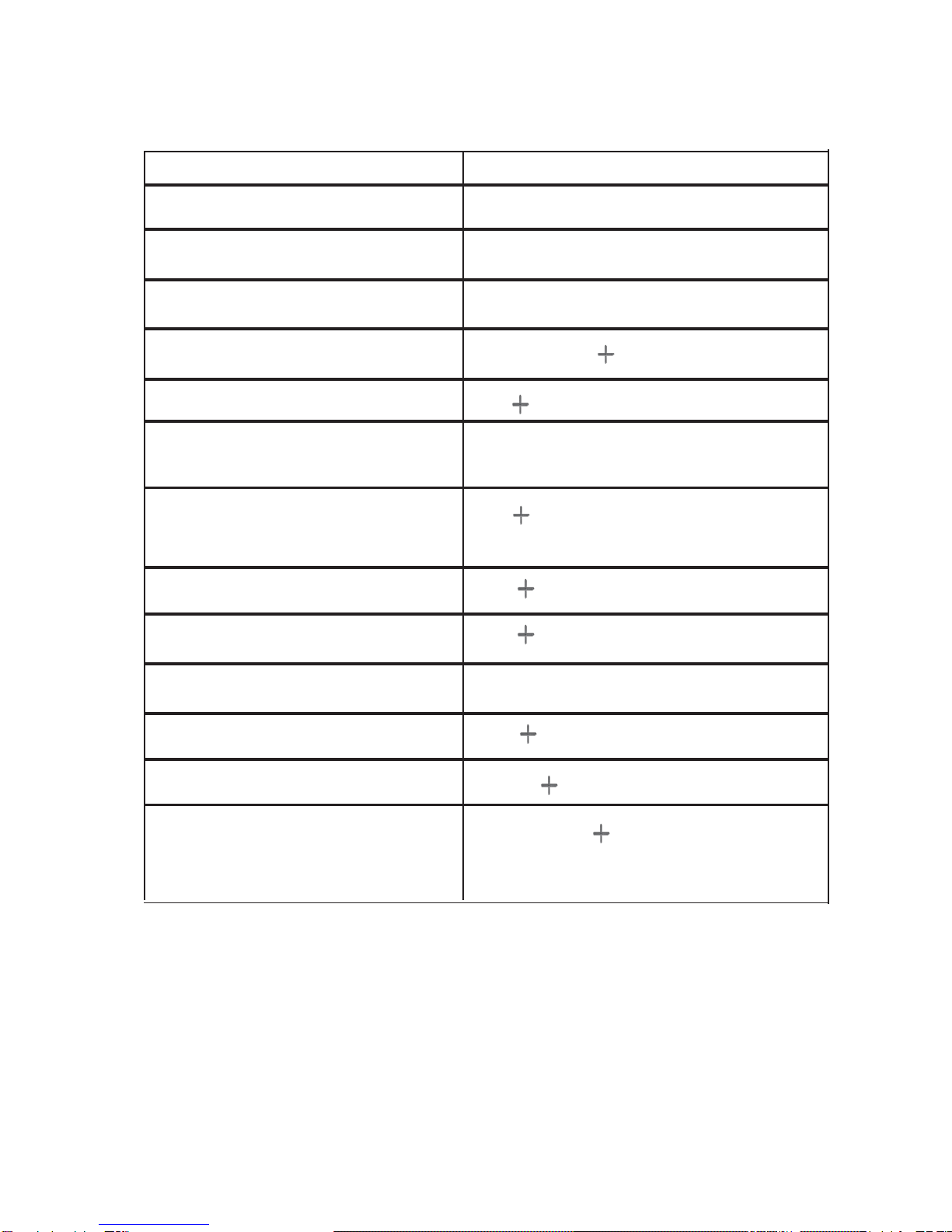
Turn handset ON / OFF ON: EOFF: Ehold for 2 s
Turn keypad lock ON / OFF ON: Ehold 1 s OFF: Ehold 1 s
Make an external call nior in
Make an internal call INT hold 3 s, down
Redial a number /, select entry, i
Store telephone number to Menu, OK, n, OK, n, OK
the phonebook
Copy telephone number from
call log to phonebook
Dialing from the phonebook
Calling from call log
Speaker phone ON / OFF ON: 2x iOFF: 1x i
Function input at the keypad
)Bsimult. until the name ap-
pears , n, OK
Bselect entry, i
)select entry, i
Set the handset volume i
Set the speaker phone volume i2x,
Transfer call to another handset INT hold 3 s, hang up when
the other user answers
Quick reference for the handset

3
Table of Contents
Quick reference for the handset............................................................... 2
Handset diagram ....................................................................................... 6
Base station overview ............................................................................... 7
Legend........................................................................................................ 8
Default settings.......................................................................................... 8
Menu structure........................................................................................... 9
Congratulations ....................................................................................... 11
Safety precautions................................................................................... 11
Contents of the package ......................................................................... 12
Features ..................................................................................................12
Maintenance ...........................................................................................13
Recycling................................................................................................. 13
LC - Display (LCD) (symbols line) ........................................................14
INSTALLING THE TELEPHONE....................................15
Installing and connecting the base station ............................................ 15
Setting up the handset ............................................................................ 15
Replacement of the batteries.................................................................. 16
Out of range ............................................................................................. 17
Registering the handset with the base .................................................. 17
Registering the handset to the Classico base....................................... 17
Registering the handset with another DECT - base
(compatible with GAP) ........................................................................ 18
De-registering the handset ..................................................................... 18
HANDSET SETTING ......................................................19
Turning the handset on and off .............................................................. 19
Automatic return to standby ................................................................... 19
Keypad locking ........................................................................................ 19
Setting the handset's ringer volume ...................................................... 20
Choosing the handset's ringer melody.................................................. 20
Setting the handset's volume ................................................................. 20
Turning keypad beeps on and off ........................................................... 21
Turning battery low beep on and off ...................................................... 21
Choosing the language ........................................................................... 22
Turning automatic answer on and off .................................................... 22
Returning the handset's setting to the default ...................................... 23
Modifying the personal code (PIN) of the handset............................ 23
Baby mode ..............................................................................................24

4
Modifying the name of the handset..................................................... 25
BASE SETTING..............................................................26
Ringer volume at the base ....................................................................26
Ringer melody at the base ....................................................................27
Setting the date and the time................................................................27
Returning the base's settings to the defaults ....................................28
Changing the dialing mode................................................................... 28
Setting the Flash-time............................................................................ 29
Modifying the PIN-code of the base.....................................................30
MAKING CALLS.............................................................31
Answering an external call...................................................................... 31
Answering an internal call ...................................................................... 31
Speaker phone calling............................................................................. 31
Setting the volume for speaker phone calling....................................... 32
Calling Outside ........................................................................................ 32
Making intercom calls ............................................................................. 32
Dialing preparation .................................................................................. 33
Redial........................................................................................................ 33
Dialing a number from the phonebook .................................................. 34
CALL CONTROL ............................................................34
Call timer .................................................................................................. 34
Total call duration .................................................................................... 34
Last call duration..................................................................................... 35
Reset call duration................................................................................... 35
Setting the call limitation ........................................................................ 35
Setting number barring ........................................................................... 36
Freeing barred numbers ......................................................................... 36
Saving emergency numbers ................................................................... 37
Transfer of a communication to another handset................................. 37
EXTERNAL COMFORT FUNCTIONS............................38
Waiting call and toggling ........................................................................ 38
Consultation and toggling....................................................................... 38
Conference call with three people.......................................................... 39

5
INTERNAL COMFORT FUNCTIONS .............................40
Waiting call during an internal call....................................................... 40
Consultation and toggling .................................................................... 40
Conference call with three people.......................................................40
Paging the handsets.............................................................................. 41
Reading the call duration ...................................................................... 41
Turning the microphone off (Mute) .....................................................41
PHONEBOOK.................................................................42
Add phonebook entry.............................................................................. 42
Dialing from the phonebook ................................................................... 42
Editing numbers in the phonebook........................................................ 43
Deleting numbers from the phonebook ................................................. 43
Deleting the whole phonebook............................................................... 44
CID LIST (CALLER LOG)...............................................44
Opening the CID list ................................................................................ 45
Dialing from the CID-list.......................................................................... 45
Editing numbers in the CID-list .............................................................. 46
Copying a number from the CID-list to the phonebook........................ 46
APPENDICES.................................................................47
Troubleshooting....................................................................................... 47
Warranty ................................................................................................... 48
Technical data .......................................................................................... 49
INDEX .............................................................................50
6
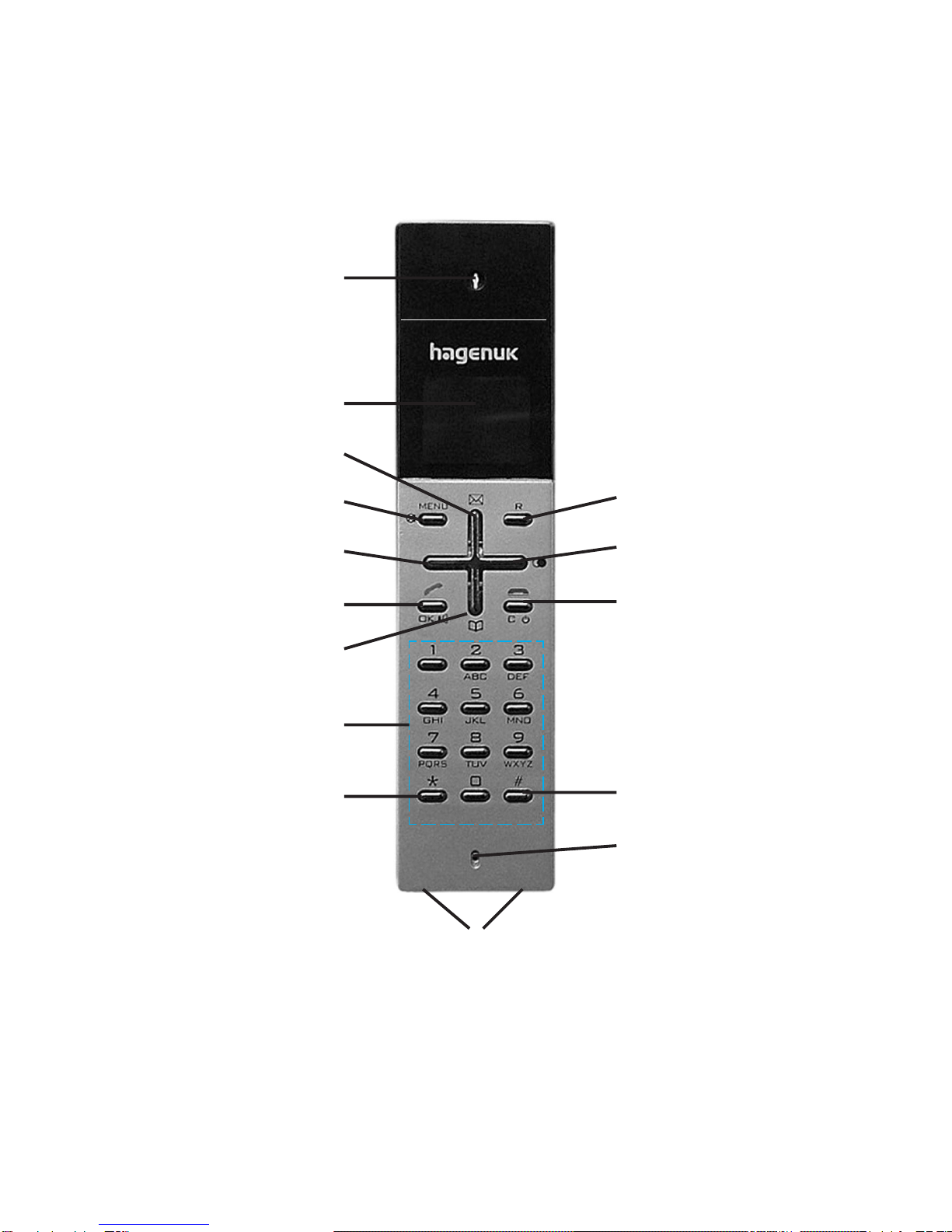
Handset diagram
1
2
3
410
511
612
7
8
913
14
15
INT
INT
7
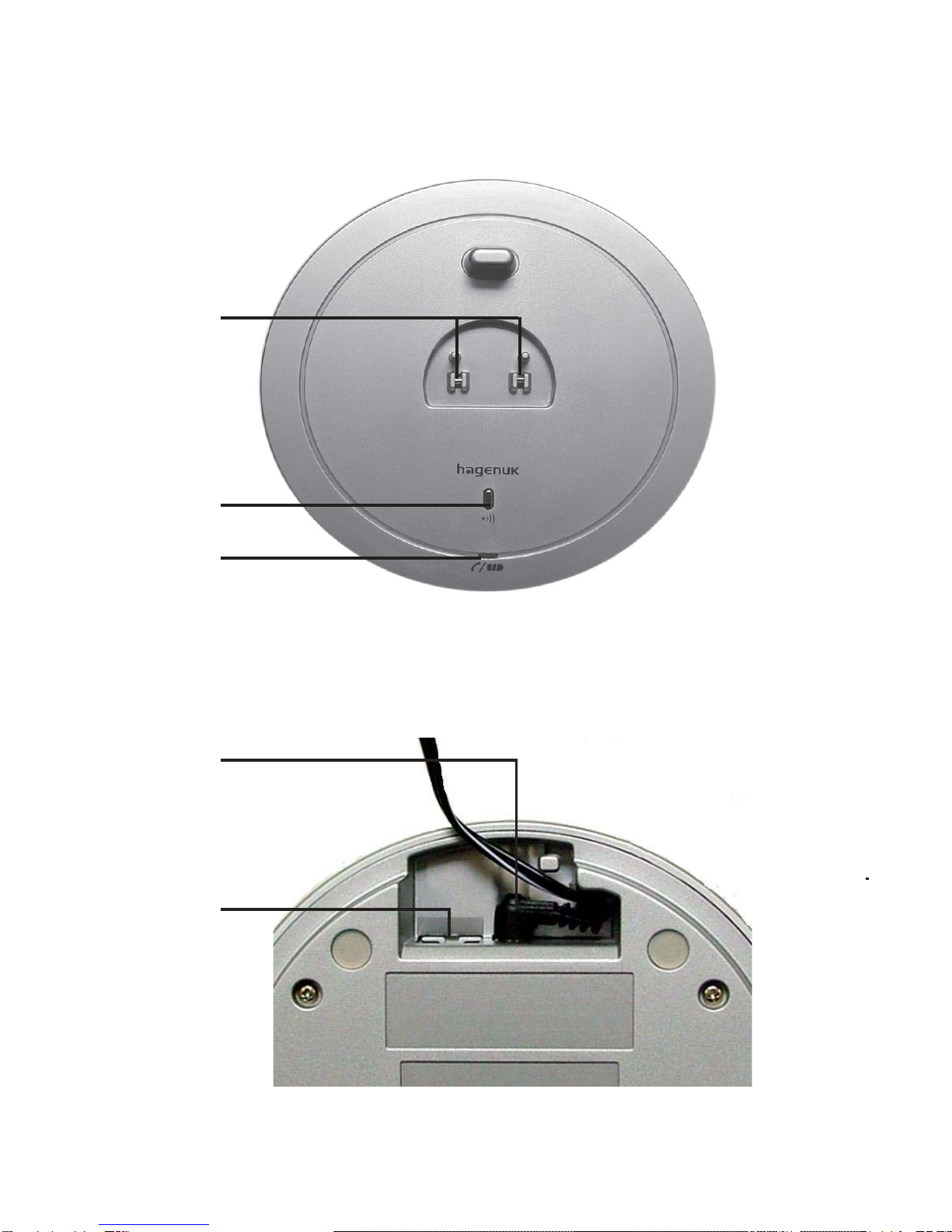
Base station overview
Classico base station, connections on the bottom of the base
17
18
19
$
16
20

8
1Loudspeaker
2Display
3Open caller log, scroll menu up
4MENU - key, turn off microphone (Mute)
5Scroll menu left
6Talk key / speaker phone / OK - key
7Open phonebook; scroll menu down
8Alphanumeric keypad
9Star key
10 Flash - key
11 Redial; scroll menu right
12 End the call; handset ON / OFF; clear
13 # - key (pound key); internal connection
14 Microphone
15 Charging contacts handset
16 Charging contacts base
17 Paging key
18 LED indicating communication
19 Power supply unit jack
20 Telephone jack
1 handset at the basis registered
2 handsets at the base registered (DUO - model)
Dialing mode tone dialing
Ringer volume 3 (handset and base)
Ringer melody 3 (handset and base)
Handset volume (level) 2
Speaker phone volume (level) 3
Keypadbeeps ON
Battery low beep ON
Auto Talk OFF
SYSTEM PIN handset and base 0000
Baby mode OFF
Rechargeablebatteries enclosed, not installed
Default settings (depending on your country's version)
Legend
9
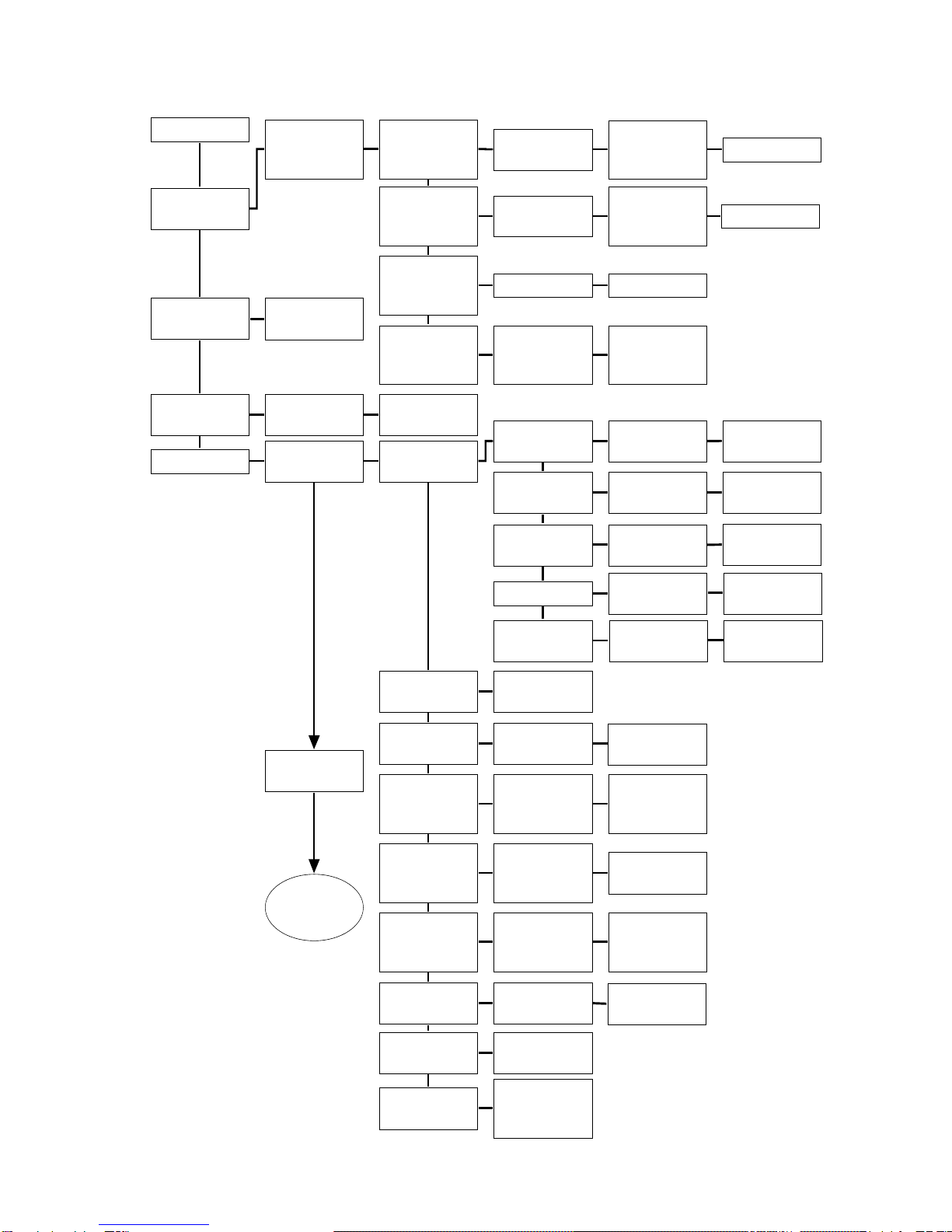
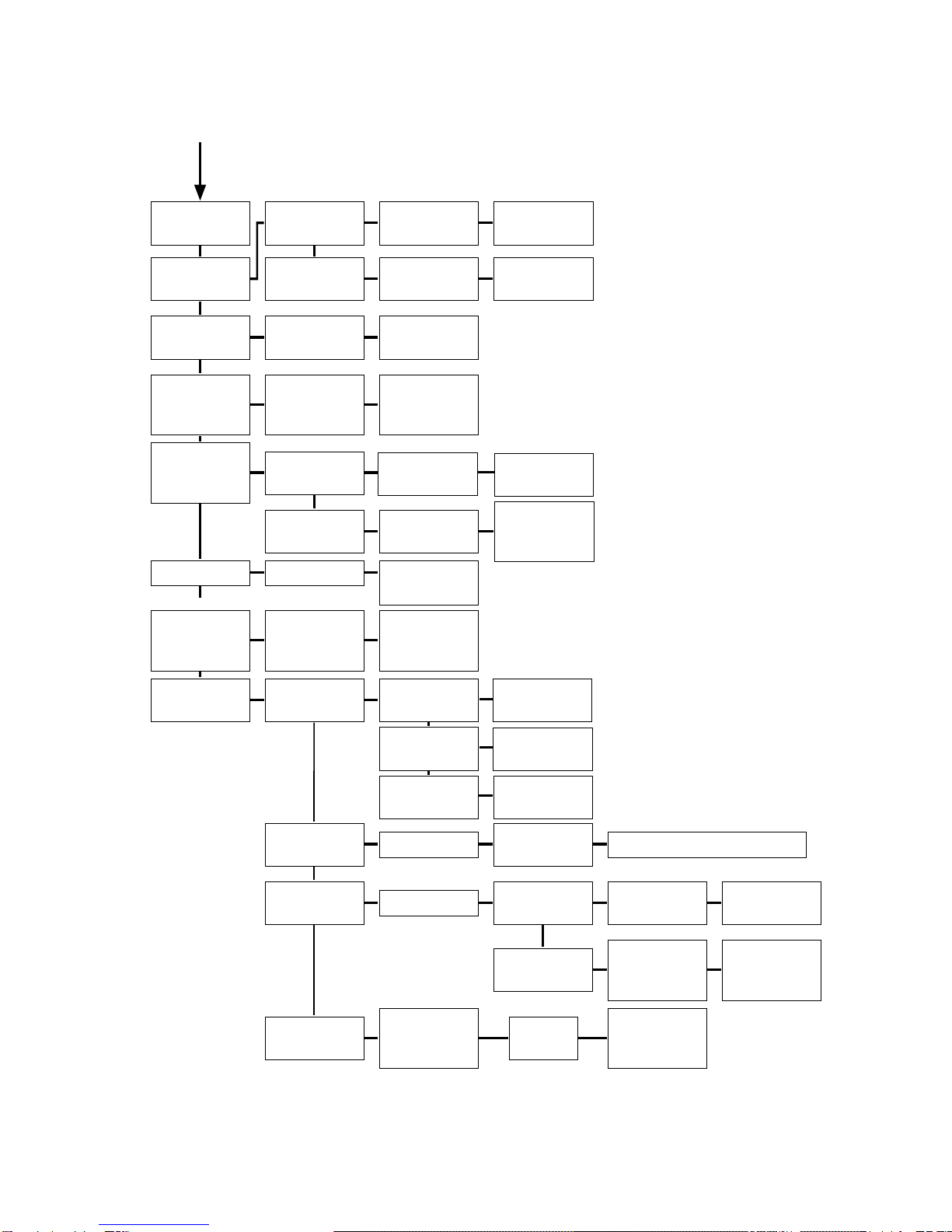
MENU Structure
MENU
PHONEBOOK-
KEYPAD
LOCK
PHONEBOOK-
ADD
ENTRY
SELECTION
PHONEBOOK-
KEYPAD
LOCKED
INTERNAL
CALL
SETTING
PHONEBOOK
EDIT
ENTRY
PHONEBOOK
DELETE
ENTRY
PHONEBOOK
DELETE ALL
ENTER NAME
_
ENTER
NUMBER
_
EDIT NAME
_
EDIT
NUMBER
_
DELETE? DELETED
ENTER
H/S PIN
_
PHONEBOOK
ALL
DELETED
INT CALL
HANDSET _ INT CALL
TO ALL
HANDSET
SETTING ACOUSTIC
SETTING
LANGUAGE
AUTOMATIC
ANSWER
DEFAULT
SETTING
REGISTER
BASE
SETTING
CHANGE PIN
BABY MODE
BABY CALL
NUMBER
HANDSET
NAME
NEXT
PAGE
RINGER
VOLUME
RINGER
MELODY
EARPIECE
VOLUME
KEY BEEP
BATTERY
LOW TONE
SET
KEY BEEP
SELECT
VOLUME
SELECT
MELODY
SELECT
VOLUME
LEVEL
0-3
MELODY
1-6
LEVEL
1-3
SELECT
LANGUAGE
SET AUTO
ANSWER
CONFIRM
DEFAULT
SETTING?
DEFAULT
SETTING
DONE
REGISTER
IN PROGRESS
ENTER
BASE PIN
_
ENTER
NEW PIN
_
CONFIRM
NEW PIN
_
ENTER NAME
_
ENTER BABY
NUMBER
SET
BABY MODE ON
OFF
STORED
STORED
SET BATT
LOW TONE
ON
OFF
ON
OFF
ON
OFF
10
BASE
SETTING
ACOUSTIC
SETTING
RINGER
VOLUME
RINGER
MELODY
SELECT
VOLUME
SELECT
MELDOY
LEVEL
0-3
MELODY
1-6
TIME & DAY
SETTING SET TIME SET DAY
DEFAULT
SETTING CONFIRM
DEFAULT
SETTING?
DEFAULT
SETTING
DONE
LINE SET
TONE -
300MS
DIALING SET DIAL
MODE
FLASH SET FLASH
TIME
80 MS
100 MS
300 MS
DEREGISTER DEREGISTERHANDSET _
CHANGE PIN ENTER
NEW PIN
_
CONFIRM
NEW PIN
_
CALL
CONTROL CALL TIMER TOTAL CALL
DURATION
LAST CALL
DURATION
RESET CALL
DURATION
CALL LIMIT SELECT H/S CALL LIMIT
HANDSET _ GLOBAL/NATIONAL/INTERNAL
CALL
BARRING SELECT H/S BARRING
MODE SET BARR
MODE
EMERGENCY
NUMBER
BARRING
NUMBER
ON
OFF
SELECT
BARRING NO
BARR NUM _
BARR NUM _
(1-3)
_
EMERGENCY
NUMBER
SOS NUM _
ENTER
SOS NUM 1
_
SOS NUM _
(1-4)
MODE TONE
PULSE
TIME
TOTAL CALL
LAST CALL
CONFIRM
RESET?
DONE
This manual suits for next models
1
Table of contents
Other HAGENUK Cordless Telephone manuals