GreenWorks GRV-3011 User manual

常州格力博集团
说明书
杨媛
徐心恺
周艳
王小妮
李海平
21.11.30
版本号
重要度等级
B
B
B A
日 期
工艺
审核
校对
设计
标记处数 签名 日期
阶段标记 视角标记 重量 比例
批准
审定
标准化
日期
更改文件号
SCALE: A5
210mm
145mm
Robotic vacuum
GRV-3011
56

www.greenworkstools.comGRV-3011
ASPIRATEUR ROBOTIQUE
ROBOT ASPIRADOR


1 Safety Instructions............................ 4
2 Includes.............................................. 6
3 Description.........................................7
3.1 Basic Parameters................................................7
3.2 Vacuum.............................................................. 7
3.3 Dust collection dock.......................................... 8
3.4 Introduction of modules.....................................8
4 Installation....................................... 10
4.1 Collection dock/charging dock........................10
4.2 Prepare the vacuum......................................... 10
5 APP download and networking
operation...........................................11
5.1 Mobile Application..........................................11
5.2 Reset the network.............................................11
5.3 Add a device.................................................... 11
5.4 Wi-Fi connection failure..................................12
6 Operation......................................... 12
6.1 Start and stop the vacuum cleaner................... 12
6.2 Charging the vacuum cleaner.......................... 13
6.3 Reset the system.............................................. 13
6.4 Map management............................................ 13
6.5 Choose the cleaning mode...............................13
7 Maintenance.....................................14
7.1 Clean the dustbin............................................. 14
7.2 Clean the sensor...............................................14
7.3 Clean up the dust channel................................15
7.4 Replace the dust bag........................................15
8 Troubleshooting...............................16
9 Voice prompts.................................. 17
10 Warranty Card................................18
3
English EN

1 SAFETY INSTRUCTIONS
Scope of use
• Read the user manual carefully, and use the product according to the instructions of the user manual to avoid damage due to
improper operation.
• The product can only be used indoors. The product is suitable for the following indoor floors: Wooden floors, ceramic tiles
and low pile carpets.
• Do not use the product in any hot, humid, flammable, explosive or corrosive environments.
• To prevent the product from falling accidentally, do not use this product in a suspended place without a protective fence,
which may result in personal injury and damage to the product.
Safety precautions
• This product can only use the adapter, batteries and charging dock or dust collection dock that are provided with this product.
The user cannot change the battery without authorization, otherwise the product may be damaged and warranty voided.
• If the main machine and accessories of this product are found to be damaged, please contact the service technicians
designated or authorized by Greenworks. Unauthorized persons and organizations are not permitted to service the
Greenworks robotic vacuum with voiding the existing warranty.
• Avoid the intake of water, oil and other liquids, which may damage the product.
• Do not use the product to suck in sharp objects (e.g. shattered glass and nails), which may damage the product.
• Remove fragile objects before use. Arrange scattered wires on the floor that may interrupt the normal operation of the
vacuum cleaner.
• The charging dock shall be placed against the wall and on a flat floor. When the product is working, removal of the charging
dock will affect the function of the product.
• Prevent clothing or any part of your body (hair, fingers, etc.) from getting caught in the brush or wheel of the robotic vacuum
cleaner. Failure to do so may result in personal injury.
• Unplug the product before maintenance. Do not touch the power plug or the product when your hands are wet, as this may
result in electrical shock.
• If the power cord is damaged, it must be replaced by the manufacturer, its service department or a similar professional to
avoid danger.
• Unplug the charging dock if it remains unused for a long time.
About child safety
• Children under the age of 8 are not allowed to use this product. Persons with physical, sensory or intellectual disabilities or
lack of relevant experience/knowledge cannot use the machine unless under supervision, operating instructions or awareness
of the danger.
• Children are not allowed to play with the machine or clean/repair the machine unless under supervision.
• Children are not allowed to play with the product's packaging bag for fear of suffocation.
About the batteries
1. Only the batteries provided by the manufacturer are applicable to the product.
2. The batteries shall be removed when the product is discarded.
3. Steps to take out the battery:
A. Be sure to turn off the power before taking out the battery;
B. Use a screwdriver to remove the bottom screws, and then remove the front bumper and middle shell;
C. Take out the motherboard and battery cover;
D. Unplug the connection line between the battery and the vacuum cleaner;
E. Remove the battery.
4. If you need to replace the battery of the vacuum cleaner, please contact our after-sales service department. If the wrong type
of battery is used for replacement, it may cause a safety accident.
5. Do not damage the battery during disassembly for fear of short circuit or battery leakage. In the event of battery leakage, be
careful not to let the liquid stick to your skin or clothing. You should wipe it off with a dry cloth immediately and send the
battery to a recycling station or designated maintenance point. Don’t throw it away randomly.
6. Please properly dispose of the old battery. The battery contains substances that are harmful to the environment if left
unattended. Please follow the local environmental protection regulations and dispose of it at the specified recycling site.
4
English
EN

Special rules
This device complies with Part 15 of the FCC Rules. Operation is subject to the following two conditions:
The following system is used in the operator manual to make it easier to understand:
• This device may not cause harmful interference.
• This device must accept any interference received, including interference that may cause undesired operation.
CAUTION: Changes or modifications not expressly approved by the party responsible for compliance could void the user’s
authority to operate the equipment.
This equipment has been tested and found to comply with the limits for a Class B digital device, pursuant to Part 15 of the FCC
Rules. These limits are designed to provide reasonable protection against harmful interference in a residential installation. This
equipment generates, uses and can radiate radio frequency energy, and if not installed and used in accordance with the
instructions, may cause harmful interference to radio or television reception, The reception can be determined by turning the
equipment off and on, the user is encouraged to try to correct the interference by one or more of the following measures:
• Reorient or relocate the receiving antenna.
• Increase the separation between the equipment and the receiver.
• Connect the equipment into an outlet on a circuit different from that to which the receiver is connected.
• Consult the dealer or an experienced radio/TV technician for help.
To satisfy FCC RF exposure requirements, a separation distance of 20cm or more should be maintained between the antenna of
this device and persons during device operation.
To ensure compliance, operations at closer than this distance is not recommended
Disclaimers
Under any of the following circumstances, the product will be excluded from the scope of free warranty, but paid repair can be
provided if warranted:
A. Damage due to the user’s failure to operate the product in strict accordance with Greenworks user manual or due to improper
storage;
B. The machine or parts have exceeded the free warranty period;
C. Damage due to disassembly by those other than the maintenance personnel of Greenworks or authorized by Greenworks;
D. A valid purchase voucher number cannot be provided;
E. The product model on the warranty card does not match that of the product to be repaired or is altered;
F. Damage caused by factors such as natural disasters;
G. Product failure or damage caused by unexpected factors or man-made causes (including operational errors, liquid ingress,
improper plugging/unplugging, scratching, handling, bumping, input of inappropriate voltage, etc.)
NOTE
Greenworks provides a warranty for the product in accordance with the “National New Regulations on Warranty”. For details,
please check the warranty card provided with the product.
5
English EN
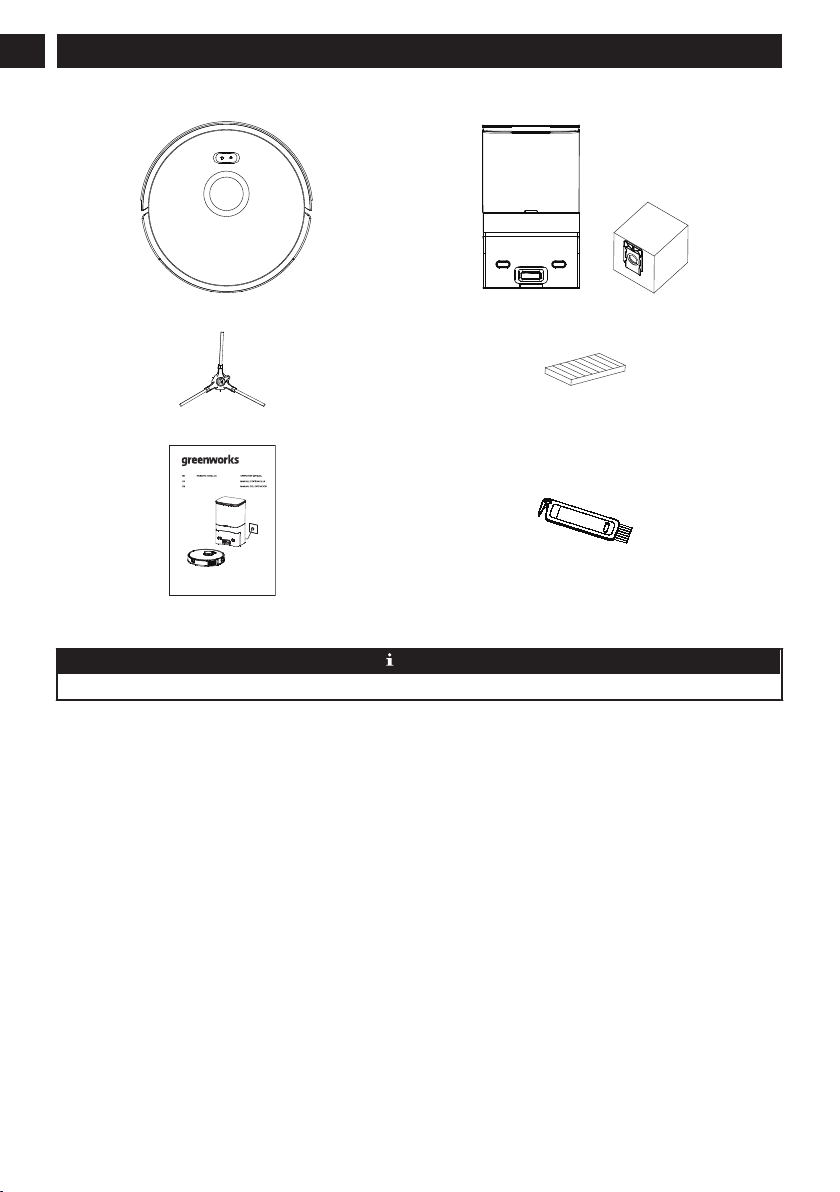
2 INCLUDES
(1) Vacuum (1) Dust collection dock + (1) extra dust bag
(1) Extra side brush (1) Replacement filter
www.greenworkstools.comGRV-3011
ASPIRATEUR ROBOTIQUE
ROBOT ASPIRADOR
(1) User manual (1) Cleaning brush
NOTE
A high-performance filter has already been installed in the vacuum.
6
English
EN

3 DESCRIPTION
3.1 BASIC PARAMETERS
Vacuum
Name Parameters
Dimensions 13.4" × 13.4" × 3.7"
Product Approx. 8.05 lbs
Battery Capacity 2600mAh
Voltage 14.4V
Rated 30W
Dust collection Dock
Name Parameters
Dimensions 8.7" × 7.1" × 15"
Rated 950W
Power 24V 1.5A MAX
3.2 VACUUM
+
button.
Cleaning/On/Off button
Network configuration mode
Power Indicator
Cleaning On/Off button
• Press once: Start cleaning.
• Press twice: Start fixed-point cleaning.
• Press and hold for threee seconds: Turn on/off the machine.
*For the first use, toggle the main switch from O to I
Recharge button
• Press once: Return for recharge.
• Press and hold for 15 seconds: Restore factory settings.
+
Recharge button + Cleaning/On/Off button
• Press the two buttons at the same time and hold for three seconds: Network configuration mode
Power Indicator • Blue: Battery level≥20%
• Purple: Battery level <20%
• Red: Fault or abnormality
7
English EN

3.3 DUST COLLECTION DOCK
Indicator LED
Blue light on: Dust Collection Dock in standby.
Blue light off: The vaccum is correctly connected to the dust collection dock or the dust collection dock is sleeping.
Red light on: The dust bag is not in place.
Red light flashing: Abnormal status.
3.4 INTRODUCTION OF MODULES
Recharge
sensor
Wall sensor
Radar
Cover
Middle shell
Button
Front bumper
Recharge sensor
8
English
EN

Anti-drop sensor
Side brush
Charging electrode
Universal wheel
Rolling brush
Rolling brush
protective cover
Wheel
Dust box release button
Filter opening
Dust collection port
Charging pole pieces
Main switch
Top cover
Open the top cover
Put in/take out the dust bag
Dust bag compartment
Charging and dust collection
induction zone
Charging pole piece
Dust suction port
The dust in the main machine
passes through the dust suction port
and is sucked into the dust bag.
9
English EN
Table of contents
Languages:
Other GreenWorks Vacuum Cleaner manuals

GreenWorks
GreenWorks VUA801 User manual

GreenWorks
GreenWorks WDV24B00 User manual

GreenWorks
GreenWorks GRV-5011 User manual

GreenWorks
GreenWorks BVU24211 User manual

GreenWorks
GreenWorks VUF301 User manual

GreenWorks
GreenWorks 4700007AU User manual

GreenWorks
GreenWorks VUG403 User manual

GreenWorks
GreenWorks VUG302 User manual

GreenWorks
GreenWorks VUG403 User manual

GreenWorks
GreenWorks VUF401 User manual