
GoCNC CNC Studio USB User manual

Version 1.0a
© Copyright GoCNC.de Uhlandstraße 24 58675 Hemer Germany Alle Rechte vorbehalten
User Manual

!"""#$#"%&'()*"'%+"'%,-"./$'/0"
Congratulations on your purchase of CNC Studio.
This software-hardware solution enables you to realize your CNC projects in the easiest possible way. We hope
you enjoy this product.
Your GoCNC.de Team
© Copyright by:
GoCNC.de
Date 24-06-2012
Hardware version: 1.2
Software version: 1.0a
Manual version 1.2
MS-Windows is a registered trademark of the Microsoft Corporation. AutoSketch, AutoCAD, AutoSketch for Windows are registered trademarks of the Autodesk
AG. CorelDRAW is a registered trademark of the Corel Corporation. Other products named herin are trademarks or registered trademarks of their respective
companies.

#$#"%&'()*"'%+"'%,-"./$'/0"1"
Table of Contents
!
!
!
!
!
"#$%"!%&'!$#&#(%"!)&*+(,%-)+&..../...............///////////0!
123!4&456-7')+.............................../..//8!
12%-!)6!4&456-7')+............................//..///8!
636-#,!(#97)(#,#&-6.......................//....../:!
-#42&)4%"!*#%-7(#6........................../...../:!
))&6-%""%-)+&...//.............................././/;!
)&6-%""%-)+&!+*!-2#!6+*-1%(#......................././;!
,%&7%"!'()<#(!)&6-%""%-)+&../....................../!=>!
*)(6-!6-#?6....//................/...............///=:!
?(+$(%,!6-%(-!%&'!*7&4-)+&6......................./=;!
-2#!@?(+$(%,A!1)&'+1........................./../=;!
-2#!@6#--)&$6A!1)&'+1............................/=B!
-2#!@#')-!4&4!*)"#A!1)&'+1..........................0=!
-2#!@6-#??!0:>>!6#--)&$6A!1)&'+1..................../.0=!
6#--)&$!%!$+4&4!@2+CC3!%8!%'<%&4#'A!,)"")&$!,%42)&#!///////////////////0D!
#,7"%-)+&............................./......./0;!
2+,)&$!%&'!,%42)&#!E#(+!?+)&-..........//.........../0B!
?%(F!?+6)-)+&/......./.............//............./0B!
,)"")&$!#G%,?"#.../.............../............../0H!
2?$"!*)"#!?(#?%(%-)+&............................./D>!
-++"!"#&$-2!6#&6+(............./................./D:!
-++"!42%&$#!?(+4#'7(#....../...................../D:!
<#(6)+&!42%&$#6....../........................../DI!
3+7(!&+-#6..................................../DB!
"
"
"

2"""#$#"%&'()*"'%+"'%,-"./$'/0"
345"#$#"%6789:;;"
CNC-Studio USB stands out from other standard CNC control programs most notably due to its ease of use.
Who hasn’t heard about the programs that stash away thousands of parameters in hundreds of submenus, which
are not only superfluous for simple jobs, but also act as a deterrent and spoil the enjoyment of the CNC?
CNC-Studio is something completely different!
During the development phase, we concentrated above all on the following:
•Easy installation
•USB connection
•Clearly laid out user interface
•Intuitive operation
•Only a single window for settings
•Only a single window for machine operation
•Graphic progress indicator
•Coordinate display
•Integrated editor
•Controllable also via touch screen
You’ll only need a few minutes to get your machine ready to go.
34<6"9="#$#>%6789:"
The control software
CNC Studio USB
connects a PC, notebook or netbook with the USB Port of a CNC machine
with a parallel port. A supplied USB Box is used for control in real time. This box features - in addition to a USB
and parallel connection – its own CPU, its own software, and its own memory in which the milling data is cached.
The milling data is sent from the PC via USB to the box, where it is processed by the box and exported to the
machine in real time through the parallel connection of the box. With this solution, all critical tasks run
independently of Windows background processes on the PC, which ensures an utterly clean, smooth and precise
running motor. The CNC Studio USB can be used to control any CNC machine which has a parallel port and which
uses clocking / direction signals as actuation.
%5=6?@"-?A79B?@?C6="
"
To run
CNC Studio USB
,
a commercially available PC with hard drive, a USB interface, any graphic board, and a
Windows operating system are required. Approximately 30 MB of free memory on the hard drive is needed for
installation. CNC Studio runs with Windows 95, Windows 98, Windows ME, Windows NT, Windows 2000, Windows
XP, Windows Vista, with 32 and 64 Bit versions of Windows 7 and Windows 8.

#$#"%&'()*"'%+"'%,-"./$'/0"D"
&?E4C9E<F"G?<67B?=H"
Easy plug-and-play hardware
The software is very simple and intuitive to use
Only one user interface, no bothersome switching between windows
Operating instructions integrated in software and can be opened with one click of the mouse
Runs on all PCs, notebooks and netbooks with at least 1Ghz output and USB connection
USB 2.0 interface
Machine control via small USB Box
Works with all clocking/direction controller cards
Extremely fine and precise motor control
Interpolated movement of all axes
Activation of maximum 3 axes ( for V1.0)
Import filter for HPGL .PLT files
Integrated high efficiency editor
Manual teach-in with the mouse in exact steps
Graphic progress indicator
Automatic and manual spindle control (on/off)
Manual switching of the cooling or suction equipment using the mouse
Speeds of all axes can be set individually
Ramps for all axes can be set individually
Axis resolution for all axes can be set individually
Thread pitch of the drive spindles can be configured at will
Variable pin assignment of all inputs and outputs
Maximum 23,076 steps per second
Supports tool length sensor
Supports EMERGENCY STOP switch
Supports manual tool change
Current reduction
Current switch-off
Tool length sensor is supported
Automatic zero point homing of the axes
Coordinates display and search of a specified zero point
Software controls the working area
The limit switches can be activated/deactivated individually by the software
Limit switch can be selected as N/O contact or N/C contact
Backlash compensation
All signals can be inverted
All LPT signals can be assigned at will
I"""#$#"%&'()*"'%+"'%,-"./$'/0"
)C=6<FF<69:C"64?"=:J6K<B?"
"
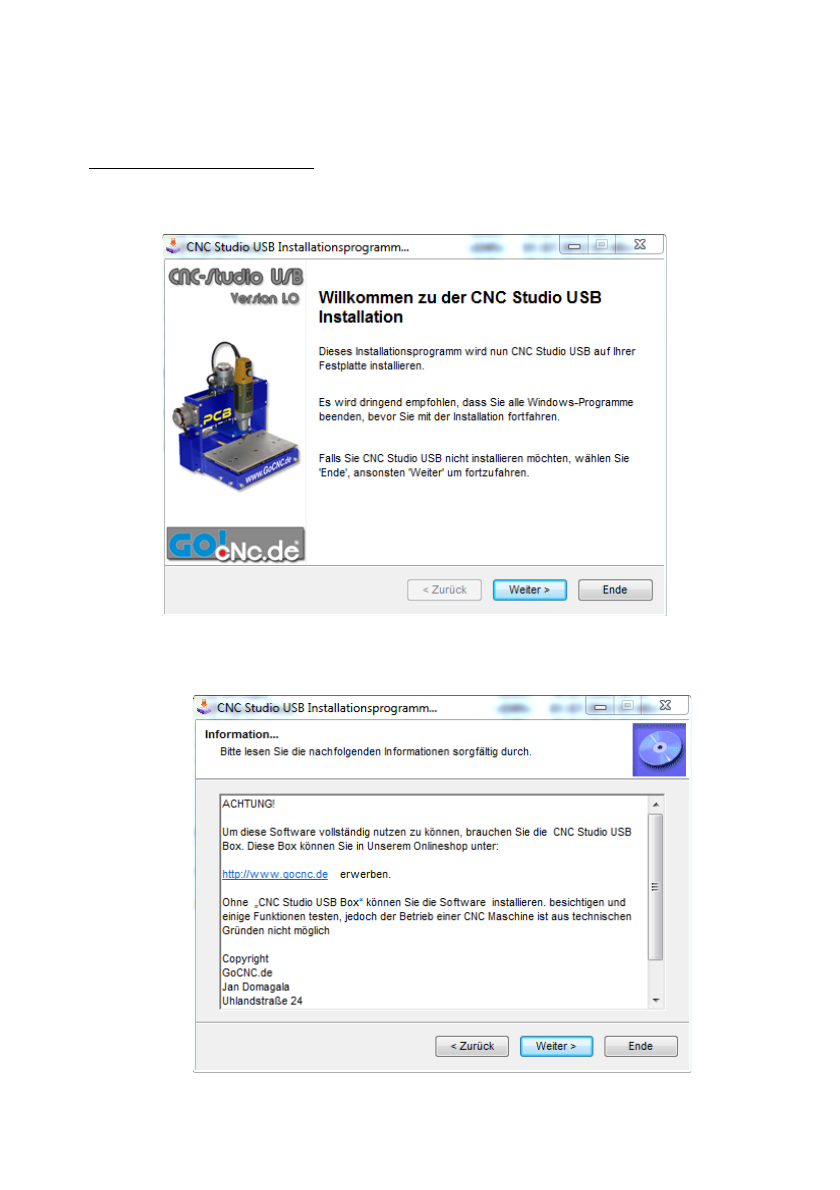
Start the file CNC-Studio-Setup.exe and follow the instructions on the screen"
Click the mouse on the “Continue” button mouse to start the installation.

#$#"%&'()*"'%+"'%,-"./$'/0"L"
After you have finished reading the information about your software, click on “Continue
Read the licence agreement, and if you agree with the conditions, click on “I agree” and then on “Continue”

M"""#$#"%&'()*"'%+"'%,-"./$'/0"
Select a target directory on your hard drive where you would like to install CNC-Studio and click the mouse
on “Continue”
You have to confirm the selected installation path by clicking the mouse on “Start.”
Now wait a few seconds until the CNC-Studio software has been transferred to the hard drive.

#$#"%&'()*"'%+"'%,-"./$'/0"N"
Installation is complete. Click on “Continue” to close the installation program.
Now you can find CNC-Studio under “Programs” in your Windows Start Menu.

OP"#$#"%&'()*"'%+"'%,-"./$'/0"
.<C7<F"9C=6<FF<69:C":J"64?"8B9Q?B"7C8?B"39C8:K="R9=6<"<C8"39C8:K="L"
Connect the CNC-Studio USB Box to your PC with the supplied USB cable. Afterwards, open the Control Panel in
the Windows menu. Change the view setting of the window to “Large Symbols” and look for the “System” symbol.
Start the program “System” with a mouse click.
At the top left of the “System” window is the Device Manager. Start that program.
Table of contents
Popular Industrial PC manuals by other brands






Dell
Dell Embedded Box PC 5000 Installation and operation manual

IBASE Technology
IBASE Technology ASB200-918 Series user manual

Lenovo
Lenovo ThinkCentre M90q Hardware Maintenance Manual

IXXAT
IXXAT Econ 100 Hardware manual

Kontron
Kontron KBox A-151-TGL user guide

AXIOMTEK
AXIOMTEK ICO500-518 Series user manual