
Goclever CHRONOS ECO 2 User manual

Chronos Eco 2
Model: GCWCHRE2
Quick Start Guide

3/892/89
Quick Start GuideQuick Start Guide
START 3
English GB 5
Polski PL 12
Čeština CZ 19
Deutsch DE 26
Magyar HU 33
Italian IT 40
Latviešu LV 47
Lietuvių LT 54
Português PT 61
Română RO 68
Slovenský SK 75
Українська UA 82
ANDROID APP
MOBILE APP
www.goclever.com/smartwear

5/894/89
Quick Start GuideQuick Start Guide GB
CONNECT ?
YES
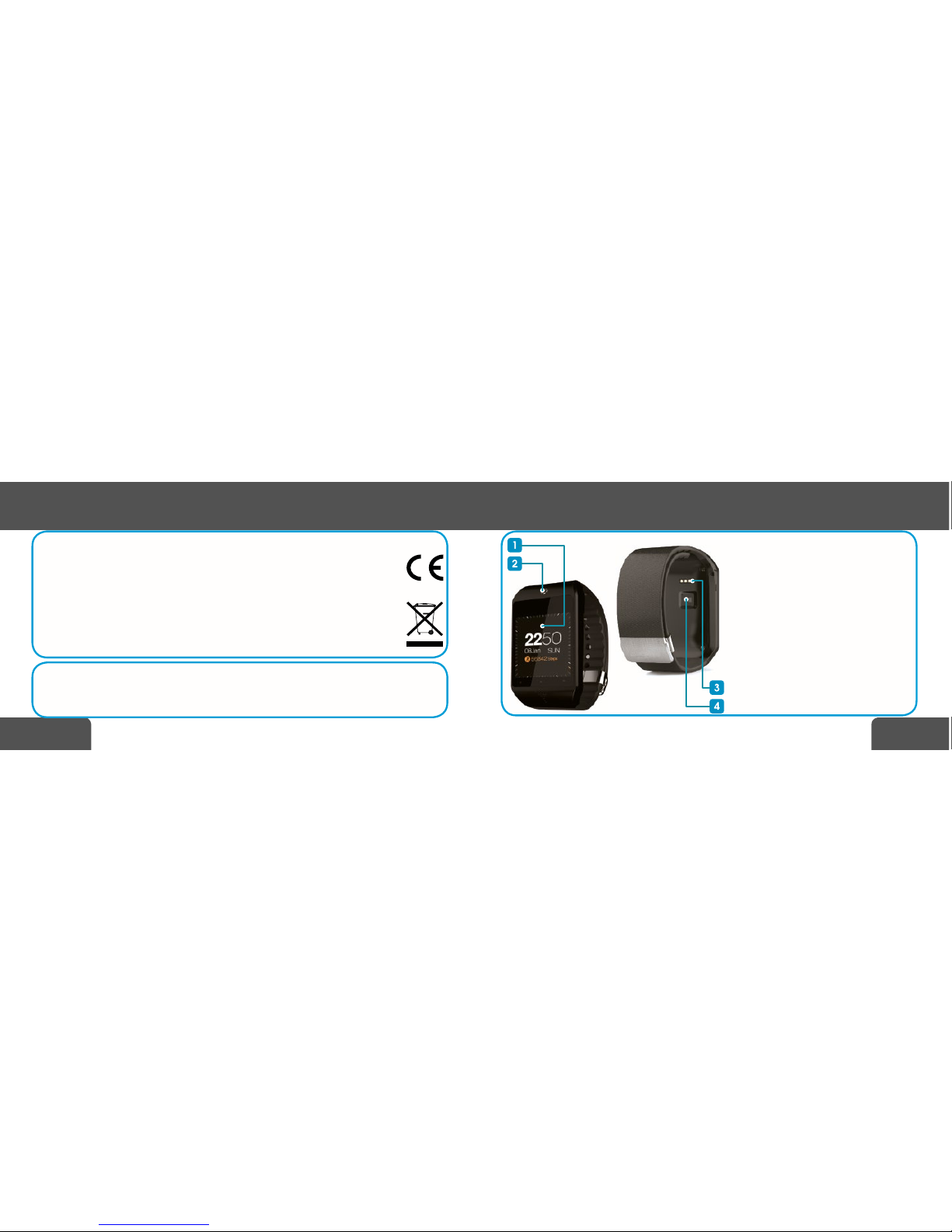
APPEARANCE
1. Transective touch LCD
2. LCD wake up button / return to the
screen with a dial
3. DC charging port
4. Optical heart rate sensor
SCREEN NAVIGATION
-long press on the dial screen: Change
dial.
-swipe from right to left: main menu.
-swipe from left to right: main menu or
return to the previous screen
-short press: conrm the selection.

7/896/89
Quick Start GuideQuick Start Guide GBGB
Charging: page 3. Download mobile software for Android: page 3. Connecting
with smartphone: page 4.
Language selection
1.First to eneter main menu from within dial screen swipe from right to left.
2.Start swiping up or down until you see settings icon.
3.Press once shortly on the settings icon to enter.
4.Chose Language by pressing this menu item.
5.Swipe through the list until you see desired language and again press to conrm
your choice.
MAIN MENU
1. Phonebook: after Chronos connects to the smartphone, you’ll
see a list of contacts. Now from the SmartWatch you can select the
person to whom you are going to call.
2. Dialer: gives you ability to dial phone numbers to call anyone
from within the SmartWatch.
3. Call logs: here you have access to list of voice calls (received,
dialed and missed).
4. Messaging: list of received SMS messages.
5. Bluetooth connection: list of trusted models of phones with
which SmartWatch will connect automatically.

9/898/89
Quick Start GuideQuick Start Guide GBGB
6. Settings: here you can change settings for bluetooth, timer, so-
und, screen brightness, language and menu icons. You can also re-
store the settings to their default values.
7. Remote notier: list of recent notications sent from your smar-
tphone to the SmartWatch.
8. Find my device: this functionality allows you to play a loud so-
und signal on your phone, which helps in nding it (this only works
if Chronos and smartphone are connected with each other via blu-
etooth).
9. Alarm: you can set alarms regardless of the smartphone.
10. Calendar: here you can check the date, day of week and also
view the calendar in the month view.
11. Bluetooth music: play music remotely from your smartphone
using Chronos. The player also provides control over the list of tracks
(START / PAUSE, NEXT / PREVIOUS, VOLUME UP / DOWN). This func-
tionality requires an active bluetooth connection to smartphone.
12. Remote capture: Chronos in conjunction with mobile applica-
tion enables remote control of the camera on your smartphone. This
functionality requires that the SmartWatch and mobile application
were connected to each other via bluetooth.

11/8910/89
Quick Start GuideQuick Start Guide GBGB
ADDITIONAL INFORMATION
GOCLEVER Sp. z o. o. hereby declares under our sole responsibility
that the product Chronos Eco 2 is in conformity with following
directives: R&TTE (1999 / 5 /EC). Full document (declaration of
conformity) is available for download from www.goclever.com in
Chronos Eco 2 product page.
Correct disposal of this product (Waste Electrical & Electronic
Equipment. Applicable in the European Union and other
European countries with separate collection systems). This
marking indicates that this product should not be disposed of with
other household wastes. To dispose of your used device, please
use the return and collection systems available in your area or
contact the retailer where the product was purchased.
13. Heartrate: measures number of heartbeats per minute
(which is also accessible from the pedometer). The result is an ap-
proximation. To allow the better measurement conditions try to be
still and not talk during the measurement.
14. Pedometer: measures number of steps, amount of energy bur-
ned and distance traveled using built-in accelerometer. For the me-
asurement was more precise please provide your height and weight.
15. Sleep monitor: measures the quality and length of sleep.
16. Reminder: signal an alarm after a specied period of time.

13/8912/89
Quick Start GuideQuick Start Guide PLPL
WYGLĄD ZEWNĘTRZNY
1. Dotykowy wyświetlacz LCD
2. Przycisk budzenia LCD / powrotu do
ekranu z tarczą zegara
3. Port ładowania
4. Optyczny czujnik tętna
NAWIGACJA PO EKRANIE
-Dłuższe naciśnięcie tarczy zegara: wybór
tarcz zegara.
-Przesunięcie z prawej do lewej: menu
główne.
-Przesunięcie z lewej do prawej: powrót
do poprzedniego ekranu / główne menu
-Krótkie naciśnięcie: potwierdzenie
wyboru.
GŁÓWNE MENU
1. Książka adresowa: po tym jak Chronos połączy się ze smart-
fonem, zobaczysz tu listę kontaktów. Teraz z poziomu smartwatcha
możesz wybrać osobę, do której zamierzasz zadzwonić.
ZMIANA JĘZYKA
1. Aby wejść do głównego menu z poziomu ekranu tarczy zegara przesuń palcem po ekranie z
prawej do lewej.
2. Przesuwaj w dół lub w górę palcem po ekranie aż zobaczysz ikonę ustawień (SETTINGS).
3. Naciśnij raz, aby potwierdzić.
4. Wybierz LANGUAGE.
5. Przesuwaj listę języków aż znajdziesz swój. Następnie potwierdź wybór pojedynczym naci-
śnięciem.
Ładowanie: strona nr 3. Pobranie aplikacji mobilnej dla Android: strona nr 3.
Połączenie ze smartfonem: strona nr 4.

15/8914/89
Quick Start GuideQuick Start Guide PLPL
2. Tarcza telefonu: daje Tobie możliwość wybierania numerów te-
lefonów, do których chcesz zadzwonić z poziomu smartwatcha.
3. Historia połączeń: w tym miejscu masz dostęp do listy połączeń
głosowych (odebranych, nawiązanych i nieodebranych).
4. Wiadomości: tu znajdują się odebrane wiadomości SMS.
5. Połączenie Bluetooth: znajduje się tu lista zaufanych modeli
telefonów, które mogą łączyć się ze smartwatchem automatycznie.
6. Ustawienia: w tym miejscu możesz zmienić ustawienia blueto-
oth, zegara, dźwięków, jasności ekranu, języka i ikon menu. Można
tu również przywrócić ustawienia do wartości domyślnych.
7. Powiadomienia: Znajduje się tu lista ostatnich powiadomień
przesłanych ze smartfona do smartwatcha.
8. Szukanie smartfona: ta funkcjonalność pozwala na odtworzenie
głośnego sygnału dźwiękowego w telefonie, co ułatwi jego odnale-
zienie (działa tylko jeżeli Chronos i smartfon są ze sob połączone
przez bluetooth).
9. Alarmy: tutaj możesz ustawić alarmy niezależnie od smartfona.

17/8916/89
Quick Start GuideQuick Start Guide PLPL
10. Kalendarz: w tym miejscu możesz sprawdzić datę, dzień tygo-
dnia a także wyświetlić kalendarz w widoku miesiąca.
11. Odtwarzacz audio: odtwarzaj bezprzewodowo muzykę bezpo-
średnio ze smartfona. Odtwarzacz zapewnia również kontrolę nad
listą utworów (START/PAUZA, NASTĘPNY/POPRZEDNI, GŁOŚNIEJ/
CISZEJ). Ta funkcjonalność wymaga aktywnego połączenia bluetooth
ze smartfonem.
12. Zdalna kontrola aparatu:Chronos w połączeniu z mobilną apli-
kacją umożliwia zdalną kontrolę kamery w Twoim telefonie. Ta funk-
cjonalność wymaga, aby smartwatch i aplikacja mobilna były ze sobą
połączone przez bluetooth.
13. Pulsometr: Mierzy ilość uderzeń serca na minutę (jest też
dostępny z poziomu krokomierza). Wynik jest poglądowy. Aby wynik
był najdokładniejszy najlepiej być w bezruchu i nie mówić, w trakcie
pomiaru.
14. Licznik kroków: Wykonuje pomiar ilości kroków, ilości spalonej
energii i przebyty dystans przy użyciu wbudowanego akcelerometra.
Aby pomiar był dokładnniejszy należy podać swój wzrost i wagę.
15. Monitoring snu: Wykonuje pomiar jakości i długości snu.
16. Timer: Włącza alarm w smartwatchu po upływie określonego
czasu.
19/8918/89
Quick Start GuideQuick Start Guide CZ
PL
SERWIS NAPRAW
Serwis napraw dostępny pod adresem:
E-mail: serwis@goclever.com
Tel.: (+48) 61 848 87 67
INFORMACJE DODATKOWE
Niniejszym GOCLEVER Sp. z o.o. oświadcza, że urządzenie Chronos Eco 2 jest
zgodne z dyrektywami: R&TTE (1999/5/EC). Pełen dokument (deklaracja zgodno-
ści) jest dostępny na stronie internetowej: www.goclever.com w zakładce dotyczą-
cej danego produktu.
Poprawna utylizacja tego produktu (zużyty sprzęt elektryczny i elektroniczny –
utylizacja odpadów elektrycznych i elektronicznych, dotyczy Unii Europejskiej oraz
innych krajów Europy posiadających odrębne systemy utylizacji). To oznaczenie
wskazuję, iż urządzenie nie powinno być utylizowane wraz z innymi opadami na
terenie UE. By zutylizować Twoje urządzenie prosimy korzystać z funkcjonujących
systemów zbierania odpadów.
VNĚJŠÍ VZHLED
1.LCD dotykový displej
2. LCD tlačítko buzení / návrat na obrazo-
vku s ciferníkem
3. Nabíjecí port DC
4. Optický senzor srdečního pulzu
NAVIGACE NA OBRAZOVCE
-Delší stisknutí ciferníku obrazovky: výběr
ciferníků
-Přesunutí zprava doleva: hlavní menu
-Přesunutí zleva doprava: návrat na
předchozí obrazovku
-Krátké stisknutí: potvrzení výběru
Table of contents
Languages:
Other Goclever Watch manuals

Goclever
Goclever CHRONOS PI GCWCHRPI User manual

Goclever
Goclever GCFWB User manual

Goclever
Goclever CHRONOS COLOUR 2 User manual

Goclever
Goclever CHRONOS CONNECT 2 GCWCHRCO2 User manual

Goclever
Goclever CHRONOS ECO User manual

Goclever
Goclever CHRONOS COLOUR User manual

Goclever
Goclever GCWSBB User manual

Goclever
Goclever GCWFWE User manual

Goclever
Goclever CRONOS CONNECT GCWCHRCO User manual

Goclever
Goclever Smart Band Maxfit User manual







