Gigaset DA310 User manual

1
en
Gi
gaset
DA
310
/
ZAF
en
/
A
30054-
M
6528-
W
101-2-7619
/
DA
310_en.
f
m
/
18.03.2016
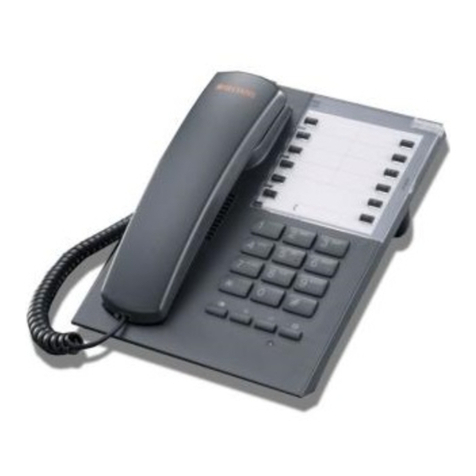
Gigaset DA310 overview
8
5
3
4
6
7
1
1 Programmable direct dial keys
2 Insert strip for writing the assignment of pro-
grammable direct dial keys and speed dial keys
3 Speed dial key
4Setkey
5 Redial/Pause key
6Recallkey
7Mutekey
8Handsetvolumekey
2

2
en
Gi
gaset
DA
310
/
ZAF
en
/
A
30054-
M
6528-
W
101-2-7619
/
DA
310_en.
f
m
/
18.03.2016
Connecting the telephone
4
1
5
6
2
3
5
Wall mounting
¤Drill two dowel holes into the wall at a distance of 100 mm and fix two
screws.
¤Lift out the handset bracket (5) with a screwdriver and clip it into the hand-
set cradle (6).
¤Hang the telephone on the projecting screw heads.
Please note: The handset bracket must be placed in the cradle with the slant-
ing edge facing forwards (see graphic), as otherwise the handset will not be
properly secured.
¤Connect the telephone connector (1) to the main phone socket using the
supplied telephone cable and, if necessary, one of the telephone adapters
provided. ¤Guide the cable through
the cable channel of the
handset cradle: upwards
for operating the phone
on the table (2);
downwards when mount-
ing the phone on
the wall (3).
¤Connect the
handset to
thetelephone
using the
coiled
cable (4).

3
en
Gi
gaset
DA
310
/
ZAF
en
/
A
30054-
M
6528-
W
101-2-7619
/
DA
310_en.
f
m
/
18.03.2016
Safety precautions
When installing, connecting and
operating the telephone, always
observe the following precautions:
uOnly use the jacks and leads sup-
plied.
uOnly connect the connecting
lead to the intended socket.
uOnly connect approved accesso-
ries.
uLay the connecting lead where it
will not cause accidents.
uPosition the telephone on a non-
slip surface.
uFor your safety and protection,
the telephone may not be used
in the bathor shower rooms (wet
locations). The telephone is not
splash proof.
uNever expose the telephone to
sources of heat, direct sunlight or
other electrical devices.
uProtect your telephone from
moisture, dust, corrosive liquids
and vapours.
uNever open up the telephone
yourself.
uDo not touch the plug contact
with pointed or metallic objects.
uDo not carry the telephone by
the leads.
uIf you give your telephone to
someone else, make sure you
also give them the operating
manual.
Setting up the telephone
for use
Recommended installation of tele-
phone:
uDo not expose the telephone to
direct sunlight or other sources
of heat.
uOperate at temperatures of
between +5°C and +40°C.
uMaintain a distance of at least
one metre between the tele-
phone and radio equipment, e.g.
radio telephones, radio paging
equipment or TV sets.
Otherwise, telephone communi-
cation could be impaired.
uDo not install the telephone in
dusty rooms as this can limit the
service life of the telephone.
uFurniture lacquer and polish can
be adversely affected by contact
with parts of the unit (e.g. feet).
Dialling and saving
numbers
Dialling a number
c~ Lift the handset, dial
the number.
Last number redial
The last number dialled is automati-
cally saved.
cI Lift the handset, press
the last number redial
key.
Speed dialling
You can save 4 numbers on the pro-
grammable direct dial keys Band
10 numbers for speed dial on the
number keys (0-9) (each with max. 21
digits).
Saving number
KPress the set key.
either ... via direct dial key
BPress the programma-
ble direct dial key.
or ... via speed dial
JPress the speed dial
key.
Q... ODefine the speed dial
number.

4
en
Gi
gaset
DA
310
/
ZAF
en
/
A
30054-
M
6528-
W
101-2-7619
/
DA
310_en.
f
m
/
18.03.2016
~Enter the number for
the programmable
direct dial key or speed
dial key.
KPress the set key.
Dialling a number via
programmable direct dial key
c B Lift the handset, press
the programmable
direct dial key.
You can extend the dialled number
by entering additional digits.
Dialling a speed dial number
c J Lift the handset, press
the speed dial key.
Q... OPress the speed dial
number key.
Notes on saving and deleting
programmable direct dial and
speed dial numbers
*and #are saved regardless
of the set dialling mode but are only
dialled with tone dialling mode
(£page 5).
If the number entered is longer than
21 digits, the saved number is
deleted.
Dialling pauses
One or more dialling pauses can be
entered using I(not at 1st digit).
Pauses are transferred to the mem-
ory and are necessary for certain
extension systems (e.g.:
0I2368).
uDialling a dialling pause within
the first 5 digits:
The entire number saved is
dialled, including the
2-second dialling pause.
uDialling a dialling pause after the
first 5 digits:
The portion of the number saved
after the pause is only dialled
after pressing the Ikey.
Adjusting the telephone
Setting the handset volume
The handset volume can be set to
two levels.
FPress the handset vol-
ume control key.
The primary volume is reset after
hanging up.
Mute
You can deactivate the telephone's
microphone during a call.
CPress the mute key.
To reactivate microphone: Press the
mute key again or press any other
key.
Setting the ringer
You can set the ringer melody and
volume or turn it off.
c K Lift the handset, press
the set key.
#Press the hash key.
Q... OPress one of the num-
ber keys,
see Table.
(0: Ringer off until
handset is next lifted).
KPress the set key.
Volume
low medium high
Melody 1 23
Melody 2 45 L
Melody 3 MN O

5
en
Gi
gaset
DA
310
/
ZAF
en
/
A
30054-
M
6528-
W
101-2-7619
/
DA
310_en.
f
m
/
18.03.2016
Operation on a PABX
Special functions/Recall key
During an external call, you can
make an enquiry or forward the call.
To do this, press the recall key H.
The subsequent procedure depends
on your PABX.
To set the recall key, the telephone’s
flash time must be set consistent
with your PABX. Please refer to the
operating instructions for your PABX.
Changing the dialling mode/
flash time
The telephone supports the follow-
ing dialling modes:
Depending on your PABX, you may
need to change your telephone’s
dialling mode or the flash time.
Temporary tone dialling switching
in "Pulse" position
To use functions that require tone
dialling (e.g. remote control of
answering machine), you can set the
telephone to tone dialling for the
duration of the call without adjust-
ing the switch.
After the connection is established:
*Press the star key.
After the connection is broken, the
setting reverts to pulse dialling.
Operation on public
telephone systems
Public telephone systems - in some
cases by special order/request – offer
you a range of useful additional ser-
vices (e.g. call divert, call back on
busy, three-party conference etc.).
These services can be selected using
specified key combinations, which
your network provider will notify you
of.
You can save the entire key combina-
tion, including the number of a fixed
call divert destination, to your pro-
grammable direct dial keys or speed
dial keys just like a normal number.
Recall key
In public telephone systems, the
recall key is required to use certain
additional services; e.g. for "Call back
on busy".
You may need to adjust the flash
time of your telephone to the needs
of the public telephone system. To
do this, use the sliding switch on the
underside of the
telephone(£page 5).
Appendix
Care
Wipe the unit with a damp cloth or
an antistatic cloth. Do not use sol-
vents or microfibre cloths.
Never use a dry cloth; this can cause
static.
Contact with liquid
If the device comes into contact with
liquid:
1 Allow the liquid to drain from the
device.
2 Pat all parts dry. Place the device
(the keypad facing down) in a
dry, warm place for at least 72
hours (not in a microwave, oven
T2: Tone dialling, flash time 280/
600 ms
(depending on device model)
T1: Tone dialling, flash time 100 ms
P: Pulse dialling
To do this, use the slid-
ing switch on the
underside of the
device.
!

6
en
Gi
gaset
DA
310
/
ZAF
en
/
A
30054-
M
6528-
W
101-2-7619
/
DA
310_en.
f
m
/
18.03.2016
etc.).
3 Do not switch on the device
again until it is completely dry.
When it has fully dried out, you will
normally be able to use it again.
In rare cases, contact with chemical
substances can cause changes to the
telephone's exterior. Due to the wide
variety of chemical products availa-
ble on the market, it was not possible
to test all substances.
Questions and answers
You lift the handset but you hear
no dialling tone: Is the connecting
lead correctly plugged into the tele-
phone and the telephone socket?
The dialling tone is audible but the
telephone will not dial: The con-
nection is OK. Is the dialling mode set
correctly?
The other party cannot hear you:
Mute activated?
Regular pulse noises can be heard
during a call: The connection is
receiving metering pulses from the
exchange, which the telephone can-
not interpret. Contact your network
operator.
Protecting our environment
Our environmental mission
statement
We, Gigaset Communications GmbH,
bear social responsibility and are
actively committed to a better world.
Our ideas, technologies and actions
serve people, society and the environ-
ment. The aim of our global activity is to
secure sustainable life resources for
humanity. We are committed to taking
responsibility for our products through-
out their entire life cycle. The environ-
mental impact of products, including
their manufacture, procurement, distri-
bution, use, service and disposal, is eval-
uated early on, during product and pro-
cess design.
Further information on environmen-
tally friendly products and processes is
available on the Internet at
www.gigaset.com.
Environmental management
system
Gigaset Communications
GmbH is certified accord-
ing to the international
standards EN 14001 and
ISO 9001.
ISO 14001 (Environ-
ment): Certified since September 2007
by TüV SÜD Management Service
GmbH.
ISO 9001 (Quality): Certified since 17/
02/1994 by TüV Süd Management Ser-
vice GmbH.
Contacts
If you should encounter any problems
when operating the telephone con-
nected to a communication system
with analogue network access, please
contact the network operator responsi-
ble or your dealer.
Authorisation
This device is intended for connection
to analogue networks: outside the Euro-
pean Economic Area (with the excep-
tion of Switzerland) depending on
national type approval.
Country-specific requirements have
been taken into consideration.
We, Gigaset Communications GmbH,
declare that this device meets the
essential requirements and other rele-
vant regulations laid down in
Directive 2014/30/EU and 2014/35/EU.
A copy of the Declaration of Conformity
is available at this Internet address:
www.gigaset.com/docs
Issued by
Gigaset Communications GmbH
Frankenstrasse 2a, D-46395 Bocholt
© Gigaset Communications GmbH 2016
All rights reserved. Subject to availability.
Rights of modification reserved.
www.gigaset.com
A30054-M6528-W101-2-7619
Other manuals for DA310
3
Table of contents
Other Gigaset Telephone manuals

Gigaset
Gigaset E370 User manual

Gigaset
Gigaset E290 User manual

Gigaset
Gigaset E630 User manual

Gigaset
Gigaset E290A User manual

Gigaset
Gigaset A160 User manual

Gigaset
Gigaset Gigaset 5020 User manual

Gigaset
Gigaset DL500a User manual

Gigaset
Gigaset DA611 User manual

Gigaset
Gigaset E290M Duo User manual

Gigaset
Gigaset A540 User manual

Gigaset
Gigaset 5005 Series User manual

Gigaset
Gigaset SL450 User manual

Gigaset
Gigaset DESK800A User manual

Gigaset
Gigaset DA310 Installation guide

Gigaset
Gigaset SL78H User manual

Gigaset
Gigaset DA210 User manual

Gigaset
Gigaset M270T User manual

Gigaset
Gigaset A590 User manual

Gigaset
Gigaset 5015 User manual

Gigaset
Gigaset Gigaset DA410 Installation guide