
Genaray MonoBright LED DAYLIGHT 750 User manual

MonoBright LED Daylight 750 - USER MANUAL 1
USER MANUAL
MonoBright™
LED DAYLIGHT 750

MonoBright LED Daylight 750 - USER MANUAL
2
Thank you for choosing Genaray.
The Genaray MonoBright™ LED Daylight 750 incorporates
the HiBrite microLED PCB in an integrated circuit
board to provide energy efficiency, high efficacy, and
low heat in a small, lightweight monolight housing.
The MonoBright emits an intense 8,000 lux (lx) of
continuous light and draws only 50 W to deliver the
equivalent output of a 750 W open-face tungsten light.
Its microLED circuitry offers outstanding longevity
with 50,000 hours of use. The color temperature is
adjusted to daylight 5200 K (±300 K), and a high color
rendering index (CRI) of ›90 optimizes color accuracy.
The MonoBright is compatible with worldwide AC
voltage and can also be run on an optional 12 V DC
battery. Thanks to its compact, lightweight build
and convenient carry handle, the MonoBright is
perfect for the traveling or location photographer.
MonoBright™
LED DAYLIGHT 750
INTRODUCTION

MonoBright LED Daylight 750 - USER MANUAL
The MonoBright offers brightness adjustment from
100%–10%, which can be controlled from either the rear
panel or the included 2.4 GHz wireless transmitter. With
the transmitter, you can wirelessly adjust output for
multiple MonoBright units—even at different outputs—
making this a convenient tool for use in a sophisticated
lighting setup. With the ability to use any of 99 channels,
you’ll be able to work wirelessly and simply from up
to 98´ (30 m) away. During the course of a shoot, you
can use the transmitter to turn the unit off, and it will
retain your settings the next time you turn it on.
This LED’s monolight housing makes adding
accessories easy. The built-in umbrella receptacle
and S-mount allow you to attach light modifiers
like umbrellas, softboxes, and beauty dishes to
customize and sculpt your light for the perfect look.
Introduction ................................2-3
Precautions ................................4-5
Overview ......................................6-9
Mounting the MonoBright ..........10
Mounting Accessories ...........11-12
Powering the MonoBright ....13-14
The Control Panel ..................15-16
The Wireless Transmitter .....17-20
Sleep Mode ...................................21
Specifications .........................22-23
FCC Statement .............................23
Warranty .......................................24
TABLE OF
CONTENTS

MonoBright LED Daylight 750 - USER MANUAL
4
PRECAUTIONS
· Please read and follow these
instructions and keep this
manual in a safe place.
· Keep this product away from water
and any flammable gases or liquids.
· Do not leave the device in a
closed vehicle under the sun
or in other areas subject to
very high temperatures.
· Remove the front transport cap
before operating the MonoBright.
· Make sure this product is powered off
when plugging it into a power source.
· Always remove the power cord by
holding the plug; do not pull the cord.
· Disconnect the power cord from
the power supply when not in use.
· Use only the correct,
recommended voltage.
· Do not attempt to disassemble
or repair this product. There are
components inside that can produce
a hazardous electric shock.
· Do not stare at the light
when it is powered on.
PRECAUTIONS

MonoBright LED Daylight 750 - USER MANUAL 5
PRECAUTIONS
· Do not point directly towards the
naked eye (especially those of
infants and small children)—it
may lead to visual impairment.
· Avoid any unnecessary impact to the
unit, as this can damage the LED.
· Handle this product with care.
· Do not touch the LED or
expose it to moisture.
· If necessary, clean the LED
with only a lint-free, cotton
cloth. Do not smudge.
· Keep this product away from children.
· Make sure that this product is intact
and that there are no missing parts.
· All photos are for illustrative
purposes only.

MonoBright LED Daylight 750 - USER MANUAL
6
PRODUCT
OVERVIEW
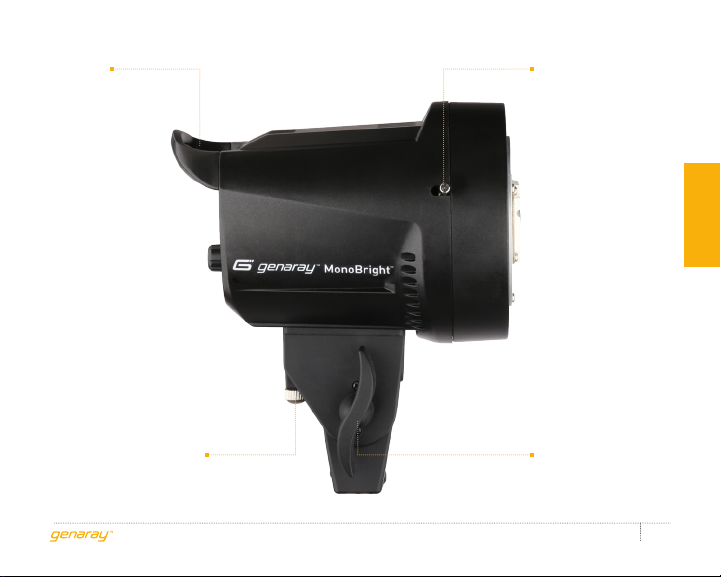
Umbrella
receptacle
Locking knob
HiBrite microLED
PCB
S-mount
Mounting socket
MonoBright LED Daylight 750 - USER MANUAL 7
PRODUCT OVERVIEW
Accessory release
Umbrella thumbscrew Tilt adjustment
knob
Handle

MonoBright LED Daylight 750 - USER MANUAL
8
DC and AC
adapter XLR
input socket
Power Switch
Display
Dimmer knob
Dimmer indicator
Wireless sensor
PRODUCT
OVERVIEW
MonoBright LED Daylight 750 - USER MANUAL 9
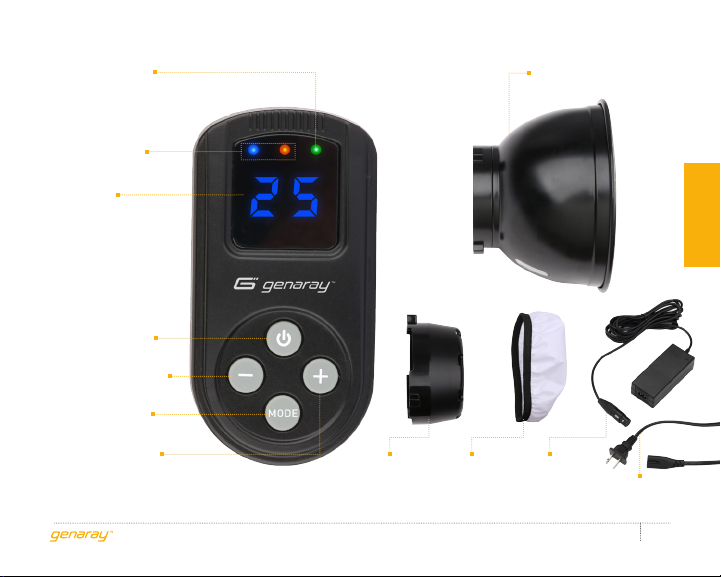
Status LEDs
Display
Power button
Minus (-) button
Transport
cap
AC/DC
adapter AC cable
Plus (+) button
Mode button
Diffuser
cover
Transmitting
indicator LED
7˝ umbrella/grid
reflector
PRODUCT OVERVIEW

MonoBright LED Daylight 750 - USER MANUAL
10
MOUNTING THE
MONOBRIGHT
1. Make sure the tilt adjustment
knob is fully tightened.
2. Loosen the locking knob on the
mounting socket and mount the
MonoBright on your lightstand or
other mounting equipment.
3. Tighten the locking knob until secure.
You can adjust the tilt of the MonoBright by
loosening the tilt adjustment knob. Keep
one hand on the light to hold it steady.
.
INSTRUCTIONS
Table of contents


