Geemarc CL7310 User manual
CL7310
Digital TV Listene
r
English

1
Introduction
The Geemarc Digital TV Listener is an amplification system specifically designed
for people with hearing difficulties.
It can be used with all kinds of Audio, Television systems, suitable for individuals
or groups without any interference.
Audio output from a TV or audio device is encoded and transmitted by the Base,
the wireless Headset receives the signal and decodes it to original audio sound.
One Base can be paired with up to 4 Headsets.
Safety & Care advice
To make the best use of this product and to use it safely, please read these
instructions thoroughly before use and keep safe for future reference.
Warning: This product can be very loud. Take care to prevent others from
using this product, if they do not have the same level of hearing loss. Excessive
sound pressure from earphones and headphones can cause hearing loss.
Caution: Electric shock. DO NOT insert unattached plug heads in to mains
power sockets. Plug heads MUST be fitted to the power adaptor.
Electrical connection: The unit is designed to operate from a 100-240VAC -
50/60Hz supply. (Classified as 'hazardous voltage' according to EN 60650
standard).
The unit does not incorporate an integral power on/off switch. To disconnect the
power, either switch off supply at the mains power socket or unplug the AC
adaptor. When installing the unit, ensure that the mains power socket is readily
accessible.
Caution: Risk of explosion if battery is replaced by an incorrect type.
Dispose of used batteries according to the instructions.
Keep the unit away from heat sources.
DO NOT expose the unit to direct sunlight.
Clean the Headset and ear pads regularly.
DO NOT modify the unit in any way.
The batteries shall not be exposed to excessive heat such as sunshine, fire or the
like.

2
The MAINS plug or an appliance coupler is used as the disconnect device, the
disconnect device shall remain readily operable
Please note: The unit may be subject to interference from appliances that
generate strong electrical or magnetic fields e.g. microwaves, mobile phones,
lighting transformers etc.
3
Table of Contents
Pack contents 2 Pairing extra headsets 11 -12
First use / Charging batteries 3 - 5 Cleaning & Maintenance 12
Connecting to TV, HiFi and other
audio equipment 6 - 8
Spare/replacement parts 13
Using Headset 8-10 Customer support 13
Headset adjustments 8-10 General information 13-14
Battery status & recharging 10-11
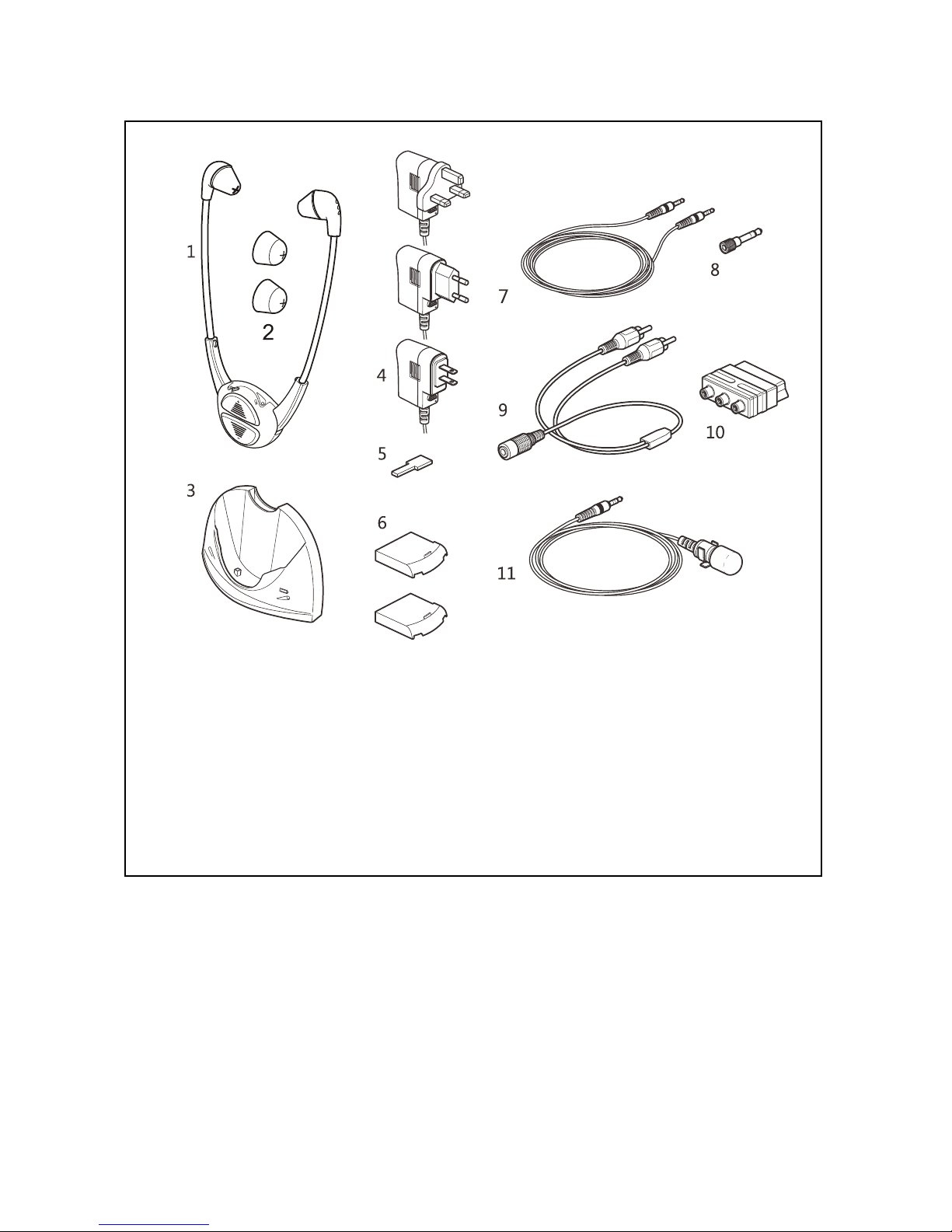
1. Headset 2. Alternative ear pads
3. Base 4. Power adaptor with cable
(UK, EU & US)
5. Slider tool 6. Batteries
7. 3.5mm to 3.5mm cable
(1.5m)
8. 3.5mm to 6.3mm adaptor
9. 3.5mm to 2 pin RCA cable
(25cm)
10. 2-pin RCA scart adaptor
11. Microphone
Pack Contents

4
First use / Charging batteries
Important: The Geemarc Digital TV Listener is supplied with two batteries.
Before use, batteries MUST be fully charged, full charge will take about 2-3 hours
when the battery is empty.
Caution: If battery is already fully charged, the red LED will stay off.
Once fully charged the TV Listener has an approximate operating time of up to 3
hours (per battery, with Headset on medium volume).
Batteries cannot be overcharged, but to save power the Base should be
disconnected from the power supply when not in use.
Battery Warnings:
•DO NOT attempt to dismantle.
•DO NOT dispose of in fire.
•DO NOT swallow.
•Keep away from children.
•Batteries are to be inserted with the correct polarity.
•DO NOT short-circuit the supply terminals.
•Exhausted batteries are to be removed from the product.
•Only use Geemarc supplied 'Li-Po' batteries.
•Caution: Risk of explosion if battery is replaced incorrectly or
fitted with the wrong type of battery. Dispose of used batteries
according to the instructions.
5
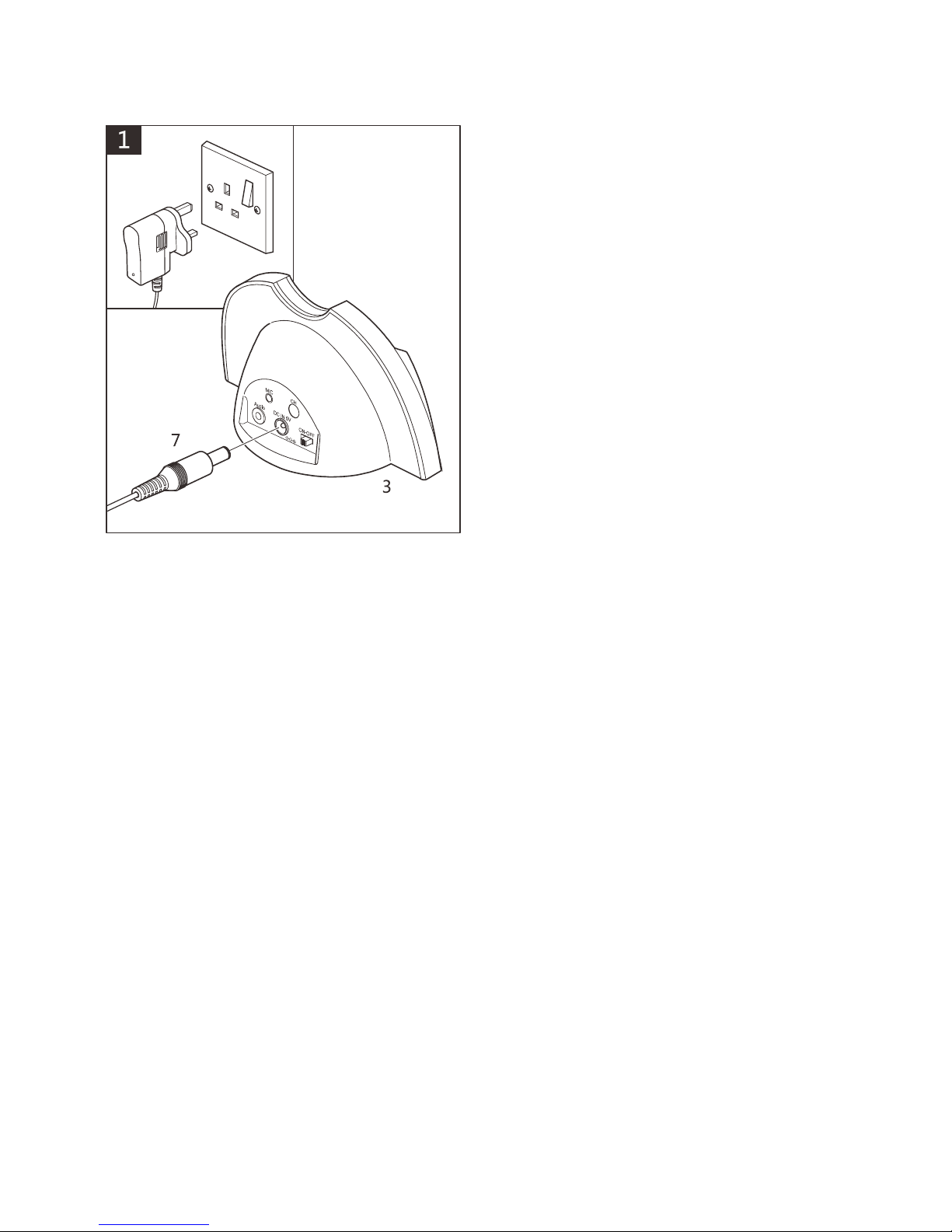
Insert power adaptor into mains power
socket. Insert power jack (7) into ‘DC
IN 5V’ socket on the back of the Base.
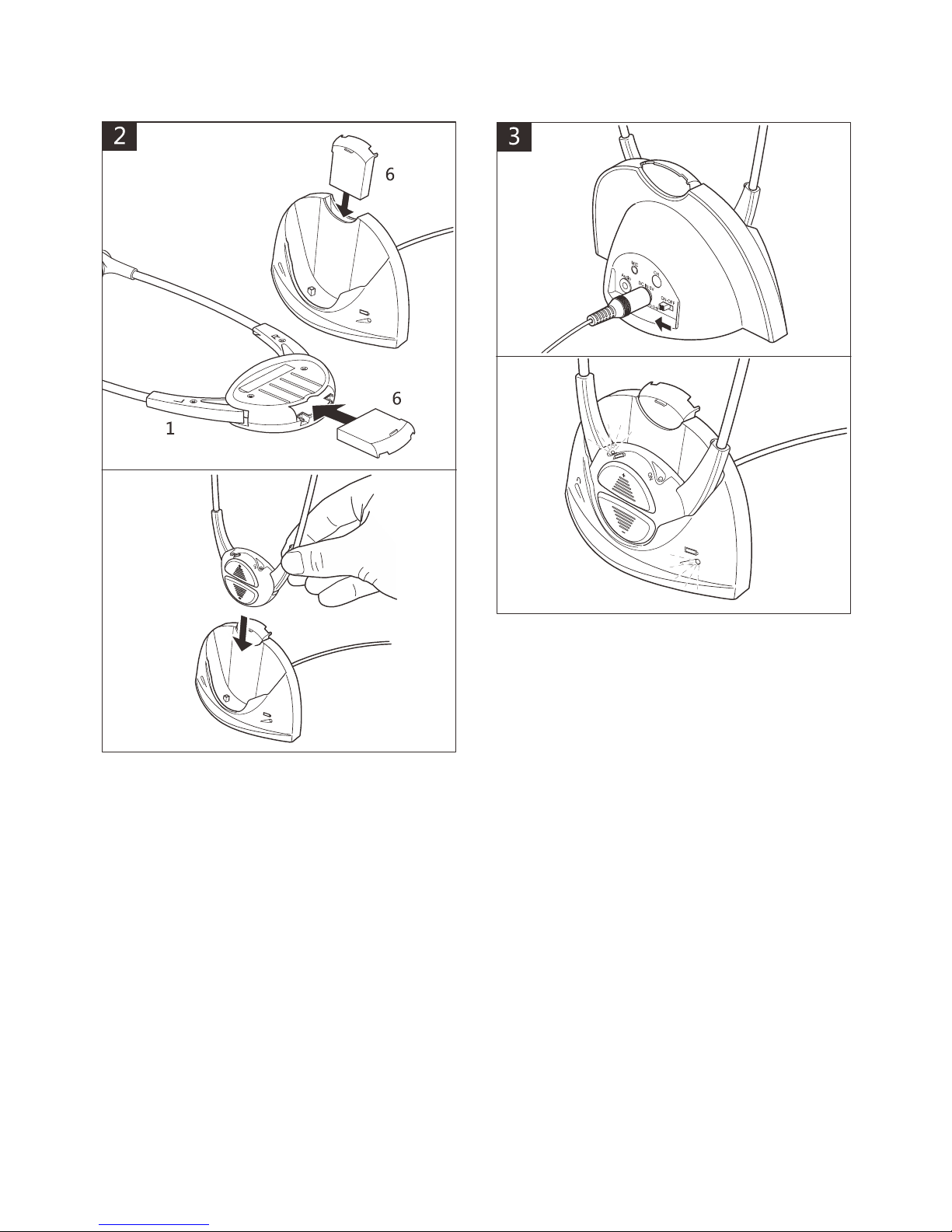
6
Insert batteries (6) into Headset and
Base.
Place Headset in Base.
Caution: Please be sure to insert the
battery correctly (see above).
Turn power on at mains and Base.
Red lights will show on Base and
Headset to indicate batteries are
charging.
After 2-3 hours, when fully charged the
red lights will be off.
7
Connecting to TV, HiFi and other audio equipment
There are a number of alternative methods of connecting to the unit depending on
the make of TV, HiFi equipment.
Important: The Base MUST connect to 'OUTPUT' sockets on the TV, HiFi
equipment (never use the INPUT access sockets).
Important: If you are using cable TV, satellite, Internet or other services in
conjunction with your TV or sound device please ensure that you connect the
CL7310 to an audio output access on your TV and NOT on your set top box. If
you are unsure or cannot identify the right connection or the input/output definition
please refer to the user manual of your TV. A connection of the CL7310 to your
set top box instead of your TV output could result some channels being seen
without sound.
Please note: In the event of having difficulty with the connections, please call the
Customer Helpline: 01707 384438
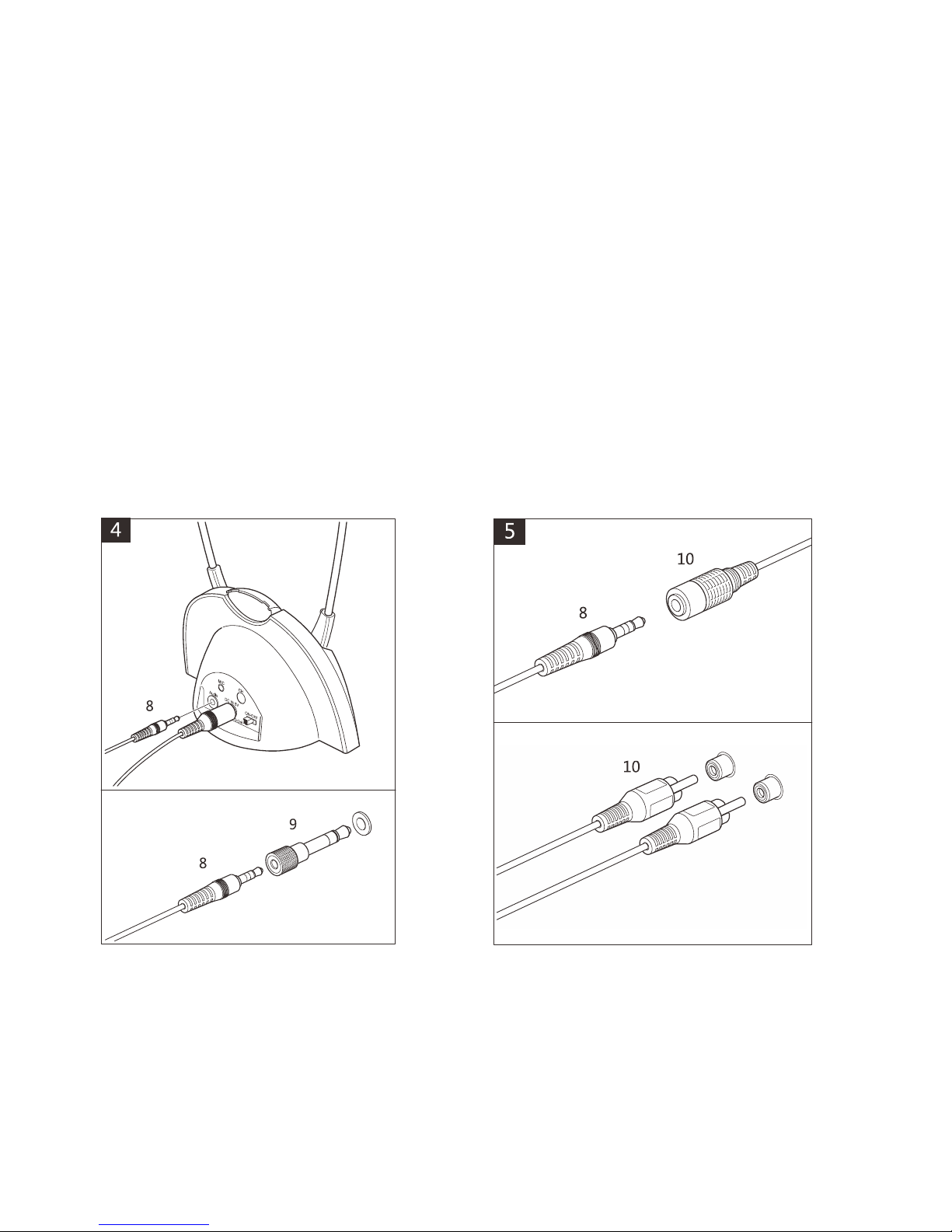
Using 3.5mm to 3.5mm cable: Insert
one 3.5mm jack (8) into ‘Audio’ socket
on Base, insert other 3.5mm jack into
the ‘headphone’ socket on the TV, HiFi
equipment. If required use 3.5mm to
6.3mm jack adaptor (9).
Using 3.5mm to RCA cable: Insert
3.5mm jack (8) into 3.5mm RCA cable
(10). Connect to the RCA jacks (10) to
the corresponding red and white
'OUTPUT' sockets on the TV, HiFi
equipment.
8
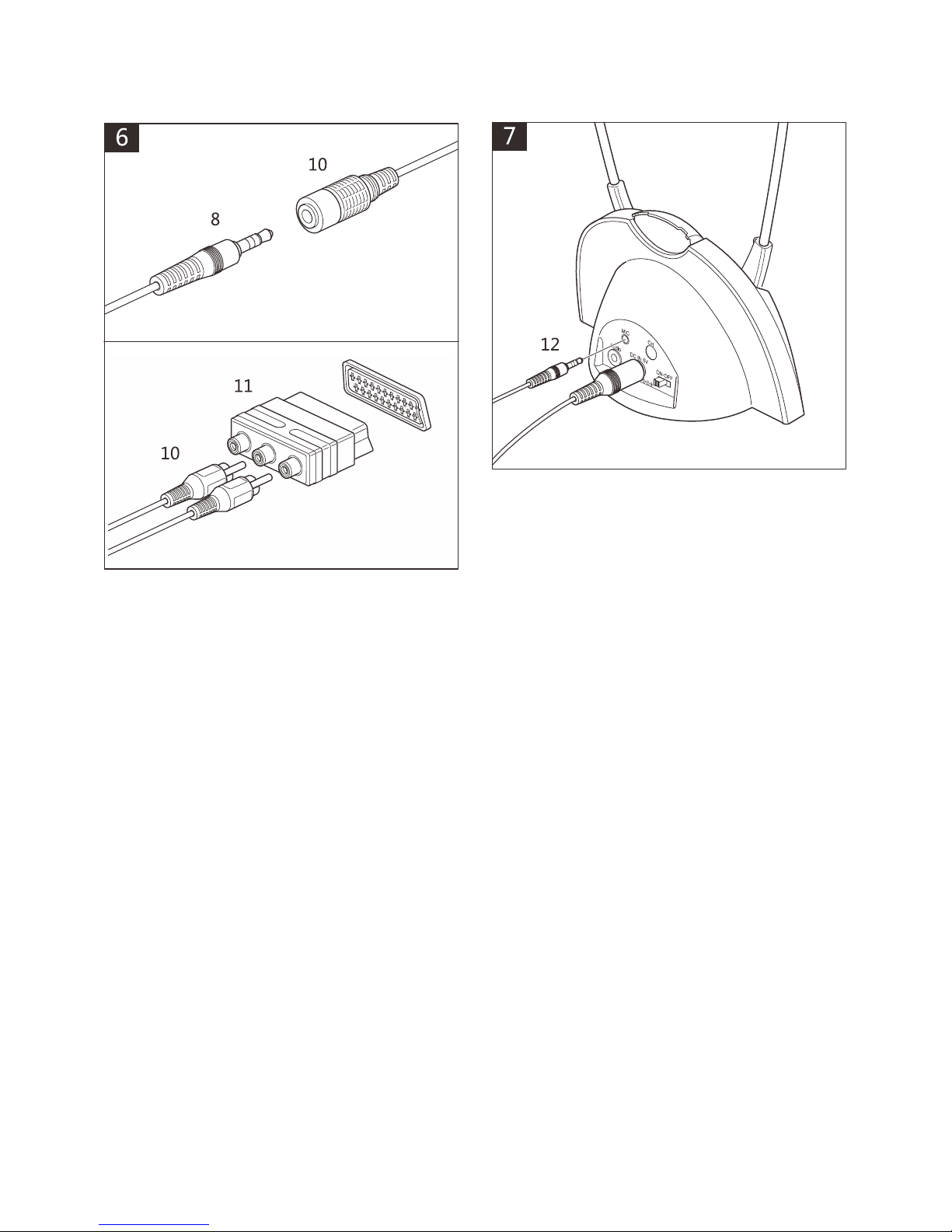
Using scart adaptor: Insert 3.5mm
jack (8) into 3.5mm to RCA cable (10).
Insert scart adaptor (11) into a
compatible scart socket on the TV, HiFi
equipment.
Connect to corresponding red and
white RCA jacks (10) to scart adaptor
(do not use the yellow socket).
Note:
Some televisions and audio
devices have an audio output SCART
level greater than the 300mV standard.
This can cause some distortion or a
very high acoustic level, even with the
Volume set to Low. If this happens,
please contact the Geemarc Customer
Services department. They will be able
to provide you with a solution to
attenuate the sensitivity of your
CL7310.
Microphone connection: Only use the
supplied Geemarc microphone. Plug
microphone jack (12) into ‘MIC’ socket
on Base and place microphone near
source you wish to listen to.
Note: Volume levels will be lower and
background noise may be picked up
when using the microphone.
9
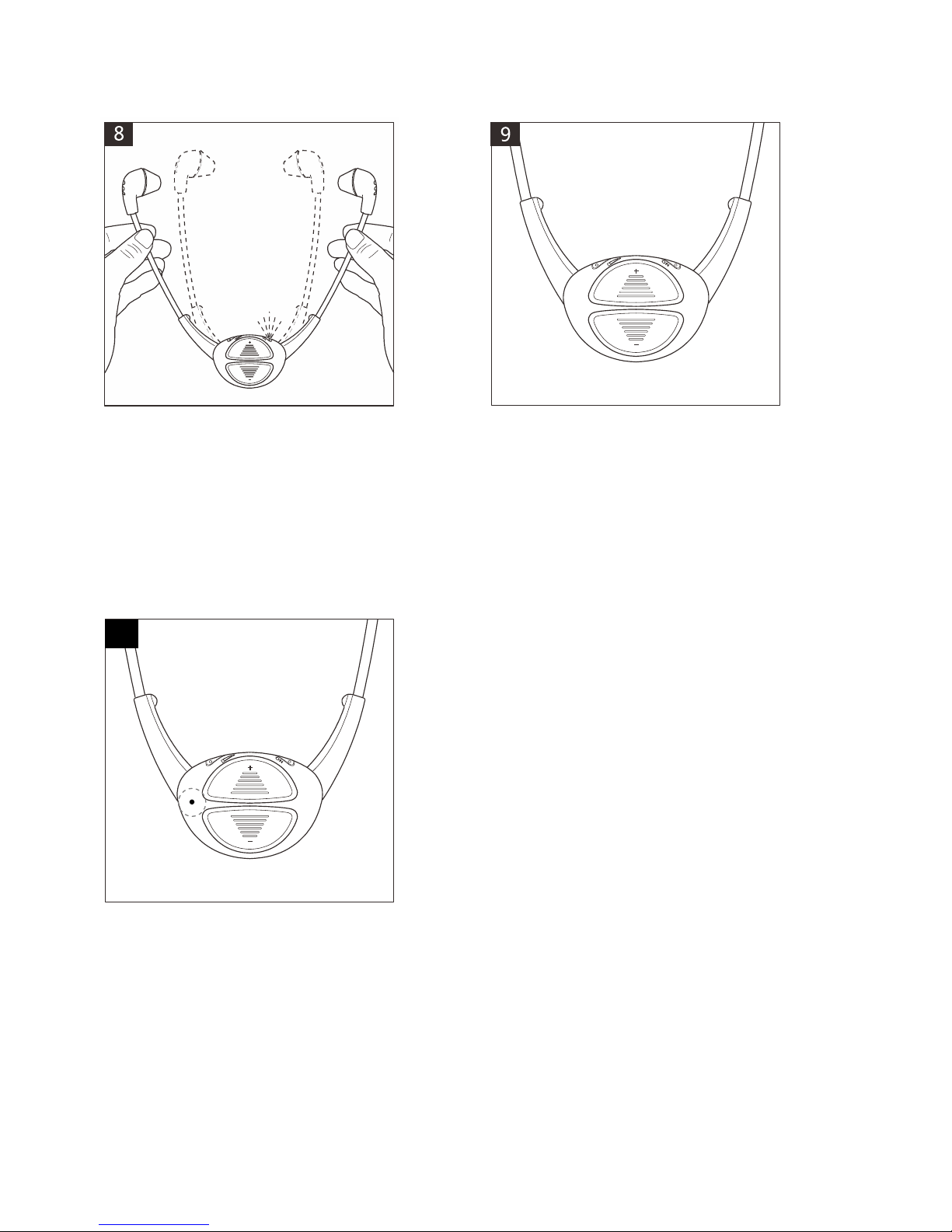
Using Headset: Once charged and
connected to your TV, HiFi equipment,
open the arms and Headset will
operate. A green light on the Headset
will show it is in use.
Headset will switch off when arms are
fully released.
Volume adjustment:
Press ‘+’ button to increase volume and
‘-’ button to decrease volume.
Headset beeps when volume reaches
maximum or minimum.
Headset Mic function:
when headset power on, press and
hold Volume ‘+’ for 3 seconds to enter
headset MIC IN mode, sound source
switches from base LINE IN to headset
MIC IN for environment sound
amplification.
Press and hold volume button for 3 sec
to come back in Base line mode.
Close and open the arms one time
reset the MIC IN to base LINE IN too.
Headset adjustments
Volume, Balance, Tone and Mono/Stereo settings are preset to their middle
settings, these will be suitable for the majority of users.
Ensure that you try the Headset before adjusting the preset settings.
If adjustments are required use the 'slider tool' to adjust the settings.
Important: Once all the adjustments are complete, ensure that the Headset
slider is set to the Volume adjustment as described in step 11.
10
Table of contents