
Gear4 StreetParty User manual

StreetParty™ Compact
User Manual
Notice d’utilisation | Benutzerhandbuch

Thank you for buying the StreetParty Compact,
portable speaker for iPod and iPhone. Please
read over this manual before use and retain it
for future reference.
Merci d’avoir choisi le système StreetParty
Compact, enceinte portative pour iPod et iPhone.
Veillez à lire attentivement cette notice d’utilisation
avant de l’utiliser, et conservez-la pour vous y
référer par la suite.
Wir freuen uns, dass Sie sich für den Kauf des
StreetParty Compact, einem tragbaren
Lautsprecher für iPod und iPhone, entschieden
haben. Lesen Sie sich dieses Benutzerhandbuch
vor der Verwendung bitte sorgfältig durch, und
bewahren Sie es zum späteren Nachschlagen auf.
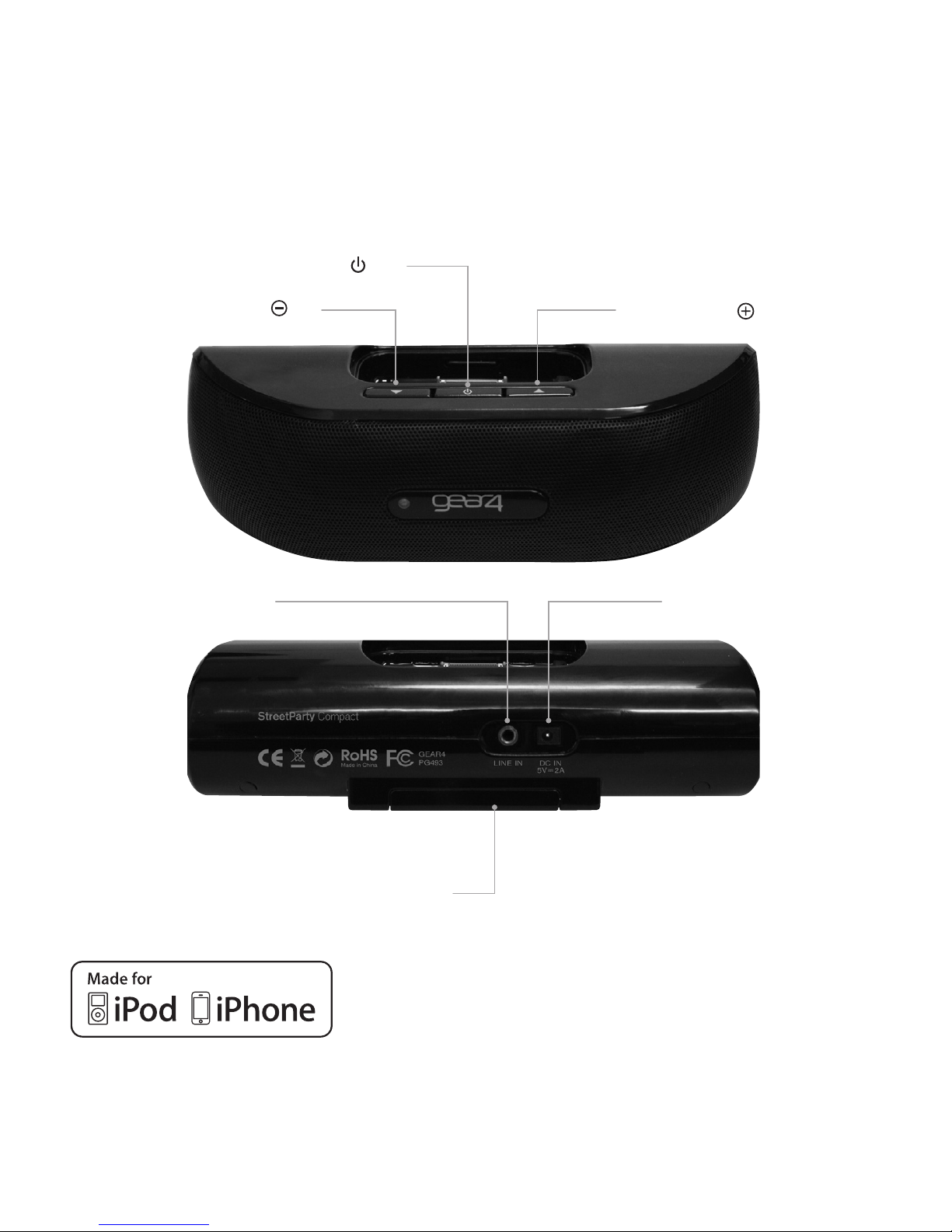
StreetParty Compact controls:
POWER ON / OFF ➊
VOLUME ➌ ➋ VOLUME
➎ DC IN
BATTERY COMPARTMENT ➏
Made for iPod touch (1st and 2nd generation),
iPod classic, iPod with video, iPod nano (2nd, 3rd,
4th and 5th generation only), iPod mini.
Made for iPhone 3GS, iPhone 3G, iPhone
AUX IN ➍
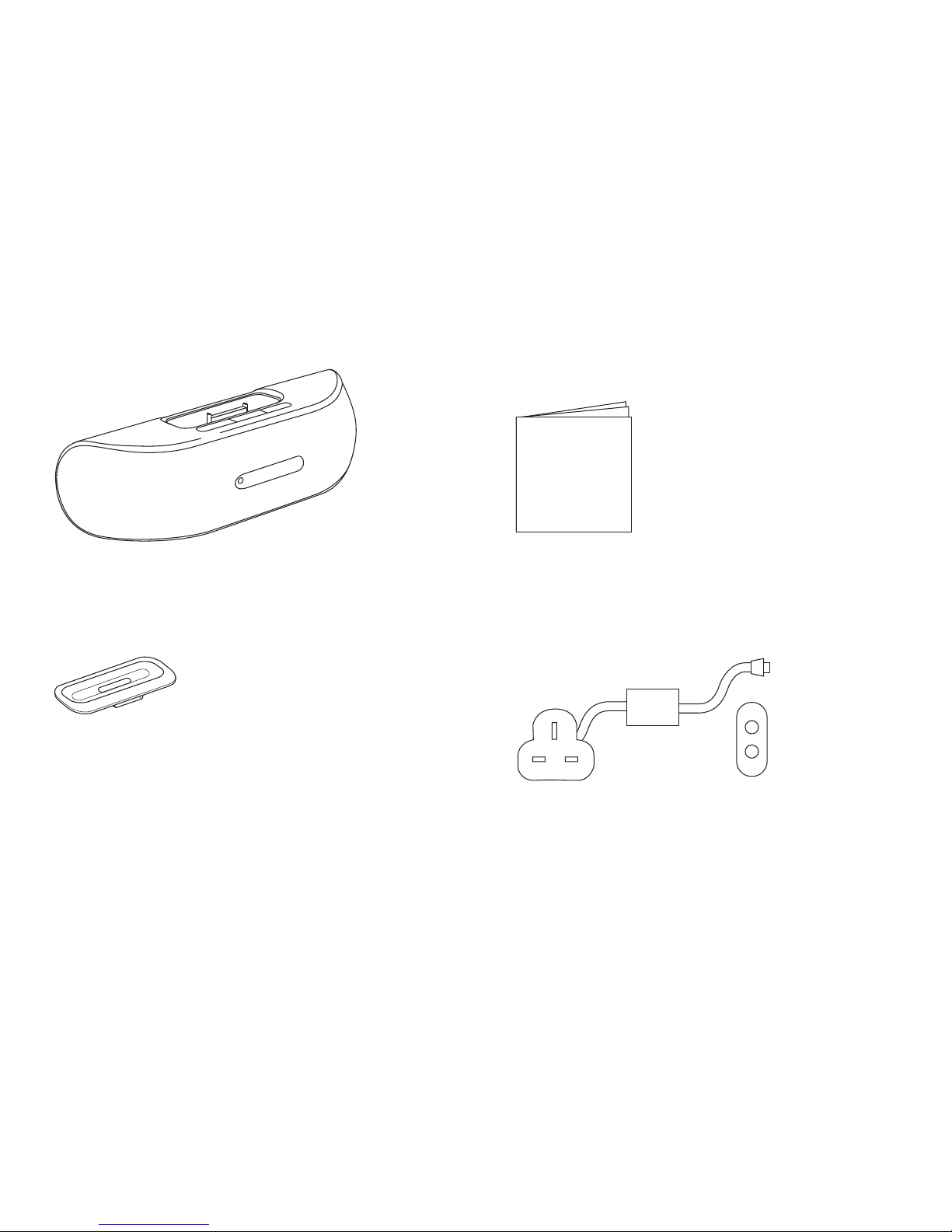
Box contents:
Contenu du coffret | Packungsinhalt
StreetParty Compact
USER
MANUAL
User manual
Notice d’utilisation
Benutzerhandbuch
4 dock adapters for iPod / iPhone
4 adaptateurs de station d’accueil
pour iPod / iPhone
4 Dock-Adapter für iPod / iPhone Power supply (UK & EU)
Alimentation (GB & EU)
Netzteil (GB & EU)
81
1216
4
20
242832

1GEAR4 | StreetParty Compact | User Manual
StreetParty Compact Please read before use.
Features:
■Powered by 4 AAA batteries (not included)
or power supply (included)
■Line-in port for use with other music players
■Charges iPod / iPhone when docked
(when powered by mains)
■Ultra-compact design
■On / Off light indicator
■Metal grill for protection
Getting started:
■Plug the power cable firstly into the back
of the unit and then into the mains supply.
Alternatively insert 4 AAA batteries into the
back of the speaker.
■Press the button.
■Select and insert the correct docking adapter
to suit your iPod / iPhone.
N.B. Please ensure that you use the correct
dock adapter for your iPod / iPhone to avoid
damage to the dock connector. If the specific
adapter is not included, please use the
adapter that was provided by Apple with
your iPod / iPhone.
■Carefully insert your iPod / iPhone into the
dock, it will start charging upon connection.
N.B. Your iPod / iPhone will only charge when
the StreetParty Compact is plugged in via the
power supply.
For use with other
audio devices:
■ Plug one end of a 3.5mm audio cable (not
included) into your MP3 or MP4 player and
connect the other end into the AUX line-in
port at the back of the unit.
■Select the track and press play on your
music source.
N.B. While a 3.5mm audio cable is plugged into
the AUX line-in port, no sound will be heard
from the iPod / iPhone dock.
To download some of the finest new music
around for FREE, visit:
www.gear4.com/newmusic
Please ensure that your iPod / iPhone is using
the latest software version. To update the
software, connect your iPod / iPhone to iTunes.
If there is a newer software version available
you will be prompted to upgrade.

2
User Manual | StreetParty Compact | GEAR4
All rights reserved. Reproduction in whole or
in part is prohibited. GEAR4 and StreetParty
are trademarks of Disruptive Ltd. iPhone, iPod,
iPod nano, iPod classic and iPod touch are
trademarks of Apple Inc., registered in the U.S.
and other countries. All other product names are
or may be trademarks of and used to identify
products or services of their respective owners.
Brands are used for illustration purposes only
and should not be used to infer any relationship
between GEAR4 and respective owners.
“Made for iPod” means that an electronic
accessory has been designed to connect
specifically to iPod and has been certified
by the developer to meet Apple performance
standards.
“Made for iPhone” means that an electronic
accessory has been designed to connect
specifically to iPhone and has been certified
by the developer to meet Apple performance
standards.
Apple is not responsible for the operation of
this device or its comnpliance with safety and
regulatory standards.
WARNING
To reduce the risk of fire or electric shock,
do not expose this unit to rain or moisture.
CAUTION
Use of controls or adjustments of performance
or procedures other than those specified may
result in hazardous radiation exposure.
UNPACKING AND INSTALLATION
Unpack your unit carefully. We recommend that
you save the packaging in case you ever need
to store your unit. To avoid damage, never place
the unit or its batteries near radiators, in front of
heating vents, under direct sunlight or near water.
FOR YOUR SAFETY
‒ When disconnecting the power supply, pull
the plug first. Do not pull the cord by itself.
‒ Never handle the power plug with wet hands,
as this could cause fire or electric shock.
‒ Refer servicing to qualified personnel only.
‒ Do not open the housing.
‒ Do not twist or pinch the power supply cord.
If the plug or power supply cord needs to be
replaced, ensure that it complies with the
manufacturer’s recommendation.
‒ Unplug the unit during lightning storms and
when unused for extended periods of time.
DISPOSAL
According to the European Directive 2002/96/
EC all electrical and electronic products must be
collected separately by a local collection system.
Please act according to your local rules and

3GEAR4 | StreetParty Compact | User Manual
do not dispose of your old products with your
normal household waste.
The lightning flash with arrowhead
symbol, within an equilateral triangle,
is intended to alert user to the
presence of uninsulated ‘Dangerous Voltage’
within the product’s enclosure that may be of
sufficient magnitude to constitute risk of electric
shock to person.
The exclamation point within an
equilateral triangle is intended
to alert user to the presence of
important operating and maintenance
(servicing) instruction in the literature
accompanying the appliance.
CAUTION
RISK OF ELECTRIC SHOCK • DO NOT OPEN
CAUTION: TO REDUCE THE RISK OF ELECTRIC SHOCK
DO NOT REMOVE COVER (OR BACK).
NO USER-SERVICABLE PARTS INSIDE.
REFER SERVICING TO QUALIFIED SERVICE PERSONNEL.
FCC RULES
You are cautioned that changes or modifications
not expressly approved by the part responsible
for compliance could void the user’s authority
to operate the equipment. This equipment has
been tested and found to comply with the limits
for a Class B digital device, pursuant to part 15
of the FCC rules.
These limits are designed to provide reasonable
protection against harmful interference in
a residential installation. This equipment
generates, uses and can radiate radio frequency
energy and, if not installed and used in
accordance with the instructions, may cause
harmful interference to radio communications.
However, there is no guarantee that interference
will not occur in a particular installation. If this
equipment does cause harmful interference
to radio or television reception, which can be
determined by turning the equipment off and
on, the user is encouraged to try to correct the
interference by one or more of the following
measures:
‒ Reorient or relocate the receiving antenna.
‒ Increase the separation between the
equipment and receiver.
‒ Connect the equipment into an outlet on
a circuit different from that to which the
receiver is connected.
‒ Consult the dealer or an experienced
radio/TV technician for help.
Operation is subject to the following two
conditions:
1) This device may not cause interference and
2) This device must accept any interference,
including interference that may cause
undesired operation of the device.

4Notice d’utilisation | StreetParty Compact | GEAR4
Veuillez lire avant utilisation. StreetParty Compact
Commandes de
StreetParty Compact:
➊ MARCHE / ARRÊT
➋ VOLUME +
➌ VOLUME -
➍ PRISE D’ENTRÉE HAUT NIVEAU AUX
➎ PRISE D’ALIMENTATION EN COURANT
CONTINU
➏ COMPARTIMENT DES PILES
Caractéristiques du
produit:
■Alimentation par 4 piles AAA (non fournies)
ou adaptateur chargeur CA (fourni)
■Prise d’entrée pour d’autres lecteurs
de musique
■Chargez votre iPod / iPhone lorsqu’il est
connecté du Dock (en alimentation secteur)
■Conception ultra compacte
■Voyant lumineux marche / arrêt
■Grille métallique de protection
Prise en main:
■Branchez tout d’abord le câble secteur à
l’arrière de l’unité puis sur une prise secteur.
Vous pouvez également insérer 4 piles AAA
à l’arrière du haut-parleur.
■Appuyez sur la touche POWER.
■Choisissez et insérez l’adaptateur
correspondant à votre modèle d’iPod /
iPhone.
Remarque : Veuillez vous assurer d’utiliser
l’adaptateur de dock pour votre iPod / iPhone
pour éviter d’endommager le connecteur de
dock. Si l’adaptateur spécifique n’est pas inclus,
le dock est universel, auquel cas vous pouvez
utiliser l’adaptateur fourni par Apple avec votre
iPod / iPhone.
■Insérez soigneusement votre iPod / iPhone
dans le dock. Le chargement commence
automatiquement.
Remarque: l’iPod / iPhone se recharge dès que
le StreetParty Compact est branché au secteur
par l’intermédiaire de son adaptateur CA.

5GEAR4 | StreetParty Compact | Notice d’utilisation
Utilisation avec d’autres
périphériques audio:
■Branchez une extrémité d’une câble audio de
3,5mm dans votre lecteur de, de MP3 ou de
MP4, et branchez l’autre extrémité dans la
prise AUX au dos de l’unité (non fournies).
■Sélectionnez la piste à écouter et appuyez
sur la touche de lecture de l’appareil.
Remarque : Bien qu’un câble de 3,5 mm soit
branché dans la prise AUX, aucun son ne sort
du dock pour iPod/iPhone.
Pour télécharger GRATUITEMENT de nouveaux
morceaux parmi les meilleurs du marché actuel,
consulter le site: www.gear4.com/newmusic
Veuillez vérifier que votre iPod / iPhone utilise
la dernière version logicielle. Pour mettre le
logiciel à jour, connectez votre iPod / iPhone à
iTunes. Si une nouvelle version est disponible,
le système vous invitera à actualiser.
Tous droits réservés. Reproduction partielle
ou totale interdite. GEAR4 et StreetParty sont
des marques de commerce de Disruptive Ltd.
iPhone, iPod, iPod nano, iPod classic et iPod
touch sont des marques de commerce d’Apple
Inc., déposées aux États-Unis et dans d’autres
pays. Tous les autres noms de produits sont
ou peuvent être des marques de commerce
et servent à identifier les produits et services
appartenant à leurs détenteurs respectifs. Les
noms de marques sont utilisés aux seules fins
d’illustration et ne doivent pas être utilisés pour
insinuer une relation entre GEAR4 et leurs
détenteurs respectifs.
Le label “Made for iPod” signifie qu’un
accessoire électronique a été conçu
spécialement pour se connecter à l’iPod
et a été certifié par son fabricant comme
répondant aux normes de performance d’Apple.
Le label “Made for iPhone” signifie qu’un
accessoire électrique a été conçu spécialement
pour se connecter à l’iPhone et a été certifié
par son fabricant comme répondant aux
normes de performance d’Apple.
Apple ne saurait être responsable du
fonctionnement de cet appareil ni de sa
conformité aux normes de sécurité et aux
réglementations en vigueur.
AVERTISSEMENT
Pour réduire le risque d’incendie ou
d’électrocution, ne pas exposer cet appareil
à la pluie ni à l’humidité.
ATTENTION
L’utilisation des commandes ou les réglages
de performances par des procédures autres
Other manuals for StreetParty
2
This manual suits for next models
1
Table of contents
Languages:
Other Gear4 Docking Speakers manuals

Gear4
Gear4 HouseParty User manual

Gear4
Gear4 HouseParty User manual

Gear4
Gear4 HouseParty Portable PG532 User manual

Gear4
Gear4 HouseParty SmartDock PG476 User manual

Gear4
Gear4 StreetParty Compact User manual

Gear4
Gear4 SoundOrb Aurora User manual

Gear4
Gear4 AirZone 3 Series User manual

Gear4
Gear4 StreetParty Size 0 User manual

Gear4
Gear4 HouseParty SmartDock PG476 User manual

Gear4
Gear4 PG533 HouseParty Rise 2 Wireless User manual


