GE 21029 User manual

2.4 GHz Triple Cordless Handset
Call Waiting Caller ID Phone System
User’s Guide
21029

2
Equipment Approval Information
Your telephone equipment is approved for connection to the Public Switched Telephone
Network and is in compliance with parts 15 and 68, FCC Rules and Regulations and the
Technical Requirements for Telephone Terminal Equipment published by ACTA.
1 Notification to the Local Telephone Company
On the bottom of this equipment is a label indicating, among other information, the US
number and Ringer Equivalence Number (REN) for the equipment. You must, upon request,
provide this information to your telephone company.
The REN is useful in determining the number of devices you may connect to your telephone
line and still have all of these devices ring when your telephone number is called. In
most (but not all) areas, the sum of the RENs of all devices connected to one line should
not exceed 5. To be certain of the number of devices you may connect to your line as
determined by the REN, you should contact your local telephone company.
A plug and jack used to connect this equipment to the premises wiring and telephone
network must comply with the applicable FCC Part 68 rules and requirements adopted by
the ACTA. A compliant telephone cord and modular plug is provided with this product.
It is designed to be connected to a compatible modular jack that is also compliant. See
installation instructions for details.
Notes
• This equipment may not be used on coin service provided by the telephone company.
• Party lines are subject to state tariffs, and therefore, you may not be able to use your own
telephone equipment if you are on a party line. Check with your local telephone company.
• Notice must be given to the telephone company upon permanent disconnection of your
telephone from your line.
• If your home has specially wired alarm equipment connected to the telephone line,
ensure the installation of this product does not disable your alarm equipment. If you have
questions about what will disable alarm equipment, consult your telephone company or a
qualified installer.
2 Rights of the Telephone Company
Should your equipment cause trouble on your line which may harm the telephone network,
the telephone company shall, where practicable, notify you that temporary discontinuance of
service may be required. Where prior notice is not practicable and the circumstances warrant
such action, the telephone company may temporarily discontinue service immediately. In case
of such temporary discontinuance, the telephone company must: (1) promptly notify you of
such temporary discontinuance; (2) afford you the opportunity to correct the situation; and (3)
inform you of your right to bring a complaint to the Commission pursuant to procedures set
forth in Subpart E of Part 68, FCC Rules and Regulations.

3
The telephone company may make changes in its communications facilities, equipment,
operations or procedures where such action is required in the operation of its business and not
inconsistent with FCC Rules and Regulations. If these changes are expected to affect the use or
performance of your telephone equipment, the telephone company must give you adequate
notice, in writing, to allow you to maintain uninterrupted service.
Interference Information
This device complies with Part 15 of the FCC Rules. Operation is subject to the following two conditions: (1)
This device may not cause harmful interference; and (2) This device must accept any interference received,
including interference that may cause undesired operation.
This equipment has been tested and found to comply with the limits for a Class B digital device, pursuant
to Part 15 of the FCC Rules. These limits are designed to provide reasonable protection against harmful
interference in a residential installation.
This equipment generates, uses, and can radiate radio frequency energy and, if not installed and used in
accordance with the instructions, may cause harmful interference to radio communications. However, there
is no guarantee that interference will not occur in a particular installation.
If this equipment does cause harmful interference to radio or television reception, which can be determined
by turning the equipment off and on, the user is encouraged to try to correct the interference by one or more
of the following measures:
• Reorient or relocate the receiving antenna (that is, the antenna for radio or television that is “receiving”
the interference).
• Reorient or relocate and increase the separation between the telecommunications equipment and
receiving antenna.
• Connect the telecommunications equipment into an outlet on a circuit different from that to which the
receiving antenna is connected.
If these measures do not eliminate the interference, please consult your dealer or an experienced
radio/television technician for additional suggestions. Also, the Federal Communications Commission has
prepared a helpful booklet, “How To Identify and Resolve Radio/TV Interference Problems.” This booklet is
available from the U.S. Government Printing Office, Washington, D.C. 20402. Please specify stock number
004-000-00345-4 when ordering copies.
Licensing
Licensed under US Patent 6,427,009
Hearing Aid Compatibility (HAC)
This telephone system meets FCC standards for Hearing Aid Compatibility.
US NUMBER IS LOCATED ON THE CABINET BOTTOM
REN NUMBER IS LOCATED ON THE CABINET BOTTOM

4
SEE MARKING ON BOTTOM / BACK OF PRODUCT
RISK OF ELECTRIC SHOCK
DO NOT OPEN
WARNING: TO
PREVENT FIRE OR
ELECTRICAL SHOCK
HAZARD, DO NOT
EXPOSE THIS
PRODUCT TO RAIN
OR MOISTURE.
THE LIGHTNING
FLASH AND ARROW
HEAD WITHIN THE
TRIANGLE IS A
WARNING SIGN
ALERTING YOU OF
“DANGEROUS
VOLTAGE” INSIDE
THE PRODUCT.
CAUTION: TO REDUCE THE
RISK OF ELECTRIC SHOCK, DO
NOT REMOVE COVER (OR
BACK). NO USER
SERVICEABLE PARTS INSIDE.
REFER SERVICING TO
QUALIFIED SERVICE
PERSONNEL.
THE EXCLAMATION
POINT WITHIN THE
TRIANGLE IS A
WARNING SIGN
ALERTING YOU OF
IMPORTANT
INSTRUCTIONS
ACCOMPANYING
THE PRODUCT.
CAUTION:
EQUIPMENT APPROVAL INFORMATION .........2
INTERFERENCE INFORMATION ....................3
LICENSING ............................................3
HEARING AID COMPATIBILITY (HAC) .........3
TABLE OF CONTENTS ..............................4
FCC RF RADIATION EXPOSURE STATEMENT 6
INTRODUCTION .......................................6
HANDSET LAYOUT ..................................8
BASE LAYOUT ........................................9
HANDSET CHARGE CRADLE LAYOUT .........9
PARTS CHECKLIST ................................10
TELEPHONE JACK REQUIREMENTS ........10
INSTALLATION ......................................11
INSTALLATION GUIDELINES ................. 11
INSTALLING THE HANDSET BATTERY .....12
INSTALLING THE PHONE .....................12
CONNECTING THE AC POWER .............13
CONNECTING THE TELEPHONE LINE ......13
SETTING THE VOICE PROMPT LANGUAGE 13
ANSWERING SYSTEM SETUP ..................14
VOICE TIME/DAY STAMP AND REAL TIME
CLOCK ............................................14
SPEAKER VOLUME ............................14
VOICE INSTRUCTION ..........................15
RECORDING THE OUTGOING
ANNOUNCEMENT ..............................15
REVIEWING AND CHOOSING THE
ANNOUNCEMENT ..............................16
ANSWERING SYSTEM OPERATION ........16
MESSAGE COUNTER .........................16
LEAVING A MESSAGE ........................17
Table of Contents
SCREENING CALLS FROM THE BASE .....17
MAILBOX INDICATOR .........................17
MESSAGES PLAYBACK .......................17
MEMORY FULL .................................18
ERASING MESSAGES .........................18
LEAVING A MEMO ............................19
TELEPHONE SETUP ...............................19
PROGRAMMING THE TELEPHONE ...........19
STANDBY SCREEN ............................19
PROGRAMMABLE FUNCTIONS ..............19
ROOM MONITOR ..............................19
HANDSET SETUP ..............................20
LANGUAGE ...............................21
HANDSET NAME .......................21
RINGER TONE ...........................22
RINGER VOLUME .......................22
VIP MELODY ............................23
STORING VIP MELODY ............23
CHANGING A STORED VIP MELODY
RECORD ..............................24
REVIEWING AND DELETING STORED
VIP MELODY RECORD ..........24
KEY TONE ................................24
MESSAGE ALERT ......................25
RING SELECT ...........................25
SECURITY CODE .......................26
AREA CODE .............................27
REGISTRATION ...........................27
DE-REGISTRATION .....................28
GLOBAL DE-REGISTRATION ..........29
DEFAULT SETTING .....................29

5
SAVE THESE INSTRUCTIONS
TELEPHONE OPERATION .........................30
CHARGE INDICATOR ...........................30
MAKING CALLS ................................30
ANSWERING CALLS ...........................30
SPEAKERPHONE OPERATION ...................30
ANSWERING A CALL W/SPEAKERPHONE 30
MAKING A CALL W/SPEAKERPHONE .....31
CALL TIMER .....................................31
AUTO STANDBY ...............................31
RINGER HI/LOW/OFF SHORTCUT ......32
FLASH/CALL WAITING .......................32
NUMBER REDIAL ..............................32
EXIT ...............................................33
PAGE .............................................33
HANDSET TO HANDSET PAGING ...33
PAGING FROM BASE/GROUP PAGE 33
MUTE ............................................34
RECEIVER VOLUME CONTROL ..............34
DO NOT DISTURB (DND) .................34
INTERCOM OPERATION ...........................34
MAKING AN INTERCOM CALL .......34
RECEIVING AN INTERCOM CALL ....35
ADVANCED INTERCOM FEATURES .........35
RECEIVING AN INCOMING TELEPHONE
CALL DURING AN INTERCOM CALL
35
USING INTERCOM WITH EXTERNAL
TELEPHONE CALLS .................35
TWO-WAY CALLING ..................36
THREE-WAY CALLING ................36
TRANSFERRING EXTERNAL CALLS TO
OTHER HANDSETS .................36
MEMORY ............................................37
STORING NAME & NUMBER IN MEMORY
37
STORING THE LAST NUMBER DIALED ...38
INSERTING A PAUSE IN THE DIALING
SEQUENCE (OF A STORED NUMBER) ....38
REVIEWING RECORDS STORED IN MEMORY
38
CHANGING RECORDS STORED IN MEMORY
39
DELETING RECORDS STORED IN MEMORY
.39
DIALING A NUMBER FROM MEMORY ....39
CHAIN DIALING FROM MEMORY ..........39
CALLER ID (CID) ................................40
CID ERROR CODES ..........................40
RECEIVING CID RECORDS ..................41
STORING CID RECORDS (IN CALLER ID
MEMORY) .......................................41
REVIEWING CID RECORDS .................41
STORING CID RECORDS IN INTERNAL
MEMORY ........................................42
DIALING A CID NUMBER ...................42
DELETING A CID RECORD ..................43
DELETING ALL CID RECORDS .............43
REMOTE ACCESS ..................................44
CORDLESS HANDSET .........................44
ANSWERING SYSTEM INDICATOR .........44
SCREENING CALLS FROM THE HANDSET 44
ACCESSING THE ANSWERING SYSTEM
FROM ANOTHER LOCATION .................45
MEMORY FULL .................................45
CHANGING THE BATTERY .......................46
BATTERY SAFETY PRECAUTIONS ..........46
BELT CLIP AND OPTIONAL HEADSET .........47
CONNECTING THE BELT CLIP ...............47
CONNECTING AN OPTIONAL HEADSET TO
THE HANDSET ..................................47
DISPLAY MESSAGES .............................47
HANDSET SOUND SIGNALS ....................50
TROUBLESHOOTING GUIDE .....................50
GENERAL PRODUCT CARE ......................52
CAUSES OF POOR RECEPTION .................53
ACCESSORY INFORMATION .....................53
INDEX ................................................54
SERVICE .............................................56
LIMITED WARRANTY ..............................57

6
FCC RF Radiation Exposure Statement
This equipment complies with FCC RF radiation exposure limits set forth
for an uncontrolled environment. This equipment should be installed and
operated with a mininum distance of 20 centimeters between the radiator
and your body. This transmitter must not be co-located or operated in
conjunction with any other antenna or transmitter.
For body worn operation, this phone has been tested and meets the FCC RF
exposure guidelines when used with the belt clip supplied with this product.
Use of other accessories may not ensure compliance with FCC RF exposure
guidelines.
Introduction
CAUTION: When using telephone equipment, there are basic
safety instructions that should always be followed. Refer to the
IMPORTANT SAFETY INSTRUCTIONS provided with this product
and save them for future reference.
Congratulations on purchasing the GE Triple Cordless Handset Telephone
System. This system operates in the 2.4 GHz frequency range, and is unique
to conventional cordless telephones. When the base is connected to electrical
power and a telephone line, you can place a fully-featured cordless handset
anywhere electrical power is available.
Features:
• 2.4 GHz digital spread spectrum technology
• Handset to handset Intercom
• 3-way Conference
• Call Waiting and Caller ID Compatible
• VIP melody
• Up to 50 Name and Number Memory Dialing
• Answering machine with 3 maiboxes
• Expandable up to 4 handsets (by purchase of optional Model 21009A
Handset with recharge cradle)
NOTE: Spread Spectrum technology does not need the feature of
changing channel.

7
This telephone has been designed to be simple to use, however, you can reach
its full potential more quickly by taking a few minutes to read this Instruction
Book. This telephone is a multifunction product for use with Call Waiting and
Caller ID services available from your local telephone company.
Your Caller ID Call Waiting phone allows you to:
• View the name and telephone number of a caller (Call Waiting Caller ID)
while you are on the phone.
• Identify callers before you answer the phone.
• View the time and date of each incoming call.
• Record up to 40 Caller ID messages sequentially.
• Know who called while you are on the other line or when you were away.
• Screen unwanted calls, eliminate harassment from annoying calls, or to
get prepared before answering a call.
IMPORTANT: Because cordless phones operate on electricity, you should
have at least one phone in your home that isn’t cordless, in case the power
in your home goes out.
IMPORTANT: In order to use all of the features of this telephone, you
must subscribe to two separate services available from your local telephone
company: the standard Name/Number Caller ID Service to know who is
calling when the phone rings and Call Waiting Caller ID Service to know
who is calling while you are on the phone.
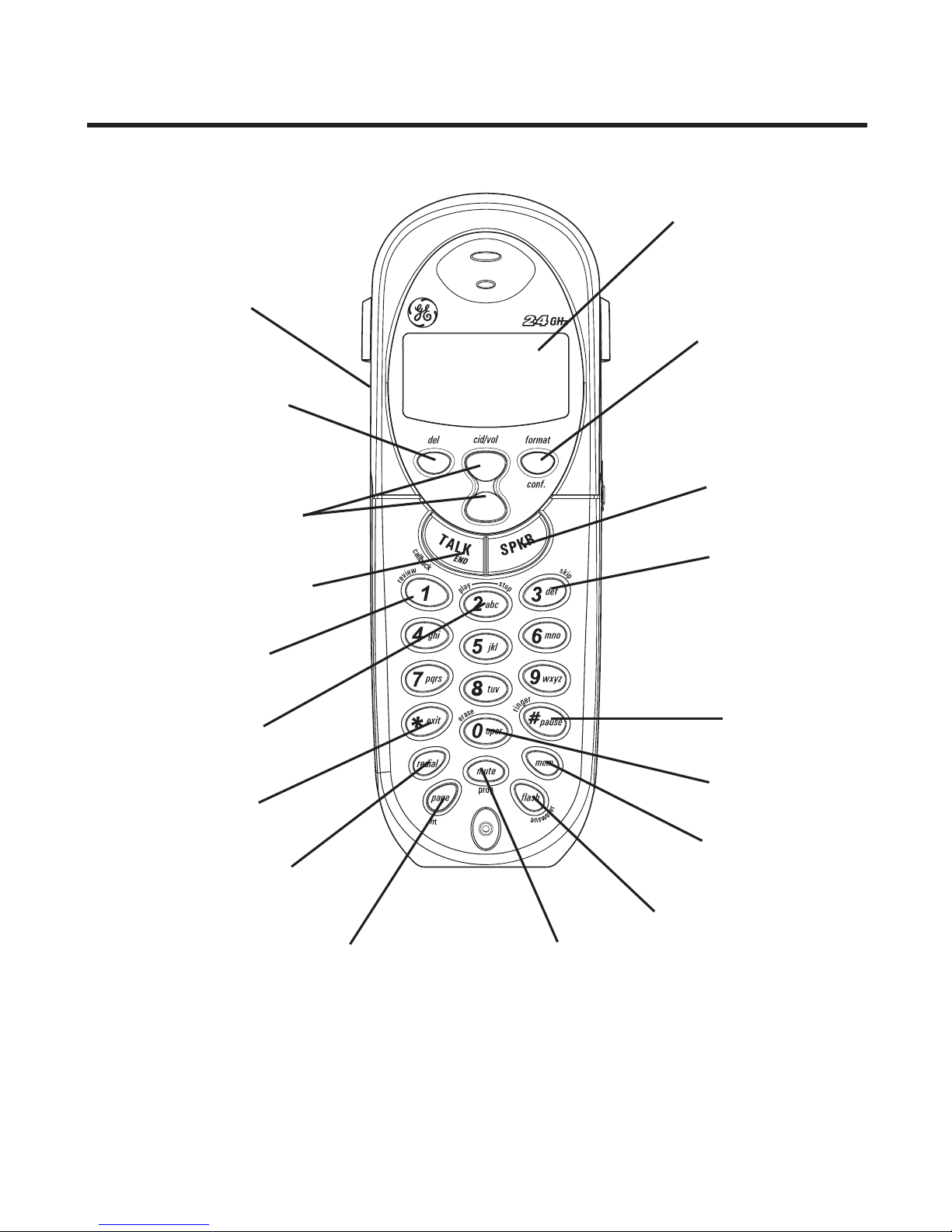
8
Handset Layout
format/conf
(format/conference button)
display
SPKR
(speaker button)
skip (button)
# pause/ringer
(button)
mem
(memory button)
erase button
flash/answerer (button)
mute/prog
(mute/program button)
page/int
(page/intercom button)
redial (button)
*exit (button)
play/stop (button)
review (button)
TALK/END/call back
(button)
cid/vol
(caller ID/volume button)
del
(delete button)
Speaker
9
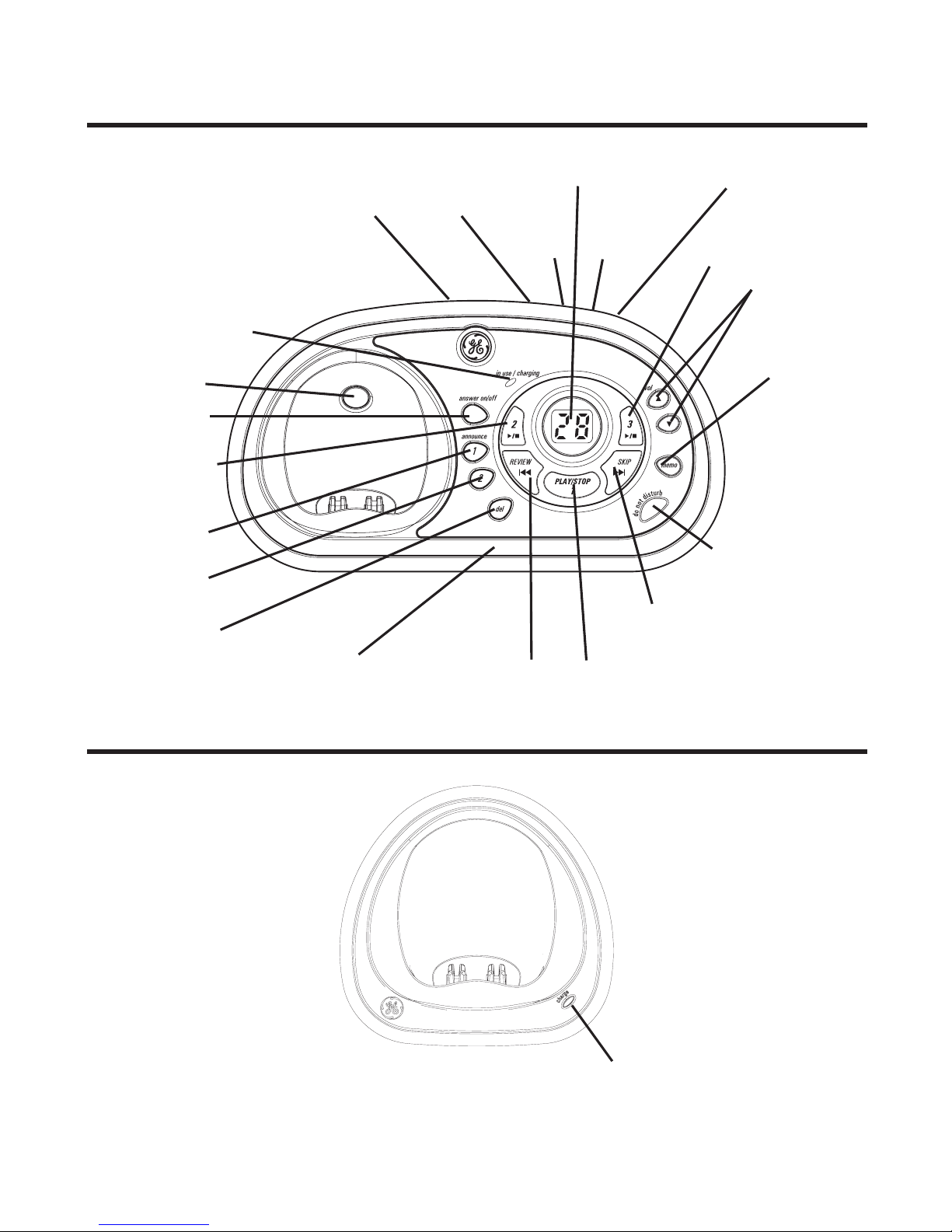
Base Layout
Handset Charge Cradle Layout
charge indicator
in use/charging (indicator)
answer on/off
(button)
announce 1
(button)
announce 2
(button)
del
(button)
REVIEW (button) PLAY/STOP 1 (button/indicator)
SKIP (button)
DO NOT DISTURB
(button)
memo
(button)
vol (buttons)
PLAY/STOP 3
(button/indicator)
PLAY/STOP 2
(button/indicator)
Message counter
PAGE (button)
SPEAKER DAY/CHECK
HOUR MINUTE
LANGUAGE
(button)
Microphone

10
Parts Checklist
Make sure your package includes the items shown here.
Telephone Jack Requirements
To use this phone, you need an RJ11C (CA11A) type
modular phone telephone jack, which might look like the
one pictured here, installed in your home. If you don’t
have a modular jack, call your local phone company to
find out how to get one installed.
Modular
telephone
line jack
Wall plate
Base 3 Handsets 3 Belt clips
AC power adaptor Telephone line
cord 2 Handset Charge Cradles
3 Batteries
and battery
compartment
doors
Table of contents
Languages:
Other GE Cordless Telephone manuals