GDC SX-3000 User manual

INSTALLATION MANUAL FOR
SX-3000 STANDALONE INTEGRATED MEDIA BLOCK™ WITH
PSD-3000-P PORTABLE STORAGE DEVICE
SMS version 9.0
July 29, 2013

1
Table of Contents
1. INTRODUCTION .....................................................................................................6
1.1. Equipment List.........................................................................................................7
2. INSTALLING SX-3000 INTO THE PROJECTOR.....................................................9
2.1. Remove existing interface board/placeholders from projector...............................10
2.1.1. Barco Projector Placement............................................................................10
2.1.2. Christie Projector Placement.........................................................................11
2.1.3. NEC Projector Placement..............................................................................11
2.2. Inserting SX-3000 into the projector......................................................................12
2.3. Projector Network.................................................................................................12
3. EXTERNAL MONITOR, KEYBOARD AND MOUSE ..............................................12
4. INSTALLING PSD-3000-P PORTABLE STORAGE DEVICE.................................13
4.1. Product Specifications..........................................................................................13
4.2. HDD Lock...............................................................................................................13
4.3. Front Panel.............................................................................................................14
4.4. Back Panel.............................................................................................................14
4.5. Bracket Installation.................................................................................................14
4.5.1. Installation Sequence..........................................................................................14
4.5.2. Installing the Bracket on a Barco S2K projector...................................................15
4.5.3. Installing the Bracket on a NEC S2K projector.....................................................16
4.5.4. Installing the Bracket on a Barco B or C Series projector ....................................18
4.5.5. Installing the Bracket on a NEC 2K or 4K projector .............................................19
4.5.6. Installing the Bracket on a Christie CP2220 or CP2230 projector........................20
4.6. eSATA Connection to the SX-3000 ........................................................................22
4.6.1. eSATA Connection on the PSD-3000-P ..............................................................22
4.7. Procedure to Install the HDDs................................................................................23
4.8. PSD-3000-P Indicator ............................................................................................25
4.8.1. LED Indicator.......................................................................................................25
4.8.2. Warning Buzzer...................................................................................................26
4.8.3. Hard Drive Failure ...............................................................................................26

2
5. OPERATION OF PSD-3000-P...............................................................................27
5.1. Selecting the PSD-3000-P (1 x eSATA connection) for the Content Storage..........27
5.2. Hard Disk Information.............................................................................................28
5.3. RAID Status ...........................................................................................................28
5.4. Creating a new RAID Array....................................................................................28
5.5. Increase Rebuild Speed.........................................................................................29
5.6. Disabled options when using the 1x eSATA Connection ........................................29
6. SX-3000 IP Setup..................................................................................................29
6.1. IMB Network Setup ................................................................................................30
6.2. Projector Connection..............................................................................................31
6.3. IMB Marriage and Clearing Door Tampers from the SX-3000............................31
7. Series 2 projector setup.........................................................................................33
7.1. Barco Series 2 Projector Setup ..............................................................................33
7.1.1. Barco Touch Panel Setup....................................................................................34
7.2. NEC Series 2 Projector ..........................................................................................35
7.3. Christie Series 2 Projector......................................................................................36
7.4. 3D settings for Series 2 projectors..........................................................................38
7.5. IMB 3D macro settings changes.............................................................................39
7.5.1. Series 2 Projector 3D Macro Settings..................................................................39
8. Time Zone Setup ...................................................................................................40
9. Content Ingest Management Setup........................................................................41
9.1. Configuring a content ingest source .......................................................................41
9.1.1. Content ingest from USB disk..............................................................................41
9.1.2. Content ingest from FTP .....................................................................................42
9.2. Selecting an ingest source .....................................................................................42
10. Audio Setup.............................................................................................................43
10.1. Digital-to-Analog Converters.................................................................................44
11. SUBTITLES...........................................................................................................44
12. AUTOMATION SETUP..........................................................................................45
12.1. General automation setup....................................................................................45
12.2. Adding event labels and actions...........................................................................46
12.3. Automation Scheduling.........................................................................................47

3
12.4. Automation setup for server GPIO........................................................................48
12.5. Automation setup for projectors............................................................................48
12.6. Automation setup for eCNA devices.....................................................................50
12.7. Automation setup for JNIOR devices....................................................................51
12.8. Automation setup for Christie ACT devices ..........................................................53
12.9. Automation setup for Dolby devices .....................................................................55
12.10. Automation setup for USL DAX devices .............................................................57
12.11. Automation setup for USL JSD devices..............................................................59
13. COMPONENT ENGINNERING TA-10 SETUP ...................................................61
14. TESTING PROCEDURES FOR QC AFTER INSTALLATION.............................61
15. APPENDIX.............................................................................................................62
15.1. AES Audio and GPIO Pinout................................................................................62
15.2. GPIO Power Details .............................................................................................62

4
Thank you for purchasing a GDC SX-3000 Standalone Integrated Media
Block™ and PSD-3000-P Portable Storage Device from GDC Technology
Limited.
To ensure proper operation and to maximize the SX-3000 and PSD-3000-P value, please review this
User Manual. It will guide you through all the features and benefits of the new SX-3000 Standalone
Integrated Media Block™.
COPYRIGHT NOTICE
Copyright © 2013 by GDC Technology Limited
All rights reserved. No part of this manual may be copied or distributed, transmitted, transcribed, stored in a
retrieval system, or translated into any human or computer language, in a form or by any means, electronic,
mechanical, photocopying, recording, magnetic, optical, manual or otherwise, or disclosed to third parties
without prior written permission of GDC Technology Limited.
MANUAL DISCLAIMER
This manual is made with SMS version 9.0 and there might be slight differences depending on the software
version the IMB is running. The contents, features and specifications stated in this manual are subject to
change without notice due to continuous product development and improvements. In no other event shall
GDC Technology Limited be liable for any loss of profit or any other commercial damages, including but not
limited to special, consequential, or other damages.
NOTE: This equipment has been tested and found to comply with the limits for a Class B digital
device, pursuant to part 15 of the FCC rules. These limits are designed to provide reasonable
protection against harmful interference in a residential installation. This equipment generates, uses,
and can radiate radio frequency energy and, if not installed and used in accordance with the
instructions, may cause harmful interference to radio communications. However, there is no
guarantee that interference will not occur in a particular installation. If this equipment does cause
harmful interference to radio or television reception, which can be determined by turning the
equipment off and on, the user is encouraged to try to correct the interference by one or more of the
following measures:
• Reorient or relocate the receiving antenna.
• Increase the separation between the equipment and receiver.
• Connect the equipment into an outlet on a circuit different from that to which the receiver is connected.
• Consult the dealer or an experienced radio/TV technician for help.

5
CONTACTS AND OFFICES
Website: www.gdc-tech.com Email: inf[email protected]
24/7 Engineering
Support Hotline:
USA (Los Angeles,
CA)
USA (Sterling, VA)
Mexico (Mexico
City)
Spain (Barcelona)
1016 West Magnolia
Boulevard
Burbank, CA 91506, USA
Tel:
+1 818 972 4370/ +1 877
743 2872 (Toll Free)
21155 Whitfield Place, Suite
207,
Sterling, VA 20165, USA
Tel: +1 877 337 0868 (Toll Free)
Ave Santa Fe 94, Torre A
Piso 8,
Col. Zedec Santa Fe,
Alvaro Obregon,
Mexico, D.F., C.P. 01210
Mexico
Tel: +52 55 8851 1198/
+52 55 8851 1165
Centro de Negocios Josep
Tarradellas, Av. Josep
Tarradellas, n°38
08029 Barcelona, Spain
Tel: +34 93 355 49 72
Hong Kong
Japan (Tokyo)
Singapore
China (Shenzhen)
Unit 1-7, 20th Floor,
Kodak House II,
39 Healthy Street East,
North Point, Hong Kong
Tel: +852 2523 6851
3F, Kyobashi-Chuo Bldg,
1-14-7 Kyobashi Chuo-ku,
Tokyo 104-0031, Japan
Tel: +81 3 5524 3607
10 Ubi Crescent Ubi Tech
Park, Lobby B, #06-25,
Singapore 408564
Tel: +65 6222 1082
5th Floor GDC Building,
No.9 Hi-tech Middle 3 Rd.,
Science & Technology
Park, Nanshan District,
Shenzhen,
P.R. China 518057
Tel: +86 755 8608 6000
China (Beijing)
India (Mumbai)
Rm. 609-618, Office Building,
20# Xinde Street,
Xicheng District,
Beijing, P.R. China 100088
Tel: 86 10 6205 7040
Office No. B-207/208,
Everest Chamber,
Andheri Kurla Road, Marol,
Andheri (East), Mumbai-400 059
Tel: +91 22 4044 0500
North America
+1 877 743 2872 (TollFree)
Latin America
+52 55 8851 1198
Europe
+34 928 912 295
China
+86 400 886 0996 (Toll Free)
North Asia
+852 3520 0920
South East Asia
+65 6100 4328
India
+91 022 4044 0500
Australia/
New Zealand
+61 407 040 744

6
1. INTRODUCTION
This document is a guide through the process of setting up the SX-3000 and PSD-3000-P with
the projector, audio system, and automation devices used in cinema theatres.
Note:
The currently supported software version for SX-3000 server is 9.0 or higher.
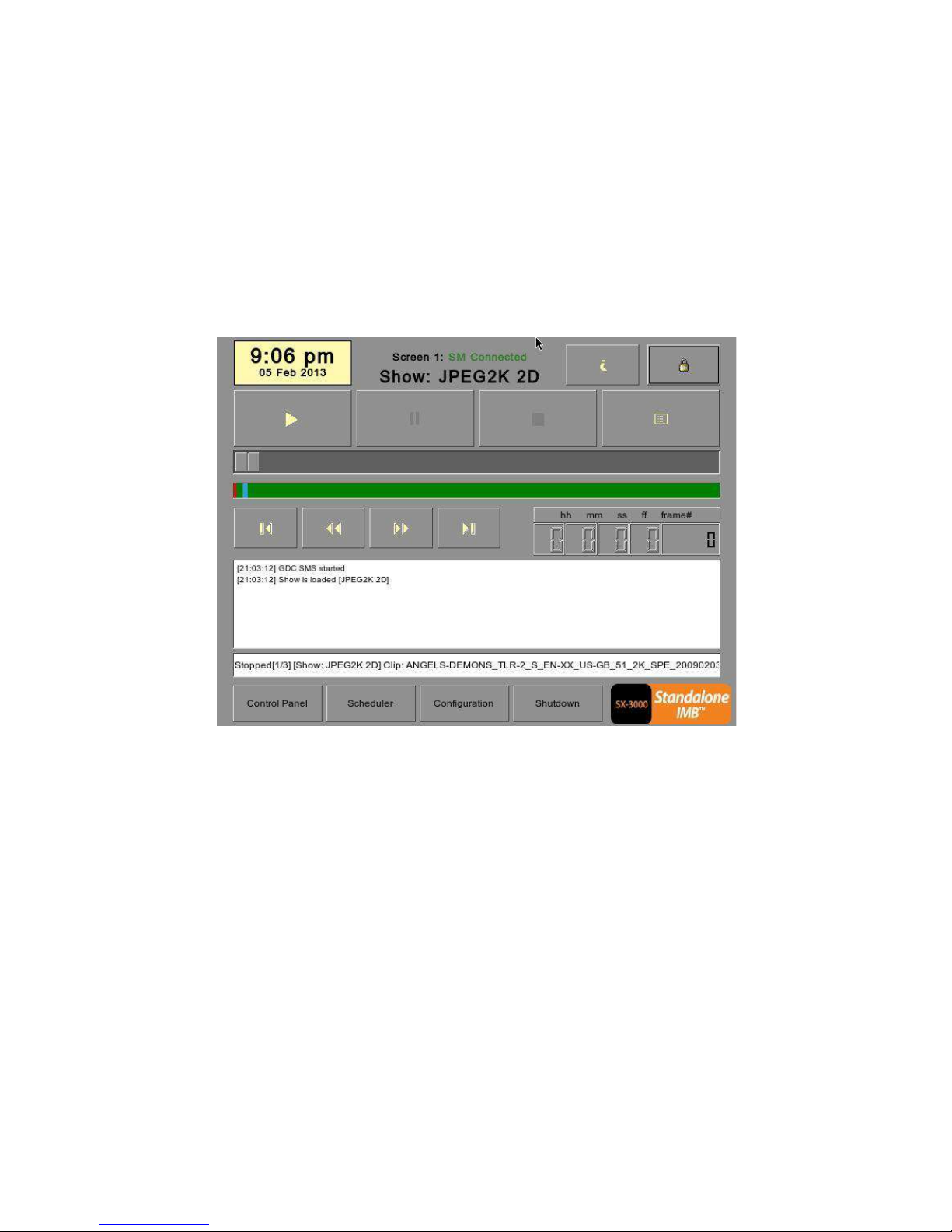
In this manual there will be many instructions starting from the SMS screen (see Figure 1). This is the
main page of the SX-3000 software that features the status of the show playing, the transport, and the
buttons to access certain menus of the software.
Figure 1 SMS interface.

7
1.1. Equipment List
This section describes the equipment shipped with the GDC SX-3000 and PSD-3000-P.
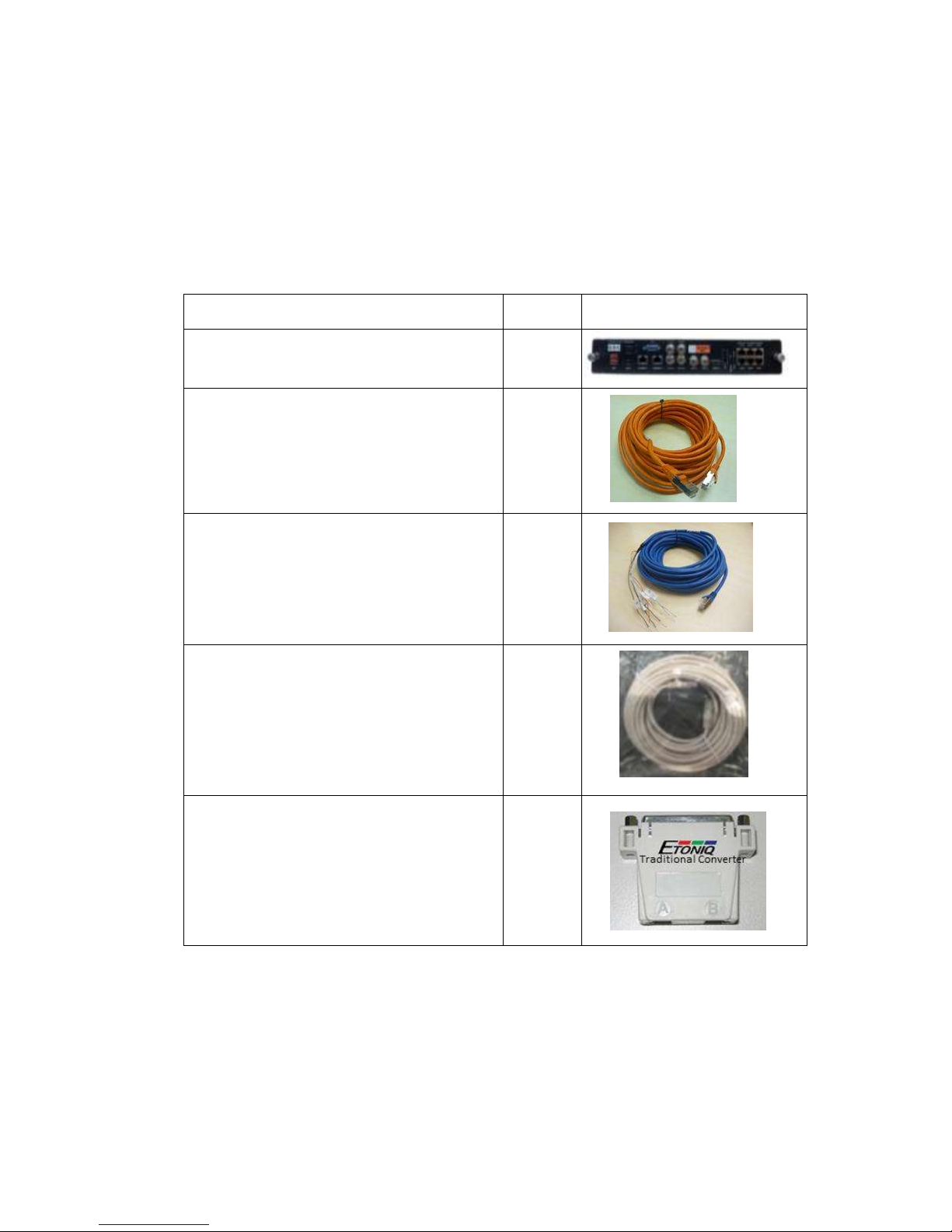
The SX-3000 Packaging Includes:
Item
Qty
Photo
SX-3000 Unit with projector coverplate
1
RJ45 AES Audio Cable
2
RJ45 GPIO Cables
4
Network Cable
1
RJ45 to DB25 Audio Converter
1

8
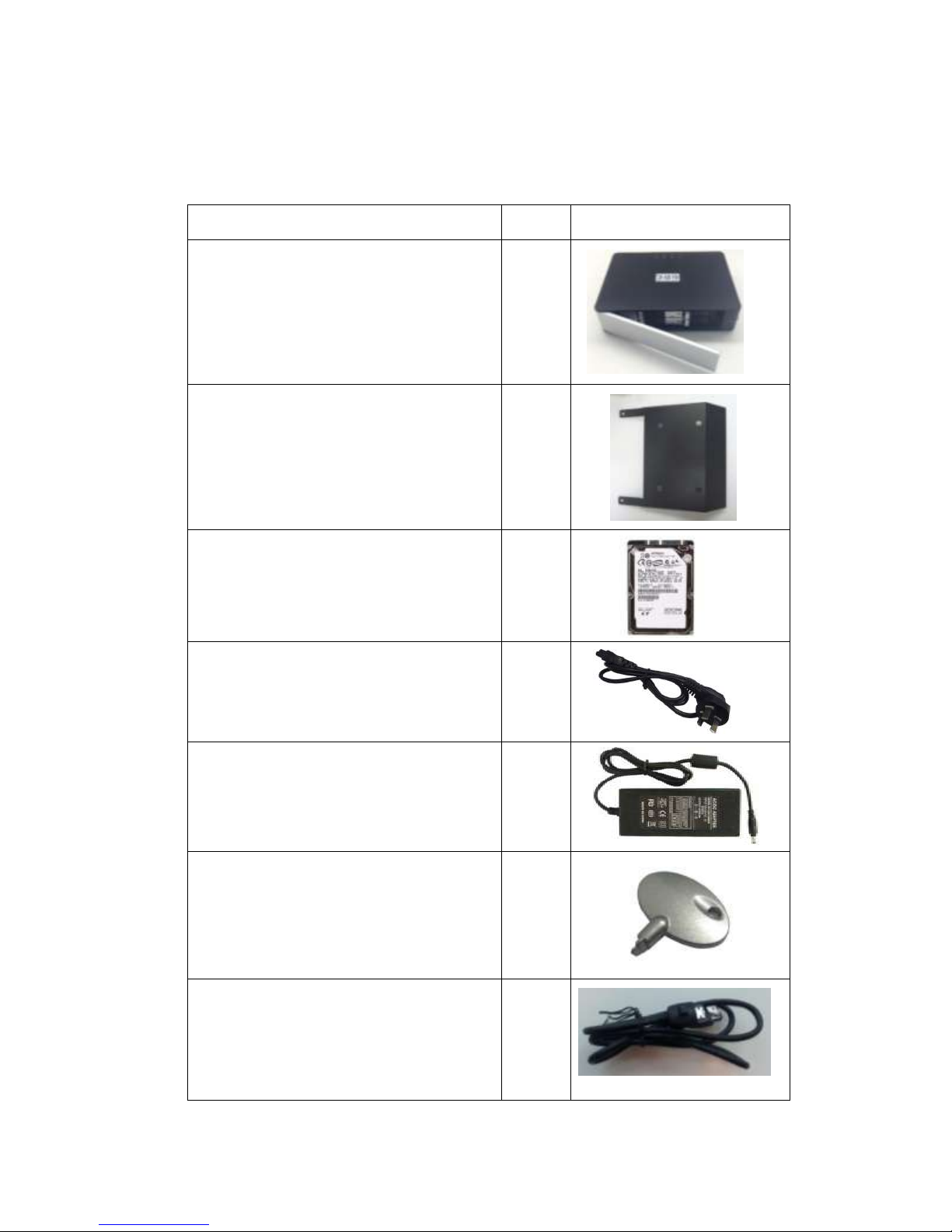
The PSD-3000-P Packaging Includes:
Item
Qty
Photo
PSD-3000-P Portable Storage Device
1
PSD-3000-P Bracket for specific projector
model
1
2.5” SATA HDD
3*
Power Cord
1
Power Adapter
1
HDD Tray Key
2
eSATA Cable
1

9
Manual CD
1
Quick Start Guide
1
*The number of HDD is subject to change without notice due to ongoing product development and
improvement.
2. INSTALLING SX-3000 INTO THE PROJECTOR
Note: If the projector comes with the GDC IMB pre-installed, the instructions in Section 2 can be skipped.
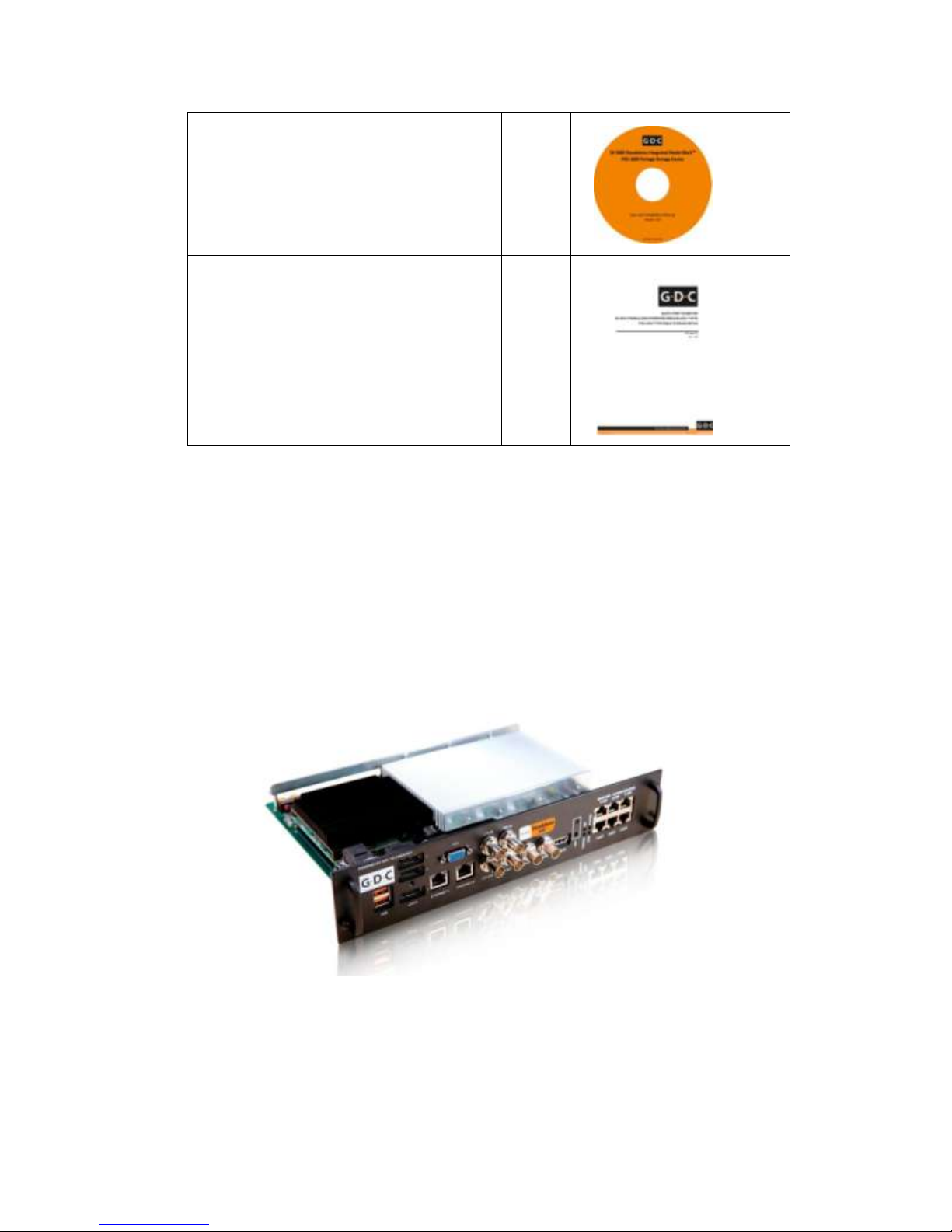
This section of the manual describes the physical installation of the SX-3000 into the projector. If
the projector does not have the GDC IMB installed, follow the steps below to install SX-3000 into
the projector.
Figure 2 SX-3000 Standalone IMB®
Other manuals for SX-3000
4
This manual suits for next models
1
Table of contents
Popular Computer Hardware manuals by other brands

EMC2
EMC2 VNX Series Hardware Information Guide

Panasonic
Panasonic DV0PM20105 Operation manual

Mitsubishi Electric
Mitsubishi Electric Q81BD-J61BT11 user manual

Gigabyte
Gigabyte B660M DS3H AX DDR4 user manual

Raidon
Raidon iT2300 Quick installation guide

National Instruments
National Instruments PXI-8186 user manual