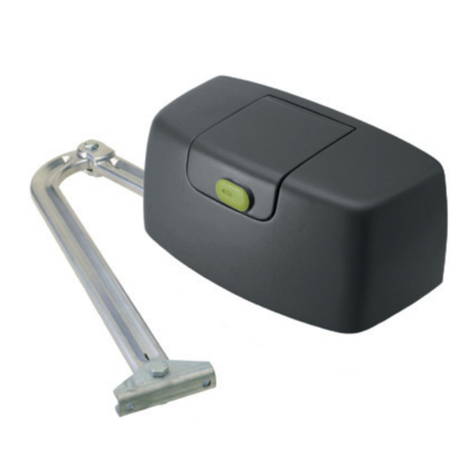
GATEXPERT SW400DC User manual

Swing Gate Opener
User Manual
SW400DC
Website: www.gatexpertstore.com
E-mail: sales@gatexpertstore.com

Instructions for SW400DC
www.gatexpertstore.com
WARRANTY
1. To repair against this warranty card and invoice during the warranty period.
2. Warranty period: 1 year after the date of invoice.
3. Without unauthorized dismantling, any product broken or damage due to
quality problem, we’ll offer the repair service for free or replace for free.
4. The malfunction and damages caused by incorrect use or man fault is not
covered by this warranty.
CONTACT US
E-mail: sales@gatexpertstore.com
Please fill in the order information in the form below.
All personal information you provided will be only used for warranty service
and kept strictly confidential.
Refer to this list when contacting GATEXPERT for technical service or
assistance with your automatic gate opener.
Order Number
Product Model
Purchase Date
Country / Region
Email Address
Issue Details

Instructions for SW400DC
www.gatexpertstore.com
CONTENTS
1. Safety Instruction........................................................................................................................1
2. Packing List..................................................................................................................................2
3. Technical Parameters............................................................................................................................... 3
4. Installation.................................................................................................................................... 4
4.1 Installation Drawing............................................................................................................................4
4.2 Size of Main Machine and Accessories.........................................................................................4
4.2.1 Size of Main Machine.................................................................................................................... 4
4.2.2 Size of Mounting Plate.................................................................................................................. 5
4.3 Installation Steps.................................................................................................................................5
4.3.1 Preparation before Main Machine Installation........................................................................... 5
4.3.2 Accessory Installation....................................................................................................................6
4.3.3 Main Machine Installation............................................................................................................. 7
4.3.4 Size of Control Box......................................................................................................................10
5. Wiring and Debugging....................................................................................................................... 11
5.1 Wiring Instructions............................................................................................................................11
5.2 Control Board Drawing and Instructions....................................................................................12
5.3 Digital Screen Setting...................................................................................................................... 13
5.4 Travel Setting..................................................................................................................................... 13
5.5 Trimmer Setting................................................................................................................................. 14
5.6 Learning Remote Control & Delete Remote Control............................................................... 14
5.6.1 Learning Remote Control............................................................................................................14
5.6.2 Delete Remote Control................................................................................................................14
5.6.3 Special Remote Control Key-button....................................................................................15
5.7 Control Board Settings....................................................................................................................15
5.7.1 Base Menu.................................................................................................................................... 15
5.7.2 Base Menu Instructions...............................................................................................................17
5.7.3 Advanced Menu............................................................................................................................19
5.7.4 Advanced Menu Instructions...................................................................................................... 21
6. Others.......................................................................................................................................... 22
6.1 Maintenance....................................................................................................................................... 22
6.2 Troubleshooting................................................................................................................................ 23

Instructions for SW400DC
www.gatexpertstore.com
1
Dear users,
Thank you for choosing this product. Please read the manual carefully before assembling
and using it. Please do not leave out the manual if you send this product to a third party.
1. Safety Instruction
● Please read this manual carefully before installation, in which involves with important
information about installation、using、maintenance and safety.
● Any undefined operations under this manual is not allowed, incorrect using may damage
the product even causing the injuries or property losses.
● To consider the possible danger during the installation or using process of swing gate
operator, installation must strictly comply with the construction standard and electrical
operating procedure.
● Before installation, please make sure that the power voltage being used matches with
the supply voltage of this product. Please check if the leakage protection switch is
installed and the grounding system is correct.
● Please check if additional equipments or materials are required to meet the specific
requirements.
● The disposal of packaging material must be complying with the local regulation.
● Please do not change any parts except for those defined under this manual. Any
undefined changes may cause the malfunction. Any damages to the product arising
therefrom shall be beyond the liability of the company.
● Please do not leak water or any liquid into the controller or any other open devices.
Please disconnect the power immediately if any mentioned cases happened.
● Please keep this product away from heat and open fire. Or it may damage the
components; cause the failure or other hazards.
● Please make sure there is no vehicles、passengers and objects passing through while
the swing gate is moving.
● Anti-clip equipment like infrared protection switch must be installed to avoid injuries to
person and property losses. The company shall not be liable for any damage or
accident arising therefrom.
● The installation、using and maintenance of this product must be carried out by
professionals.
● Children are not allowed be touch the control devices or remote transmitters.

Instructions for SW400DC
www.gatexpertstore.com
2
● A warning sign must be placed somewhere on the swing gate according to the national
standard.
● Please keep this instruction properly for future reference.
2. Packing List (Standard)
No.
Picture
Name
Quantity
1
Main machine
2
2
Control box
1
3
Manual release bar
1
4
Remote control
2
5
Wall bracket
4
6
Front mounting bracket
2
7
Connecting bracket
2
8
Mounting screw (short)
2
9
Mounting screw (long)
2
10
Screw M8×25
4
11
Nut M8
6
12
Limit stopper
1

Instructions for SW400DC
www.gatexpertstore.com
3
No.
Picture
Name
Quantity
13
Spring washer Ø12
2
14
gasket
2
Packing List (Optional)
No.
Picture
Name
Quantity
1
Infrared sensor
1
2
0
8
5 6
97
4
1 2 3
Wireless keypad
1
3
Alarm lamp
1
4
Electric lock
1
5
Storage battery
2
3. Technical Parameters
Model
SW400DC
Power supply
220V/50Hz;110V/60Hz
Motor power
62W
Gate moving speed
22~26s / 90°
Max.single-leaf weight
400kg
Max.single-leaf length
3m
Max.piston stroke
45cm
Max.force
3800N
Remote control distance
≥30m
Remote control mode
Single button mode
Storage battery (optional)
DC24V (4.5Ah or 9Ah)

Instructions for SW400DC
www.gatexpertstore.com
4
Noise
≤60dB
Working duty
S2, 30min
Recording of up remote controls
20
Remote frequency
433.92 MHz
Working temperature
-20°C - +70°C
Package weight
20kg
4. Installation
SW400DC swing gate opener is applicable to single leaf gate weight less than 400kg,
and the length shorter than 3m. The drive mode adopts the worm and worm gear to
combine the screw rod transmission. This gate opener must be installed inside the
enclosure or yard for protection.
4.1 Installation Drawing
0
8
5 6
97
4
1 2 3
⑦
①
③
④
⑤
②
⑧
⑥
Figure 1
①Control box ③Gate ⑤Infrared sensor (optional) ⑦
Remote control
②Gate opener ④Alarm lamp (optional) ⑥Limit stopper ⑧
Wireless keypad (optional)
4.2 Size of Main Machine and Accessories
4.2.1 Size of Main Machine

Instructions for SW400DC
www.gatexpertstore.com
5
1 4 5 0 m m
1 0 0 0 m m
1 0 6 m m
Figure 2
4.2.2 Size of Mounting Plate
F ro n t m o u n tin g b ra c k e t W a ll b ra c k e t
70mm
8.
5mm
17.5mm
40mm
2x8.
5mm
φ
Figure 3
4.3 Installation Steps
4.3.1 Preparation before Main Machine Installation
Before installing the door opener, please confirm that the door were installed
correctly, please ensure that the door can be manually operated smoothly, and the
door limit stopper can effectively prevent the door to continue moving.
Please keep a distance of 40-50mm between the door bottom and the ground for
installing the electric lock. If electric lock is not required, the distance between the
door bottom and the ground should be ≥20mm;
The recommended mounting height of the 2 main machines is around 300 ~
800mm above the ground, and make sure there are reliable fixed points for mounting
brackets.
Cable bury
In order to ensure the normal operation of the door opener and protect the cable
from damage, please use two PVC pipes to bury the motor and power cables, and the

Instructions for SW400DC
www.gatexpertstore.com
6
control cables separately. One PVC pipe for motor and power cables, the other one
for control cables.
Mounting brackets fixing
In order to install the SW400DC main machines firmly, it is recommended to use
the expansion screws to fix the mounting brackets.
4.3.2 Accessory Installation
a) Before installing the main machines, please install the wall bracket on the wall first,
then fix the connecting bracket, finally install the front mounting bracket on the door.
Note: Please detect by gradienter before fixing to ensure that the front
mounting bracket and the connecting bracket are in the same level.
Expansion screw Hexagon screw
Nut Nut
Hexagon screw
Nylon gasket
Figure 4
b) The connecting bracket and wall bracket can be connected according to different
conditions, please refer to figure 5.
Figure 5
c) Users should prepare power cables for the control box and the main machines by
themselves due to the different installation environment. The cores for the control box
power supply cable should be more than 3, the cores for the motor cable is 2. If users
need to install external accessories like electric lock, infrared sensor, alarm lamp,
external button switch etc., please increase the embedded cables accordingly, please
make sure the sectional diameter of electric lock cable is over 1.5mm², sectional

Instructions for SW400DC
www.gatexpertstore.com
7
diameter of other cables is over 0.5mm². The cable length should be determined by
users according to their installation situations.
Note: The outlet on the PVC pipe should be downward in order to avoid the rain
water flowing into the pipe along the cable.
d) Before the installation, please unlock the two main machines. Unlock method:
Remove the cover, insert the manual release bar, rotate the bar until it’s released, as
shown in Figure 6, then turn the telescopic arm, you’ll find it is stretched easily.
Left engine Right engine
Figure 6
4.3.3 Main Machine Installation
Please refer to Figure 7 to fix the tail of the main machine and the connecting bracket
with the installation screws, and then manually adjust the telescopic arm to the
appropriate length, finally fix the telescopic arm connector and the front mounting
bracket with the installation screws. Pull the door after installation to ensure the travel
is flexible without jamming.
Mounting screw (length)
Spring washer
Mounting screw (short)
Nut
gasket
Figure 7
Table of contents
Other GATEXPERT Gate Opener manuals

GATEXPERT
GATEXPERT GA1000AC User manual

GATEXPERT
GATEXPERT DKC500DCL User manual

GATEXPERT
GATEXPERT SW200DC User manual

GATEXPERT
GATEXPERT GA600AC User manual

GATEXPERT
GATEXPERT SL500DCL User manual

GATEXPERT
GATEXPERT GA500DC User manual

GATEXPERT
GATEXPERT INDUS-E Series User manual

GATEXPERT
GATEXPERT PY300DCL User manual

GATEXPERT
GATEXPERT DKC500ACL User manual

GATEXPERT
GATEXPERT PY300DC User manual