Garmin MS-NRX300 User manual

MS-NRX300
INSTALLATION INSTRUCTIONS
Important Safety Information
WARNING
See the Important Safety and Product Information guide in the product box for product warnings and other
important information.
Failure to install this device according to these instructions could result in personal injury, damage to the vessel
or device, or poor product performance.
CAUTION
To avoid possible personal injury, always wear safety goggles, ear protection, and a dust mask when drilling,
cutting, or sanding.
NOTICE
When drilling or cutting, always check what is on the opposite side of the surface to avoid damaging the vessel.
Getting the Owner's Manuals
To fully understand the features and operations of your stereo, you can get the latest stereo owner's manual
and translations of manuals from the web. You can also download the full remote owner's manual for more
information about using this remote.
1Go to garmin.com/marine.
2Select a manual.
What's In the Box
• Mounting gasket
• Four 8-gauge, self-tapping screws
• Two screw covers
• 6m (20ft.) NMEA 2000® backbone cable
• NMEA 2000 T-connector
• Dust cover
GUID-56FDBE7F-D572-4ADD-87A0-7729C3FC4E84 v5February 2024

Tools Needed
• Phillips screwdriver
• Drill
• 2.5mm (3/32in.) drill bit
• 50mm (2in.) hole saw
• Marine sealant (optional)
Connection Considerations
You can connect the MS-NRX300 remote control to a Fusion® stereo using one of two methods, depending on
the stereo:
• A new Fusion remote control network
• An existing NMEA 2000 network
The main difference between a Fusion remote control network and a NMEA 2000 network is how they receive
power. A NMEA 2000 network receives power through a power cable connected to the backbone and a power
source.
A Fusion remote control network receives power from the stereo. The stereo can supply power to a Fusion
remote control network if it has the NRX POWER option in the SETTINGS menu or if a red drop cable is included
in the stereo box. The Fusion remote control network can support up to three remote controls.
If the stereo cannot supply power to the Fusion remote control network, you must connect the MS-NRX300
remote control using the NMEA 2000 network.
NMEA 2000 Connection Considerations
You may connect the remote control to the stereo using an existing NMEA 2000 network.
• You can connect more than three MS-NRX300 remote controls to one Fusion stereo.
• You are connecting to a Fusion stereo that cannot provide power to the remote.
• You can control a connected Fusion stereo from a FUSION-Link™ compatible chartplotter.
2

Item Description
Fusion stereo
Compatible chartplotter
MS-NRX300 remote control*
12Vdc power source with an ignition or in-line switch
NMEA 2000 drop cable and T-connector, dependant on stereo. See the following table.
NMEA 2000 drop cable
NMEA 2000 power cable, 2m (6ft.)
NMEA 2000 terminator or backbone cable
NMEA 2000 T-connector*
*Components included with the MS-NRX300 remote control.
NOTE: The NMEA 2000 network may include other NMEA 2000 devices.
NMEA 2000 Cables and Software Settings
The cables required to connect to the NMEA 2000 network vary depending on the stereo. See the table below to
determine which cables and possible software settings are required for your stereo model.
All stereos require a T-connector to connect the drop cable to the NMEA 2000 network. You can extend the drop
cable to a maximum length of 6m (20ft.) using a standard NMEA 2000 cable.
3

Stereo Cables and software settings required
NRX POWER option in
software.
Examples:
• Apollo™ MS-RA770
• Apollo MS-RA670
• Included NMEA 2000 drop cable required.
• Included NMEA 2000 T-connector required.
NOTICE
To avoid damaging other devices on the NMEA 2000 network, the NRX POWER
option must be off. This is off by default. See the stereo owner's manual for
more information.
NRX POWER option in
software, NMEA 2000 cable
hardwired to stereo.
• Use the cable on the stereo wiring harness.
• Included NMEA 2000 T-connector required.
NOTICE
To avoid damaging other devices on the NMEA 2000 network, the NRX POWER
option must be off. This is off by default. See the stereo owner's manual for
more information.
No NRX POWER option in
software.
• Included NMEA 2000 drop cable required.
• Included NMEA 2000 T-connector required.
No NRX POWER option in
software, red cable included.
• Drop cable required.
• Included NMEA 2000 T-connector required.
NOTICE
To avoid damaging other devices on the NMEA 2000 network, do not use the
red drop cable included with the stereo to connect to the NMEA 2000 network.
4

Fusion Remote Control Network Connection Considerations
You may connect the remote control to the stereo using a standalone powered Fusion remote control network if
you have the following conditions.
• You do not have a full NMEA 2000 network on your boat.
• You are connecting three or fewer MS-NRX300 remote controls to one Fusion stereo.
• You are connecting to a Fusion stereo that can provide power to the remote. The stereo can supply power to
the remote control if it has an NRX POWER option in the SETTINGS menu or if a red drop cable is included.
Item Description
Fusion stereo
MS-NRX300 remote control*
NMEA 2000 drop cable. See the following table.
NMEA 2000 female terminator*
NMEA 2000 T-connector*
NMEA 2000 backbone cable, 6m (20ft.)*
NMEA 2000 inline terminator*
*Components included with the MS-NRX300 remote control.
5

Fusion Remote Control Network Cables and Software Settings
The cables required to connect to the Fusion remote control network vary depending on the stereo. See the
table below to determine which cables and possible software settings are required for your stereo model.
The stereo can supply power to the remote control if it has an NRX POWER option in the SETTINGS menu or if a
red drop cable is included.
Stereo characteristics Cables and software settings required
NRX POWER option in software.
• Included NMEA 2000 drop cable required.
• You must enable the NRX POWER setting to provide power to the remote
control. Select > SETTINGS > POWER OPTIONS > NRX POWER.
NRX POWER option in software,
NMEA 2000 cable hardwired to
stereo.
• Use the cable on the stereo wiring harness. No additional cables needed.
• You must enable the NRX POWER setting to provide power to the remote
control. Select > SETTINGS > NRX POWER.
No NRX POWER option in
software. Not supported. Connect to a NMEA 2000 network.
Mounting Considerations
When selecting a mounting location, observe these considerations.
• The device must be mounted in a location where there is at least 75mm (3in.) of clearance behind the
mounting surface and you can access the controls after it is mounted.
• If you want to mount the device outside the boat, it must be mounted in a location well above the waterline,
where it is not submerged.
• If you want to mount the device outside the boat, it should be mounted in a location where it will not be
damaged by a docks, pilings, or other pieces of equipment.
Mounting the Remote Control
1At the mounting location, use a 50mm (2in.) hole saw to cut through the mounting surface.
2Place the remote control in the cutout and mark the pilot holes.
3Remove the remote control from the cutout, and using a 2.5mm (3/32in.) drill bit, drill the pilot holes.
4Apply marine sealant around the cutout (optional).
5Place the gasket on the back of the remote control.
6Feed the attached NMEA 2000 cable through the cutout.
7Place the remote control in the cutout.
8Secure the remote control to the mounting surface using the included screws.
9Install the decorative bezel around the edges of the remote control.
10 Route the NMEA 2000 cable away from sources of interference and connect it to the NMEA 2000 network or
the Fusion remote control network.
6

More Information
Specifications
Specification Measurement
Operating voltage From 10.8to 16Vdc negative ground
Electrical input current 110mA at 12Vdc
NMEA 2000 Load Equivalency Number (LEN) 3 (150mA)
Operating temperature From 0 to 50°C (from 32 to 122°F)
Storage temperature From -20 to 70°C (from -4 to 158°F)
Water rating IEC 60529 IPX7
Top Dimensions
Item Measurement
110mm (45/16in.)
42mm (15/8in.)
28mm (13/32in.)
16.5mm (41/64in.)
7

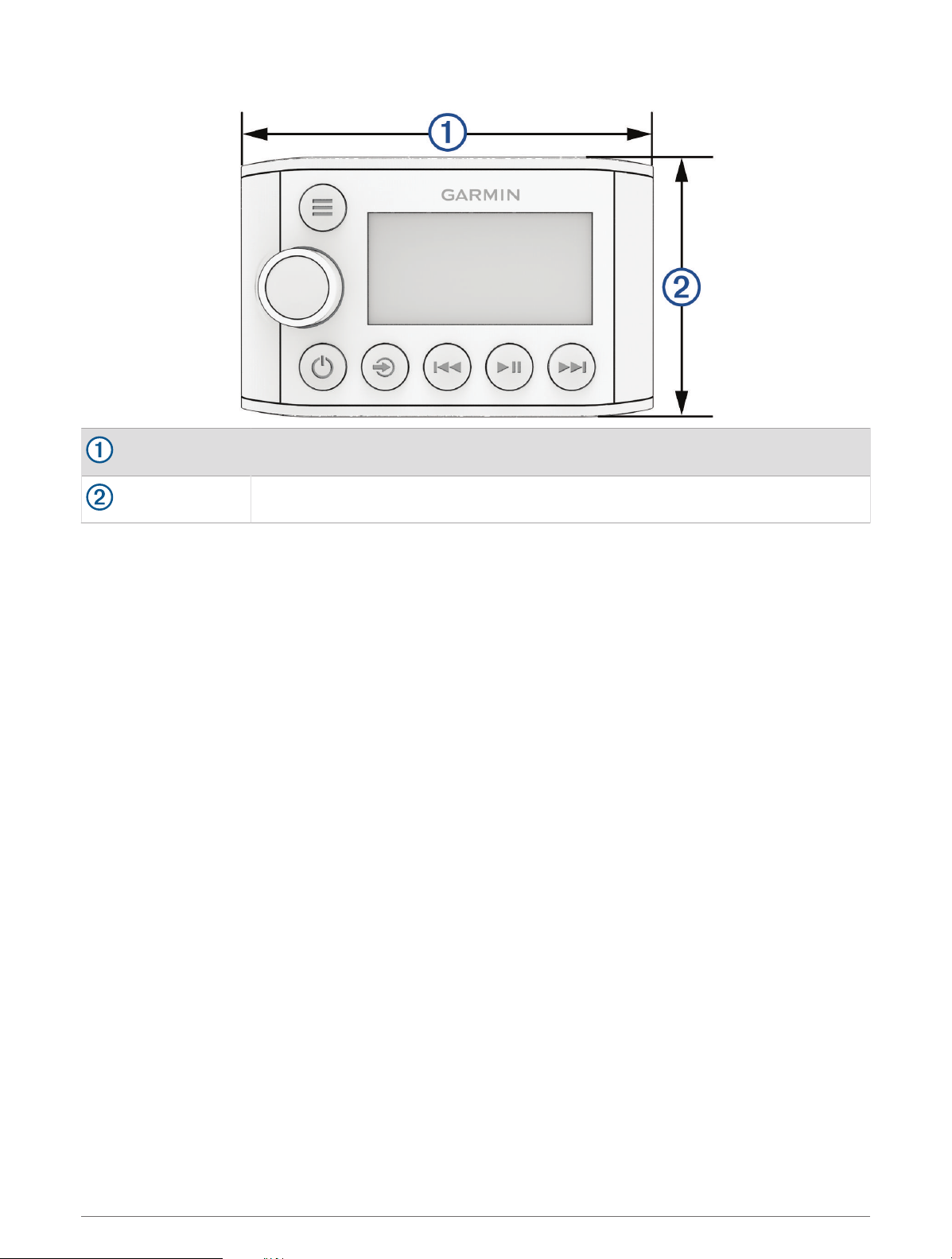
Front Dimensions
110mm (4.33in.)
70mm (2.76in.)
Supported NMEA 2000 PGN Information
NOTE: You must connect the device to a NMEA 2000 network for NMEA 2000 support.
8

PGN Number Data Field
127250
Heading sensor reference:
• 0: True
• 1: Magnetic
128259
Water speed reference:
• 00: Paddle wheel
• 01: Pitot tube
• 02: Doppler log
• 03: Correlation log (ultrasound)
• 04: Electromagnetic (EM) log
128267 Water depth:
• Offset add or subtract
129025 Position:
• Latitude and longitude
129026
Course Over Ground (COG) and Speed Over Ground (SOG)
COG reference:
• 0: True
• 1: Magnetic
129029 Global Navigation Satellite System (GNSS) position data
129284 Navigation data:
• ETA date
130306 Wind data reference:
• 0x02 : Apparent wind (relative to the vessel centerline)
130310 Water temperature and air pressure
130311 Water temperature and air pressure
130312 Temperature and temperature source:
• 00 : Sea temperature
130314 Actual pressure and pressure source:
• 00 : Atmospheric pressure
130577
Direction data and COG reference:
• 0: True
• 1: Magnetic
Registering Your MS-NRX300
Help us better support you by registering the product online.
• Go to garmin.com.
• Keep the sales receipt, or a copy, in a safe place.
9

Software Updates
You must update the software for this device using a connected compatible stereo or using the Fusion-Link™
app.
To make sure the device functions correctly with all compatible stereos on the network, you should update the
software in all devices after you install this device.
For software update instructions, see the online owner's manual for this device or for a connected compatible
stereo.
物質宣言
部件名称
有毒有害物质或元素
铅 汞 镉 六价铬 多溴联苯 多溴二苯醚
印刷电路板组件
屏幕/背光
金属零件
电缆 电缆组件 连接器
本表格依据 SJ/T11364 的规定编制。
: 代表此种部件的所有均质材料中所含的该种有害物质均低于
(GB/T26572) 规定的限量
: 代表此种部件所用的均质材料中, 至少有一类材料其所含的有害物质高于
(GB/T26572) 规定的限量
*該產品說明書應提供在環保使用期限和特殊標記的部分詳細講解產品的擔保使用條件。
產品
© 2016 Garmin Ltd. or its subsidiaries
Garmin®, the Garmin logo, Fusion®, and the Fusion logo are trademarks of Garmin Ltd. or its subsidiaries, registered in the USA and other countries. FUSION-Link™ is a
trademark of Garmin Ltd. or its subsidiaries. These trademarks may not be used without the express permission of Garmin.
NMEA®, NMEA 2000®, and the NMEA 2000 logo are registered trademarks of the National Marine Electronics Association. All rights reserved. Other trademarks and trade
names are those of their respective owners.
© 2016 Garmin Ltd. or its subsidiaries support.garmin.com
Table of contents
Other Garmin Remote Control manuals

Garmin
Garmin GRID User manual

Garmin
Garmin DELTA CANINE REMOTE User manual

Garmin
Garmin Fusion Apollo MS-ERX400 User manual

Garmin
Garmin GRC 10 Remote Control User manual

Garmin
Garmin 010-11146-00 - GPS Receiver Remote Control User manual

Garmin
Garmin GPSMAP 5000 Series User manual

Garmin
Garmin GHC 10 User manual

Garmin
Garmin Meteor User manual

Garmin
Garmin Edge User manual

Garmin
Garmin 010-11146-00 - GPS Receiver Remote Control Reference guide