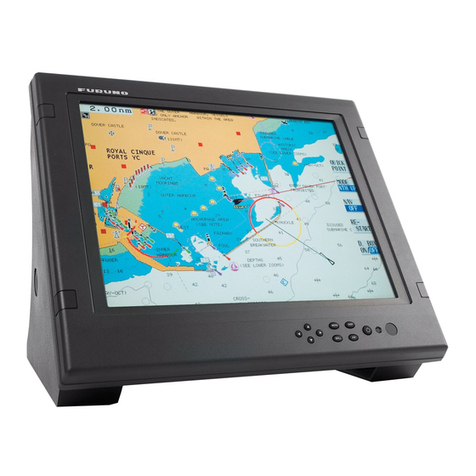
Furuno Mu 120c User manual

MULTI-PURPOSE LCD DISPLAY
MU-120C


i
SAFETY INSTRUCTIONS
Safety Instructions for the Operator
WARNING
Do not open the equipment.
Only qualified personnel
should work inside
the equipment.
Do not disassemble or modify the
equipment.
Fire, electrical shock or serious injury can
result.
Use the proper fuse and power cable.
Fuse rating is shown on the equipment.
Use of a wrong fuse can result in damage
to the equipment.
Immediately turn off the power at the
switchboard if the equipment is emitting
smoke or fire.
Continued use of the equipment can cause
fire or electrical shock. Contact a FURUNO
agent for service.
CAUTION
A warning label is attached to the
equipment. Do not remove the label.
If the label is missing or damaged,
contact a FURUNO agent or dealer.
WARNING
To avoid electrical shock, do not
remove cover. No user-serviceable
parts inside.
Name: Warning Label (2)
Type: 03-129-1001
Code No.: 100-236-741
WARNING
Do not open the cover
unless totally familiar with
electrical circuits and
service manual.
Improper handling can result
in electrical shock.
Turn off the power at the switchboard
before beginning the installation.
Fire or electrical shock can result if the
power is left on.
Do not install the equipment where it
may get wet from rain or water splash.
Water in the equipment can result in fire,
electrical shock or damage to the equip-
ment.
Safety Instructions for the Installer
CAUTION
Observe the following compass safe
distances to prevent interference to a
magnetic compass:
When lifting the display unit, hold it
together with the cover.
Grasping by the cover alone may allow
the display unit to fall, resulting in possible
bodily injury or damage to the equipment.
LCD Monitor MU-120C
Standard Steering
compass compass
0.3 m 0.3 m
Remote Controler
RMC-200
0.75 m 0.5 m
Do not connect/disconnect the signal
cable while turning the power on.
The unit may be damaged.

ii
TABLE OF CONTENTS
FOREWARD.........................................................................................................iii
SYSTEM CONFIGURATION................................................................................ iv
EQUIPMENT LISTS.............................................................................................. v
1. MOUNTING.......................................................................................................1
1.1 Display Unit..................................................................................................................... 1
1.2 Remote Controller ...........................................................................................................4
2. WIRING .............................................................................................................5
3. ADJUSTMENTS................................................................................................7
3.1 RGB/DVI Setting .............................................................................................................7
3.2 VIDEO Setting.................................................................................................................9
3.3 Menu Window Setting ...................................................................................................10
3.4 Remote Controller Setting .............................................................................................12
4. OPERATION....................................................................................................13
4.1 Controls......................................................................................................................... 13
4.2 Adjusting Display Brilliance............................................................................................15
4.3 Choosing Source for Main Picture.................................................................................16
4.4 Choosing Source for Picture-in-Picture..........................................................................17
5. MAINTENANCE, TROUBLESHOOTING .......................................................18
5.1 Maintenance..................................................................................................................18
5.2 Troubleshooting.............................................................................................................19
5.3 Clearing the Memory ..................................................................................................... 20
SPECIFICATIONS...........................................................................................SP-1
PACKING LISTS ............................................................................................... A-1
OUTLINE DRAWINGS...................................................................................... D-1
INTERCONNECTION DIAGRAM ......................................................................S-1

iii
FOREWORD
A Word to the Owner of the MU-120C
FURUNO Electric Company thanks you for purchasing the MU-120C 12.1” Multi-Purpose
LCD Display. We are confident you will discover why the FURUNO name has become
synonymous with quality and reliability.
For over 50 years FURUNO Electric Company has enjoyed an enviable reputation for
quality and reliability throughout the world. This dedication to excellence is furthered by our
extensive global network of agents and dealers.
Your equipment is designed and constructed to meet the rigorous demands of the marine
environment. However, no machine can perform its intended function unless properly
installed and maintained. Please carefully read and follow the operation, installation and
maintenance procedures set forth in this manual.
We would appreciate feedback from you, the end-user, about whether we are achieving our
purposes.
Thank you for considering and purchasing FURUNO.
Features
• Main or remote display for radars, video sounders, sonars, plotter. Compatible
equipment: FAR-21X7 series, MODEL1833C/1833C-BB series (NavNet), FCV-1200L,
CH-250, CH-270, CSH-5L/8L, GD/GP-280/380/680, etc.
• High resolution display of 800 x 600dot (SVGA)
• Brightness of 1,000 cd/m2(maximum) and 5 cd/m2(minimum) for comfortable viewing
day and night
• Landscape orientation
• Wide viewing angle for observation by more than one person
• Picture-in-picture function

i
v
SYSTEM CONFIGURATION
12-24VDC
CCDcamera,
Videorecorder,etc.
FAR-2107seriesetc.
Radar,VideoPlotter,
Navigator,VideoSounder,
ScanningSonar,etc.
RGB
DVI
VIDEO(NTSC/PAL)
Connectable equipment
Equipment Resolution Signal
FR-1510 MK3 series XGA Analog
FCV-1200L* VGA Analog, via IF8000
GD/GP-280/380/680 VGA Analog
CH-250 VGA Analog, via IF8000
CH-270 VGA Analog, via IF8000
CSH-5L/8L XGA Analog
FSV-24/24S/30/30S SXGA Analog
FR-21X5 series SXGA Analog
FAR-21X7 series SXGA DVI
FEA-2107 SXGA DVI
MODEL 1833C series VGA Analog
MODEL 1833C-BB series VGA Analog
*= Not available for the portrait type.
Note: The resolution of MU-120C is SVGA. VGA, XGAand SXGA signal may not be sharp
in character or scan line.
The TFT LCD is constructed using the
latest LCD techniques, and displays
99.99% of its pixels. The remaining 0.01%
of the pixels may drop out or blink, how-
ever this is not an indication of malfunc-
tion.
About the TFT LCD

v
EQUIPMENT LISTS
Standard supply
Name Type Code No. Qty Remarks
Display Unit MU-120C −1 w/LCD cover
Remote Controller RMC-200 −1
Spare Parts* SP19-00101 001-403-170 1 set
Installation Materials* CP19-00100 000-012-630 1 set Power cable
Accessories* FP19-00601 001-403-200 1 set
Option
Name Type Code No. Qty Remarks
Hanger FP19-00700 001-403-240 1 w/knob, self-tapping screws
000-146-500 1 Cable length: 5 m
3COX-2P-6C 000-146-501 1 Cable length: 10 m
Cable Assy
DVI-D/D SINGLELINK5M 000-149-054 1 Cable length: 5 m
* = See packing list at end of manual.

vi

1
1 MOUNTING
Refer to the outline drawing at the end of the manual for mounting dimensions.
Note: A grass plate covers the LCD. For this reason, handle the unit carefully.
1.1 Display Unit
The display unit may be mounted on a desktop (optional hanger required) or flush mounted
in a panel.
When selecting a mounting location, keep in mind the following points:
• Locate the unit out of direct sunlight.
• Select a location where the display can be easily viewed and the controls can be easily
operated.
• Leave sufficient space around the unit for servicing and maintenance. See the outline
drawing for minimum servicing space.
• The unit weighs 5.4 kg (flush mounting)/6.3 kg (desktop mounting). Be sure the
mounting location is strong enough to support the weight of the unit.
• Locate the unit away from areas subject to water splash and rain.

2
Flush mounting
See the outline drawing at the end of the manual for mounting dimensions.
CAUTION
Holdthecoveranddisplayunit
togetherwhenliftingthedisplayunit.
Thedisplayunitmayfalloutifonlythe
coverisheld.
1. Remove the LCD cover from the unit.
2. Using the paper template supplied in the installation materials, make a cutout in the
mounting location.
3. Insert the display unit to the cutout, and fasten the display unit to the mounting location
with four self-tapping screws (5X30, supplied as accessories).
Note: Hex head bolts may also be used to fasten the display unit. However, their lengths
must be at least 30 mm.
Waterproofing: IP20
Waterproofing: IPX5
30
110
Cosmetic cap
Mounting dimensions
4. Attach the cosmetic caps (supplied as accessories) to the display unit at the locations
shown in the drawing above.
Other manuals for Mu 120c
2
Table of contents
Other Furuno Monitor manuals

Furuno
Furuno MU-231 User manual

Furuno
Furuno FMD1920C User manual

Furuno
Furuno MU-151C User manual

Furuno
Furuno MU-170C Manual

Furuno
Furuno MU-155C Manual

Furuno
Furuno FMD-1712 User manual

Furuno
Furuno FEA-2107 User manual

Furuno
Furuno MU-150HD User manual

Furuno
Furuno NAVNET TZTOUCH2 TZTL15F Installation guide

Furuno
Furuno FMD3100 User manual

Furuno
Furuno FEA-2107-BB User manual

Furuno
Furuno MFD12 User manual

Furuno
Furuno RD-20 User manual

Furuno
Furuno NAVNET 3D MFDBB User manual

Furuno
Furuno RD-30 User manual

Furuno
Furuno RD-50 User manual

Furuno
Furuno MU-170C Manual

Furuno
Furuno MU-150C User manual

Furuno
Furuno MU-190 User manual

Furuno
Furuno TZT9 User manual