FujiFilm JADAK flexpoint HS-1M User manual

Bar Code Scanner
User Guide

SonoSite, SonoSite SII, X-Porte, Edge, M-Turbo, MicroMaxx, NanoMaxx, S Series, and the SonoSite logo are registered and unregistered
trademarks of FUJIFILM SonoSite, Inc. in various jurisdictions.
All other trademarks are the property of their respective owners.
Part Number: P07766-08
Publication Date: November 2017
Copyright © 2017 FUJIFILM SonoSite, Inc. All Rights reserved.
Manufacturer
FUJIFILM SonoSite, Inc.
21919 30th Drive SE
Bothell, WA 98021 USA
T: 1-888-482-9449 or
1-425-951-1200
F: 1-425-951-1201
EC Authorized Representative
FUJIFILM SonoSite B.V.
Joop Geesinkweg 140
1114 AB Amsterdam,
The Netherlands
Australia Sponsor
FUJIFILM SonoSite Australasia Pty Ltd
114 Old Pittwater Road
BROOKVALE, NSW, 2100
Australia

English Deutsch Español Français Italiano Português
Introduction 1
English Deutsch Español Français Italiano Português Nederlands
Bar Code Scanner User Guide
Introduction ..................................................................................................................................................... 1
Additional documentation ...................................................................................................................................................................... 1
Document conventions ........................................................................................................................................................................... 2
Getting Help .................................................................................................................................................................................................. 2
Using the bar code scanner to enter patient information ........................................................................ 3
Safety ............................................................................................................................................................... 3
Cleaning ........................................................................................................................................................... 3
Specifications .................................................................................................................................................. 4
Introduction
This Bar Code Scanner User Guide supplements the manufacturer’s documentation included with the bar
code scanner by providing information about using the bar code scanner with the following ultrasound
systems:
Additional documentation
For information from the manufacturer, see one of these documents:
JADAK flexpoint HS-1M Quick Start Guide, included with the bar code scanner
Symbol LS 2208 Product Reference Guide, included with the bar code scanner and available from
Motorola at www.symbol.com/manuals
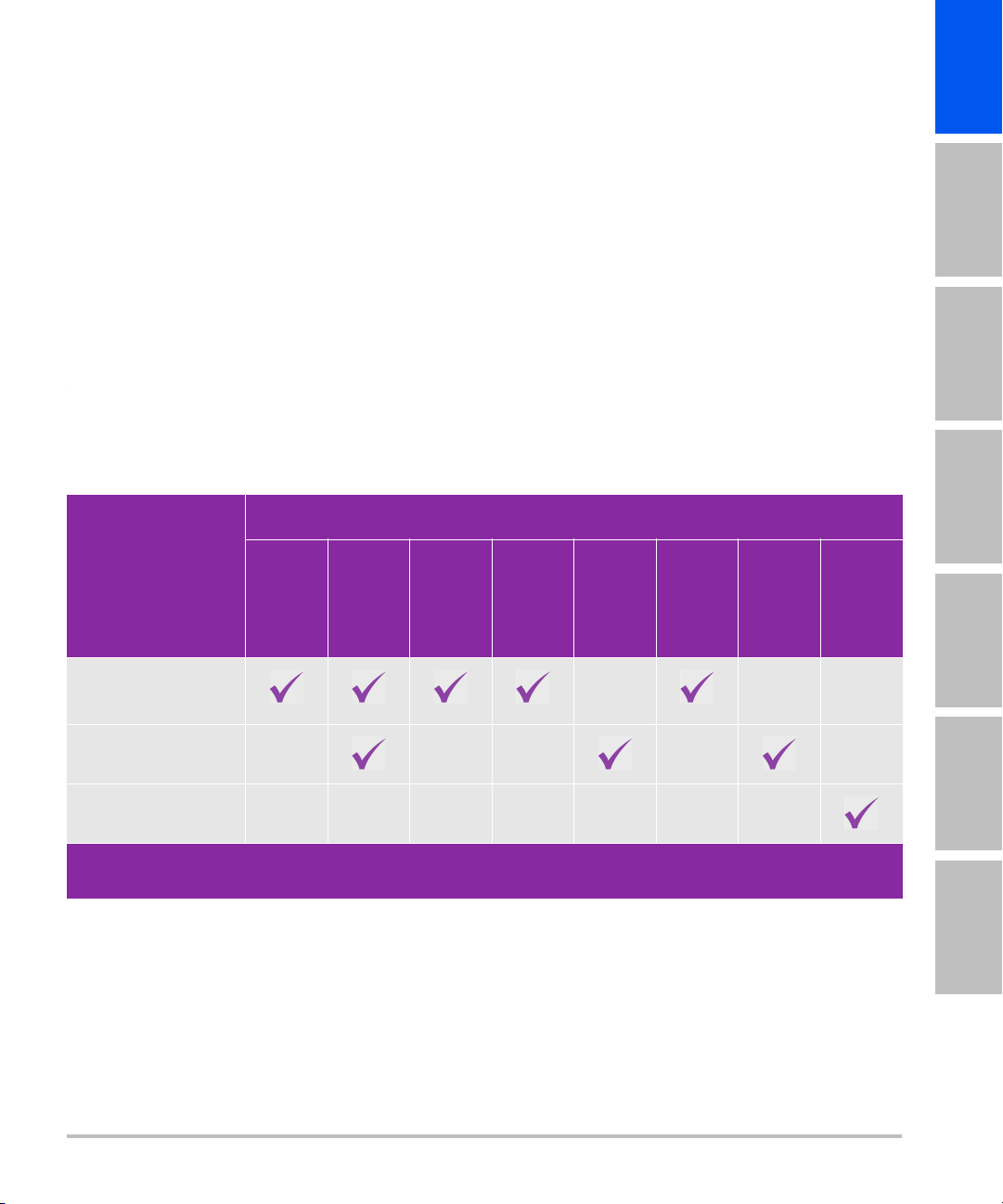
Table 1: Bar code scanners used with SonoSite ultrasound systems
Bar code scanner
Ultrasound system
X-Porte
NanoMaxx
Edge
SonoSite
Edge II
SSeries
SonoSite
SII
M-Turbo
MicroMaxx
JADAK flexpoint
HS-1M*
Symbol LS2208*
Symbol DS6707**
* USB bar code scanner
** Serial bar code scanner

2Introduction
DS6707 Digital Imager Scanner Product Reference Guide, available from Motorola at
www.symbol.com/manuals
To set up the bar code scanner on the ultrasound system, see one of these documents:
USB: USB Bar Code Scanner Installation Instructions from SonoSite
Serial: Ultrasound system user guide
Document conventions
The document follows these conventions:
A WARNING describes precautions necessary to prevent injury or loss of life.
A Caution describes precautions necessary to protect the products.
A Note provides supplemental information.
Numbered and lettered steps must be performed in a specific order.
Bulleted lists present information in list format but do not imply a sequence.
Single-step procedures begin with .
For a description of labeling symbols that appear on the product, see "Labeling Symbols" in the user guide.
Getting Help
For technical support, please contact FUJIFILM SonoSite as follows:
Phone
(U.S. or Canada)
877-657-8118
Phone
(outside U.S. or Canada)
425-951-1330, or call your local representative
Fax 425-951-6700
Email [email protected]
Web www.sonosite.com
Europe Service Center Main: +31 20 751 2020
English support: +44 14 6234 1151
French support: +33 1 8288 0702
German support: +49 69 8088 4030
Italian support: +39 02 9475 3655
Spanish support: +34 91 123 8451

English Deutsch Español Français Italiano Português
Using the bar code scanner to enter patient information 3
English Deutsch Español Français Italiano Português Nederlands
Printed in the U.S.
Using the bar code scanner to enter patient information
You can use the bar code scanner to automatically enter patient information by scanning the patient’s bar
code. When you scan the bar code, the patient’s ID and other information associated with the ID, if any,
populate on the patient information form, saving time and preventing errors.
On certain systems, scanning the patient ID bar code can also query the worklist for patient information. To
enable this functionality, do one of the following:
(X-Porte) Make sure that Bar Code Auto Query is selected on the User Profile setup page and that a
worklist server is configured and connected. For more information, see the ultrasound system Help.
(SonoSite Edge II, SonoSite SII, and Edge) Make sure that Bar Code Auto Lookup is selected on the
Connectivity setup page and that a worklist server is configured and connected. For more information, see
the document Sending and Receiving DICOM Data on SonoSite Systems.
To use the bar code scanner to enter patient information
1Tap Patient.
2Ensure that your cursor is in the Patient ID text box.
3Scan the patient’s bar code.
4Ensure that the entered patient ID is correct. If it is incorrect, you can enter the patient ID manually.
Safety
Cleaning
The exterior surface and cable of the bar code scanner can be cleaned using the recommended cleaning
product.
Asia Service Center +65 6380-5581
Note If your cursor is not in the Patient ID text box and the Bar Code Auto
Query/Lookup on the User Profile or the Connectivity setup page is not selected,
the scan of the patient’s bar code appears in whatever text box is selected.
WARNINGS To avoid damage to the eye, do not stare into the beam. The bar code scanner
is a Class 2 laser product.
Do not allow patient contact with the bar code scanner.

4Specifications
To clean the JADAK bar code scanner
Follow the cleaning instructions in JADAK flexpoint HS-1M Quick Start Guide.
To clean a Symbol bar code scanner
1Disconnect the scanners.
(USB) Disconnect the scanner from the USB port.
(Serial) Disconnect the AC power from the bar code scanner power supply.
2Clean the surface and cable using a clean towel and one of the following cleaning products. Apply the
cleaning product to the cloth rather than the surface.
3Air dry or towel dry with a clean cloth.
For cleaning the lens on the Symbol bar code scanner, refer to Symbol LS 2208 Product Reference Guide or
DS6707 Digital Imager Scanner Product Reference Guide.
Specifications
The ultrasound system supports the bar code scanning formats Code 39 and Code 128.
Caution To avoid damaging the bar code scanner, do not immerse the bar code scanner
in the cleaning or disinfecting solutions.
Sani-Cloth HB 409
Sani-Cloth Plus Windex Blue
Super Sani-Cloth Hydrogen Peroxide (3%)
Isopropyl Alcohol Wipes (70%) Clorox Bleach
Caviwipes Gentle Dish Soap and Water
Betadine

English Deutsch Español Français Italiano Português
Einführung 1
Nederlands
Barcode-Leser Benutzerhandbuch
Einführung ....................................................................................................................................................... 1
Zusätzliche Dokumentation .................................................................................................................................................................. 1
Dokumentkonventionen ......................................................................................................................................................................... 2
Weiterführende Informationen ............................................................................................................................................................ 2
Verwendung des Barcode-Lesers zur Eingabe von Patientendaten ...................................................... 3
Sicherheit ........................................................................................................................................................ 4
Reinigung ........................................................................................................................................................ 4
Technische Daten ........................................................................................................................................... 5
Einführung
Dieses Barcode-Leser-Benutzerhandbuch ergänzt die dem Barcode-Leser beigefügte Dokumentation des
Herstellers, indem es Informationüber die Verwendung des Barcode-Lesers im Zusammenhang mit den
folgenden Ultraschallsystemen enthält:
Zusätzliche Dokumentation
Weitere Informationen vom Hersteller finden Sie in den folgenden Dokumenten:
JADAK flexpoint HS-1M Kurzanleitung, im Lieferumfang des Barcode-Lesers enthalten
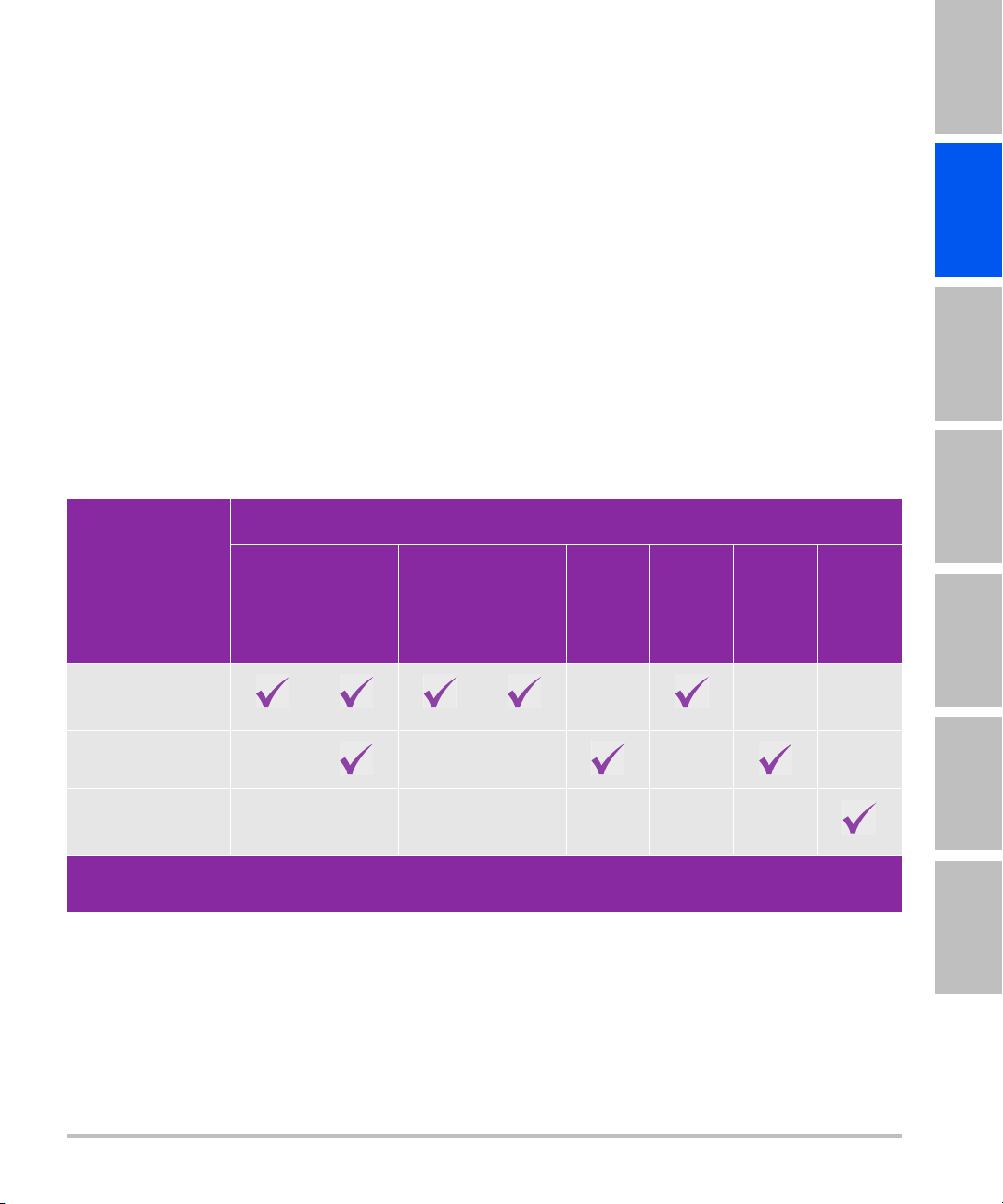
Table 1: Verwendung des Barcode-Lesers mit SonoSite-Ultraschallsystemen
Barcode-Leser
Ultraschallsystem
X-Porte
NanoMaxx
Edge
SonoSite
Edge II
SSeries
SonoSite
SII
M-
Turbo
MicroMaxx
JADAK flexpoint
HS-1M*
Symbol LS2208*
Symbol
DS6707**
* USB-Barcode-Leser
** Serieller Barcode-Leser

2Einführung
Symbol LS 2208 Produktreferenzhandbuch, im Lieferumfang des Barcode-Lesers enthalten und bei
Motorola direkt unter www.symbol.com/manuals erhältlich
DS6707 Digital Imager Scanner Produktreferenzhandbuch, erhältlich bei Motorola unter
www.symbol.com/manuals
Informationen zum Einrichten des Barcode-Lesers am Ultraschallsystem finden Sie in den folgenden
Dokumenten:
USB: USB-Barcode-Leser Installationshinweise von SonoSite
Seriell: Ultraschallsystem-Benutzerhandbuch
Dokumentkonventionen
Für das Dokument gelten folgende Konventionen:
Ein WARNHINWEIS beschreibt die notwendigen Vorsichtsmaßnahmen zur Vermeidung einer Verletzung
oder eines tödlichen Unfalls.
Ein Vorsichtshinweis beschreibt die notwendigen Vorsichtsmaßnahmen zum Schutz der Produkte.
Ein Hinweis enthält ergänzende Informationen.
Nummerierte und mit Buchstaben versehene Schritte müssen in einer bestimmten Reihenfolge
ausgeführt werden.
Listen mit Gliederungspunkten stellen Informationen in einem Listenformat dar, schreiben jedoch keine
Reihenfolge vor.
Weiterführende Informationen
Der technische Kundendienst von FUJIFILM SonoSite ist wie folgt erreichbar:
Telefon
(USA oder Kanada)
877-657-8118
Telefon
(außerhalb USA oder
Kanadas)
425-951-1330, oder wenden Sie sich an Ihren
zuständigen Kundendienstvertreter
Fax 425-951-6700
E-Mail ffss-service@fujifilm.com
Web www.sonosite.com

English Deutsch Español Français Italiano Português
Verwendung des Barcode-Lesers zur Eingabe von Patientendaten 3
Nederlands
Gedruckt in den USA.
Verwendung des Barcode-Lesers zur Eingabe von
Patientendaten
Sie können den Barcode-Leser zur automatischen Eingabe von Patientendaten verwenden, indem Sie den
Patienten-Barcode scannen. Durch das Scannen des Barcodes werden die Patientennummer und, falls
vorhanden, weitere mit der Nummer verbundene Daten automatisch in das Patientendaten-Formular
eingegeben, wodurch Zeit gespart und Fehler vermieden werden.
Bei bestimmten Systemen kann das Einlesen des Barcode einer Patienten-ID auch die Arbeitsliste nach
Patienteninformationen abfragen. Zum Aktivieren dieser Funktion einen der folgenden Schritte ausführen:
(X-Porte) Vergewissern Sie sich, dass die Option Bar Code Auto Query (Auto-Barcodeabfrage) auf der
Einrichtungsseite User Profile (Benutzerprofil) ausgewählt ist und dass ein Arbeitslistenserver konfiguriert
und angeschlossen ist. Weitere Informationen finden Sie unter Help (Hilfe) des Ultraschallsystems.
(SonoSite Edge II und Edge) Vergewissern Sie sich, dass die Option Bar Code Auto Lookup
(Automatischer Barcode-Suchlauf) auf der Einrichtungsseite Connectivity (Verbindung) ausgewählt ist
und dass ein Arbeitslistenserver konfiguriert und angeschlossen ist. Weitere Informationen finden Sie
unter Senden und Empfangen von DICOM-Daten auf SonoSite-Systemen.
So verwenden Sie den Barcode-Leser zur Eingabe von Patientendaten
1Patientberühren.
2Sicherstellen, dass sich der Cursor im Textfeld Patient ID (Patienten-ID-Nr.) befindet.
3Den Patienten-Barcode einlesen.
Europäisches
Servicezentrum
Hauptstelle: +31 20 751 2020
Kundendienst auf Englisch: +44 14 6234 1151
Kundendienst auf Französisch: +33 1 8288 0702
Kundendienst auf Deutsch: +49 69 8088 4030
Kundendienst auf Italienisch: +39 02 9475 3655
Kundendienst auf Spanisch: +34 91 123 8451
Asiatisches
Servicezentrum
+65 6380-5581
Hinweis Befindet sich der Cursor nicht im Textfeld Patient ID (Patienten-ID-Nr) und ist die
Bar Code Auto Query/Lookup (Auto-Barcodeabfrage) auf dem User Profile
(Benutzerprofil) oder die Einrichtungsseite für die Connectivity (PC-Anbindung)
nicht ausgewählt, erscheinen die eingelesenen Daten des Patienten-Barcodes in
dem Textfeld, das derzeit ausgewählt ist.


4Sicherheit
4Sicherstellen, dass die eingegebene Patienten-ID korrekt ist. Falls sie nicht korrekt ist, können Sie die
Patienten-ID auch manuell eingeben.
Sicherheit
Reinigung
Die Außenfläche und das Kabel des Barcode-Lesers können mit dem empfohlenen Reinigungsmittel
gereinigt werden.
Reinigung des JADAK Barcode-Lesers
Befolgen Sie die Reinigungsanweisungen in der JADAK flexpoint HS-1M Kurzanleitung.
Reinigung eines Symbol Barcode-Lesers
1Trennen Sie den Leser vom System:
(USB) Trennen Sie den Leser vom USB-Anschluss.
(Seriell) Trennen Sie das Stromkabel des Barcode-Lesers von der Stromversorgung.
2Reinigen Sie die Oberfläche und Kabel mit einem sauberen Tuch und einem der folgenden
Reinigungsmittel. Das Reinigungsmittel sollte auf das Tuch und nicht auf die Oberfläche aufgetragen
werden.
3Das Gerät an der Luft trocknen lassen oder es mit einem trockenen, sauberen Tuch abwischen.
WARNHINWEIS Um Augenschäden zu vermeiden, schauen Sie nicht direkt in den Strahl.
Der Barcode-Leser ist ein Laserprodukt der Klasse 2.
Der Barcode-Leser darf nicht in direkten Kontakt zum Patienten kommen.
Vorsichtshinweis Um Beschädigungen am Barcode-Leser zu vermeiden, tauchen Sie das
Gerät nicht in das Reinigungs- oder Desinfektionsmittel ein.
Sani-Cloth HB 409
Sani-Cloth Plus Windex Blue
Super Sani-Cloth Wasserstoffperoxid (3 %)
Wischtücher mit Isopropylalkohol (70 %) Clorox Bleiche
Caviwipes Sanftes Spülmittel und Wasser
Betadine
This manual suits for next models
2
Table of contents
Languages: