Franklin Wireless F800HPVL User manual

User Guide
F800HPVL

Contents
Getting Started....................................................................................................................................................................1
Overview ................................................................................................................................................................................................ 2
Package Contents............................................................................................................................................................................... 2
Components.......................................................................................................................................................................................... 2
Device Layout ...................................................................................................................................................................................... 3
Device Display ..................................................................................................................................................................................... 4
Setting up Your F800HPVL.............................................................................................................................................5
Using Your F800HPVL for the First Time ................................................................................................................................. 6
Installing the SIM Card .............................................................................................................................................................. 6
Removing the SIM Card............................................................................................................................................................. 7
Charging the Battery .................................................................................................................................................................. 8
Powering On/Off the F800HPVL........................................................................................................................................... 8
Resetting F800HPVL .................................................................................................................................................................. 9
Installing the Antennas ............................................................................................................................................................. 9
Connecting to Your F800HPVL to a Phone ............................................................................................................................10
Installing F800HPVL ................................................................................................................................................................10
Using Your F800HPVL...................................................................................................................................................11
Managing Your Calls.......................................................................................................................................................................12
Making Calls .................................................................................................................................................................................12
Receiving Calls ............................................................................................................................................................................12
Call Waiting ..................................................................................................................................................................................13
Three-way Calling......................................................................................................................................................................13
Managing Your Voice-mail...........................................................................................................................................................14
Setting up Voice-mail ...............................................................................................................................................................14
Retrieve Voice-mail...................................................................................................................................................................14
F800HPVL Settings.........................................................................................................................................................15
F800HPVL Settings..........................................................................................................................................................................16
Setting Caller ID..........................................................................................................................................................................16
Setting DTMF Length............................................................................... 오류! 책갈피가 정의되어 있지 않습니다.
Setting TTY Mode.......................................................................................................................................................................16
About F800HPVL ..............................................................................................................................................................................17
F800HPVL Info............................................................................................................................................................................17
Troubleshooting .............................................................................................................................................................18
First Steps............................................................................................................................................................................................19
Common Problems and Solutions ..............................................................................................................................................19
Technical Support............................................................................................................................................................................19
Regulatory Information ...............................................................................................................................................20

Regulatory Statements ..................................................................................................................................................................21
FCC Equipment Authorization ID: XHG-F800HPVL ....................................................................................................21
Body-Worn Operation .............................................................................................................................................................21
Safety Hazards ..................................................................................................................................................................................21
Limited Warranty and Liability .................................................................................................................................................23
Trademark..........................................................................................................................................................................................24
Glossary..............................................................................................................................................................................25
Glossary................................................................................................................................................................................................26

1
1
Getting Started
Overview
Package Contents
Components
Device Layout
Device Display

2
Overview
Thank you for choosing the F800HPVL!
Having the F800HPVL will allow you to save money and have more features that are convenient. For example, you can
switch to an additional call while you are on the phone by using the Call Waiting feature and you can also talk with two
parties at the same time by using the Three-way Calling feature. Please see detailed information below.
Package Contents
- F800HPVL with 2 Antenna (1ea)
- Quick Start Guide and Terms & Condition (1ea)
- Micro USB Charger (1ea)
- Battery (1ea)
Components
3
Device Layout

4
Device Display
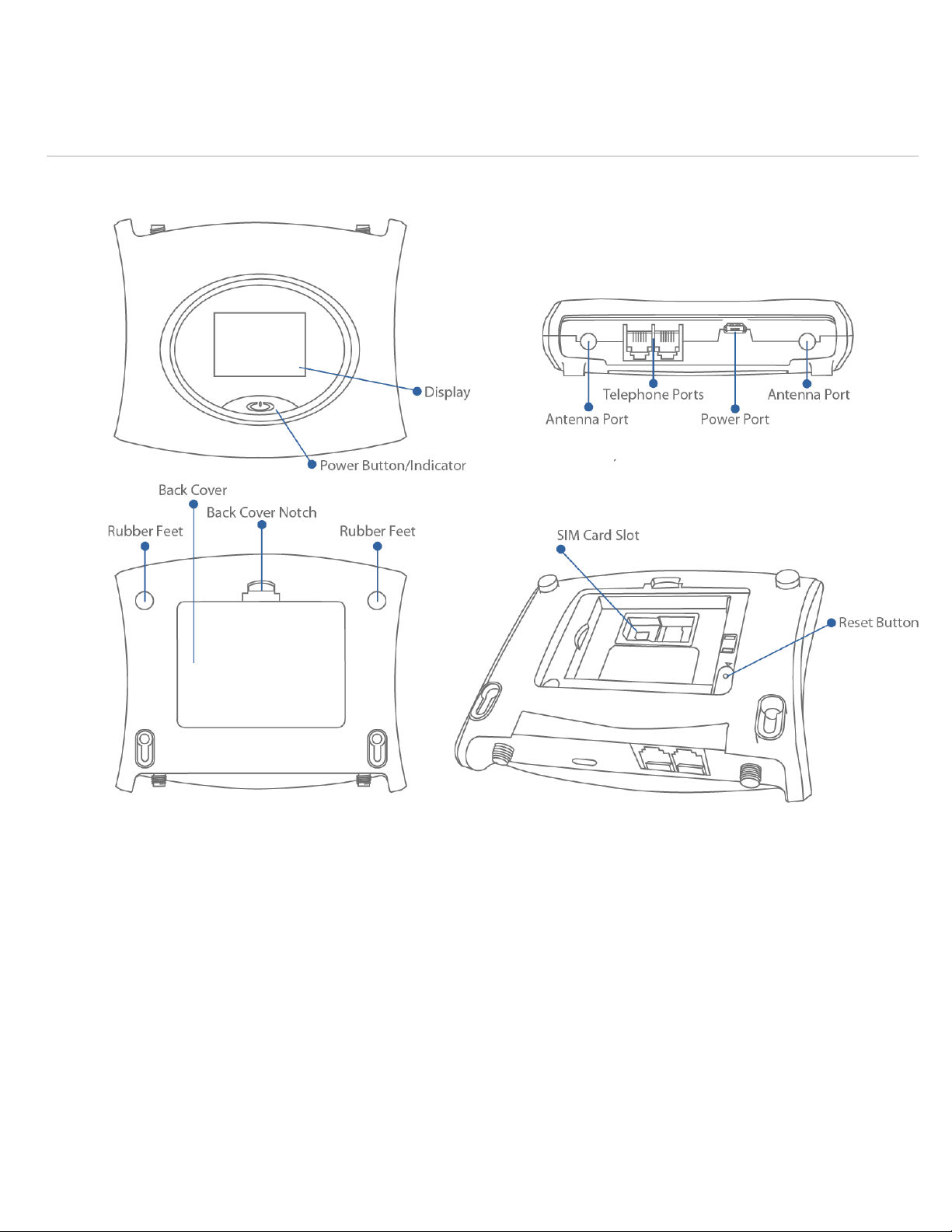
The F800HPVL color display screen shows a various kinds of information while the device is in use. It shows device
status such as signal strength, battery, date/time, phone number. Additionally, for examples, during a call, it shows a
timer that measures the length of call. If you receive, make or miss a call, you can view a caller ID on the screen.
IMPORTANT! In order to charge, please use only an approved charger to charge your F800HPVL. Improper handling
of the power port, as well as the use of an incompatible charger, may cause damage to your device and void the
warranty.

5
2
Setting up Your F800HPVL
Using Your F800HPVL for the First Time
Connecting to Your F800HPVL to a Phone
6
Using Your F800HPVL for the First Time
Installing the SIM Card
Your SIM (Subscriber Identity Module) card is a small rectangular plastic card that stores your phone number and
important information about your wireless service.
Your SIM card may already be inserted.
If not already inserted, follow the instructions below to install your SIM card.
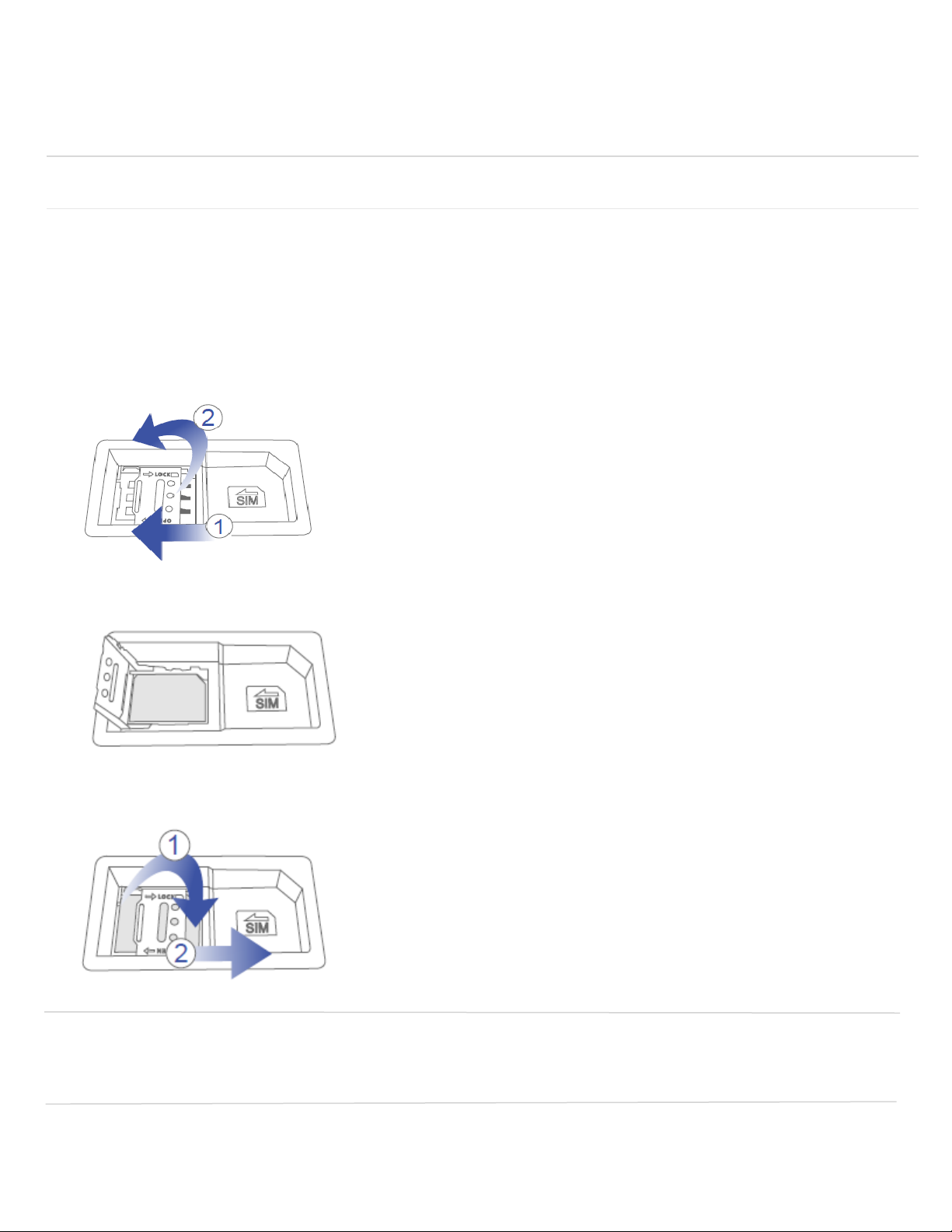
1. Ensure that power of your device is off.
2. Softly press and slide to the left to unlock. Lift the right side up to open the cover.
3. Place the SIM card on the tray and gold contacts facing down.
4. Close the cover first and softly press and slide to the right to lock.
IMPORTANT! Do not bend or scratch your SIM card. Avoid exposing your SIM card to static electricity, water,
or dirt. Whenever you insert or remove the SIM card, ensure your F800HPVL is powered off and is not
connected to any power source. Never use tools, knives, keys, or any type of object to force the door open or
to remove the SIM card.

7
Removing the SIM Card
To remove the SIM card, follow the instructions below.
1. Remove the back cover and take out the battery.
2. Softly press and slide to the left to lock and Lift the right side up to open the cover.
3. Pull the SIM card out.
4. Close the cover first and softly press and slide to the right to lock.
NOTE: Should your SIM card be lost or damaged, contact Tracfone Customer Care for a replacement.
Table of contents