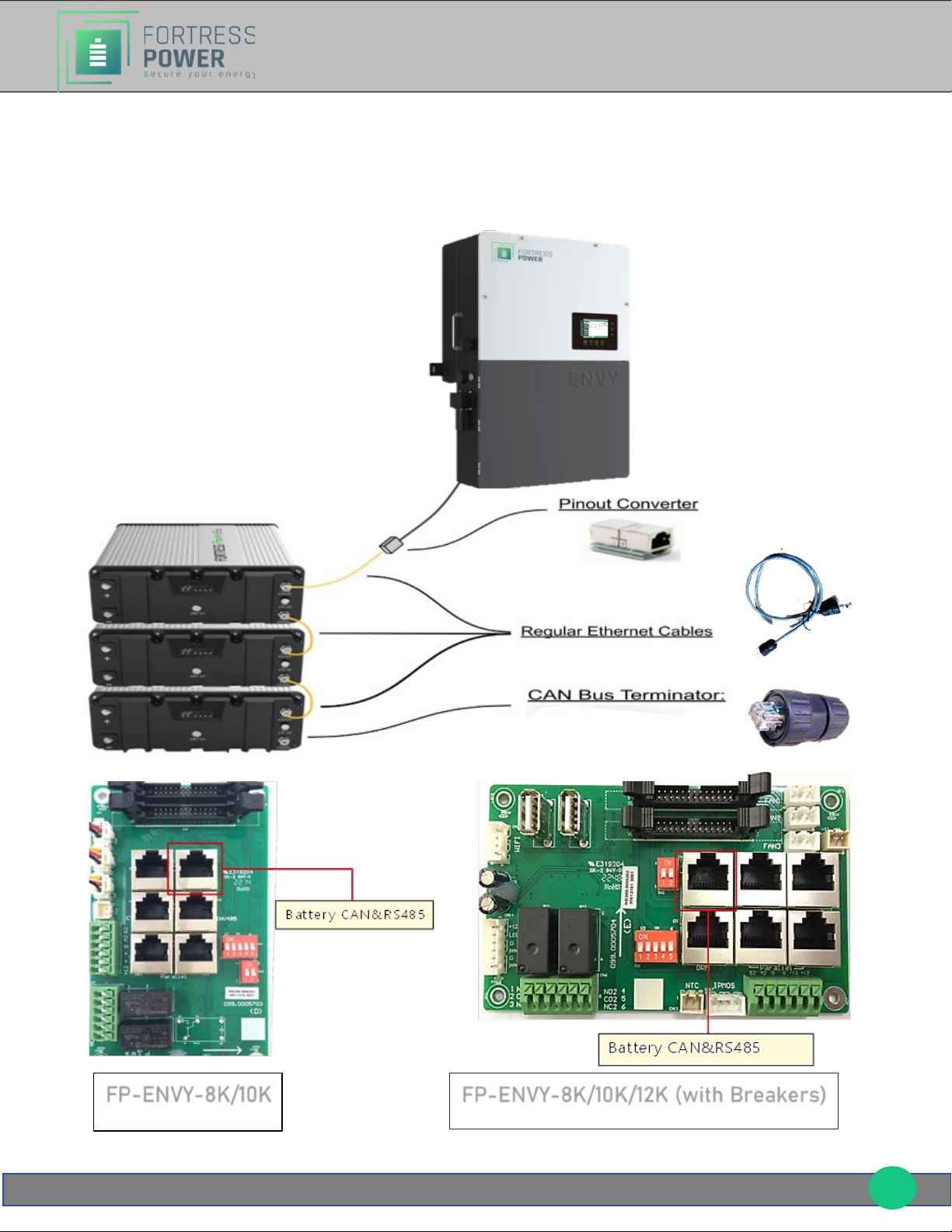
The eVault Max has four Ethernet ports: two COM Parallel Ports, CAN port, and RS485
port. CAN port, and RS485 are used for battery to inverter communication purposes,
whereas the COM Parallel ports are bi-directional and are used to establish a
battery-to-battery communication. CAN Bus terminators are built into the
communication board and are applied as needed using a dipswitch. To set up an
eVault Max to FP-ENVY, please follow the instructions and refer to the graphic below.
1. While having the batteries turned off and having their DC breakers in the off
position, daisy-chain the battery-to-battery communication cables using the bi-
directional COM Parallel ports (IN/OUT).
2. Make sure that the USB port is empty and always remains empty.
3. Turn on one battery at a time, enter the correct battery IDs and set the Protocol
ID' to '1' on all batteries using the battery touchscreen. Starting with the battery
that will be connected to the inverter via the battery-inverter communication
cable, the battery IDs are to be entered in an ascending order (1 for the first
battery, 2 for the second etc.). In systems with only one eVault Max battery, its
battery ID must be set to zero. Once the battery IDs and protocol IDs are changed
on the screens, restart the batteries. If the battery-to-battery communication is
established, after the restart you will see no BMS red lights blinking.
4. Battery to inverter communication cable must be plugged in to the RS485 port of
the first eVault max in the sequence and the other end of this cable must be
plugged in to the Battery port on the FP (if you need to make a modified cable for
battery to inverter communication, refer to the diagram given in the graphic
below).
5. CAN Bus terminator switch must be in the "120Ω" position on the first and the last
batteries in the sequence, having the switch in the "OFF" position on all other
batteries. In systems with one eVault Max battery, CAN Bus terminator switch
must be in the "120Ω" position.
6. Refer to the diagram below for visual insights.