
Fluance AB40 Operating and maintenance manual

High Performance Soundbase
Speaker System
AB40
Instructional Manual
Thank you for your purchase of this Fluance product. Please read this manual carefully before
using the product to ensure proper use. Keep this manual in a safe place for future reference.
fluance.com

Fluance has successfully revolutionized the
home audio industry. Fluance develops a
broad line of high-delity products based
on ve key aspects: Sound Quality, Solid
Construction, Performance, Style, and Value.
These distinctive points make Fluance the
most reliable and respected name among
our fans and ensure your music is heard the
way your favorite artist intended.
Today, Fluance expands on this vision and
takes its approach to a new level. With our
dedicated team, Fluance assures its products
meet the most stringent marks of quality
control - overseeing each step from design
to manufacturing - and has raised the indus-
try bar in customer experience and quality to
be second-to-none.

Table of Contents
What’s Included..................................................................................................................................................4
Bluetooth® Pairing for Bluetooth Enabled Smartphones .............................................................4
Pairing Multiple Devices.................................................................................................................................. 5
Reconnecting Your Device ........................................................................................................................... 5
Out of Range or Lost Signal......................................................................................................................... 5
Using the Remote.............................................................................................................................................. 6
Cabinet Buttons & LED Indicator............................................................................................................... 6
Placing Your Soundbase System............................................................................................................... 7
Connecting Your Soundbase System...................................................................................................... 8
Connecting to Power....................................................................................................................................... 9
FAQ......................................................................................................................................................................... 10
Troubleshooting ................................................................................................................................................12
Specications......................................................................................................................................................13
Fluance Warranty .............................................................................................................................................14
Important Safety Instructions.....................................................................................................................15
FCC & IC Information ......................................................................................................................................16

4
• High Performance Soundbase
Speaker System
• Remote Control
• Optical Cable
• Power Adapter
• 2x AAA Batteries
• Quick Start Guide
• 2 Year Parts & Labor Warranty
• Lifetime Customer Support
What’s Included
Bluetooth® Pairing for Bluetooth Enabled Smartphones
Certain Bluetooth®features, including those listed, may not be supported by all compatible Bluetooth-enabled devices, and/or the functionality
of such features may be limited in certain devices, or by certain wireless carriers.
We reserve the right to change models, conguration, or specications without notice or liability. Product may not be exactly as shown.
©2016 FLUANCE®. FLUANCE®, the FLUANCE®logo, and any other FLUANCE®marks may be registered. All other trademarks are property of
their respective owners.
1. Set the Fluance AB40 to the Bluetooth® input.
2. Option 1: Press the Bluetooth button on the remote control.
3. Option 2: Press the source button on the touch panel of the Soundbase until the
Blue LED appears.
4. The LED should now be flashing BLUE. This means the Soundbase is ready
for pairing.
5. Enable Bluetooth on your device.
6. Under the Bluetooth settings select “Fluance AB40”.
7. You will now be connected and able to play/pause/skip tracks using either the
device or remote control.
Important!
How you access your Bluetooth® Settings may vary from one manufacturer to another. Maximum line
of sight for Bluetooth transmission range is 33ft. Obstacles may decrease transmission distance.

5
Out of Range or Lost Signal
If the device is out of range (beyond 33 feet) of the Fluance AB40 or if there is
something blocking the Bluetooth® signal, the Bluetooth LED will ash to indicate that
the Bluetooth connection with the device has been lost. To avoid a lost connection:
1. Move the device back into range (within 33 feet), and/or make sure there’s a clear
line of sight and that there are no obstructions between the Fluance AB40 and
the device.
2. Within 15 seconds, the connection will automatically be reestablished and the
Bluetooth LED light will turn solid.
3. If the connection is lost for more than 15 seconds, the connection will need to be
reestablished.
Pairing Multiple Devices
Although the Fluance AB40 can only play music from one device at a time, it can
memorize up to 8 device proles. Switching from one device to another:
1. Access the Bluetooth® function and turn the Bluetooth function of the device OFF.
(OPTIONAL: Press and hold the Bluetooth button on the remote then release to break the connection)
2. The Fluance AB40 can now be connected to a different device.
3. Follow the “For Bluetooth Enabled Smartphones” instructions to pair a new device.
Reconnecting Your Device
If you move out of range or turn off the Bluetooth® feature on your device, the
Fluance AB40 will disconnect from your device. To reconnect, simply turn the
Bluetooth feature back on or move within 33 feet (line of sight) of the Fluance AB40.
Important!
Unit will auto-pair if it was the last device connected. If not, please refer to the pairing instructions.

6
Using the Remote
Cabinet Buttons & LED Indicator
Previous Track Skip Track
Standard Equalizer
Preset
Mute
Power On/Off
Bass Boost
*For a deep cinematic or
music experience
Virtual Surround Sound
On/Off
*For a more life like
viewing-experience ideal
for movies and TV shows
LED will ash 2x when
enabled and 1x when disabled
Play/Pause
Source Selection
Source
Selection
Power
On/Off
Volume
Up/Down
Bluetooth®Feature
Volume Down Volume Up
White LED:
Optical
Green LED:
AUX
Blue LED:
Bluetooth®
7
Placing Your Soundbase System
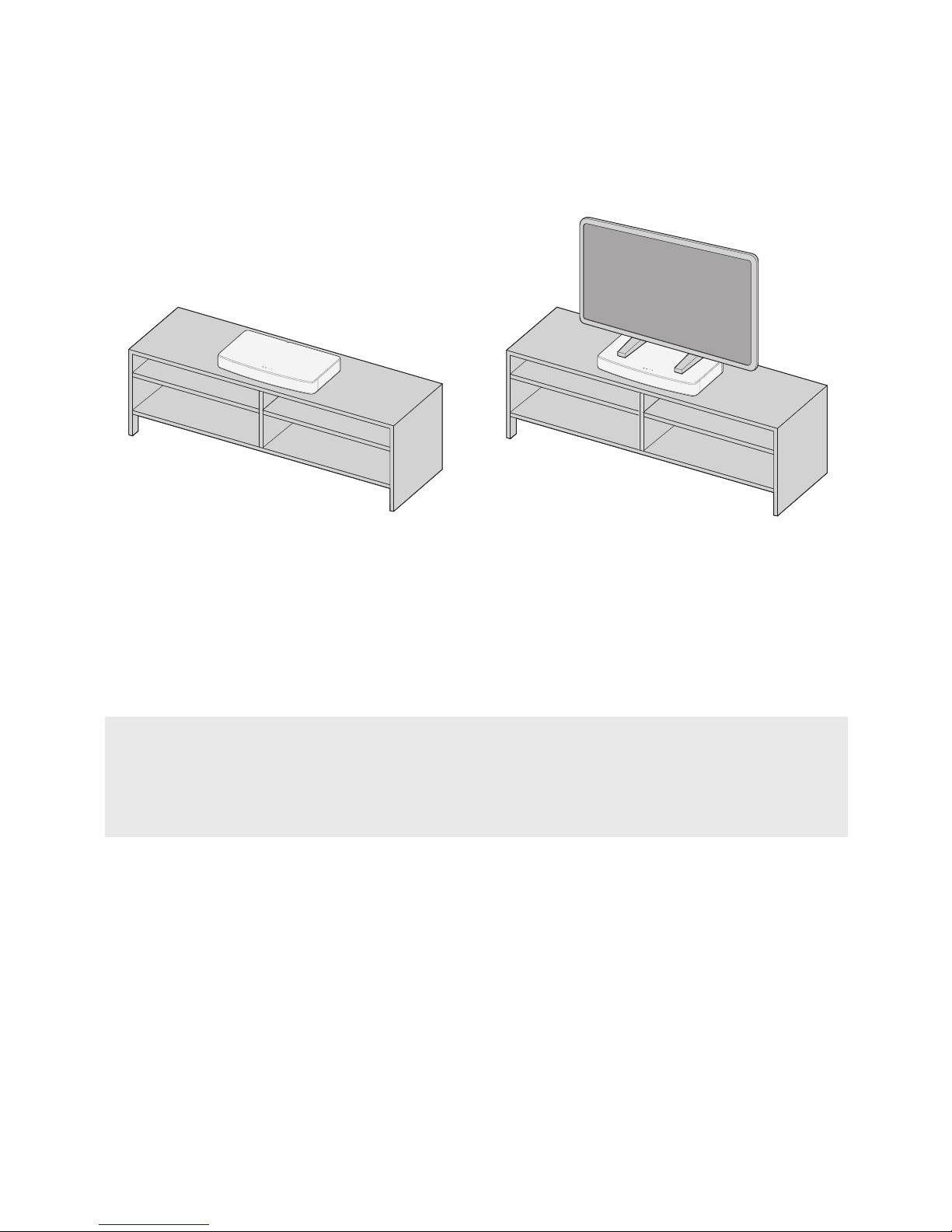
Placement Guidelines:
If placing the sound system in a cabinet or on a shelf, position the front of the system
as close as possible to the front edge of the shelf for optimum audio performance
• Place the Soundbase on your media table where you had your TV.
• Place your TV on top of your Soundbase
Important!
If placing the sound system backed up to a wall, make sure there is a space of at least 1” (2.5 cm)
between the wall and the rear of the system. With any placement of this product, make sure the
ventilation openings on the rear panel are not blocked

8
Connecting Your Soundbase System
• Plug one end of the Optical Cable into the Soundbase
• Plug the other end into the TV’s optical output
• Plug one end of the Auxiliary Cable into the Soundbase
• Plug the L and R connectors to the TV’s auxiliary outputs
Option 1: Optical Cable (Preferred Method)
Option 2: Auxiliary Cable (Optional)
NOTE: This setup is optional as it is not required to set up the product. Auxiliary Cable is NOT included.

9
Connecting to Power
• Plug one end of the Power Cable into the Power Input
• Plug the other end into a power outlet.

10
What does the “3D” toggle do?
The 3D toggle will enable or disable the 3D Virtual Surround Sound mode. The Virtual
Surround Sound mode uses a 3D algorithm to create a wider more room lling
soundstage. This technical Grammy award winning software combined with angled
drivers on each side of the cabinet result in a superb immersive experience.
How do I adjust the Volume / Change the EQ settings?
Use the +/- buttons on the remote or touch panel located on the cabinet to increase
or decrease the volume accordingly. The range of volume is 0 to 40. To adjust the
EQ settings either select STANDARD or BASS BOOST on the remote control to select
your desired EQ setting. STANDARD EQ is the Soundbase default EQ. It has been
designed for an ideal audio experience across all applications. BASS BOOST EQ
increases the volume of the low end frequencies, resulting in a more impactful
experience.
What is “Auto-Pairing” and how does it work?
Auto-Pairing is a convenient connection feature implemented into all Fluance
Bluetooth Speakers. If the connected Bluetooth enabled device leaves the connection
range of the AB40 and returns at a later time, the device will automatically connect. If
the device’s Bluetooth function is disabled and then enabled at a later time, the device
will automatically connect as well.
*Note that the Fluance Soundbase will only Auto-Pair to the last device that it was
connected to.
How do I change the input of the Fluance Soundbase?
Press the SOURCE button on either the remote or touch panel of the cabinet to cycle
between AUX, Optical, and Bluetooth inputs. You can also press the Bluetooth button
on the remote to switch directly to Bluetooth mode.
What does the LED color/behavior mean?
GREEN = 3.5mm AUX input
WHITE = Optical input
BLUE = Bluetooth input
If the LED ashes once it means that the Soundbase has received the command from the
remote or touch panel.
Another device is connected to the AB40 and I wish to connect my device.
You can reset any Bluetooth connection by pressing and holding the Bluetooth®
button on the remote. The AB40 will be available to connect to any new device for
the next 30 seconds. If no device is found, the AB40 will auto-pair back to the
previously connected device.
*Note only one device can be paired at a time.
FAQ
Other manuals for AB40
3
Table of contents
Other Fluance Speakers System manuals


Popular Speakers System manuals by other brands




Sondpex
Sondpex Active Speaker System and Digital Music... User manual and installation instructions

JVC
JVC NX-PN7 instructions

Marshall Amplification
Marshall Amplification AR-DM61-BT user manual
Yamaha
Yamaha NX-A01 - Speaker Sys Product bulletin
SE Audiotechnik
SE Audiotechnik I-LINE manual

Gemini
Gemini WRX-843 Series user manual