FLIR D-348 User manual

Installation
Manual
D-Series

427-9030-01-12 Version 140 March 2018 2
© 2018 FLIR Systems, Inc. All rights reserved worldwide. No parts of this manual, in whole or in part, may be copied,
photocopied, translated, or transmitted to any electronic medium or machine readable form without the prior written
permission of FLIR Systems, Inc.
Names and marks appearing on the products herein are either registered trademarks or trademarks of FLIR Systems,
Inc. and/or its subsidiaries. All other trademarks, trade names, or company names referenced herein are used for
identification only and are the property of their respective owners.
This product is protected by patents, design patents, patents pending, or design patents pending.
The contents of this document are subject to change without notice.
FLIR Systems, Inc.
6769 Hollister Avenue
Goleta, CA 93117
Support: https://www.flir.com/support-center/support-hq/
Important Instructions and Notices to the User:
Modification of this device without the express authorization of FLIR Commercial Systems, Inc. may void the user’s
authority under FCC rules to operate this device.
Note 1: This equipment has been tested and found to comply with the limits for a Class B digital device, pursuant to
Part 15 of the FCC rules. These limits are designed to provide reasonable protection against harmful interference in a
residential installation. This equipment generates, uses, and can radiate radio frequency energy and, if not installed
and used in accordance with the instructions, may cause harmful interference to radio communications. However,
there is no guarantee that the interference will not occur in a particular installation. If this equipment does cause
harmful interference to radio or television reception, which can be determined by turning the equipment off and on, the
user is encouraged to try to correct the interference by one or more of the following measures:
• Reorient or relocate the receiving antenna;
• Increase the separation between the equipment and receiver;
• Connect the equipment into an outlet on a circuit different from that of the receiver; and/or
• Consult the dealer or an experienced radio/television technician for help.
Note 2: This equipment was tested for compliance with the FCC limits for a Class B digital device using a shielded
cable for connecting the equipment to an analog video output to a monitor and using a shielded USB cable for
connecting the equipment to a personal computer. When making such connections, shielded cables must be used
with this equipment.
Industry Canada Notice:
This Class B digital apparatus complies with Canadian ICES-003.
Avis d’Industrie Canada:
Cet appareil numérique de la classe B est conforme à la norme NMB-003 du Canada.
Proper Disposal of Electrical and Electronic Equipment (EEE)
The European Union (EU) has enacted Waste Electrical and Electronic Equipment Directive 2002/96/EC (WEEE),
which aims to prevent EEE waste from arising; to encourage reuse, recycling, and recovery of EEE waste; and to
promote environmental responsibility.
In accordance with these regulations, all EEE products labeled with the “crossed out wheeled bin” either on the
product itself or in the product literature must not be disposed of in regular rubbish bins, mixed with regular
household or other commercial waste, or by other regular municipal waste collection means. Instead, and in order
to prevent possible harm to the environment or human health, all EEE products (including any cables that came
with the product) should be responsibly discarded or recycled.
To identify a responsible disposal method where you live, please contact your local waste collection or recycling service, your
original place of purchase or product supplier, or the responsible government authority in your area. Business users should contact
their supplier or refer to their purchase contract.

427-9030-01-12, Version 140 March 2018 3
Contents
Contents
D-Series Camera Installation
1.1 Warnings and Cautions .................................................................................................. 4
1.2 References .................................................................................................................... 4
1.3 Camera Overview .......................................................................................................... 5
1.4 Installation Overview ......................................................................................................5
1.5 Camera Connection Options ......................................................................................... 6
1.5.1 Supplied Components .......................................................................................... 6
1.5.2 Required Supplies ................................................................................................ 6
1.5.3 Bench Testing ....................................................................................................... 6
1.6 Location Considerations ................................................................................................ 7
1.6.1 Prior to Cutting/Drilling Holes ................................................................................ 8
1.7 Camera Mounting .......................................................................................................... 8
1.8 Camera Connections ..................................................................................................... 9
1.8.1 Connecting Power ................................................................................................ 9
1.8.2 Camera Grounding ............................................................................................. 10
1.8.3 Analog Video Connections .................................................................................. 10
1.8.4 Ethernet .............................................................................................................. 10
1.8.5 Serial Connection ............................................................................................... 10
1.9 D-Series Camera Specifications .................................................................................. 11
Basic Operation and Configuration
2.1 IP Camera, ONVIF Profile S Compliant ........................................................................ 13
2.1.1 Serial and/or IP Communications ........................................................................ 13
2.1.2 Server Configuration ........................................................................................... 13
2.2 Camera Bench Test ..................................................................................................... 13
2.2.1 Set IP Address using the FLIR Discovery Network Assistant (DNA) ................... 14
2.3 Log into the Camera Web Page ................................................................................... 15
2.3.1 Live Video Page .................................................................................................. 16
2.3.2 Camera Control and Status ................................................................................. 17
2.3.3 Web Control Panel .............................................................................................. 17
2.4 Camera Configuration .................................................................................................. 19
2.4.1 Expert and Admin Accounts ................................................................................ 19
2.4.2 Setup Menu ........................................................................................................ 19
2.4.3 Maintenance Menu ............................................................................................. 24
2.5 Thermal Imaging Overview .......................................................................................... 38
2.6 Troubleshooting Tips ................................................................................................... 39

427-9030-01-12, Version 140 March 2018 4
1D-Series Camera Installation
The D-Series Camera is a multi-sensor camera system on a pan/tilt platform. The system combines an
infrared thermal imaging camera and a visible-light video camera, and is intended for outdoor
installations.
This manual describes the installation of the D-Series cameras. If help is needed during the installation
process, please refer to https://www.flir.com/support-center/support-hq/ for support. All installers and
integrators are encouraged to take advantage of the training offered by FLIR; visit
https://www.flir.com/support-center/training/ for more information.
This manual includes the following topics:
• Installation overview
• Mounting the camera and its components
• Connecting the electronics
• Bench testing the camera
• Basic configuration and operation of the camera
• Camera Specifications
For safety, and to achieve the highest levels of performance from the D-Series camera system, always
follow the warnings and cautions in this manual when handling and operating the camera.
1.1 Warnings and Cautions
Warning!
Caution!
1.2 References
D-SERIES Interface Control Drawing (ICD) (FLIR Doc # 427-9XXX-XX-19)
Available from the FLIR website, provides further details regarding mechanical dimensions and
mounting for the D-Series camera.
If mounting the D-Series camera on a pole, tower or any elevated location, use industry standard safe
practices to avoid injuries.
Except as described in this manual, do not open the D-Series camera for any reason. Damage to the
camera can occur as the result of careless handling or electrostatic discharge (ESD). Always handle
the camera with care to avoid damage to electrostatic-sensitive components.
Prior to making any connections, ensure the power supply or circuit breaker is switched off.
Be careful not to leave fingerprints on the D-Series camera’s infrared optics.
Operating the camera outside of the specified input voltage range or the specified operating
temperature range can cause permanent damage.
Be sure to use a water-tight enclosure for the pigtail connections (rated IP 67 or higher).

427-9030-01-12 Version 140 March 2018 5
1 D-Series Camera Installation
1.3 Camera Overview
The D-Series camera is both an analog and an IP camera. The video from the camera can be viewed
over a traditional analog video network or it can be viewed by streaming it over an IP network using
MPEG-4, M-JPEG, and H.264 encoding. Analog video will require a connection to a video monitor or
an analog matrix/switch. The IP video will require a connection to an Ethernet network switch and a
computer with the appropriate software for viewing the video stream.
1.4 Installation Overview
The D-Series Camera is a multi-sensor thermal imaging camera system intended for outdoor security
applications. The system has a pan/tilt gimbal assembly with a dual payload that includes:
• An uncooled thermal imaging camera with fixed Field of View (FOV)
• A daylight camera with continuous zoom
It is shipped from the factory in one of two configurations,
either ball up1 or ball down, depending on the model
number ordered. The D-Series camera is intended to be
mounted on a heavy-duty fixed pedestal or wall mount
commonly used in the security industry. The camera
mount must support at least 11.4 kg (25 lbs).
The camera can be attached to the mount with a single
1.5” NPT stainless steel threaded coupler which is
supplied with the camera. Optionally the camera can also
be mounted to a surface with M5 fasteners (quantity 6).
The electrical connections can be made with a short pigtail
cable assembly which exits the base of the camera. The
camera will typically be mounted (either directly or via a
short coupler) to a water-tight enclosure for the pigtail
connections. In order to install the camera, it is not
necessary to open the camera’s electronics enclosure.
The pigtail connectors range in length from 300 mm (11.8 in) minimum to 450 mm (17.7 in) maximum.
1. A camera mounted in the ball up position has a limited range of downward tilt. The range of
tilt motion is 25° to -90° when ball down, -25° to 90° when ball up.
Figure 1-1: Pigtail Cable Assembly

427-9030-01-12 Version 140 March 2018 6
1 D-Series Camera Installation
1.5 Camera Connection Options
The camera can be powered with a conventional 24 Vac/Vdc power supply:
21 Vac to 30 Vac, or
21 Vdc to 30 Vdc.
The D-Series Camera produces analog or digital (IP) video output (or both). Analog video will require
at least one connection to a video monitor or an analog video matrix switch. In most analog
installations, two video connections will be used—one for the thermal camera video, and one for the
daylight camera video. The camera pigtail provides two BNC connectors for these video channels.
An Ethernet connection is provided for IP video streaming and for command and control
communications (pan/tilt/zoom/etc.). A PC or laptop with a web browser is also required for camera
configuration and maintenance (software/firmware updates).
For analog installations that are not using Ethernet/IP, a serial cable (RS232 or RS422) can optionally
be connected and used for command and control communications, supporting either Pelco D or Bosch
protocols. In installations using analog video and serial communications, it is recommended an
Ethernet cable is installed for camera configuration and troubleshooting using a PC with a web
browser.
For installations where the camera is mounted on a tower or pole or other location that may be difficult
to access, it is recommended the Ethernet connection should be installed from the camera down to
ground level at a minimum, to allow easier access.
1.5.1 Supplied Components
The D-Series camera package includes these standard components:
• Multi-sensor Pan/Tilt Camera Gimbal Assembly
• Stainless Steel threaded coupler (1.5” OD)
• Power connectors (qty 3)
• Ethernet coupler (RJ-45 jacks at each end)
Accessories are available from FLIR Systems, Inc. Contact your FLIR Dealer or integrator for up-to-
date information.
1.5.2 Required Supplies
The installer will supply the following items, as needed (specific to the installation).
• Water-tight enclosure for the connections
• 24 Vac or 24 Vdc power supply
• Power cable for system power; 3-conductor, shielded, gauge determined by cable length and
supply voltage
• Cat5e Ethernet cable for digital video and/or communications
• Coaxial RG59U cables for analog video (up to 2, with BNC male connector at the camera end)
• Serial cable for serial communications
• Camera grounding strap, camera mount, miscellaneous connectors and tools
1.5.3 Bench Testing
Connect the power, video, serial, and Ethernet connections and confirm that the video is displayed on
a monitor when the power is turned on. Confirm the camera can be controlled by moving it (pan/tilt).
Refer to Basic Operation and Configuration, pg. 13.

427-9030-01-12 Version 140 March 2018 7
1 D-Series Camera Installation
1.6 Location Considerations
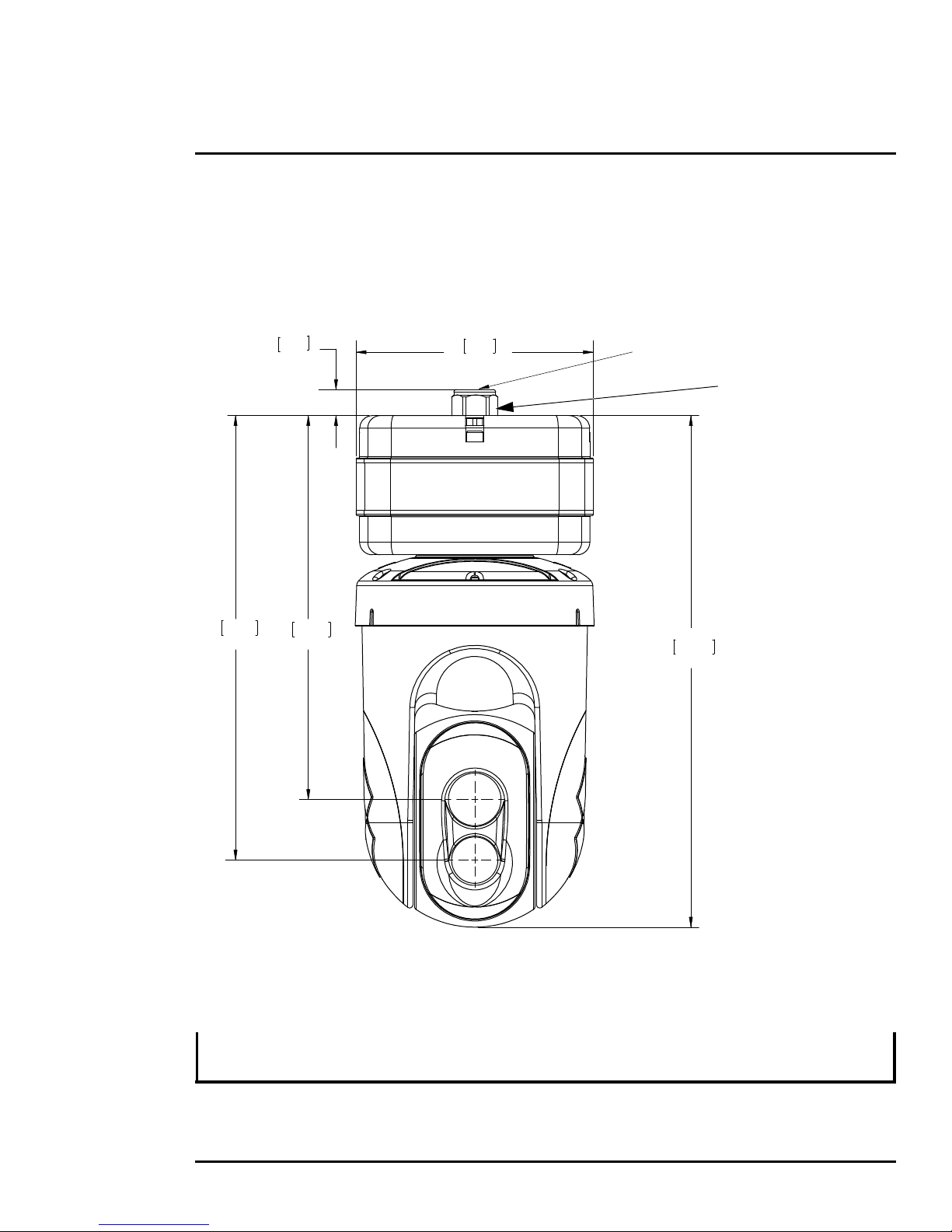
The camera will require connections for power, video and communications. Ensure that cable
distances do not exceed the specifications and that cables adhere to all local and industry standards,
codes, and best practices. The D-Series camera should be mounted upright (ball up) or upside down
(ball down), depending on the model ordered. The camera should be mounted such that the FLIR logo
on the side of the camera is right-side up and readable.
A ball-up camera model can be mounted on top of the mounting surface. A ball-down camera model
can be mounted under an overhanging mounting arm, or underneath an overhanging mounting
surface such as eaves or an awning.
Note
If the camera is to be mounted on a pole or tower or other hard-to-reach location, connect and operate
the camera as a bench test at ground level prior to mounting the camera in its final location.
7.38
187.5
15.92
404.4
0.81
20.6
11.94
303.4
13.83
351.4
Cables (not shown)
exit at center of base
All dimensions are
in mm and (inches)
Cable Gland
Do not loosen
or remove

427-9030-01-12 Version 140 March 2018 8
1 D-Series Camera Installation
1.6.1 Prior to Cutting/Drilling Holes
When selecting a mounting location for the D-Series camera, consider cable lengths and cable routing.
Ensure the cables are long enough, given the proposed mounting locations and cable routing
requirements, and route the cables before you install the components.
Use cables that have sufficient dimensions to ensure safety (for power cables) and adequate signal
strength (for video and communications).
Caution!
1.7 Camera Mounting
The camera mount must nominally be rated to support at least 11.4 kg (25 lbs). For some installations,
the mount must support even greater weights. Use a mount which will provide adequate support in
adverse weather and environmental conditions. The D-Series camera can be secured to the mount
two ways:
• 1.5 in. NPT threaded coupler
Intended for rigid mounting with the supplied NPT stainless steel coupler, or equivalent.
Use PTFE pipe seal tape or equivalent on the coupler.
• M5 x 0.8 fasteners (quantity 6)
If using four M5 x 0.8 fasteners, the maximum depth of the fastener should not exceed 10.0 mm
(0.394 in). Use Loctite 222 low strength threadlocker for the M5 fasteners.
Refer to the ICD for additional information (FLIR Doc. # 427-9XXX-XX-19).
There is no need to open the electronics enclosure. All settings and adjustments are done through
software. There are no user-serviceable parts inside the camera enclosure.
Figure 1-2: D-Series Camera Bottom Mounting Holes
(7.38)
187.5
square
(2.598)
66.00
bolt circle
60.0°
6X M5 X 0.8
equal spacing
10 mm (0.394 in.) max
fastener engagement
1-1/2 NPT
All dimensions are
in mm and (inches)

427-9030-01-12 Version 140 March 2018 9
1 D-Series Camera Installation
Select a water-tight enclosure for the connections that allows adequate space for the cable
connections. This requirement may vary, depending on the installation. Do not exceed the bend radius
per the recommendation of the cable manufacturer. The typical cable bend radius is 50 mm to 75 mm
(2-3 in).
1.8 Camera Connections
Do not disassemble the camera, as it will void the camera warranty and could lead to damage if the
camera is not resealed properly.
1.8.1 Connecting Power
The camera can be powered with a conventional AC or DC power supply. Prior to making any
connections, ensure the power supply or circuit breaker is switched off.
The power cable supplied by the installer must use wires that are sufficient size gauge for the supply
voltage and length of the cable run, to ensure adequate current carrying capacity (for most installations
18 AWG is recommended). Always follow local building/safety codes.
Note
Table 1-1: Mounting Specifications
1M5 bolt circle diameter 66 mm (2.598 in)
26X M5 X 0.8 fasteners, equally spaced at 60°; maximum fastener engagement 10 mm (.394 in)
31-1/2 in NPT threaded opening
4Do not loosen or remove the cable gland nut; doing so could result in damage to the camera unit
Table 1-2: Power Connections
Wire Color Vac Vdc
Red Line DC +
Black Neutral DC -
Clear Chassis Chassis
The supplied connectors for the power connections will accept 16 AWG to 24 AWG wire size.
Figure 1-3: Power Cable (3 conductor)

427-9030-01-12 Version 140 March 2018 10
1 D-Series Camera Installation
The camera itself does not have an on/off switch. Generally the D-Series camera may be connected to
a circuit breaker and the circuit breaker will be used to apply or remove power to the camera. If power
is supplied to it, the camera will be powered on and operating.
1.8.2 Camera Grounding
Ensure the camera is properly grounded. Failure to properly ground the camera can lead to permanent
damage to the camera. Typical to good grounding practices, the camera chassis ground should be
connected to the lowest resistance path possible.
Grounding of the camera is accomplished by terminating the ground wire (clear wire of the power
cable pigtail). Additional grounding can be accomplished by connecting a grounding strap to one of the
6X bolt locations on the unit's mounting surface, with the other end connected to the nearest earth-
grounding point.
1.8.3 Analog Video Connections
The analog video connections from the camera use female BNC connectors. The video cable supplied
by the installer should be rated as RG-59/U or better to ensure a quality video signal and should be
terminated with male BNC connectors.
1.8.4 Ethernet
The Ethernet pigtail cable is terminated with an RJ-45 plug. Connect the supplied Ethernet coupler to
the pigtail cable, then connect a shielded cat5e/6 Ethernet cable to the other end of the Ethernet
coupler. Connect the far end of the Ethernet cable to a network switch.
1.8.5 Serial Connection
By default, the serial interface uses the Pelco D protocol, RS-422 standard, 9600 baud rate (8/none/1),
and address 1. The pigtail serial connection provides a female DB9 connector. The pinouts are as
follows:
Table 1-3: Serial Connector
Signal DB9F Pin Color wire
TxA 2Green
TxB 7White
RxA 8Black
RxB 3Red
Ground 4Brown
This manual suits for next models
3
Table of contents
Other FLIR Thermal Camera manuals

FLIR
FLIR T Series Parts list manual

FLIR
FLIR Voyager II Installation and operating instructions

FLIR
FLIR i40 User manual

FLIR
FLIR K 5 Series User manual

FLIR
FLIR InfraCAM User manual

FLIR
FLIR B series User manual

FLIR
FLIR GF309 User manual

FLIR
FLIR EX Series User manual

FLIR
FLIR K33 User manual

FLIR
FLIR FLIR TG167 User manual