Fike 803-0006 User manual

26-0555 Issue 6
General Description
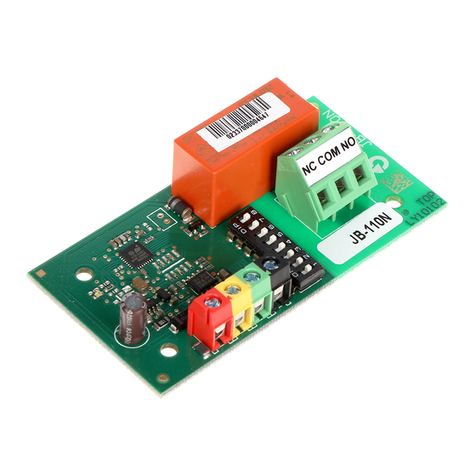
The Loop I/O module provides an interface between ancillary devices and the loop. It can be configured as an input
allowing for reporting from other systems / devices or as an output to control external systems. Digital
communication technology to the control panel is implemented, allowing for accurate data transfer at high
transmission speeds. This device is only compatible with the Sita200plus, Duonet and Quadnet range of control
panel.
Before Installation
The I/O module must be installed in compliance with the control panel installation manual. The installation must also
meet the requirements of any local authority and BS5839 Pt1 : 2002 + A2 : 2008.
Positioning
The module should be mounted securely and care should be taken to ensure the device is accessible for future
maintenance.
Device Installation
All wiring must be installed in compliance with the recommendations laid out by BS5839 Pt1 : 2002 as well as any
special recommendations documented in the control panel installation manual. The cabling used should be of a
2-core 1.5mm
2
screened, fire resistant type, and is to be wired in the form of a screened 2-core loop
returning to the control panel. The use of spurs on this system is not permitted. Care should be taken when
terminating devices to ensure all cables are correctly sleeved and connections are secure. Improper connections
will prevent a system from responding properly in the event of a fire.
The Loop IN +Ve (positive) and the Loop OUT +Ve (positive) connections are split within the module, for cable
continuity readings at the commissioning stage they must be temporarily removed and connected through. Please
remember that all high voltage testing must be carried out before the installation of the electronics, otherwise the
electronics will be damaged. Please also note that the SCRN terminal should only be connected to the loop screen
and NOT the building earth.
Once all testing has been carried out on the cabling and continuity & insulation has been proven, the I/O Unit can
be connected.
Connection Schematic
Please see the circuit boards for actual locations of each connection
terminal.
CE1 +VE
CE1
-
VE
SCREEN
CE2 +VE
CE2
-
VE
SCREEN
+VE OUT
0V OUT
0V IN
+VE IN
SCRN
SCRN
+VE OUT
0V OUT
0V IN
+VE IN
SCRN
SCRN
CONTROL PANEL LOOP I/O MODULE LOOP I/O MODULE
(LOOP END 1) (LAST DEVICE ON LOOP) (FIRST DEVICE ON LOOP)
(LOOP END 2)
NC2
COM2
NO2
EARTH
NC1
COM1
NO1
EARTH
MAX LOAD
230V 3A
CAUTION
High Voltage
may be
present
FUSES = 3. 5AT
+-+-
LED
VOLTAGE
AL
3K3 EOL
680R FR
LOW ON
LOOP
Before installing the module remember to note the serial number of the device (located on the rear of the unit) on to
your drawings or configuration sheets to enable you to prove its location later. The address allocation for the device
is carried out automatically by the control panel whilst in initialisation mode, so addresses do not need to be set
manually. See the system Installation and Operating Instructions for further details.
INSTALLATION AND MAINTENANCE INSTRUCTIONS
803-0006 Sita Loop I/O Module Mk2

26-0555 Issue 6
Device Settings
The I/O settings are configured using the relevant panel software configuration package.
The Loop I/O Module may be connected to the addressable circuit in order to provide an input to, or an output from
the fire alarm system. The unit may be configured as an input or an output, not both. The physical connections are
shown below.
Output Relay without Fault Monitoring
Output Relay with Fault Monitoring
For use as a simple ‘change-over’ relay output, connect
as shown on the left, remembering to set the EOL
(end of line) switch to ON.
For use as a ‘change-over' relay output with fault
monitoring, connect as shown on the right,
remembering to set the EOL (end of line) switch to
OFF, and to use a volt free fault contact to break the
EOL circuit in order to generate a fault condition.
Input with Fault Monitoring
For use as a fault monitored input, connect as shown
on the right, remembering to set the EOL (end of
line) switch to OFF.
Use a volt free fire contact to make the circuit in order
to generate a fire condition and a volt free fault contact
to break the circuit in order to generate a fire condition.

26-0555 Issue 6
Technical Data
Dimensions: Overall 146mm x 87mm x 41mm
Back box 146mm x 87mm x 32mm
Operating temperature: -10
o
C to +50
o
C.
Voltage Range: 24 to 42v DC
LED Indication: Output Activated LED on
Contact Rating: Relay 1 Max load 230V AC 3A (DPCO)
Relay 2 Max load 30V DC 1A (SPCO)
Fuses: Fuse 1, Fuse 2 3.15A Antisurge 20mm Ceramic
(eg. Bussman S505-3.15A)
Important note: All 230V AC mains voltage connections should switch both Live and Neutral. The installation of
these connections should only be carried out by suitably qualified persons whilst the mains supply is fully
isolated.
System Compatibility: Sita200plus V2.30 onwards.
Duonet and Quadnet V1 onwards.
PRODUCT DESCRIPTION LOOP CURRENT (mA)
Type Product Code Name Quiescent Active Low Medium High
I/O 803 0006 Loop I/O Module MK2 0.46 10.11 - - -
BATTERY CURRENT (mA)
Type Product Code Name Quiescent Active Low Medium High
I/O 803 0006 Loop I/O Module MK2 0.46 21.06 - - -
DLU RATING
Type Product Code Name Active Low Medium High
I/O 803 0006 Loop I/O Module MK2 10.5 - - -
Technical Support
Contact your supplier for technical support on this product.
Due to the complexity and inherent importance of a life risk type system training on this equipment is essential, and
commissioning should only be carried out by competent persons. Fike cannot guarantee the operation of any
equipment unless all documented instructions are complied with, without variation.
Fike’s policy is one of continual improvement and the right to change a specification at any time without notice is
reserved. Whilst every care has been taken to ensure that the contents of this document are correct at time of
publication, Fike shall be under no liability whatsoever in respect of such contents. E&OE
Other Fike I/O System manuals