Feig Electronic OBID i-scan ID ISC.MR100 User manual

MANUAL
final
public (B)
2005-04-22
H01000-5e-ID-B.doc
OBI
D
i-scan
®
ID ISC.MR100/101
ID ISC.PR100/101
ID ISC.PRH100
ID ISC.M02 (V3.0)
Standard-Reader
Firmware-Version 4.0 and higher
ID ISC.PRH100
ID ISC.PR100/101
ID
ISC.MR100/101
ID ANT340/240

OBID i-scan®System-Manual ID ISC.MR/PR/PRH100/101-A
FEIG ELECTRONIC GmbH Page 2 of 118 H01000-5e-ID-B.doc
Note
©Copyright 2002-2003 by
FEIG ELECTRONIC GmbH
Lange Strasse 4
D-35781 Weilburg-Waldhausen
Tel.: +49 6471 3109-0
http://www.feig.de
Edition: MD/05/03/08 - h01000-5e-id-b_mit m02.doc
With the edition of this manual, all previous editions become void. Indications made in this manual may be changed without
previous notice.
Copying of this document, and giving it to others and the use or communication of the contents thereof are forbidden without
express authority. Offenders are liable to the payment of damages. All rights are reserved in the event of the grant of a patent
or the registration of a utility model or design.
Composition of the information in this manual has been done to the best of our knowledge. FEIG ELECTRONIC GmbH does
not guarantee the correctness and completeness of the details given in this manual and may not be held liable for damages
ensuing from incorrect or incomplete information. Since, despite all our efforts, errors may not be completely avoided, we are
always grateful for your useful tips.
The installation instructions given in this manual are based on advantageous boundary conditions. FEIG ELECTRONIC
GmbH does not give any guarantee promise for perfect function in cross environments.
FEIG ELECTRONIC GmbH assumes no responsibility for the use of any information contained in this manual and makes no
representation that they free of patent infringement. FEIG ELECTRONIC GmbH does not convey any license under its patent
rights nor the rights of others.
OBID®is registered trademark of FEIG ELECTRONIC GmbH.
OBID i-scan®is registered trademark of FEIG ELECTRONIC GmbH.
I-Code®is registered trademarks of Philips Electronics N.V.
Tag-itTM is a registered trademark of Texas Instruments Incorporated
General information's regarding this manual
•If bits within one byte are filled with "-", these bit spaces are reserved for future extensions or for internal
testing- and manufacturing-functions. These bit spaces must not be changed, as this may cause faulty op-
eration of the Reader.
•The following figure formats are used:
0...9: for decimal figures
0x00...0xFF: for hexadecimal figures,
b0...1 for binary figures.
•The hexadecimal value in brackets "[ ]" indicates a control byte (command).

OBID i-scan®System-Manual ID ISC.MR/PR/PRH100/101-A
FEIG ELECTRONIC GmbH Page 3 of 118 H01000-5e-ID-B.doc
Content
Revision History of documentation...........................................................................................7
Abbreviations..............................................................................................................................8
1. Data Transmission between OBID®i-scan ID ISC.MR/PR/PRH100 and Host 9
1.1. Configuration Commands and Control Commands ........................................................9
1.2. ISO15693 Host Commands .............................................................................................10
1.3. Scan-Mode........................................................................................................................13
2. Asynchronous Interface 15
2.1. Data Format and Protocol Frames ..................................................................................15
2.2. CRC16 Calculation Algorithm.........................................................................................16
3. Configuration Parameters (CFG) 17
3.1. CFG0: Reserved................................................................................................................19
3.2. CFG1: Interface .................................................................................................................19
3.3. CFG2: Inputs / Outputs general.......................................................................................22
3.4. CFG3: RF-Interface ...........................................................................................................24
3.5. CFG4: Transponder Parameters......................................................................................25
3.6. CFG5: Anticollision...........................................................................................................28
3.7. CFG6: Scan-Mode1...........................................................................................................29
3.8. CFG7: Scan-Mode2...........................................................................................................33
3.9. CFG8 + CFG9 : Selection Mask (only I-Code EPC Transponder) (not for ISC.M02).....36
4. Protocols for Reader Configuration 38
4.1. [0x80] Read Configuration ...............................................................................................38
4.2. [0x81] Write Configuration...............................................................................................39
4.3. [0x82] Save Configuration................................................................................................40

OBID i-scan®System-Manual ID ISC.MR/PR/PRH100/101-A
FEIG ELECTRONIC GmbH Page 4 of 118 H01000-5e-ID-B.doc
4.4. [0x83] Set Default Configuration .....................................................................................41
5. Protocols for Reader Control 42
5.1. [0x52] Baud Rate Detection..............................................................................................42
5.2. [0x55] Start Flash Loader.................................................................................................42
5.3. [0x63] CPU Reset .............................................................................................................43
5.4. [0x65] Get Software Version ............................................................................................44
5.5. [0x66] Get Reader Info......................................................................................................45
5.6. [0x69] RF Reset................................................................................................................47
5.7. [0x6A] RF ON/OFF.............................................................................................................47
5.8. [0x71] Set Output ..............................................................................................................48
5.9. [0x74] Get Input (only for ID ISC.PRH100/110) ...............................................................50
6. Protocols for ISO15693 Host Commands 51
6.1. [0xB0] Host commands for ISO15693 Mandatory and Optional Commands...............52
6.1.1. [0x01] Inventory...........................................................................................................53
6.1.2. [0x02] Stay Quiet.........................................................................................................55
6.1.3. [0x22] Lock Multiple Blocks.........................................................................................56
6.1.4. [0x23] Read Multiple Blocks........................................................................................57
6.1.5. [0x24] Write Multiple Blocks ........................................................................................59
6.1.6. [0x25] Select................................................................................................................61
6.1.7. [0x26] Reset to Ready.................................................................................................62
6.1.8. [0x27] Write AFI...........................................................................................................63
6.1.9. [0x28] Lock AFI............................................................................................................64
6.1.10. [0x29] Write DSFI......................................................................................................65
6.1.11. [0x2A] Lock DSFI.......................................................................................................66
6.1.12. [0x2B] Get System Information.................................................................................67
6.1.13. [0x2C] Get Multiple Block Security Status.................................................................69
6.1.14. [0xA0] Read Config Block.........................................................................................70
6.1.15. [0xA1] Write Config Block..........................................................................................71

OBID i-scan®System-Manual ID ISC.MR/PR/PRH100/101-A
FEIG ELECTRONIC GmbH Page 5 of 118 H01000-5e-ID-B.doc
7. Special Commands 72
7.1. [0x1B] Reset QUIET Bit (only I-Code 1 Transponders).................................................72
7.2. [0x18] Destroy (only I-Code EPC/UID Transponders)....................................................73
8. [0xB1] Host commands for ISO15693 Custom and Proprietary Commands 74
8.1. Infineon Custom Commands...........................................................................................75
8.1.1. [0x10] Read.................................................................................................................75
8.1.2. [0x30] Write .................................................................................................................76
8.1.3. [0x90] Write Byte.........................................................................................................77
8.2. KSW Custom Commands.................................................................................................78
8.2.1. [0xA0] Set Passive ......................................................................................................78
8.2.2. [0xA1] Set Log.............................................................................................................79
8.2.3. [0xA2] Get Log Status .................................................................................................80
8.2.4. [0xA3] Bist ...................................................................................................................81
8.2.5. [0xA4] Lock..................................................................................................................82
8.2.6. [0xA5] Unlock ..............................................................................................................83
8.3. Philips ISO15693 I-Code SLI Custom Commands .........................................................84
8.3.1. [0xA2] Set EAS............................................................................................................84
8.3.2. [0xA3] Reset EAS........................................................................................................84
8.3.3. [0xA4] Lock EAS..........................................................................................................85
8.3.4. [0xA5] EAS Alarm........................................................................................................86
8.4. [0xBF] ISO15693 Transparent Command .......................................................................87
9. Supported ISO15693 Host commands 90
9.1. Supported ISO15693 Host commands for ISO15693 Transponders............................90
9.1.1. EM4135 EM MICROELECTRONIC.............................................................................90
9.1.2. Fujitsu (MB89R116)....................................................................................................91
9.1.3. Infineon (my-d page mode) 0x60................................................................................92
9.1.4. Infineon (ISO Address mode) 0xE0............................................................................93
9.1.5. KSW Microtec (TempSens)........................................................................................94
9.1.6. Philips (I-Code SLI) ...................................................................................................95
9.1.7. STMicroelectronics (LRI512).....................................................................................96

OBID i-scan®System-Manual ID ISC.MR/PR/PRH100/101-A
FEIG ELECTRONIC GmbH Page 6 of 118 H01000-5e-ID-B.doc
9.1.8. STMicroelectronics (LRI64)......................................................................................97
9.1.9. Texas Instruments (Tag-it HF-I) ................................................................................98
9.2. Supported ISO15693 Host commands for I-Code 1 Transponders..............................99
9.3. Supported ISO15693 Host commands for I-Code EPC Transponders.......................100
9.4. Supported ISO15693 Host commands for I-Code UID Transponders........................101
9.5. Supported ISO15693 Host commands for Tag-it HF Transponders...........................102
ANNEX 103
ANNEX A: Codes of Transponder Types..............................................................................103
ANNEX B: Time Behavior of the Asynchronous Interface..................................................104
ANNEX C: Time Behavior of ISO15693 Host Commands....................................................105
Time Behavior for I-Code 1 and Tag-it HF Transponders (only execution time)..................105
Time Behavior for [0x01] Inventory and ISO15693 Transponders.......................................106
Time Behavior for common commands with independent Transponder performance.........107
ANNEX D: Index of Status Bytes ...........................................................................................108
Error-Code for ISO15693 Transponders..............................................................................109
ANNEX E: Index of Control Bytes..........................................................................................111
ANNEX F: Index of Configuration Parameters .....................................................................111
ANNEX G: Memory Model I-Code 1 Transponders ..............................................................112
ANNEX I: Examples for Read Data .......................................................................................115
ISO15693 Host Command (DB-Size of the Transponder = 4 bytes)....................................115
ISO15693 Host Command (DB-Size of the Transponder = 8 bytes)....................................115
)Annex J: Differences between USB- and SCI-Reader.....................................................116
ANNEX K: Codes of Reader Types........................................................................................118

OBID i-scan®System-Manual ID ISC.MR/PR/PRH100/101-A
FEIG ELECTRONIC GmbH Page 7 of 118 H01000-5e-ID-B.doc
Revision History of documentation
Rev. Date Page Description
90 Supported ISO15693Host commands for ISO15693 Transponders
105 Descriptions of the time behaviors
115 Examples of the MSB / LSB handling
29 New read operations in CFG 6 Scan Mode 1
2e 01.07.02
72 Special command „[0x1B] Reset Quiet Bit“
25 New Parameter in CFG 4 Transponder Parameters: I-Code Mode
3e 12.09.02 29 New Parameters in CFG 6 Scan Mode1: D-LGT; D-START.
Changed function of the SCAN-LOCK-TIME
13 Scan Mode for USB-Reader
78 KSW Custom Commands
84 Philips ISO15693 Transponder I-Code SLI Custom Commands
73
100 [0x18] Destroy (only I-Code EPC Transponders)
Supported ISO15693 Host commands for I-Code EPC Transponders
116 Differences between USB- and SCI-Reader
75 Infineon Custom commands
93 Infineon (ISO Address mode) 0xE0
50 New command “Get Input” for ID ISC.PRH100/110
4e 22.03.04
91 Fuijtsu mb89r116 ISO15693 commands
Some additional comments to ID ISC.M02 and ID ISC.MR/PR101
45 New Protocol: [0x66] Get Reader Info
24 CFG3: RF-Interface, New Transponder Driver
108 New status message [0x17] Firmware activation required:
73 [0x18] Destroy (only I-Code EPC/UID Transponders)
101 Supported ISO15693 Host commands for I-Code UID Transponders
118 Codes of reader types
5e 08.03.05
90 New Transponder EM4135 supported

OBID i-scan®System-Manual ID ISC.MR/PR/PRH100/101-A
FEIG ELECTRONIC GmbH Page 8 of 118 H01000-5e-ID-B.doc
Abbreviations
ADR Address
ASK Amplitude Shift Keying
CB Config Block
CFG Configuration Parameter Block
CRC Cyclic Redundancy Check
DB data block
DIP Dual Inline Plastic
FIFO First in First out
frq Frequency
FSK Frequency Shift Keying
h Hour
Hz Hertz
ID Identification
IN Input
LEN Length
LOC Location
LSB Least Significant Byte
min Minutes
ms Milliseconds
MSB Most Significant Byte
N Number
OUT Output
R/W Read / Write Access
RD Read
REL Relay
RF Radio Frequency
RSSI Received Signal Strength Indicator
RTC Real Time Clock
TAB Table
TR Transponder
TS Timeslot
UID Unique Identifier (read only Serial Number)
WO Write Only Access
WR Write

OBID i-scan®System-Manual ID ISC.MR/PR/PRH100/101-A
FEIG ELECTRONIC GmbH Page 9 of 118 H01000-5e-ID-B.doc
1. Data Transmission between OBID®i-scan ID ISC.MR/PR/PRH100 and Host
For different ways of data transmission between OBID®i-scan Readers and host (terminal, PC) are
possible. The ISO15693Host Commands and the Scan Mode are used for the data exchange be-
tween Transponder and host, whereas the Configuration Commands and the Control serves for
adapting the Reader parameters to the individual range of applications. The following chart shows
which method of data transmission is supported by which interface:
asynchronous interface
(RS232 / RS485)
Configuration Commands √
Control Commands √
ISO15693Host Commands √
Scan-Mode √
1.1. Configuration Commands and Control Commands
This method of data transmission is used for Reader configuration and the diagnosis via the asyn-
chronous interface or USB.
The Reader-configuration parameters will be stored in the Reader memory. To store the current con-
figuration during a power down of the Reader, the Reader-Configuration must be stored in the
EEPROM. After power up the Reader reads the configuration out of the EEPROM.
The Reader control is immediately processed and the response from the Reader contain status or
data information of the control command.
Host (Terminal / PC / ....) Reader
parameter- / control command →parameter received and stored / control
command processed
yes no
←status /
data error status
←

OBID i-scan®System-Manual ID ISC.MR/PR/PRH100/101-A
FEIG ELECTRONIC GmbH Page 10 of 118 H01000-5e-ID-B.doc
1.2. ISO15693 Host Commands
The ISO Host Commands provides the exchange of data between a host and Transponders via the
Reader as long as the Transponder remains in the detection range of the Reader.
Note:
During the writing of data on a Transponder, it must be ensured that the Transponder is lo-
cated within the detection range of the Reader during the entire process. If the Transponder is
removed from the detection range of the Reader during a writing process, this will cause a loss
of data.
The Reader distinguishes between three different modes:
Addressed mode:
Before reading or writing data in addressed mode, the UID of the Transponder must be
known. This is executed by sending the protocol “6.1.1. [0x01] Inventory If a Transponder is
located within the detection range of the Reader at that time, it answers with its UID. For all
following read- / write orders the Transponder must be addressed with its correct UID.
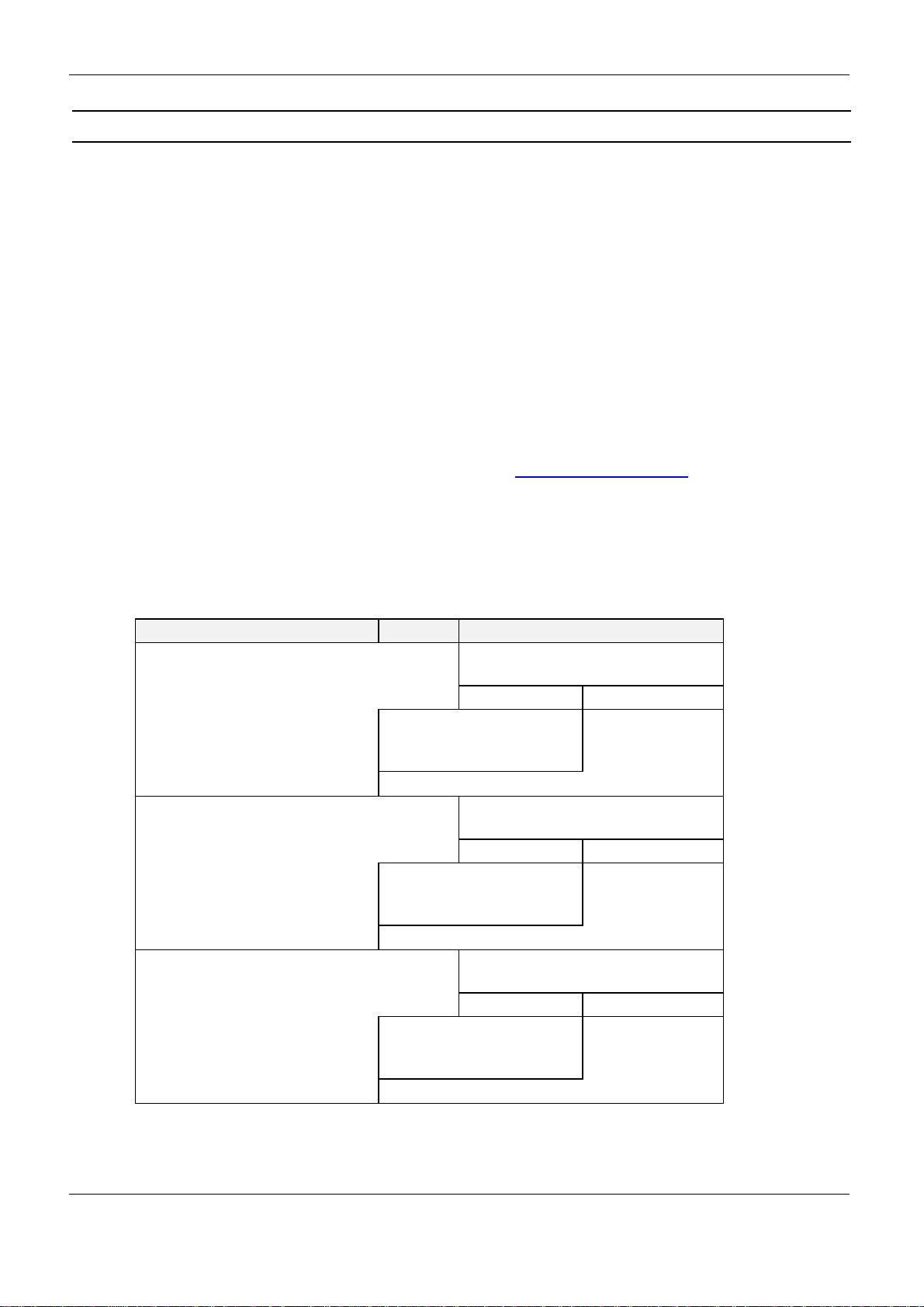
The following chart will show the necessary steps for the communication with a Transponder
in addressed mode:
Host (Terminal / PC / ....) Reader
Inventory
to get the UID →Transponder in antenna field ?
Yes No
←status /
number of Trans-
ponders / UID
status =
no Transponder
←
read data from Transponder with UID →Transponder with
correct UID in antenna field ?
Yes No
←status /
Transponder read
data
status =
no Transponder
in Reader field
←
write data to Transponder with UID →Transponder with
correct UID in antenna field ?
Yes No
←OK status status =
no Transponder
in Reader field
←
This manual suits for next models
5
Table of contents
Other Feig Electronic Barcode Reader manuals

Feig Electronic
Feig Electronic OBID i-scan ISC.PRHD102 User manual

Feig Electronic
Feig Electronic ID PM ECCO+ User manual

Feig Electronic
Feig Electronic OBID i-scan ID ISC PRHD102 User manual

Feig Electronic
Feig Electronic PAN MOBILE ID ECCO Lite User manual

Feig Electronic
Feig Electronic ID SCANNDYgun User manual

Feig Electronic
Feig Electronic PAN MOBILE ID smartSCANNDY User manual

Feig Electronic
Feig Electronic PAN MOBIL ID PM ECCO+ User manual