Exibel KW-94R-UK User manual

Cd-spelare med radio · CD-spiller med radio · CD-soitin ja radio
Ver. 201205
English 3
Svenska 8
Norsk 13
Suomi 18
CD Player With Radio
Art.no. Model
18-8033, -1, -2, -3, -4 KW-94R-UK
38-2352, -1, -2, -3, -4 KW-94R


3
English
CAUTION !
RISK OF ELECTRIC
SHOCK DO NOT OPEN
CLASS 1
LASER PRODUCT
CD Player with radio
Art.no. 18-8033, -1, -2, -3, -4 Model KW-94R-UK
38-2352, -1, -2, -3, -4 KW-94R
Please read the entire instruction manual before using and save it for future use.
We apologise for any text or photo errors and any changes of technical data.
If you have any questions concerning technical problems please contact our
Customer Service Department (see address on reverse).
Safety
• The product should only be repaired by qualified service personnel.
• The product should not be dismantled or changed.
• Do not place the product where it could fall into water or another type of liquid.
Do not place any objects which contain liquid on the product, e.g. flower vase or
soft drink.
• Shut off the standby function during night time or when you travel away.
• Do not cover the product. Adequate ventilation with a distance of at least
15 cm between ventilation holes and surrounding area is necessary to prevent
the device from becoming warm.
• Do not place the stereo in a damp, dusty environment or where there are
strong vibrations.
Symbols
Warning! Do not open the casing! Certain
components within the product’s casing
contain dangerous currents. Contact with
these may give you an electric shock.
On CD player
CLASS 1 LASER PRODUCT
Warning! Do not open the casing!
Invisible laser beam which can cause eye damage.
Avoid exposure to the laser beam. Do not look into
the laser beam even with optical instruments.
4
English
Product Description
• CD player with AM/FM radio.
• Operated on 230 V or 8x LR14/C batteries
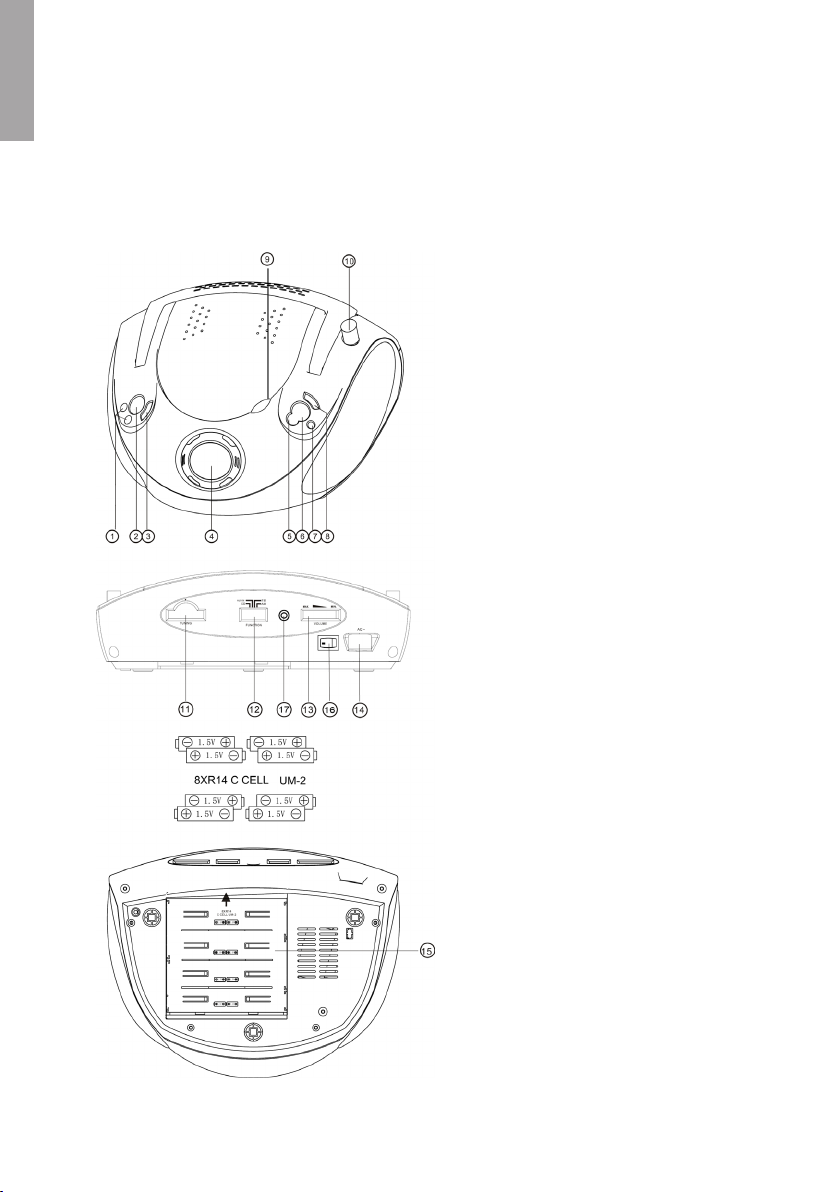
Buttons and Functions
1. SEARCH |◄◄ ►►|
Step to previous or next track/
search in current track
2. DBBS (Dynamic Bass Boost)
Increases the base strength
3. RANDOM
Random playing
4. LCD DISPLAY
Displays the CD functions
5. PROGRAM
Programme your CD playing
6. STOP
Stops the CD playing
7. REPEAT
Repeated CD playing
8. PLAY/PAUSE
Starts or pauses CD playing
9. Opening spot for CD door. Lift to
open, push down to close
10. Telescopic FM antenna
11. TUNING
Knob for installing stations
12. Function switch CD/AUX-IN/FM/AM
13. VOLUME
Volume control
14. AC IN
Connection for the included cable
15. Battery cover
16. Main power switch
17. 3.5 mm AUX-IN jack

5
English
Getting Started
Battery operation
1. Remove the battery cover on the backside of the device by pushing
it straight back.
2. Place 8x LR14/C batteries in the battery compartment Make sure to place
the batteries according to the markings in the battery compartment.
3. Replace the battery cover.
Mains operation
1. Turn the main power switch (16) to position ON.
2. Connect the cable to the socket (14). Plug the plug into a 230 V wall socket.
Use
Use the radio
1. Set the function switch (12) to the desired frequency band, FM or AM.
2. Set the desired station with the knob TUNING (11).
3. Adjust the telescope antenna for the best possible reception (at FM reception).
4. Adjust the volume to the desired level with the volume control (13).
Insert a CD
1. Open the CD door by carefully lifting (9).
2. Place a CD in the CD compartment.
3. Shut the door by carefully pushing it down.
Playing a CD
The device’s CD player can play Audio Discs, CD-R, CD-RW discs
containing music/speech.
1. Insert a CD according to the above.
2. Turn the function switch (12) to position CD.
3. The display shows the amount of tracks on the CD.
4. Press PLAY/PAUSE (8) to start the playing again from the first track.
5. You can whenever you want pause the playing by pressing PLAY/PAUSE (8).
Press PLAY/PAUSE to start the playing again.
6. Press STOP (6) to terminate the playing.

6
English
Note!
The CD player stops even if:
• If you open the CD door.
• You choose RADIO as the sound source.
• The entire CD has been played.
Choose a different track/find a chapter in a track
1. Press |◄◄ or ►►| one or several times to go to desired track. Chosen track is
shown in the display.
2. Press once |◄◄ to return to the track that was previously played.
3. Press repeatedly |◄◄ to go back to previous tracks.
4. Press and hold |◄◄ or ►►| to quick search back of forward for a track. Release
the button when you have found the desired spot.
Repeat a track
1. During playing of a CD, press REPEAT (7) once to repeat the track that is playing.
”REPEAT 1” is shown in the display.
2. Press REPEAT (7) again to repeat all the tracks on the CD. ”REPEAT ALL” is
shown in the display.
3. Press REPEAT (7) a third time to shut off repeat. No text is shown in the display
when the function is shut off.
Programmed playing of a CD
A total of 20 tracks can be programmed. Always press STOP (6) before
programming of the playing.
1. Press PROGRAM (5) once. ”PROG” and ”00” blinks in the display.
2. Use |◄◄ or ►►| to choose the track that should be stored.
3. Press PROGRAM (5) to store the desired track in the memory. The display shows
the next memory spot.
4. Repeat step 2 – 3 to store more tracks in the memory.
5. When the programming is done, press PLAY/PAUSE (8). The playing of the CD
can be started according to the programming.
6. To clear the programming press STOP (6) twice or set the function switch (12) to
FM, AM or AUX-IN.

7
English
Care and Maintenance
Cleaning of the device
• Use a soft damp cloth to wipe the product. Never use strong solvents or
detergents.
Care of your CDs
• Do not touch the surface, hold on to the edge.
• Do not expose the CD for direct sun light, heat or dust.
• Do not put labels on the CD.
• Use a special marker suitable for making CDs.
• Dry from the centre and out when cleaning. Do not ever dry in circles.
• Use a dry soft cloth without detergents or solvents.
• Always store the CDs in a pouch when not being used.
Disposal
Follow local ordinances when disposing of this product. If you are unsure about how
to dispose of this product contact your municipality.
Specifications
Power 230 V AC, 50 Hz or 8 x. LR14/C-batteries (not included)
Size 270 x 248 x 139 mm
Frequency area radio FM 88 – 108 MHz
AM: 540 – 1,600 kHz
Output 2 x 1 W RMS
Speaker impedance 8 Ohm

8
Svenska
CAUTION !
RISK OF ELECTRIC
SHOCK DO NOT OPEN
CLASS 1
LASER PRODUCT
Cd-spelare med radio
Art.nr 18-8033, -1, -2, -3, -4 Modell KW-94R-UK
38-2352, -1, -2, -3, -4 KW-94R
Läs igenom hela bruksanvisningen före användning och spara den sedan för framtida
bruk. Vi reserverar oss för ev. text- och bildfel samt ändringar av tekniska data. Vid
tekniska problem eller andra frågor, kontakta vår kundtjänst (se adressuppgifter på
baksidan).
Säkerhet
• Produkten får endast repareras av kvalificerad servicepersonal
• Produkten får inte demonteras eller ändras
• Placera inte produkten så att den kan falla ner i vatten eller annan vätska. Ställ inte
några föremål som innehåller vätska på produkten, t.ex. blomvas eller läskedryck.
• Stäng av eventuell stand-by funktion om natten eller när du reser bort.
• Täck inte över anläggningen. Tillräcklig ventilation, med ett minsta avstånd på 15
cm mellan ventilationshålen och omgivande ytor, är nödvändig för att förhindra att
anläggningen blir för varm.
• Placera inte anläggningen i en fuktig, dammig miljö eller där det förekommer starka
vibrationer.
Lägg märke till dessa säkerhetssymboler
Varning! Öppna inte höljet! Farlig spänning
finns oskyddat på komponenter inuti pro-
duktens hölje, kontakt med dessa kan leda
till brand eller ge elektriska stötar.
På CD-spelare
KLASS 1 LASERAPPARAT
Varning! Öppna inte höljet! Osynlig laserstrålning som
kan orsaka ögonskador.
Rikta inte blicken in mot strålen och titta inte direkt på
den genom optiska instrument.

9
Svenska
Produktbeskrivning
• Cd-spelare med AM/FM-radio.
• Drivs med 230 V eller 8 st. LR14/C-batterier.
Knappar och funktioner
1. SÖK |◄◄ ►►|
Stega till föregående eller nästa
spår/Sök i aktuellt spår
2. DBBS (Dynamic Bass Boost)
Förstärker basåtergivningen
3. RANDOM
Slumpvis uppspelning
4. LCD-DISPLAY
Visar cd-funktionerna
5. PROGRAM
Programmera cd-avspelning
6. STOP
Stoppar cd-avspelningen
7. REPEAT
Repeterad cd-avspelning
8. PLAY/PAUSE
Startar eller pausar cd-avspelning
9. Öppningspunkt för CD-lucka
Lyft för att öppna. Tryck ner för att
stänga
10. Teleskopisk FM-antenn
11. TUNING
Ratt för stationsinställning
12. Funktionsomkopplare
CD/AUX-IN/FM/AM
13. VOLUME
Volymkontroll
14. AC IN
Anslutning för den medföljande
nätsladden
15. Batterilucka
16. Strömbrytare
17. 3,5 mm AUX-ingång

10
Svenska
Att komma igång
Batteridrift
1. Ta bort batteriluckan på apparatens undersida genom att skjuta den rakt bakåt.
2. Placera 8 st. LR14/C-batterier i batterifacket. Se till att vända batteripolerna korrekt
enligt märkningen i batterifacket.
3. Sätt tillbaka batteriluckan.
Nätdrift
1. Sätt strömbrytaren (16) i läge ON.
2. Anslut nätsladden i uttaget (14). Sätt i stickproppen i ett 230 Volts vägguttag.
Användning
Använda radion
1. Sätt funktionsomkopplaren (12) på önskat frekvensband, FM eller AM.
2. Ställ in önskad station med TUNING-ratten (11).
3. Justera teleskopantennen för bästa möjligt mottagning (vid FM-mottagning).
4. Justera volymen till önskad nivå med volymkontrollen (13).
Sätta i en cd-skiva
1. Öppna cd-luckan genom att försiktigt lyfta vid fördjupningen (9).
2. Placera en cd-skiva i cd-facket.
3. Stäng luckan genom att försiktigt trycka den nedåt.
Spela en cd-skiva
Denna cd-spelare kan spela ljudskivor samt CD-R och CD-RW-skivor
innehållande musik/tal.
1. Sätt i en cd-skiva enligt instruktionen ovan.
2. Sätt funktionsomkopplaren (12) i läge CD.
3. Displayen visar antal spår på skivan.
4. Tryck på PLAY/PAUSE (8) för att starta avspelningen från första spåret.
5. Du kan när som helst pausa avspelningen genom att trycka på PLAY/PAUSE (8).
Tryck åter på PLAY/PAUSE (8) för att starta avspelningen igen.
6. Tryck på STOP (6) för att avsluta avspelningen.
This manual suits for next models
1
Table of contents
Languages:
Other Exibel CD Player manuals