eTung PLC-505 User manual

PLC-505 PLC LianWangBao
User Manual
eTung Technology Co. Ltd
2nd Floor Building 3, Beike Industrial Park, No.7 Feng Xian Mid Road,
Haidian Dist. Beijing
TEL:4008-909-611 FAX:010-64857815
Website: www.etungtech.com.cn
Copyright © 2005-2018 ALL RIGHTS RESERVED

PLC-505 User Manual
2
This manual applies to the following models, and the corresponding
networks supported by the models are listed in the table below:
Model
Network
PLC-505-N4
4G/3G/2G (7 kinds of network modes) and WAN
cable networks, use 4G by default
PLC-505-W0
WIFI and WAN cable networks, use WAN by
default
PLC-505-W4
4G/3G/2G (7 kinds of network modes) and
WIFI/WAN cable networks, use 4G by default
PLC-505-N4G
4G/3G/2G (7 kinds of network modes) and WAN
cable networks, support GPS

PLC-505 User Manual
3
Table of Contents
1. Product Introduction .......................................................................................................4
1.1 Brief Introduction .........................................................................................................4
1.2 Product Outlook ............................................................................................................5
1.3 Standard Accessories..................................................................................................6
1.4 Dimension........................................................................................................................9
1.5 Working Mechanism ..................................................................................................10
1.6 Specifications ............................................................................................................... 11
1.6.1 Technical Parameters.................................................................................... 11
1.6.2 Indicator Light Description..........................................................................12
1.6.3 Serial Port Definition .....................................................................................13
1.6.4 RESET Button...................................................................................................14
1.7 Typical Usecases.........................................................................................................14
2. Device Configurations...................................................................................................17
2.1 Configurations..............................................................................................................17
2.1.1 Preparation........................................................................................................17
2.1.2 Configuring PLC-505 .....................................................................................17
2.2 Configuration Parameters .......................................................................................23
2.3 Restore to Default ......................................................................................................24
2.4 Firmware Update ........................................................................................................25
2.5 Remote Configurations.............................................................................................26
Appendix 1: Use PLC-505 Ethernet Functionality to Implement PLC Remote Data
Acquisition and Program Update ..............................................................................................31
Appendix 2: Use PLC-505 Serial Functionality to Implement PLC Remote Data
Acquisition and Program Update ..............................................................................................39
Appendix 3: Use PLC-505 to Access LAN Remotely via VPN .........................................46
Appendix 4: Configure PLC-505 to Access Internet via 4G Network .........................50
Appendix 5: Configure PLC-505 to Access Internet via Cable/WIFI...........................51
Appendix 6: Configure GPS Query Settings and GPS data format .............................59
Appendix 7: Send/Receive SMS with PLC-505‟s Ethernet Interface and SMS Format
..............................................................................................................................................................61
Appendix 8: Use VNC and PLC-505 to Access and Control Devices Remotely.......65

PLC-505 User Manual
4
1. Product Introduction
This chapter mainly introduces the outlook, accessories, specifications and
mechanism of PLC-505.
1. Brief Introduction
2. Product Outlook
3. Accessories
4. Dimension
5. Working Mechanism
6. Specifications
7. Typical Usecases
1.1 Brief Introduction
PLC-505 is an industrially designed product, and is especially used
with PLCs. PLC-505 provides program download and data acquisition
functionalities for PLCs that have RJ-45 Ethernet interface, or
RS232/RS485 serial interfaces. It supports PLCs from Siemens,
Mitsubishi, Omron, Panasonic, Delta, Fatek, etc. PLC-505 connects
with 4G network, and with PLC programming tools or SCADA software
to implement remote program download and data acquisition.
PLC-505 integrates functionalities of all other PLC LianWangBao
products. It not only supports all network modes from China‟s three
mobile operators, but also has two RJ-45 Ethernet interfaces, one of
which (LAN1) can be used as WAN as well, one RS232 and one RS485
serial interfaces. Ethernet interfaces and serial interfaces can be used
at the same time. It breaks through network limits, so that it not only
supports 4G network, but also 3G: TD-SCDMA/WCDMA/EVDO or 2G:
GPRS/EDGE/GSM/CDMA networks, and can automatically switch
between different networks. In case there is no 4G network or SIM
card does not support 4G, PLC-505 can automatically switch to 3G or
2G networks.
PLC-505 has WIFI functionality as well, and supports 802.11b/g/n
protocol. In theory the highest speed can be 150Mbps. Either mobile
phones, PCs or other devices that has WIFI functionality, can bind

PLC-505 User Manual
5
PLC-505‟s WIFI access point and share Internet access via PLC-505.
This greatly extends the number of devices that can connect with
PLC-505 at the same time.
PLC-505 can use WAN or WIFI network: in case cable network is
available, WAN (LAN1) port can be used to access cable network; and
in case WIFI is available, PLC-505 can be configured to access internet
via WIFI. 4G, WAN and WIFI are all supported by PLC-505, this greatly
facilitates customer‟s project deployment that customers do not have
to choose different devices from different suppliers because of
different network access at the spot. This can not only save
procurement cost, but also reduce maintenance effort for the projects.
GPS model can be embedded into PLC-505, to implement device
location. Set time interval of transmitting GPS location data, then after
PLC-505 connects to data center, it will transmit location data to data
center with the predefined time interval. Data center can also ask for
GPS location data at any time by sending commands. Besides, the
device connecting PLC-505 can also send AT command via
RS232/RS485 serial port to ask for location information.
PLC-505 is easy to use, and is plug-n-play without any configuration.
Together with eTung‟s eYun platform and Virhub/Vircom software, it
can be easy to integrate with PLC programming software, and there is
no extra integration effort. PLC-505 is stable and easy-to-use, thus
greatly facilitates project deployment.
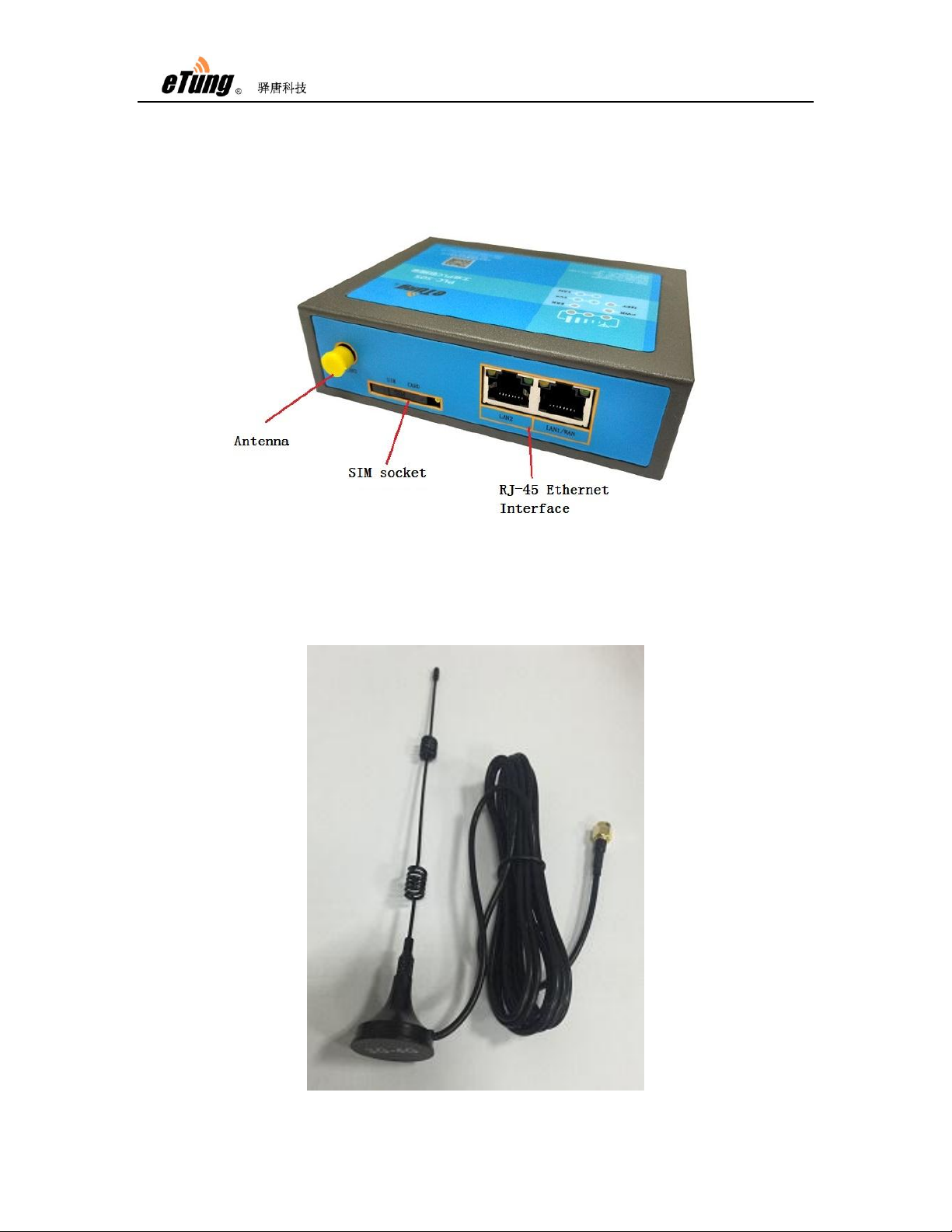
1.2 Product Outlook

PLC-505 User Manual
6
Figure 1-1: PLC-505 side view 1
Figure 1-2: PLC-505 side view 2
1.3 Standard Accessories
Figure 1-3: 4G all frequency sucking antenna

PLC-505 User Manual
7
Figure 1-4: WIFI antenna
Figure 1-5: GPS antenna

PLC-505 User Manual
8
Figure 1-6: Cross cable
NOTE: The accessories may be different because of different models and
customer requirements, the figures above are just for reference.

PLC-505 User Manual
9
1.4 Dimension
Figure 1-7: PLC-505 dimension
Figure 1-8: Installation effect

PLC-505 User Manual
10
1.5 Working Mechanism
Figure 1-9: PLC-505 working mechanism
PLC-505 has RJ45 Ethernet interface and RS232/RS485 serial
interface, so it can connect with PLCs that have Ethernet interface or
serial interface, and Ethernet and serial interfaces can be used at the
same time.
1. Usage of Ethernet interface
PLC-505 connects with PLC via Ethernet cross cable, and after
power on, it dials up into 3G/4G network (or, via cable/WIFI
network) and access Internet, then establishes connection with
cloud platform and mServer. Use browser at the host computer to
access IoT cloud platform, and monitor PLC‟s data in real time. At
the same time Virhub software is run at the host computer and
connects to mServer as well. Then with Virhub functionality PLC and
the host computer are in the same virtual LAN, and user software at
the host computer can then access PLC, to download or update
program.
PLC-505 has two RJ45 interfaces, and can be WIFI AP. So it allows
multiple PLCs (or other devices) that have Ethernet interface to
connect with it. And with PLC-505‟s virtual channels, one PLC-505
can serve at most nine PLCs to perform remote data acquisition and
Table of contents
Other eTung Network Router manuals