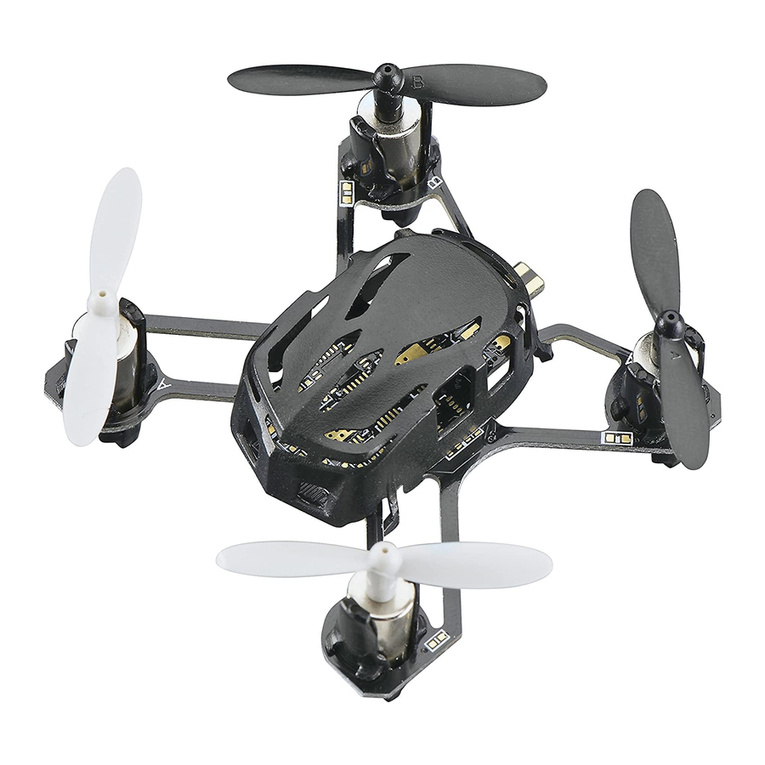
Estes Dart User manual

4605
Instruction Manual
Manual de instrucciones
Mode d’emploi
™
™

2
Thank you for purchasing the Estes Dart Quadcopter. We are certain you will get
many hours of enjoyment out of this model. If you should have any questions or
concerns please feel free to contact us at Hobby Services.
SAFETY PRECAUTIONS
Follow these safety precautions when operating this or any model helicopter.
•Adult supervision required.
•Keep your face and body as well as all spectators away from the rotors whenever
the battery is connected.
•
Stay clear of buildings, trees and power lines. AVOID flying in or near crowded
areas. DO NOT fly close to people, children or pets.
•Maintain a safe pilot-to-helicopter distance while flying.
•
Your Dart should not be considered a toy, but rather a sophisticated, working
model and, if not operated correctly, the model could possibly cause injury to
yourself or spectators and damage to property.
•Do not alter or modify the model, as doing so may result in an unsafe or unflyable
model.
•You must check the operation of the model before every flight to insure that the
model has remained structurally sound.
90-DAY LIMITED WARRANTY
PLEASE DO NOT RETURN YOUR PRODUCT TO THE STORE – Estes will repair
or replace factory defects for 90 days from the date of purchase. This warranty
specifically does not cover crash damage, misuse or abuse. To make a warranty
claim, please contact our product support team at 1-217-398-8970 or e-mail us at
productsuppor[email protected]
If requested by Product Support, please send defective product to:
Hobby Services
3002 N Apollo Dr., Suite #1
Champaign, IL 61822
This warranty applies only if the product is operated in compliance with the
instructions and warnings provided with each model. Estes assumes no liability
except for the exclusive remedy or repair of parts as specified above. Estes shall
not be liable for consequential or incidental damages. Some states do not allow the
exclusion of consequential or incidental damages so the above exclusion may not
apply to you. This warranty gives you specific legal rights and you may also have
other rights which vary from state to state.
READ THROUGH THIS MANUAL BEFORE OPERATING.

3
ADDITIONAL ITEMS REQUIRED
❏Four AAA 1.5V alkaline batteries
❏Phillips head screwdriver
CONTENTS
1. Dart
2. USB Charge Cord
3. Flight Battery
4. Controller
5. Spare Blades
(2 black, 2 white)
BATTERY PRECAUTIONS
This Dart Quadcopter uses a lithium polymer (LiPo) battery. Follow these
precautions to insure safe and trouble-free operation.
•Only use the included charger with the included battery.
•Do not attempt to use this charger with NiCd or NiMH battery packs.
•Do not attempt to use a damaged battery.
•This product contains a LiPo battery. Must be recycled or disposed of properly.
•Do not leave the charger unattended while charging. Disconnect the battery and
unplug the charger immediately if either becomes hot! However, it is normal for
the charger to get warm.
•Disconnect the battery from the charger and carefully move the battery to a
fireproof location if the battery begins to swell or smoke!
•Never allow the battery temperature to exceed 140° F [60° C].
•Never disassemble or modify pack wiring in any way or puncture cells.
•Do not place the charger or any battery on a flammable surface or near a
combustible material while in use.
1
2
3
4
5

4
•Never charge inside a vehicle.
•Always disconnect the battery and remove the charger from the USB port when
not in use.
•Do not attempt to charge a battery if it is swollen or hot.
•Land your model immediately when the battery begins to lose power. Recharge
the battery before attempting another flight. A dangerous situation can occur
when attempting to recharge an over-discharged battery!
•ALWAYS keep a supply of sand accessible when charging. Dumping sand on
the battery will extinguish a LiPo chemical fire.
•ALWAYS KEEP OUT OF REACH OF CHILDREN.
CARE AND MAINTENANCE
•Always remove the batteries from the controller and Dart when it is not being
used for a long period of time.
•Wipe the Dart with a clean, damp cloth.
SAFETY CHECK BEFORE FLYING
CAREFULLY INSPECT BEFORE FLIGHT
•Before operation, please make sure the batteries of the controller and receiver
are charged enough for the flight.
•Before turning on the controller, please check that the throttle stick is in the
lowest position.
•Carefully check rotor blades and rotor holders. Broken or premature failure of
parts will result in a dangerous situation.
•
When turning ON, always turn on the controller first, and then plug in the battery.
•
When turning OFF, always unplug the battery first and then turn off the controller.
•Beginners should find a larger area free from obstacles (such as a gymnasium
or a large basement with a tall ceiling). If the winds are calm, experienced pilots
may also be able to fly the Dart outdoors.

5
CONTROLLER
IDENTIFICATION AND FUNCTIONAL KEYS
OFF
Antenna
Elevator Trim
Throttle/Rudder Stick
Rudder Trim
LED Indicator
Throttle Trim
Elevator/Aileron stick
Power Switch
Aileron Trim
INSTALL BATTERIES
1. Remove the screw 2. Take off the cover
PUSH
PUSH
3. Install alkaline batteries
according to the
correct polarities
5. Re-install the screw4. Re-install the cover
•Do not mix old and new batteries
•Do not mix different types of batteries

6
CHARGING THE FLIGHT BATTERY
WARNING!!
The charger supplied with the Estes Dart contains
protective circuitry. If you experience any difficulties while charging the
battery, please disconnect the battery from the charger and unplug the
charger from the power source. Allow the battery and charger to rest for two hours
as this will allow the charge protection circuit to reset.
3.7V 240mAh
1.Remove the battery from bottom of the Dart.
3.7V 240mAh
2. Plug the USB charger into your USB port. The indicator light will remain off. Plug
the battery into the charger. The indicator light will glow solid, indicating that the
battery is being charged. Once the battery is completely charged, the indicator
light will turn off. Disconnect the battery from the charger. Under normal operating
conditions, the battery may take up to 60 minutes to recharge.
FLIGHT
POWER-ON (FAILSAFE) PROCEDURE
Your Dart is fitted with a Power-On failsafe. This is designed to ensure that the
motor will not start unless it detects a suitable radio-control signal when the LiPo
battery is connected. The correct Start-Up sequence is as follows:

7
1. Move the throttle stick to the lowest position.
2. Power on the controller.
3.7V 240mAh
3. Switch on the Dart by connecting the battery plugs with correct polarity and
insert into the back of the model.The LED will blink RED while it is binding with the
quadcopter. Once the controller is bound to the quadcopter, it will glow GREEN.
Place on a flat surface
Tip: You do not need to adjust the rudder trim button if the Dart spins left or right
during flight. The Dart will find the rudder central point automatically in 3 seconds
after it lands on a flat surface.
OFF
ON

8
EFFECT OF CONTROL
CAUTION: ALWAYS move the controls slowly! Be ready to use a little extra throttle
to maintain altitude during maneuvers.
NOTE: The white propellers are on the FRONT of the quadcopter!
Throttle increases/decreases the altitude your Dart.
OFF
Up
Down
Rudder rotates your Dart’s fuselage left/right.
OFF
Right
rotation
Left
rotation
Aileron moves your Dart “sideways” left/right.
OFF
LEFT movement
CAUTION: Controls will appear reversed
when the model is flying towards you!
RIGHT movement
Elevator moves your Dart forward/backward.
OFF Forward Backward
B
B
A
A

9
ADJUSTING FLIGHT TRIMS
During hover, it is normal for the Dart to drift slightly. However, if it moves off in any
direction consistently, quick press (1 or more times) the trim button opposite the
movement until it holds steady.
B
B
A
A
A
B
C
D
E
F
To stop drift, push A
To stop drift, push B
To stop drift,
push C
To stop drift,
push D
To stop spin,
push E
To stop spin,
push F
OFF
A
B
CD
EF
FLIGHT MODES
The solid green LED also indicates the controller is in BEGINNER mode. Beginner
mode is the default setting when the controller is turned on.
To adjust the controller to ADVANCED mode (more sensitive controls,) press the
elevator/aileron (right) joystick one time. The LED will begin to flash green.
To adjust the controller to EXPERT mode (most sensitive controls,) press the
elevator/aileron (right) joystick one more time. The LED will begin to flash orange.
Flip maneuvers can only be performed in expert mode.
To return to the beginner mode, press the elevator/aileron (right) joystick again.
The LED will once again be solid green.
360° AERIAL FLIPS (Expert Mode Only)
Tip: Perform the flip while gaining altitude.
OFF
LEFT SIDE FLIP: Quickly push the joystick halfway to the right and then quickly
push the joystick full to the left.

10
OFF
RIGHT SIDE FLIP: Quickly push the joystick halfway to the left and then quickly
push the joystick full to the right.
OFF
FORWARD FLIP: Quickly pull the joystick halfway to the back and then quickly
push the joystick full to the front.
OFF
BACKWARD FLIP: Quickly push the joystick halfway to the front and then quickly
pull the joystick full to the back.
TROUBLESHOOTING
PROBLEM: Controller and Dart can not be bound.
SOLUTION: Throttle position needs to be minimized to zero.
PROBLEM: Red controller LED light flashing after binding.
SOLUTION: Replace with new AAA batteries.
Table of contents
Languages:
Other Estes Quadcopter manuals