
Ergotron 97-754-002 User manual

888-97-295-W-00 rev.B • 02/13
1 of 8
ASSEMBLY INSTRUCTIONS
Instrucciones de instalación
Notice d’assemblage
Montageanleitungen
Installatie instructies
Manuali d’Istruzione
取扱い説明書
설치 안내
Task Light for StyleView Carts
42.5" (1080 mm)
5.6" (143 mm) 13.1" (333 mm) 23.8" (603 mm)
OFF (0%), 20%, 50%, 100%.
Pushing the button will switch through these brightness settings:
Al presionar el botón, se irá alternando la siguiente conguración de brillo:
Appuyez sur le bouton pour parcourir ces paramètres de luminosité.
Durch Drücken des Knopfes werden nacheinander die folgenden Helligkeitsstufen eingestellt:
Als u op de knop drukt loopt u door deze helderheidinstellingen:
La pressione del pulsante consentirà di alternare tra le seguenti impostazioni di luminosità:
Om du trycker på knappen, växlar du mellan dessa ljusinställningar:
ボタンを押すと明るさの設定が切り替わります。
按下按钮将在这些亮度设置之间切换:

888-97-295-W-00 rev.B • 02/13
2 of 8
ABCDE
1
2
1x
1x
1x 1x 1x
1x
4mm (5/32")
3 6
LCD
Pantalla LCD
液晶显示器
Laptop
Computador portátil
Ordinateur portable
ノートパソコン
笔记本电脑
USB
USB
M6 x 14mm M4 x 5mm
1x1x 2x
M6 x 33mm
888-97-295-W-00 rev.B • 02/13
3 of 8
1
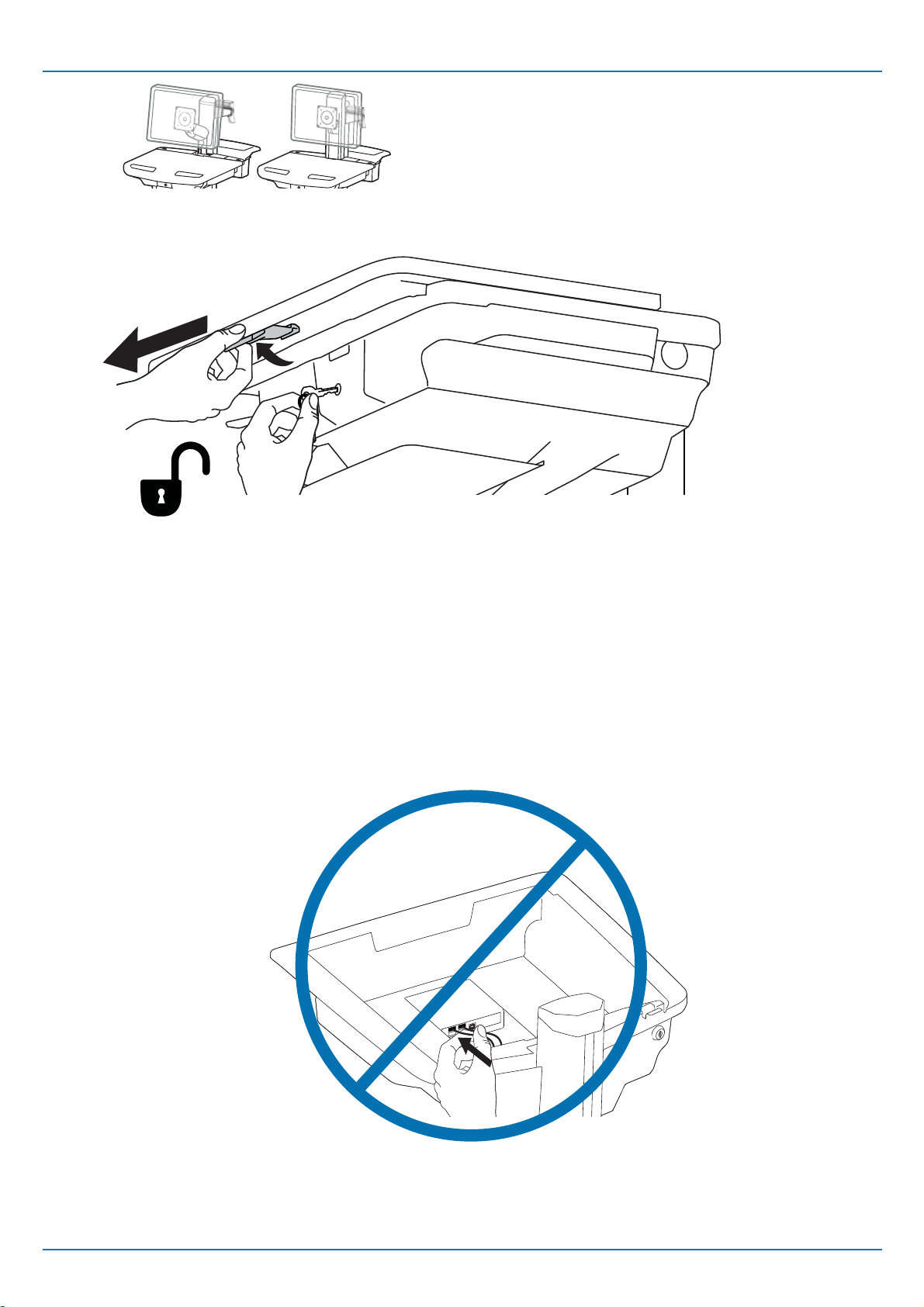
IMPORTANT! DO NOT plug the Task Light into the USB Hub.
¡IMPORTANTE! NO conecte la iluminación en el conector USB.
IMPORTANT ! NE PAS brancher la lampe de travail dans le concentrateur USB.
WICHTIG! Arbeitsleuchte NICHT am USB Hub anschließen.
BELANGRIJK! Steek het werklicht NIET in de USB hub.
IMPORTANTE! NON inserire la spina della lampada da scrivania nell'hub USB.
VIKTIGT!KOPPLA INTE in arbetsbelysningen i USB hubben
重要!タスクライトはUSBハブに接続しないでください。
重要说明! 不要将任务灯插入 USB 集线器。
LCD
Pantalla LCD
液晶显示器

888-97-295-W-00 rev.B • 02/13
4 of 8
2
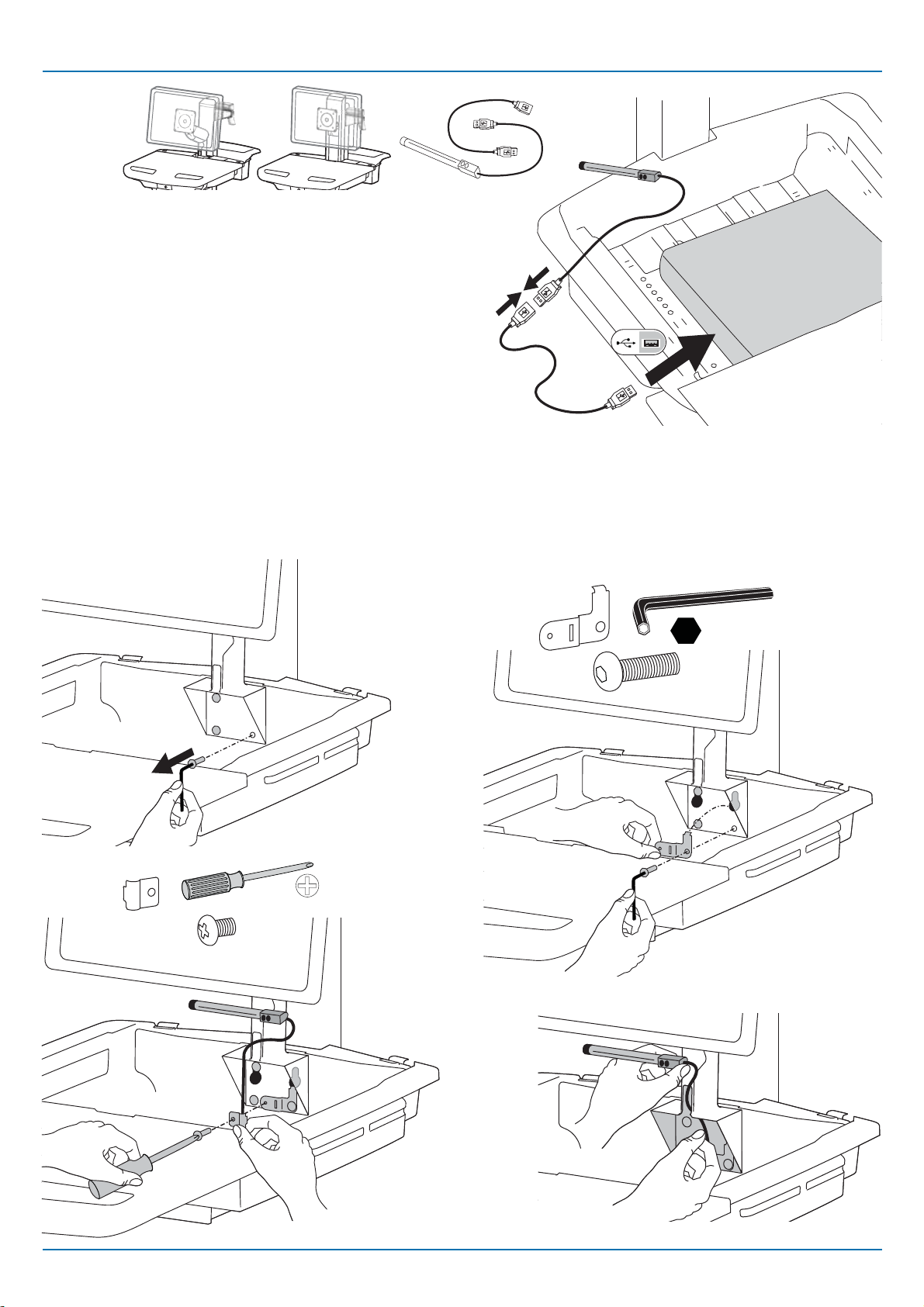
Computer has rear facing USB.
El ordenador cuenta con un puerto USB en la parte trasera.
L'ordinateur dispose d'un USB faisant face à l'arrière.
Computer mit USB-Buchsen auf der Rückseite
De computer heeft een naar achteren gericht USB
L'USB del computer è sul retro.
Dator har USB på baksidan
コンピュータの背面にUSBがある場合。
电脑上有后侧 USB。
Computer has side facing USB and USB extension is needed.
El ordenador cuenta con un puerto USB lateral y una
extensión USB si es necesaria.
L'ordinateur dispose d'un USB faisant face sur le côté et une
extension USB est requise.
Computer mit USB-Buchsen an der Seite; USB-Verlängerung
nötig.
De computer heeft een naar de zijkant gerichte USB en er is
een USB verlenging nodig.
L'USB del computer è a lato e occorre una prolunga USB.
Dator har USB på sidan och kräver USB förlängningskabel.
コンピュータの側面にUSBがあり、USBエクステンションが必要な
場合。
电脑上有侧面 USB,需要 USB 延长线。
4
a
a1
a2
b
b
LCD
Pantalla LCD
液晶显示器
888-97-295-W-00 rev.B • 02/13
5 of 8
b
b1
b3
b4
b2
4mm (5/32")
M4 x 5mm
1x
M6 x 14mm
1x
LCD
Pantalla LCD
液晶显示器
Computer has side facing USB and USB extension is needed.
El ordenador cuenta con un puerto USB lateral y una
extensión USB si es necesaria.
L'ordinateur dispose d'un USB faisant face sur le côté et une
extension USB est requise.
Computer mit USB-Buchsen an der Seite; USB-Verlängerung
nötig.
De computer heeft een naar de zijkant gerichte USB en er is
een USB verlenging nodig.
L'USB del computer è a lato e occorre una prolunga USB.
Dator har USB på sidan och kräver USB förlängningskabel.
コンピュータの側面にUSBがあり、USBエクステンションが必要な
場合。
电脑上有侧面 USB,需要 USB 延长线。

888-97-295-W-00 rev.B • 02/13
6 of 8
1
Laptop
Computador portátil
Ordinateur portable
ノートパソコン
笔记本电脑
IMPORTANT! DO NOT plug the Task Light into the USB Hub.
¡IMPORTANTE! NO conecte la iluminación en el conector USB.
IMPORTANT ! NE PAS brancher la lampe de travail dans le concentrateur USB.
WICHTIG! Arbeitsleuchte NICHT am USB Hub anschließen.
BELANGRIJK! Steek het werklicht NIET in de USB hub.
IMPORTANTE! NON inserire la spina della lampada da scrivania nell'hub USB.
VIKTIGT!KOPPLA INTE in arbetsbelysningen i USB hubben
重要!タスクライトはUSBハブに接続しないでください。
重要说明! 不要将任务灯插入 USB 集线器。

888-97-295-W-00 rev.B • 02/13
7 of 8
Laptop
Computador portátil
Ordinateur portable
ノートパソコン
笔记本电脑
2
7
a
a1
a2
b
b
Computer has rear facing USB.
El ordenador cuenta con un puerto USB en la parte trasera.
L'ordinateur dispose d'un USB faisant face à l'arrière.
Computer mit USB-Buchsen auf der Rückseite
De computer heeft een naar achteren gericht USB
L'USB del computer è sul retro.
Dator har USB på baksidan
コンピュータの背面にUSBがある場合。
电脑上有后侧 USB。
Computer has side facing USB and USB extension is needed.
El ordenador cuenta con un puerto USB lateral y una
extensión USB si es necesaria.
L'ordinateur dispose d'un USB faisant face sur le côté et une
extension USB est requise.
Computer mit USB-Buchsen an der Seite; USB-Verlängerung
nötig.
De computer heeft een naar de zijkant gerichte USB en er is
een USB verlenging nodig.
L'USB del computer è a lato e occorre una prolunga USB.
Dator har USB på sidan och kräver USB förlängningskabel.
コンピュータの側面にUSBがあり、USBエクステンションが必要な
場合。
电脑上有侧面 USB,需要 USB 延长线。

888-97-295-W-00 rev.B • 02/13
8 of 8
M4 x 5mm
1x
b1
b3
b4
b2 4mm (5/32")
b
2x
M6 x 33mm
Laptop
Computador portátil
Ordinateur portable
ノートパソコン
笔记本电脑
Computer has side facing USB and USB extension is needed.
El ordenador cuenta con un puerto USB lateral y una
extensión USB si es necesaria.
L'ordinateur dispose d'un USB faisant face sur le côté et une
extension USB est requise.
Computer mit USB-Buchsen an der Seite; USB-Verlängerung
nötig.
De computer heeft een naar de zijkant gerichte USB en er is
een USB verlenging nodig.
L'USB del computer è a lato e occorre una prolunga USB.
Dator har USB på sidan och kräver USB förlängningskabel.
コンピュータの側面にUSBがあり、USBエクステンションが必要な
場合。
电脑上有侧面 USB,需要 USB 延长线。
Table of contents
Popular Lighting Equipment manuals by other brands


Qazqa
Qazqa Suplux SL 3 Black 103062 instruction manual

Commercial Electric
Commercial Electric 54568141 Use and care guide

CREE LIGHTING
CREE LIGHTING 304 Series installation instructions

Goobay
Goobay 49867 user manual

ECOMAN ITALIA
ECOMAN ITALIA LED T8 instruction manual

Alkalite
Alkalite Krypton KT-81 user manual


