
EPOS GTW 270 User manual


1
Contents
Welcome �����������������������������������������������������������������������������������������������������������������������������������2
Package contents �������������������������������������������������������������������������������������������������������������3
GTW 270 at a glance������������������������������������������������������������������������������������������������������4
Earbuds at a glance ��������������������������������������������������������������������������������������������������������������������������������������������������4
Charge case at a glance�������������������������������������������������������������������������������������������������������������������������������������� 5
How to connect to your devices ��������������������������������������������������������������������������6
Pairing with a Bluetooth device���������������������������������������������������������������������������������������������������������������������� 6
Finding your t���������������������������������������������������������������������������������������������������������������������7
Changing the eartips�����������������������������������������������������������������������������������������������������������������������������������������������7
Positioning securely in your ears�������������������������������������������������������������������������������������������������������������������7
How to use – the basics�����������������������������������������������������������������������������������������������8
Powering the earbuds on – auto connect ���������������������������������������������������������������������������������������������8
Powering the earbuds o������������������������������������������������������������������������������������������������������������������������������������ 9
Handling audio������������������������������������������������������������������������������������������������������������������������������������������������������������10
Handling calls���������������������������������������������������������������������������������������������������������������������������������������������������������������10
Using Siri®, Google Now™, Alexa ��������������������������������������������������������������������������������������������������������������������11
Installing the EPOS Gaming Suite����������������������������������������������������������������������������������������������������������������11
Changing the voice prompts language��������������������������������������������������������������������������������������������������12
Updating the rmware�������������������������������������������������������������������������������������������������������������������������������������������12
How to charge��������������������������������������������������������������������������������������������������������������������13
Charging the earbuds�������������������������������������������������������������������������������������������������������������������������������������������13
Charging the case����������������������������������������������������������������������������������������������������������������������������������������������������14
Good to know���������������������������������������������������������������������������������������������������������������������15
Pair up to eight devices�������������������������������������������������������������������������������������������������������������������������������������� 15
Overview of the LED indications ����������������������������������������������������������������������������������������������������������������� 15
If you leave the Bluetooth range����������������������������������������������������������������������������������������������������������������� 16
Waking up from energy saving mode������������������������������������������������������������������������������������������������������ 16
Multi-platform compatibility – Accessories�����������������������������������������������������������������������������������������17
Pairing with the dongle ����������������������������������������������������������������������������������������������������������������������������������������18
If a problem occurs ������������������������������������������������������������������������������������������������������19
How to care for your earbuds�����������������������������������������������������������������������������20
Cleaning the products����������������������������������������������������������������������������������������������������������������������������������������20
Cleaning the eartips �����������������������������������������������������������������������������������������������������������������������������������������������21
Specications������������������������������������������������������������������������������������������������������������������� 22

2Welcome
Welcome
The unique ergonomically shaped
earbuds are soft and exible to adjust
to your ear and ensures a secure and
comfortable t with best-in-class
acoustic seal� The closed acoustic
design provides noise attenuation that
lets you tune out background noise and
lose yourself in the immersive audio of
your game�
Dual microphones deliver acoustic
clarity and ve hours of listening time
in the earbuds is extended to up to
20 hours with the included charge case�
Let the Power of Audio™ break you
away from the cares of your commute
and free your mind�
High-end mobile audio
Enjoy immersive audio playback that
takes your game enjoyment to a new
level while on the go� Pair to your
favorite mobile device with stable
Bluetooth® 5�1, slip the compact
GTW 270 wireless earbuds into your
ears and enter a new dimension�
Game audio on the go
Enjoy a quick escape to new worlds
with immersive audio when you slip the
compact GTW 270 wireless earbuds into
your ears� Its unique ergonomic shape
delivers a secure and comfortable t
for hours of high-performance audio
playback while dual microphones deliver
acoustic clarity�
Key benets & features
Closed acoustic earbuds
Closed-back and in-ear for
maximum noise reduction and
maximum game focus
EPOS audio technology
Delivering audio excellence with
noise isolating custom designed
ear tips�
Dual microphone technology
Dual microphone design delivers
acoustic clarity
Multi-command button
A single button switches through
play, pause, next track and phone
controls
IPX 5 water resistance
IPX 5 water resistance protects
the earbuds from sweat and light
rain
Multi-platform compatibility
Multi-compatibility through the
USB-C aptX™ low-latency dongle
and Bluetooth®
Portable charge case
Up to 20 hours of listening time:
ve on the earbuds plus 15 more
with the case�
§
§
For safety instructions, consult the Safety Guide�

3Package contents
Package contents
GTW 270 earbuds L & R
with built-in rechargeable battery
On-the-go charge case
with built-in rechargeable battery
for earbuds
USB-A to USB-C®charge cable
Silicone eartips – XS, S, L
(M pre-mounted)
Quick Guide
Safety Guide
Compliance sheet

4GTW 270 at a glance
GTW 270 at a glance
Earbuds at a glance
R
L
Status LED
Right earbud Microphone 2
Ear adapter
Multi-function button
Status LED
Left earbud
Microphone 1

5GTW 270 at a glance
Charge case at a glance
Multi-function button
Earbuds charging compartments
with magnetic holders
Lid
Magnetic lid catch
Status LEDs
USB-C charging socket
6How to connect to your devices
How to connect to your devices
You can pair up to eight devices with your GTW 270 – see page 15�
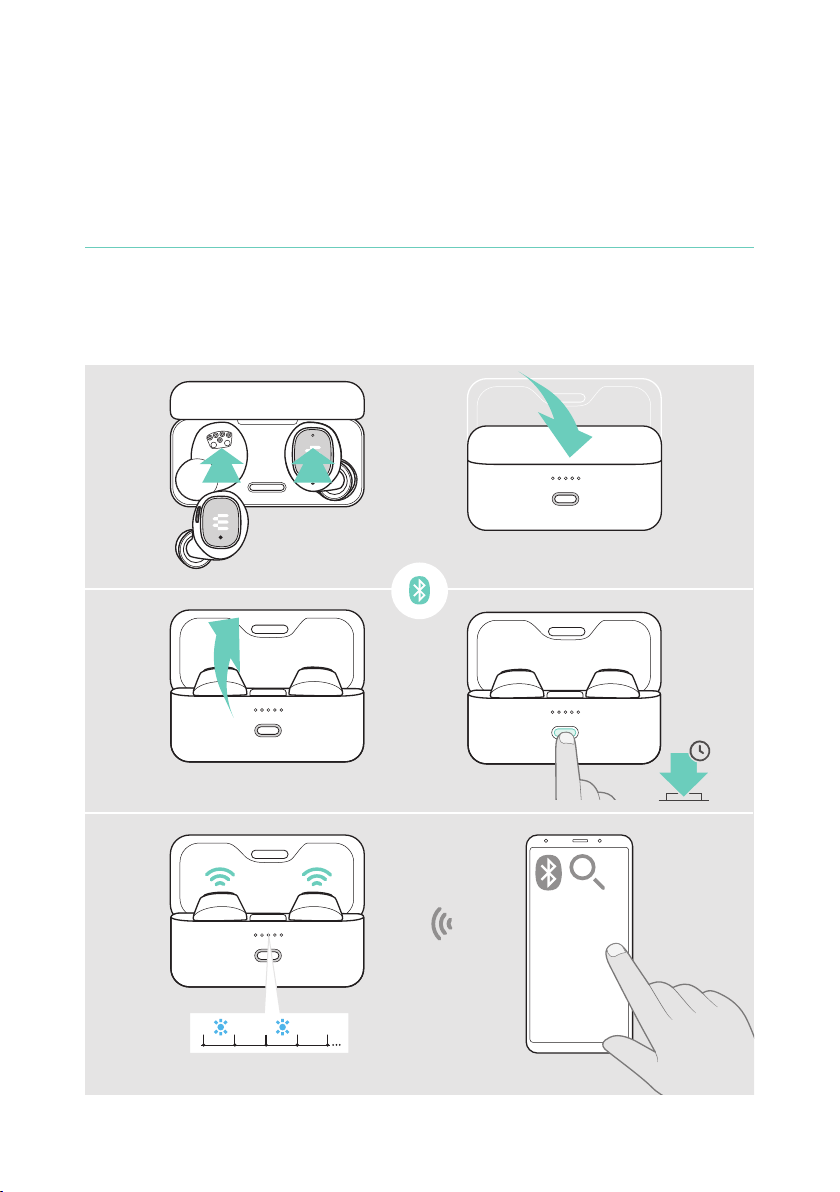
Pairing with a Bluetooth device
1 Dock both earbuds� Close the lid�
2 Open the lid� Press and hold the charge case button to initiate pairing�
3 Search for Bluetooth devices – see instruction manual of your device – and
select “EPOS GTW 270”�
3s
3
2
1
...
...
EPOS GTW 270
...

7Finding your t
Finding your t
Changing the eartips
For the optimal audio experience and the most comfortable t, try out each size of
our custom-designed eartips� Check for your left and right ear separately as most
people’s ears are dierent in size� Overall, you should feel a good sealing without
losing on comfort�
1 Select eartips of the correct size (XS, S, M or L) so that the earbud sits
comfortably and securely in your ear�
2 Remove the eartip carefully�
3 Push the suiting eartip on the in-ear sound tunnel and ensure that it is rmly
attached�
XS M LS
Positioning securely in your ears
1 Insert the earbuds into your ears�
2 Rotate to t comfortably�

8How to use – the basics
How to use – the basics
CAUTION
Risk of hearing damage!
Listening at high volume levels for long periods can lead to permanent
hearing defects�
Set the volume on your connected device to a low level before inserting the
earbuds� Do not continuously expose yourself to high volumes�
Powering the earbuds on – auto connect
1 Open the lid to power on the earbuds� Activate Bluetooth on your device�
Insert the earbuds into your ears�
2 The earbuds automatically try to connect the nearest Bluetooth device – see
page 15�
You hear the voice prompt “Device connected”�
2
1

9How to use – the basics
Powering the earbuds o
Your earbuds’ true home is your charge case� They feel home and safe when
docked into the case�
1 Dock both earbuds�
2 Close the lid to power o the earbuds and automatically charge them�
The battery is being charged – see page 13�
2
1
iIf you leave the earbuds on your desk and there is no audio signal, the
earbuds turn to energy saving mode after 3 minutes – see page 16�
This manual suits for next models
1
Table of contents
Other EPOS Headphones manuals


