
epiphan VGA2Ethernet User manual

Epiphan Technical
Documentation
©2009-2011
Epiphan Systems Inc.
All Rights Reserved
February 2011
VGA2Ethernet™
User Guide
www.epiphan.com

Thank you for choosing Epiphan!
At Epiphan Systems Inc. (“Epiphan”), product function and quality are our top
priority. We make every effort to make sure that our products exceed our
customers’ expectations.
Product Feedback
We regularly contact our customers to ensure product performance and
reliability. We strive to continually enhance our products to accommodate your
needs. We welcome your feedback and suggestions for product improvements.
Specifications
You can go to the Frame Grabbers page of the Epiphan website to get
information about the VGA2Ethernet.
Warranty
All Epiphan Systems products are provided with a 100% return to depot warranty
for one year from the date of purchase.
Technical Support
Epiphan is staffed by a professional support team. If, after checking the FAQs
for your product on the Epiphan website and re-installing the Epiphan driver
software (where applicable), you continue to have outstanding issues, email a
efficiently, include the following info:
•Your VGA2Ethernet serial number.
•The behavior of your VGA2Ethernet LED indicators.
•Technical description of the signal source including resolution, refresh
rate, synchronization, type of hardware.
•Complete description of the problem you are experiencing.
Copyright ©2011 Epiphan Systems Inc. All Rights Reserved.

Introduction
ii
VGA2Ethernet User Guide
Terms and Conditions
This document, the Epiphan web site, and the information contained therein,
including but not limited to the text and images as well as Epiphan Systems Inc's
trademarks, trade names and logos are the property of Epiphan and its affiliates
and licensors, and are protected from unauthorized copying and dissemination
by Canadian copyright law, United States copyright law, trademark law,
international conventions and other intellectual property laws.
Epiphan, Epiphan Systems, Epiphan Systems Inc., and Epiphan logos are
trademarks or registered trademarks of Epiphan Systems Inc., in certain
countries. All Epiphan product names and logos are trademarks or registered
trademarks of Epiphan. All other company and product names and logos may be
trademarks or registered trademarks of their respective owners in certain
countries.
Copyright ©2011 Epiphan Systems Inc. All Rights Reserved.
THE SOFTWARE LICENSE AND LIMITED WARRANTY FOR THE
ACCOMPANYING PRODUCT ARE SET FORTH IN THE INFORMATION
PACKET OR PRODUCT INSTALLATION SOFTWARE PACKAGE THAT
SHIPPED WITH THE PRODUCT AND ARE INCORPORATED HEREIN BY
REFERENCE. IF YOU ARE UNABLE TO LOCATE THE SOFTWARE LICENSE
OR LIMITED WARRANTY, CONTACT YOUR EPIPHAN REPRESENTATIVE
FOR A COPY.
PRODUCT DESCRIPTIONS AND SPECIFICATIONS REGARDING THE
PRODUCTS IN THIS MANUAL ARE SUBJECT TO CHANGE WITHOUT
NOTICE. EPIPHAN PERIODICALLY ADDS OR UPDATES THE INFORMATION
AND DOCUMENTS ON ITS WEB SITE WITHOUT NOTICE. ALL
STATEMENTS, INFORMATION AND RECOMMENDATIONS ARE BELIEVED
TO BE ACCURATE AT TIME OF WRITING BUT ARE PRESENTED WITHOUT
WARRANTY OF ANY KIND, EXPRESS OR IMPLIED. USERS MUST TAKE
FULL RESPONSIBILITY FOR THEIR APPLICATION OF ANY PRODUCTS.
LIMITATION OF LIABILITY
UNDER NO CIRCUMSTANCES SHALL EPIPHAN BE LIABLE FOR ANY
INCIDENTAL, SPECIAL, CONSEQUENTIAL, EXEMPLARY OR OTHER
INDIRECT DAMAGES THAT RESULT FROM THE USE OF, OR THE INABILITY
TO USE, THIS PRODUCT OR THE INFORMATION CONTAINED ON THIS
DOCUMENT OR PROVIDED ON EPIPHAN’S WEB SITE, EVEN IF EPIPHAN
HAS BEEN ADVISED OF THE POSSIBILITY OF SUCH DAMAGES. IN NO

Introduction
iii
VGA2Ethernet User Guide
EVENT SHALL EPIPHAN'S TOTAL LIABILITY TO YOU FOR ALL DAMAGES,
LOSSES, AND CAUSES OF ACTION RESULTING FROM YOUR USE OF THIS
PRODUCT, WHETHER IN CONTRACT, TORT (INCLUDING, BUT NOT
LIMITED TO, NEGLIGENCE) OR OTHERWISE, EXCEED THE AMOUNTS YOU
PAID TO EPIPHAN DURING THE MOST RECENT THREE-MONTH PERIOD IN
CONNECTION WITH AMOUNTS WHICH YOU PAID FOR USING THIS
PRODUCT.
INFORMATION AND DOCUMENTS, INCLUDING PRODUCT
SPECIFICATIONS, PROVIDED IN THIS DOCUMENT OR THE EPIPHAN WEB
SITE ARE PROVIDED "AS IS." SPECIFICALLY, BUT WITHOUT LIMITATION,
EPIPHAN DOES NOT WARRANT THAT: (i) THE INFORMATION IS CORRECT,
ACCURATE, RELIABLE OR COMPLETE; (ii) THE FUNCTIONS CONTAINED
ON THIS WEB SITE WILL BE UNINTERRUPTED OR ERROR-FREE; (iii)
DEFECTS WILL BE CORRECTED, OR (iv) THE EPIPHAN WEB SITE OR THE
SERVER(S) THAT MAKES IT AVAILABLE ARE FREE OF VIRUSES OR
OTHER HARMFUL COMPONENTS. EPIPHAN SPECIFICALLY DISCLAIMS
ALL REPRESENTATIONS, WARRANTIES AND CONDITIONS, EITHER
EXPRESS, IMPLIED, STATUTORY, BY USAGE OF TRADE OR OTHERWISE
INCLUDING BUT NOT LIMITED TO ANY IMPLIED WARRANTIES OF
MERCHANTABILITY, NON-INFRINGEMENT, TITLE, SATISFACTORY
QUALITY OR FITNESS FOR A PARTICULAR PURPOSE.
For additional terms and conditions, please refer to additional sections in this
document.

1. Table of Contents
1. Introduction ............................................................................... 4
2. Installation.................................................................................. 6
VGA2Ethernet Hardware Features................................................. 6
VGA2Ethernet Software Features ................................................ 10
Optimizing VGA2Ethernet Performance...................................... 11
Connect and Power on a VGA2Ethernet Device.......................... 11
Installing the Drivers and Application for Windows.................... 13
If the VGA2Ethernet User Interface Cannot Find the Device......16
Finding the VGA2Ethernet Device Manually .............................. 16
Using the Network Discovery Utility to Find the VGA2Ethernet 17
Installing the Drivers and Applications for Mac OS X ................ 18
If the VGA2Ethernet User Interface Cannot Find the Device......20
Direct Connection of VGA2Ethernet to Workstation................... 20
3. Windows VGA2Ethernet User Interface............................... 22
Finding VGA2Ethernet Drivers and Application Updates........... 22
Starting the VGA2Ethernet User Interface................................... 23
Pausing, Copying, Saving, and Printing Images...........................24
Recording Captured Images.......................................................... 26
Menus............................................................................................ 28
Toolbar.......................................................................................... 33
Status Bar...................................................................................... 34
Capture, Recording, and Display Options ................................... 35
4. Mac OS X VGA2Ethernet user interface..............................48
Upgrading to the Latest Mac OS X Software Version ................. 48
Starting the Mac OS X VGA2Ethernet user interface.................. 49
Menus............................................................................................ 51
Toolbar.......................................................................................... 54
Changing System Preferences ...................................................... 58
5. Web admin interface............................................................... 59
Logging into the Web admin interface ......................................... 59
Configuring the Ethernet Bridge For Use if You Have Only One
Ethernet Connection ..................................................................... 62
If the Network Does Not Have a DHCP Server ........................... 63
Adding or Changing the Web admin Interface Password............. 65
Adding or Changing the Viewer Password................................... 66
Configuring Frame Grabber Adjustments .................................... 67
Changing the Network Configuration........................................... 71
Configuring Remote Support........................................................ 75
Setting the Date and Time............................................................. 77

Introduction
2
VGA2Ethernet User Guide
Upgrading the VGA2Ethernet Firmware......................................79
Using Maintenance Controls ........................................................ 81
Restoring the VGA2Ethernet Default Factory Configuration...... 81
Rebooting or Restarting VGA2Ethernet....................................... 82
Shutting Down the VGA2Ethernet Device...................................82
Displaying VGA2Ethernet Information........................................ 82
6. Web Broadcasting ................................................................... 85
Setting the Display Format for Web Broadcasting....................... 85
Starting a Web Broadcasting Session...........................................86
Viewing a Web Broadcasting Session.......................................... 87
Troubleshooting Web Broadcasting Performance........................ 87
7. Windows Network Discovery Utility .....................................88
Finding and Installing Drivers and Application Updates .............89
Starting the Network Discovery Utility........................................ 89
Menus............................................................................................ 90
List of Devices.............................................................................. 91
Captured Image Display ............................................................... 92
Configuring Image Adjustments................................................... 94
Configuring DirectShow Options................................................. 95
8. Recording Image Files............................................................. 97
Configuring Image File Recording Options ................................. 97
Recording Image Files.................................................................. 97
9. Recording Videos.....................................................................98
Recording Videos Using the Epiphan VGA2Ethernet user interface
...................................................................................................... 99
Selecting a Windows Video Codec .............................................. 99
Installing the ffvfw Video Codec Pack....................................... 100
Recording a Video ...................................................................... 101
Playing Back a Video File .......................................................... 102
Recording Videos for Mac OS X................................................ 102
10. Cables, Connectors and Adapters........................................105
3.5 mm Mini-jack ....................................................................... 105
DVI ............................................................................................. 105
VGA............................................................................................ 106
DVI to VGA cable...................................................................... 106
RJ-45 Male.................................................................................. 108

Introduction
3
VGA2Ethernet User Guide
Composite Video to DVI Converter........................................... 108
8. Sample Applications.............................................................. 109
Sharing Data without Using Guest-access Networks ................. 109
Performing Presentations over Ethernet ..................................... 109
Recording Training Sessions and Lecture Capture..................... 110
9. List of Figures........................................................................112

Introduction
4
VGA2Ethernet User Guide
1. Introduction
The Epiphan VGA2Ethernet™ is a compact external DVI/VGA/composite frame
grabber that is capable of capturing single link DVI and VGA signals at rates of up to
60 frames per second. VGA2Ethernet also supports a stereo 3.5mm audio input.
Designed for high speed and high precision military, medical and industrial
applications, Epiphan Systems VGA2Ethernet uses the common RJ45 Ethernet port
to interface itself with the target computer, allowing for up to 1 Gigabit transfer rates.
This is the only frame grabber capable of capturing both DVI and VGA signals and
sending the data over Ethernet. Using the latest state-of-the-art pre-compression
technologies developed by Epiphan Systems specifically for the VGA2Ethernet, you
are able to acquire diagnostic-quality 100% lossless images from any DVI/VGA/RGB
source.
This solution is also able to capture a composite video signal using a composite to
VGA converter cable, purchased separately.
The VGA2Ethernet is part of Epiphan’s complete line of video signal capture,

Introduction
5
VGA2Ethernet User Guide
broadcasting and recording products. For more information about all of Epiphan’s
broadcasting products, please see the Broadcaster Products Overview on the
Epiphan website.
Installation
6
VGA2Ethernet User Guide
2. Installation
This chapter describes the basics of how to connect a VGA2Ethernet device to a
VGA, DVI source and to an Ethernet network.
The VGA2Ethernet device uses an Ethernet network connection to send captured
image data to a video capture workstation. A video capture workstation is any PC or
Mac on which you have installed the VGA2Ethernet drivers and application and that is
connected to the same Ethernet network as the VGA2Ethernet device.
VGA2Ethernet Hardware Features
The VGA2Ethernet device is a 202mm x105mm x35mm (7.95”x4.13”x.1.38”) unit.
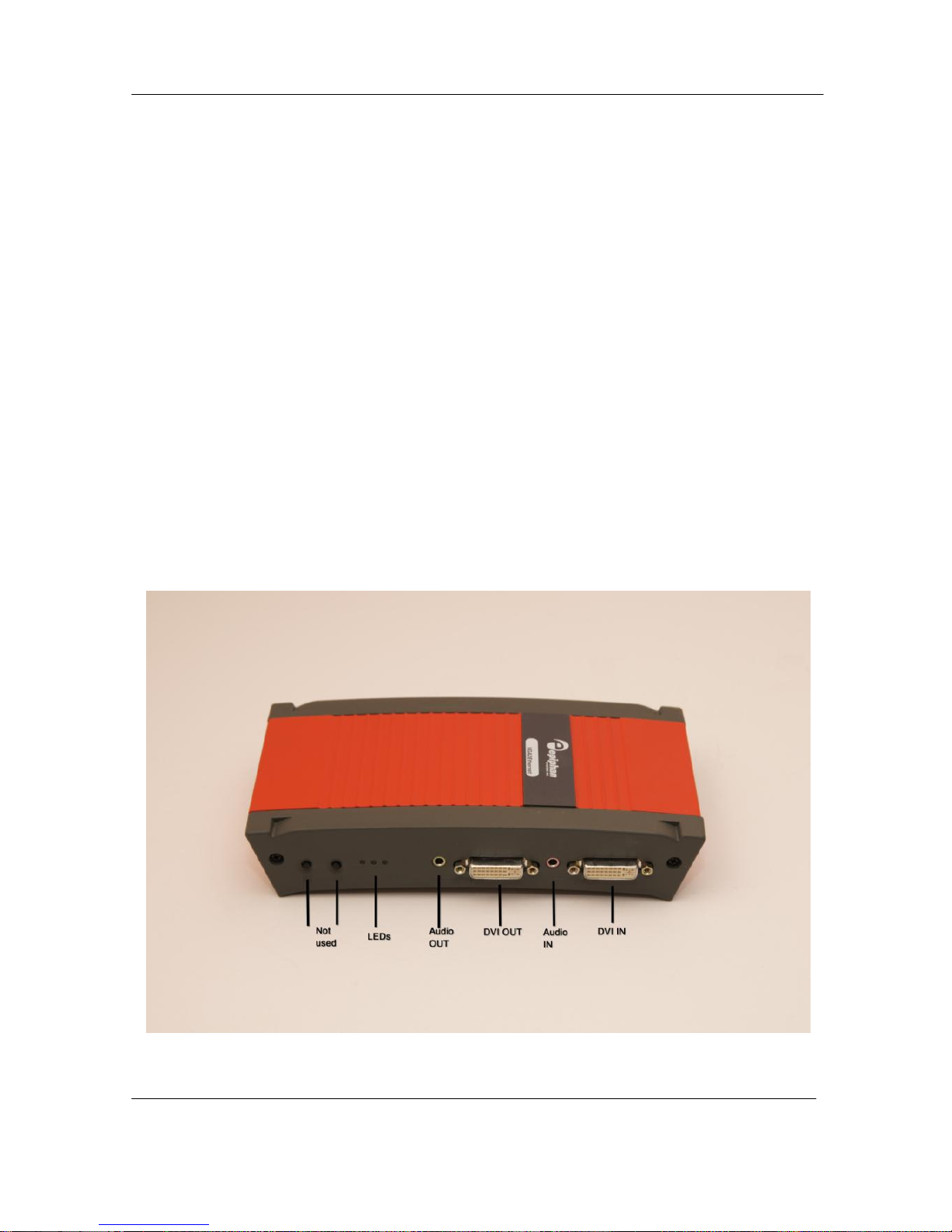
The front panel includes power and capture activity LEDs, DVI In and Out, audio In
and Out ports. The back panel includes 2 10/100/1000 Ethernet ports, and a power
connector.
Figure 1.
VGA2Ethernet (front view)
Other manuals for VGA2Ethernet
2
Table of contents
Other epiphan Media Converter manuals

epiphan
epiphan VGA2Ethernet User manual

epiphan
epiphan DVI2USB 3.0 User manual

epiphan
epiphan Networked VGA Grid User manual

epiphan
epiphan DVI2USB 3.0 User manual

epiphan
epiphan VGA Grid User manual

epiphan
epiphan SDI2USB 3.0 User manual

epiphan
epiphan Pearl-2 Rackmount User manual

epiphan
epiphan VGA2USB LR User manual

epiphan
epiphan SDI2USB 3.0 User manual


