
Eneo PXD-2080Z03 D User manual

Quick Installation Guide
1/3” Network Dome,
WDR, Day&Night, 3-9mm,
1920x1080, 3x AF Zoom, Infra-
red, PoE
PXD-2080Z03 D
EN


Safety Precaution
03
NETWORK AF-ZOOM CAMERA
CAUTION: TO REDUCE THE RISK OF ELECTIC SHOCK,
DO NOT REMOVE COVER (OR BACK).
NO USER SERVICEABLE PARTS INSIDE.
REFER SERVICING TO QUALIFIED SERVICE PERSONNEL.
To prevent fire or shock hazard, do not expose the unit to rain or moisture.
To prevent electric shocks and risk of fire hazards, do NOT use other than
specific power source.
Warning :
This equipment has been tested and found to comply with the limits for a Class
A digital device, pursuant to part 15 of the FCC Rules. These limits are designed
to provide reasonable protection against harmful interference when the equipment
is operated in a commercial environment. This equipment generates, uses, and
can radiate radio frequency energy and, if not installed and used in accordance with
the instruction manual, may cause harmful interference to radio communications.
Operation of this equipment in a residential area is likely to cause harmful
interference in which case the user will be required to correct the interference at
his own expense.
Caution :
Any changes or modifications in construction of this device which are not expressly
approved by the party responsible for compliance could void the user's authority
to operate the equipment.
Mains power quality should be that of a typical commercial environment. If the user
of the model requires continued operation during power mains interruptions, it is
recommended that the model be powered from an uninterruptible power supply
(UPS) or a battery.
The symbol is intended to alert the user to the presence of important
operating and maintenance(servicing) instructions in the literature
accompanying the unit.
The symbol is intended to alert the user to the presence of uninsulated
"dangerous voltage" within the product's enclosure that may be of
sufficient magnitude to constitute a risk of electric shock to persons.

Safety Precaution
04
NETWORK AF ZOOM CAMERA
NOTICE
The image used in this instruction manual are processed to help comprehension
and may differ from actual video of the camera.
Avoid installing areas where has shock or vibration which results in the problems.
Pay attention to safety when laying the connection cable and observe that the cable
is not subjected to heavy loads, kinks or damage and no moisture can get in.
Never open the device such as boards or lens.
The warranty becomes void if repairs are undertaken by unauthorized persons.
Maintenance and repair have to be carried out only by authorized service centers.
Use only a mild detergent to clean the housing.
The camera should never be operated beyond the technical specifications.
This can lead to destruction.
The camera should never be operated in water.

Contents
05
NETWORK AF ZOOM CAMERA
Safety Precaution
p.03~04
Contents
p.05
Features
p.06~07
Composition
p.07
Dimensions
p.08
Part Names
p.09
Installation Instructions
p.10~13
Operating Instructions
p.14~30
Specifications
p.31~32

Features
Key Features
06
NETWORK AF ZOOM CAMERA
• Full HD, 2Mega Pixel, NETWORK CAMERA, 1920x1080(30p/25p)
• ONVIF & PSIA Conformance
• Built-in f=3~9mm, F1.2~F2.1 Day&Night zoom lens
(Optical 3x Auto focus zoom / Digital 32x zoom)
• Real time True WDR (Wide Dynamic Range) / 30fps
• Improved noise figure with the enhanced 3DNR
• Dual Filter Switcher
• Color D/N, optimized color mode for night
• Focusing Status Indicator on Screen
- ★(Blue) Focusing in process
- ★(White) Focusing Completed
• Various Zooming Technologies
- Smart Motion Zoom (Automatic zoom in/out when motion is detected)
- Pointing Zoom (which enables the programmable zooming at any area)
- Preset Zoom
• Home Position setting
• Motion Detection, Privacy Mask, Defog, Sens-up, BLC/HLC, H/V/HV Flip,
Smart IR, Title Set, Motion Deblur
• ID / TITLE / ZOOM RATIO DISPLAY
• Enhanced Sensitivity by DSS technology
• H.264 / MJPEG dual streaming
• Full duplex 2 way Audio, Alarm IN/OUT
• Max 30fps live view @ 1920x1080p
• Audio & Alarm input/output
• Slot for Micro SD memory card verified up to 32GB
• Zoom & Menu Control via either Local Joystick or WEB
• OSD menu & CVBS Video output BNC for easy installation & maintenance
• Circuit protection against faulty connection in power polarity
• Isolated power supply against ground loop problem
• PoE(IEEE Std. 802.3af) & Local dual power
• Built-in 2 High power LEDs
• LED ON/OFF Control
• Built-in Cooling Fan & Heating function
• 3-Axis gimbal, Flush mount (Option: Surface mount and various adaptors)
• Double side Hard Coated Clear bubble dome
• IP67 / IK10 Protection
General Description
• With ICR mechanism,
- Enhances its sensitivity about 10x at night time
- Can accepts the infrared light
• With 24VAC/12VDC dual power & PoE (Power Over Ethernet) design,
- Offers the flexibility of installation
- Ensures the reliability
This camera realizes the natural and crisp image as you see the scene in front
of you by adopting Auto Focus Full HD(1920x1080p) camera module.
Highly detailed pictures can be achieved and color reproducibility deserves
attention.
Features
07
NETWORK AF ZOOM CAMERA
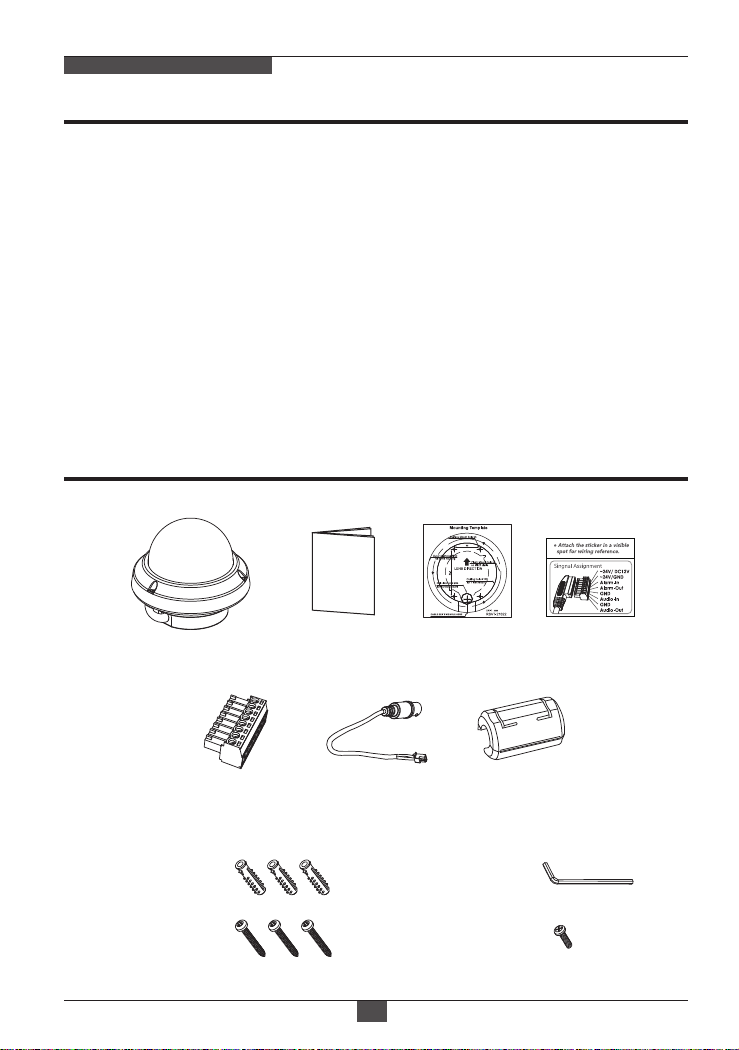
Composition
Torque Wrench:
3mm (1pc)
Mounting Screw:
4 x 30mm (3pcs)
Plastic Anchor:
6 x 30mm (3pcs)
Mounting
Template
Operating
Instruction
Dome Camera
Video Sub-out
Cable (1pc)
Wiring Connector
(1pc)
EMI Ferrite
Core (1pc)
Cable Signal
Sticker
Connector fixing Screw:
2.5 x 5mm (1pc)

Dimensions
08
NETWORK AF ZOOM CAMERA
Ø140
119
PCD Ø120
Ø102
Ø140
3-Ø4.2
82
(unit : mm)

Part Names
09
NETWORK AF ZOOM CAMERA
BUBBLE DOME
3-AXIS GIMBAL
DOME COVER
SAFTY WIRE
FLUSH MOUNT
ZOOM LENS
OSD CONTROL
JOY STICK
MICRO
SD-CARD SLOT
IP RESET
RTX Status
Indicator
Press over 10 sec
by stick driver
Power Supply
Connector
Ethernet
Connector
[ BOTTOM VIEW ]
ETHERNET &
POWER CABLE
ETHERNET &POWER CABLE
Coupler Board

Installation Instructions
10
NETWORK AF ZOOM CAMERA
Assembly Screw
(4x12mm)
Mounting Screw
(4x30mm)
1. Locate the mounting template at the installation position and drill the ceiling
or wall if needed.
2. Open the dome cover by loosening screws(4x12mm). Use the torque wrench
supplied.
3. Connect the dome cable with the power source cable.
4. Set the camera’s viewing angle.
5. Put the dome cover to the dome base unit and tighten the assembly screws.
- Place the dome base unit on pre-drilled position and fix it through using mounting
screws (4x30mm).
- Route the Ethernet & Power cable to the connecting place.
Torque
Wrench
• Surface mount
• Pole mount adaptor
• Tilted mount
• Wall mount
(Requires additional
Surface mount)
• Tilted junction mount
■ Optional Mounting Accessories
Table of contents
Other Eneo Dome Camera manuals


