Enconnex EdgeRack 3P Series User manual

EdgeRack 3P Series
USER MANUAL

Legal Disclaimer
This publication has been compiled in good faith by Enconnex LLC. The
information presented in this manual is not warranted by Enconnex to be
authoritative, error-free, or complete. This publication is not meant to be a
substitute for a detailed operational and site-specific development plan.
Enconnex assumes no liability for damages, violations of codes, improper
installation, system failures, or any other problems that could arise based on
the use of this publication.
In no event shall Enconnex LLC, its officers, its directors, or its employees
be liable for any direct, indirect, consequential, punitive, special, or
incidental damages (including, without limitation, damages for loss of
business, contracts, revenue, data, information, or business interruption)
resulting from, arising from, or in connection with the use of, or inability to
use this publication or the content, even if Enconnex has been expressly
advised of the possibility of such damages.
Enconnex reserves the right to make changes or updates with respect to or
in the content of the publication or the format thereof at any time without
notice. Copyright, intellectual, and all other proprietary rights in the content
(including but not limited to software, audio, video, text, and photographs)
rest with Enconnex or its licensors. All rights in the content not expressly
granted herein are reserved. No rights of any kind are licensed or assigned
or shall otherwise pass to persons accessing this information.
Copyright by ENCONNEX Co. Ltd
This publication shall not be for resale in whole or in part. No organization or
individual shall extract and/or duplicate this document in any form without
written permission from Enconnex.
1

Notice
Enconnex is not responsible for damages to the unit or personal injury due
to noncompliance with operation requirements as outlined in this document.
●This User Manual must be strictly complied with at the time of
installation and throughout the life of the EdgeRack 3P and the
integrated cooling unit.
●Operation of the cooling unit equipment must be completed by
professionals who are familiar with this manual.
●Only technicians that have received professional training from
Enconnex may service the system.
●Power to the EdgeRack 3P must be shut off if internal maintenance of
the equipment is required.
●Warranty of the equipment is ensured only under the premise that the
contents included in this manual are complied with.
●Parameters included in this manual are only to be used as a reference.
Enconnex reserves the right to change the parameters without prior
notice.
●In case of a lost, damaged, or misplaced manual, a replacement copy
can be requested from the Enconnex website, www.enconnex.com.
●This appliance is not intended for use by persons (including children)
with reduced physical, sensory or mental capabilities, or lack of
experience and knowledge unless they have been given supervision or
instruction concerning the use of the appliance by a person responsible
for their safety.
●Children should be supervised to ensure that they do not play with the
appliance.
●This appliance can be used by children aged 8 years and above and
persons with reduced physical, sensory or mental capabilities or lack of
experience and knowledge if they have been given supervision or
instruction concerning the use of the appliance safely and understand
the hazards involved. Children shall not play with the appliance.
2

Cleaning and user maintenance shall not be performed by children
without supervision.
●If the supply cord is damaged, it must be replaced by the manufacturer,
its service agent, or similarly qualified persons to avoid a hazard.
Enconnex LLC
Address: 4670 Aircenter Circle, Reno, NV 89502, USA
Website: www.enconnex.com
Customer service mailbox: [email protected]
Customer service number: +1 510 651 2205
3

Table of Contents
Legal Disclaimer 1
Copyright by ENCONNEX Co. Ltd 2
Notice 2
Table of Contents 4
1. General Safety Precautions 6
1.1. Overview 6
1.2. Local Rules and Regulations 6
1.3. Basic Installation Requirements 6
2. Product Overview 7
2.1. Appearance 7
2.2. Specifications 8
2.3. Components 8
2.4. Environmental requirements 11
2.4.1. Operating conditions 11
2.4.2. Storage Environment 11
2.5. Space 12
2.6. Weight capacity 14
3. Installation 15
3.1. Installation Instructions 15
3.1.1. Tools 15
3.1.2. Accessories 16
3.1.3. Self-Prepared Materials 16
3.2. Equipment transportation, unpacking, inspection 16
3.2.1. Transportation & Movement 16
3.2.2. Unpacking 20
3.3. Installation 21
3.3.1. Installing the cabinet 21
3.3.2. Installation of cooling accessories 23
3.3.3. Install the air duct 23
3.3.4. Connect the power cable 24
3.3.5. Network connection 24
3.4. Power-up and Shutdown Procedure 25
3.4.1. Inspection 25
3.4.2. Power-up procedure 25
3.4.3. Access control setting 27
3.4.4. Shutdown 28
4. Management System 30
4

4.1. Network Switch 30
4.2. Management system interface 30
4.2.1. Home page 31
4.2.2. Equipment-UPS 32
4.2.3. Equipment-Cooling 33
4.2.4. Equipment-Environment 34
4.2.5. Setting-Environment 34
4.2.6. Setting-Cooling 36
4.2.7. Log 36
4.2.8. Alarm 37
4.2.9. System 38
4.2.10. Remote access 38
5. Maintenance 39
5.1. Cooling system maintenance 39
5.2. UPS system maintenance 39
5.2.1. Check the UPS status 39
5.2.2. Replace the battery 40
5.3. Alarm reference 40
5.4. Troubleshooting 44
5.5. Electrical system layout 48
5

1. General Safety Precautions
1.1 Overview
Enconnex is not responsible for any of the following situations:
• Operation of equipment in adverse environments beyond the manual
instructions.
• Any installation and operation environment beyond regulations of any
relevant international standards.
• Altering of the product or changes in the software without prior
approval.
• Failure to follow the product and manual’s operational instructions and
safety warnings. See the end of this manual for further details.
• Equipment damage caused by natural disasters.
1.2 Local Rules and Regulations
Local rules and regulations should be followed during equipment operation.
Safety precautions in the manual serve as a supplementary guide to local
safety specifications.
1.3 Basic Installation Requirements
Personnel performing the EdgeRack 3P installation and maintenance must
receive authorized training.
• Equipment installation, operation, and maintenance can only be
conducted by qualified and trained people.
• Replacing and changing equipment or components (including software)
must be completed by professionals with Enconnex certification or
authorization.
• Operators should immediately report faults or errors which may cause
safety issues.
6

2. Product Overview
The EdgeRack 3P Series Secure Integrated Cabinet from Enconnex is a fully
integrated enclosure system that provides the power, cooling, management, and
security you need in a small footprint. Equipped with 3.5 kW of cooling, power
management, environmental sensors, remote monitoring, and intuitive controls, this
turn-key solution is 100% ready to be outfitted with whatever equipment you need for
your business to be successful. The EdgeRack 3P is ideal for areas where space is
limited and/or heat levels could be a concern and is a perfect solution for small to
medium offices, retail outlets, educational institutions, and remote edge computing
locations.
2.1. Appearance
Figure 2-1 Appearance of EdgeRack 3P
7
2.2. Specifications
Table 2-1 Specifications
Model
ECX-ER3P-42UXX
UPS
3 kVA
Input power
208~240 V 50/60 Hz
Usable IT space
26U
Rated Cooling capacity
3.5 kW
Dimension (W x D x H)
600 mm x 1100 mm x 2025 mm
Net weight
330 kg
2.3. Components
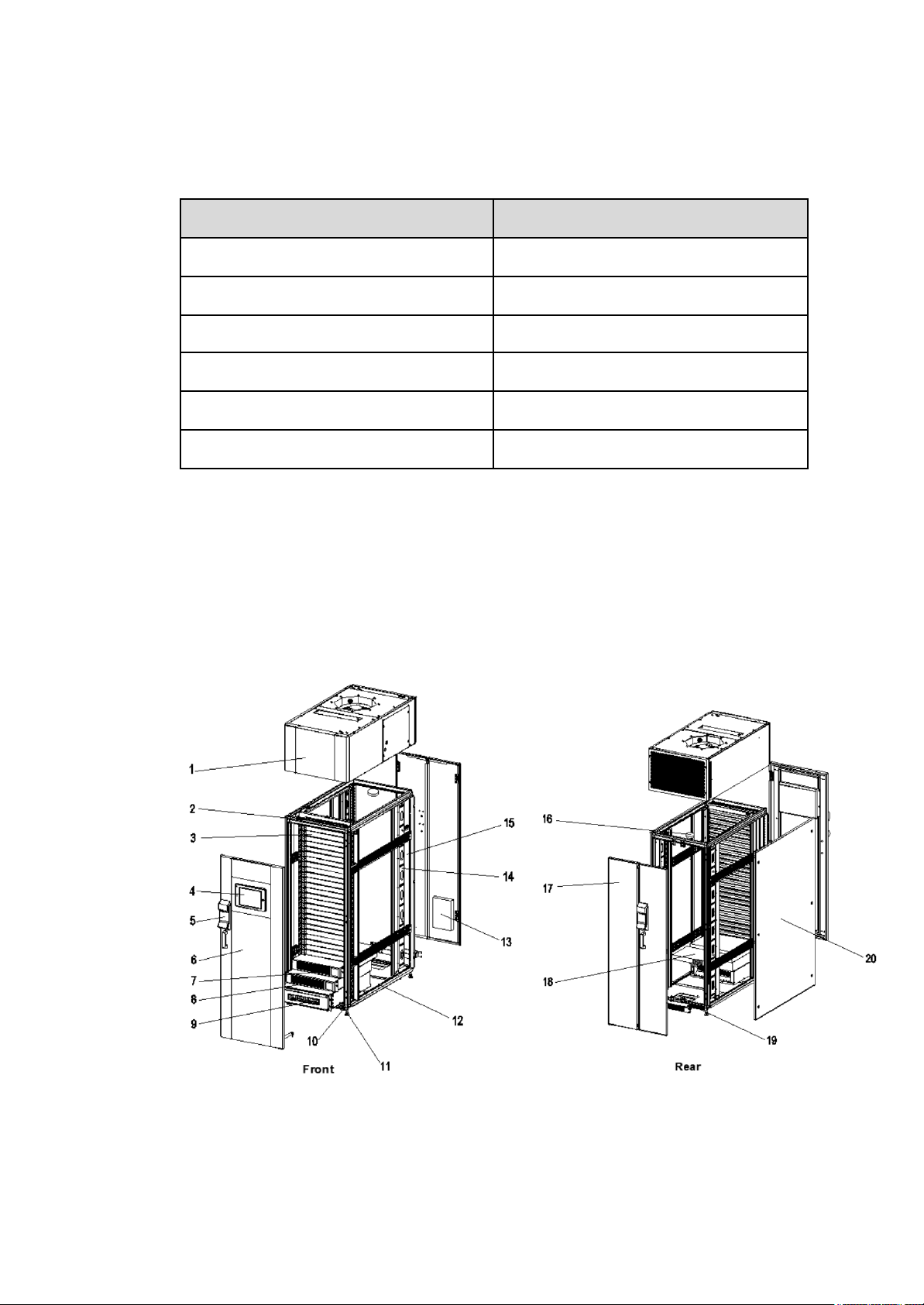
The Edge Rack 3P product mainly includes a cabinet structure, power distribution
module (PDM), UPS & Battery, cooling units, emergency ventilation system, monitoring
system, and LCD display. The system components are shown in Figure 2-2 and Table
2-2
Figure 2-2 Components
8

Table 2-2 EdgeRack 3P Main components
No.
Component Name
Part number
Functions
1
Cooling unit
ECX-EdgeRack
3P-001
The cooling unit provides clean
air for stable temperature and
humidity to critical load
equipment.
2
Temp & Humidity
sensor
ECX-EdgeRack
3P-002
Detects the temperature and
humidity of the cold air output.
3
Blanking panel
ECX-EdgeRack
3P-003
This allows for hot and cold
airflow isolation improving the
cool air utilization.
4
Integrated HMI screen
ECX-EdgeRack
3P-004
The touch-screen HMI
monitors, controls, and alarms
all the components, including
the UPS, cooling unit,
temperature and humidity
sensors, door switch, leak
detector, and other dry
contacts. All information can be
monitored remotely by the
network. For details, refer to
the monitoring system chapter.
5
Access control
ECX-EdgeRack
3P-005
This provides keypad and
fingerprint access to the
EdgeRack at the front and rear
doors.
6
Double-layered glass
door
ECX-EdgeRack
3P-006
Isolate the inside and outside
of the cabinet and protect the
equipment in the cabinet.
7
UPS
ECX-EdgeRack
3P-007
The UPS provides power
conditioning and switches to a
backup battery when mains
power is lost.
8
Battery
ECX-EdgeRack
3P-008
The battery provides backup
power through the UPS when
mains power is lost and
charges when mains is
restored.
9
Power distribution
module
ECX-EdgeRack
3P-009
Power distribution for critical
load equipment and EdgeRack
9
This manual suits for next models
1
Table of contents