Eminent EM1019 User manual

EM
1019
4 Port Switchbox USB 2.0

2
|
ENGLISH
EM1019 4 Port Switchbox USB 2.0
Table of contents
1.0 Introduction ...........................................................................................................2
1.1 Packing contents...............................................................................................2
2.0 Connecting the EM1019........................................................................................3
3.0 Using the EM1019.................................................................................................4
4.0 Frequently Asked Questions and other related information....................................4
5.0 Service and support...............................................................................................4
6.0 Warning and points of attention.............................................................................5
7.0 Warranty conditions...............................................................................................6
1.0 Introduction
Congratulations with the purchase of this high-quality Eminent product! This product
has undergone extensive testing by Eminent’s technical experts. Should you
experience any problems with this product, you are covered by a five-year Eminent
warranty. Please keep this manual and the receipt in a safe place.
Register your product now on www.eminent-online.com and receive product updates!
1.1 Packing contents
The following parts need to be present in the packing:
•EM1019, 4 port Switchbox USB 2.0.
•Manual.

3
|
ENGLISH
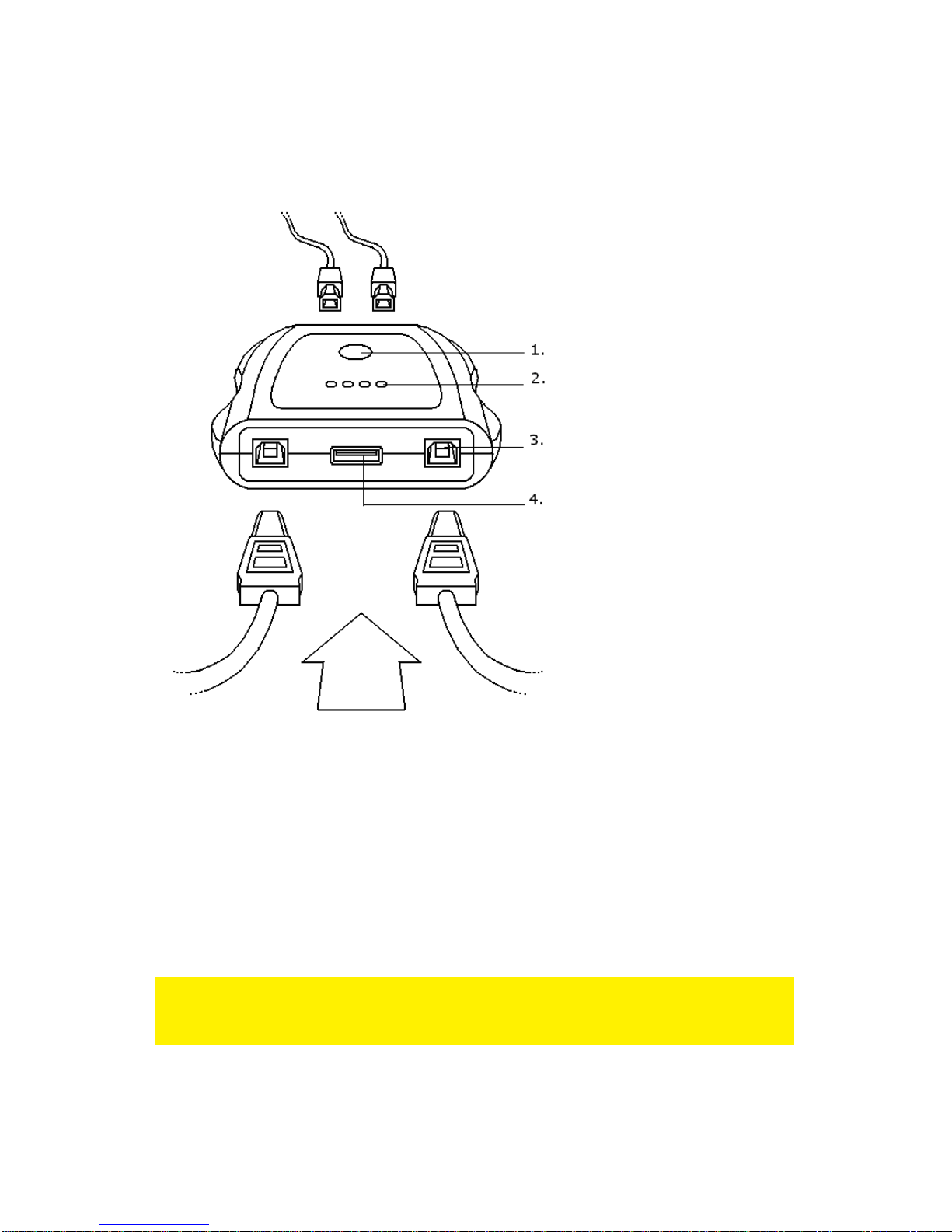
2.0 Connecting the EM1019
(1) Selection button to switch
between the computers.
(2) Indication LED for the
active computer.
(3) USB port for the computer.
(4) Port for a USB device such
as your printer, digital
camera etc.
Figure 1.
1. Turn off your computer.
2. Connect the USB cable to an available USB port on your computer.
3. Connect the other end of the USB cable to port 1,2,3 or 4 of the EM1019. See
figure 1, number (3).
4. If needed, repeat steps 1 to 3 to connect other computers.
5. Now connect a USB device to the EM1019. See figure 1, number (4).
Hint! Eminent recommends you to install software for USB devices, such as scanners
and printers, on all computers before connecting the USB device to the EM1019. This
way you will not have to bother with installation procedures.

4
|
ENGLISH
3.0 Using the EM1019
The EM1019 is very easy to use. If, for instance, you connected 4 computers to your
EM1019, you can effortlessly switch between these computers. Follow the steps
below to start using the EM1019.
1. Turn on your computer(s) .
2. Wait for all the computers to boot.
3. The EM1019 is equipped with LEDs to indicate which computer is using the
connected USB device. For instance, if the LED near ‘Pc1’ is lit then the
computer that is connected to USB port 1 is the one using the USB device. See
figure 1, number (2).
4. If you want to let another computer use the connected USB device, you can push
the ‘Select’ button. See figure 1, number (1).
5. The LED near ‘Pc2’ will now light up. Push the ‘Select’ button again to switch to
the next computer. See figure 1, number (2).
4.0 Frequently Asked Questions and other
related information
The latest Frequently asked questions for your product can be found on the support
page of your product. Eminent will update these pages frequently to assure you have
the most recent information. Visit www.eminent-online.com for more information about
your product.
5.0 Service and support
This users manual has been carefully written by Eminent’s technical experts. If you
have problems installing or using the product, please fill out the support form at the
website www.eminent-online.com/support.
You can also contact us by phone. Please check www.eminent-online.com/support for
the helpdesk phone number and opening hours.

5
|
ENGLISH
6.0 Warning and points of attention
Due to laws, directives and regulations set out by the European parliament, some
(wireless) devices could be subject to limitations concerning its use in certain
European member states. In certain European member states the use of such devices
could be prohibited. Contact your (local) government for more information about this
limitations.
Always follow up the instructions in the manual*, especially where it concerns devices
which need to be assembled.
Warning: In most cases this concerns an electronic device. Wrong/improper use may
lead to (severe) injuries!
Repairing of the device should be done by qualified Eminent staff. The warranty
immediately voids when products have undergone self repair and/or by misuse. For
extended warranty conditions, please visit our website at www.eminent-
online.com/warranty.
*Tip: Eminent manuals are written with great care. However, due to new technological
developments it can happen that a printed manual does not longer contain the most
recent information.
If you are experiencing any problems with the printed manual or you cannot find what
you are looking for, please always check our website www.eminent-online.com first for
the newest updated manual.
Also, you will find frequently asked questions in the FAQ section. It is highly
recommended to consult the FAQ section. Very often the answer to your questions will
be found here.

6
|
ENGLISH
7.0 Warranty conditions
The five-year Eminent warranty applies to all Eminent products, unless mentioned
otherwise before or during the moment of purchase. After buying a second-hand
Eminent product the remaining period of warranty is measured from the moment of
purchase by the product’s initial owner. Eminent warranty applies to all Eminent
products and parts, indissolubly connected or mounted to the product it concerns.
Power supply adapters, batteries, antennas and all other products not directly
integrated in or connected to the main product or products of which, without
reasonable doubt, can be assumed that wear and tear during use will show a different
pattern than the main product, are not covered by the Eminent warranty. Products are
not covered by the Eminent warranty when exposed to incorrect/improper use,
external influences or when opening the service parts of the product by parties other
than Eminent. Eminent may use refurbished materials for repair or replacement of
your defective product. Eminent cannot be held responsible for changes in network
settings by internet providers. We cannot guarantee that the Eminent networking
product will keep working when settings are changed by the internet providers.
Eminent cannot guarantee the working of web services, apps and other third party
content that is available through Eminent products. Eminent products with an internal
hard disk have a limited warranty period of two years on the hard disk. Eminent could
not be held responsible for any data lost. Please make sure that if the product stores
data on a hard drive or other memory source, you will make a copy before you return
the product for repair.
When my product gets defective
Should you encounter a product rendered defective for reasons other than described
above: Please contact your point of purchase for taking care of your defective product.
EM1019-UK | 02-2015

Table of contents
Other Eminent Switch manuals

Eminent
Eminent EM4432 User manual

Eminent
Eminent EM4433 User manual

Eminent
Eminent EM8038 User manual

Eminent
Eminent EM4435 User manual

Eminent
Eminent e-Domotica EM65X0 User manual

Eminent
Eminent e-DOMOTICA EM6556 User manual

Eminent
Eminent EM4434 User manual

Eminent
Eminent AB7819 User manual

Eminent
Eminent EM8028 User manual

Eminent
Eminent EM4430 User manual