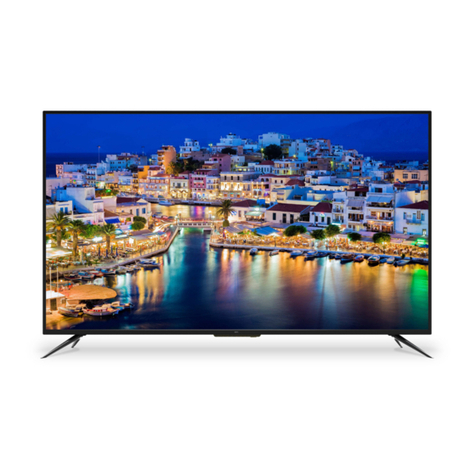
Element ELEFS403S User manual

ELEFS403S
INSTRUCTION MANUAL
Please read all the instructions carefully before using this TV,
and keep the manual for future reference.
40" FHD Digital LED TV


1
CONTENTS
CONTENTS
Important Safety Instructions 2
Additional Safety Information 3
Preparations 4
What's Included 4
Front View 5
Rear View 6
Wall Mounting 6
Remote Control 7
Connecting External Devices 8
Customizing TV Settings 9
Turning On/Off Your TV 9
Setup Wizard 9
Navigating The On-screen Display 11
Streaming 12
Media 13
Viewing Photos 13
Listening To Music 14
Selecting The Input Source 15
Channel Selection 15
Volume Adjustment 15
Setup 16
Settings 16
Audio Settings 17
Picture Settings 18
Channel Settings 19
Time Settings 19
Network Settings 20
Lock Settings 22
Parental Control 23
Troubleshooting 25
FCC Notes 28
Specications 28
OTT APP Service 29

2
IMPORTANT SAFETY INSTRUCTIONS
• Read these instructions – All the safety
and operating instructions should be read
before this product is operated.
• Keep these instructions – The safety
and operating instructions should be
retained for future reference.
• Heed all warnings – All warnings on
the appliance and in the operating
instructions should be adhered to.
• Follow all instructions – All operating
and use instructions should be followed.
• Do not use this apparatus near water
– The appliance should not be used near
water or moisture – for example, in a wet
basement or near a swimming pool, and
the like.
• Clean only with dry cloth.
• Do not block any ventilation openings.
Install in accordance with the
manufacturer’s instructions.
• Do not install near any heat sources such
as radiators, heat registers, stoves, or
otherapparatus(includingampliers)that
produce heat.
• Do not defeat the safety purpose of
the polarized or grounding-type plug. A
polarized plug has two blades with one
wider than the other. A grounding-type
plug has two blades and a third grounding
prong. The wide blade or the third
prong are provided for your safety. If the
providedplugdoesnottintoyouroutlet,
consult an electrician for replacement of
the obsolete outlet.
• Protect the power cord from being walked
on or pinched particularly at plugs,
convenience receptacles, and the point
where they exit from the apparatus.
• Only use attachments/accessories
speciedbythemanufacturer.
• Use only with the cart, stand, tripod,
bracket, or table specified by the
manufacturer, or sold with the apparatus.
When a cart is used, use caution when
moving the cart/apparatus combination to
avoid injury from tip-over.
• Unplug this apparatus during lightning
storms or when unused for long periods
of time.
• Refer all servicing to qualified service
personnel. Servicing is required when
the apparatus has been damaged in any
way, such as the power-supply cord or
plug is damaged, liquid has been spilled
or objects have fallen into the apparatus,
the apparatus has been exposed to rain
or moisture, does not operate normally, or
has been dropped.
• Please keep the unit in a well-ventilated
environment.
WARNING:Toreducetheriskofreorelectric
shock, do not expose this apparatus to rain
or moisture. The apparatus should not be
exposed to dripping or splashing. Objects
lledwithliquids,suchasvasesshouldnotbe
placed on apparatus.
WARNING: The batteries shall not be exposed
toexcessiveheatsuchassunshine,reorthe
like.
WARNING: The mains plug is used as
disconnect device, the disconnect device shall
remain readily operable.
WARNING: To reduce the risk of electric
shock,donotremovecover(orback)asthere
are no user-serviceable parts inside. Refer
servicingtoqualiedpersonnel.
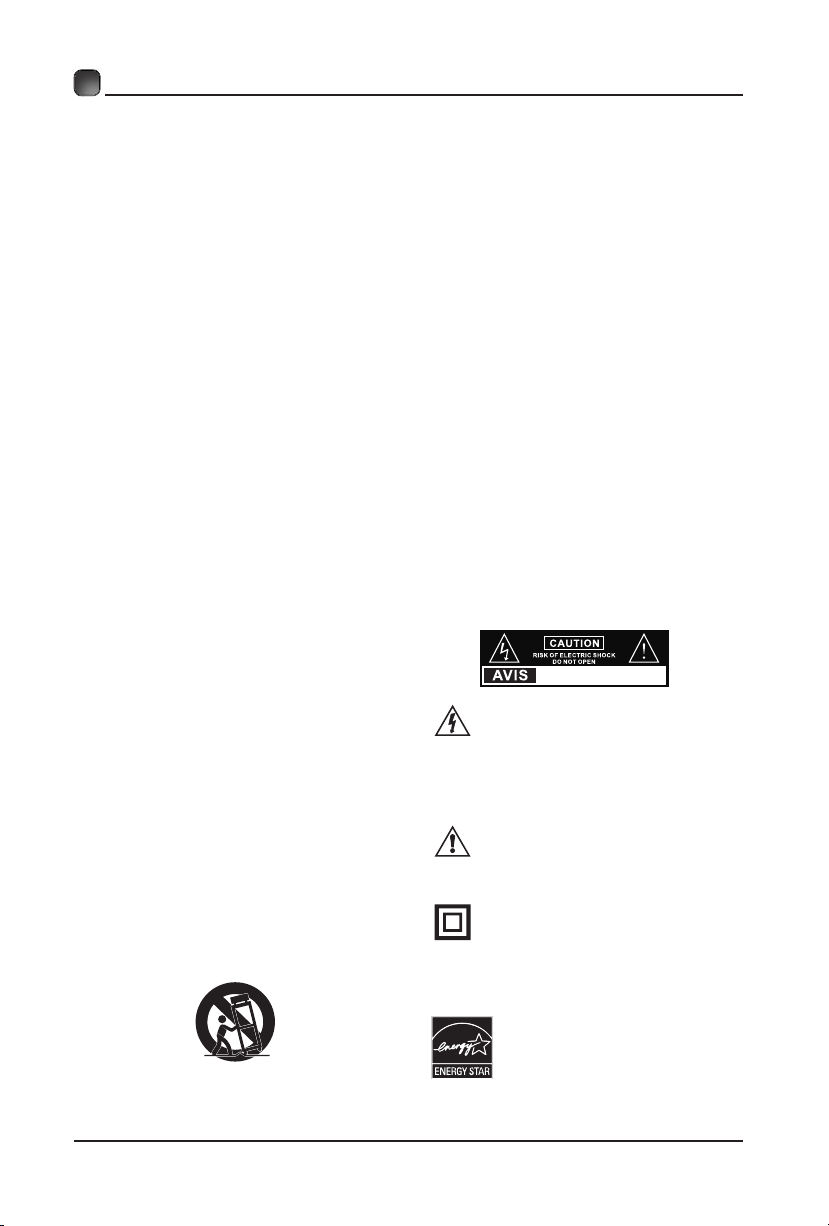
This lightning flash with arrowhead
symbol within an equilateral triangle
is intended to alert the user to
the presence of non-insulated “dangerous voltage”
within the product’s enclosure that may be of
sufficient magnitude to constitute a risk of electric
shock.
The exclamation point within an
equilateral triangle is intended to
alert the user to the presence of
important operating and maintenance instructions in
the literature accompanying the appliance.
This equipment is a Class II or double
insulated electrical appliance. It
has been designed in such a way
that it does not require a safety connection to
electrical earth.
This product meets ENERGY
STAR®guidelines for energy
efficiency. ENERGY STAR
and the ENERGY STAR®mark
are registered U.S. marks.
ENERGY STAR®is a registered
mark owned by the U.S.
government.
RISQUE DE CHOC ELECTRIQUE NE
PAS OUVRIR

3
ADDITIONAL SAFETY INFORMATION
To ensure reliable and safe operation of this equipment, please read carefully all the
instructions in this user guide, especially the safety information below.
Electrical Safety
• The TV set should only be connected to a main power supply with voltage that
matches the label at the rear of the product.
• To prevent overload, do not share the same power supply socket with too many other
electronic components.
• Do not place any connecting wires where they may be stepped on or tripped over.
• Do not place heavy items on them, which may damage the leads.
• Hold the main plug, not the wires, when removing from a socket.
• During a thunderstorm, or when not using the television for extended period of time,
turn off the power switch on the back of the television.
• Do not allow water or moisture to enter the TV or power adapter. Do NOT use in wet,
moist areas, such as bathrooms, steamy kitchens or near swimming pools.
• Pull the plug out immediately, and seek professional help if the main plug or cable
is damaged, liquid is spilt onto the set, if accidentally exposed to water or moisture,
if anything accidentally penetrates the ventilation slots or if the set does not work
normally.
• Do not remove the safety covers. There are no user serviceable parts inside. Trying
to service the unit yourself is dangerous and may invalidate the product’s warranty.
Qualiedpersonnelmustonlyservicethisapparatus.
• To avoid battery leakage, remove exhausted batteries from the remote control, or
when not using for long period.
• Donotbreakopenorthrowexhaustedbatteriesonare.
Physical Safety
• Do not block ventilation slots in the back cover. You may place the TV in a cabinet,
butensureatleast5cm(2'')clearanceallaround.
• Do not tap or shake the TV screen, or you may damage the internal circuits. Take
good care of the remote control.
• TocleantheTVuseasoftdrycloth.Donotusesolventsorpetroleumbaseduids.
• Do not install near any heat sources such as radiators, heat registers, stoves or other
apparatus(includingampliers)thatproduceheat.
• Do not defeat the safety purpose of the polarized or grounding-type plug. A polarized
plug has two blades with one wider than the other. A grounding type plug has two
blades and a third grounding prong, the wide blade, or the third prong is provided for
yoursafety.Iftheprovidedplugdoesnottintoyouroutlet,consultanelectricianfor
replacement of the obsolete outlet.
• Protect the power cord from being walked on or pinched particularly at plugs.
• Unplug the apparatus during lightning storms or when unused for long periods.
• Referallservicingtoaqualiedservicepersonnel.Servicingisrequiredwhenthe
apparatus has been damaged in any way, such as power-supply cord or plug is
damaged, liquid has been spilled, or objects have fallen into the apparatus, has been
exposed to rain or moisture, does not operate normally, or has been dropped.
• Please always connect your television to a power outlet with protective ground
connection.

4
What is Included?
PREPARATIONS
TV Set Remote Control with Batteries
User Manual Quick Start Guide Warranty Card
ELEFS403S
INSTRUCTION MANUAL
Please read all the instructions carefully before using this TV,
and keep the manual for future reference.
40" FHD Digital LED TV
Element LCD TV’s LIMITED WARRANTY TO ORIGINAL CONSUMER
LCD TV (CCFL or LED Backlight) –40” and Under Screen Size Models (the “Product”)
This Product (including any accessories i ncluded in the original packaging) as supplied and di stributed in new condition, is warranted by
Element Electronics Corp. (Element) to the original consumer purchaser against defects in material and workmanship (“Warranty”) as
follows:
1. LABOR: For a period of one (1) year from date of original consumer purchase, if this Product or any part is determined by Element, or a
Element authorized service provider, to be defective, Element will repair or replace th e Product with new or refurbished product of
similar or better quality, at Element’s option, at no charge to the original consumer, or pay the labor charges to any Element authorized
service provider. After the one (1) year Warranty period, you must pay for all labor charges.
2. PARTS: For a period of one (1) year from the date of original consumer purchase, Element will supply, at no charge to the origina l
consumer, new, rebuilt or refurbished replacement parts in exchange for defective parts, or will replace the Product with new or
refurbished product of similar or better quality, at Element’s option, at no charge to the original consumer. After the one (1) year
Warranty period, you must pay for the costs of all parts.
3. SHIPPING COSTS: Notwithstanding the foregoing, the original consumer is responsible fo r any shipping charges incurred to ship the
Product or part(s) to Element or to an Element authorized customer service provider, for diagnosis, repair or replacement.
To obtain Warranty Service and Troubleshooting information call our toll free customer service line at
1-888-338-5666
Please have your model and serial number available along with your date of purchase. You can also visit us online at:
www.elementelectronics.com
To receive Warranty service, the original consumer purchaser must contact Element for problem determination and service procedures.
Proof of purchase in the form of a bill of sale or receiptedin voice, evidencingthat the Product is within the applicable Wa rranty
period(s), MUST be presented to Element, or an authorized customer service provider, in orde r to obtain the requested service.
Exclusions and Limitations
This Warranty covers manufacturing defects in materials and workmanship encountered in the normal, non-commercial use of the
Product, and does not cover (a) damage or failure caused by or attributable to abuse, misuse, failure to follow instructions, improper
installation or maintenance, alteration, accident, or excess voltage or current; (b) improper or incorrectly performed repairs by non-
authorized service facilities; (c) onsite consumer instruction or adjustments; (d) transportation, shipping, delivery, insurance, installation
or set-up costs; (e) costs of product removal, transportation or reinstallation costs; (f) ordinary wear and tear, cosmetic damage or
damage due to acts of nature, accident; (g) commercial use of the Product; (h) modification of, or to any part of the Product. In addition,
this Warranty does not cover images “burnt” into the screen. This Warranty applies to the original consumer only and does not cover
products sold AS IS or WITH ALL FAULTS, or consumables (e.g., fuses, batteries, bulbs etc.), and the Warranty is invalid if the factory-
applied serial number has been altered or removed from the Product. This Warranty is valid only in the United States and Canada, and
only applies to products purchased and serviced in the United States and Canada. All replaced parts and products, and products on which
a refund is made, become the property of the Warrantor.
NO WARRANTIES, WHETHER EXPRESS OR IMPLIED, INCLUDING, BUT NOT LIMITED TO, ANY IMPLIED WARRANTIES OF
MERCHANTABILITY OR FITNESS FOR A PARTICULAR PURPOSE, OTHER THAN THOSE EXPRESSLY DESCRIBED ABOVE SHALL APPLY. THE
WARRANTOR FURTHER DISCLAIMS ALL WARRANTIES AFTER THE EXPRESS WARRANTY PERIOD STATED ABOVE. NO OTHER EXPRESS
WARRANTY OR GUARANTY GIVEN BY ANY PERSON, FIRM OR ENTITY WITH RESPECT TO THE PRODUCT SHALL BE BINDING ON THE
WARRANTOR. REPAIR, REPLACEMENT, OR REFUND OF THE ORIGINAL PURCHASE PRICE - AT THE WARRANTOR’S SOLE DISCRETION -
ARE THE EXCLUSIVE REMEDIES OF THE CONSUMER. THE WARRANTOR SHALL NOT BE LIABLE FORANY INCIDENTAL OR
CONSEQUENTIAL DAMAGES CAUSED BY THE USE, MISUSE OR INABILITYTO USE THE PRODUCT. NOTWITHSTANDING THE FOREGOING,
CONSUMER’S RECOVERY SHALL NOT EXCEED THE PURCHASE PRICE OF THE PRODUCT SOLD BY Element. THISWARRANTY SHALL NOT
EXTEND TO ANYONE OTHER THAN THE ORIGINAL CONSUMER WHO PURCHASED THE PRODUCT AND IS NOT TRANSFERABLE.
Some states do not allow the exclusion or limitation of incidental or consequential damages, or allow limitations on warranties, so the
above limitations or exclusions may not apply to you. This Warranty gives you specific rights, and you may have other rights, which vary
from state to state.
Please send all correspondence to:
Element Electronics Corp. Customer Service
6880 Commerce Blvd., Canton, MI 48187 USA
DO NOT SHIP PRODUCT TO THIS ADDRESS. PLEASE CONTACT THE CUSTOMER SERVICE TO CONFIRM SHIPPING ADDRESSES FOR SERVICE.

5
PREPARATIONS
Front View
•
Switch the TV between On / Standby mode.
• SOURCE
Press to select among different input signal sources.
• MENU
DisplaytheOSD(onscreendisplay)menu.
• CH
Press to select a channel.
• VOL +/-
Press to adjust the volume.
• LED
The LED light indicates when the TV is activated.
• IR
Infrared Receiver.
LED
IR

6
Your new TV is heavy, please consult with professional
wallmount installer to perform this installation.
PREPARATIONS
Rear View
Wall Mounting
1.Headphone output
Connect to the Headphones.
2.USB Input
Connect to a USB storage device to
playcompatibleaudioandphotoles.
3. LAN
Network connection port.
4. HDMI Inputs
ConnecttoaHigh-Denition(HD)signal
input device.
5. VGA Input
Connect to a computer or other devices
with a VGA interface.
6. PC Audio Input
Connect to a computer audio output.
7. Antenna Input (75Ω VHF/UHF)
Connecttotheantenna(75ΩVHF/UHF)
socket with the RF coaxial cable.
8. Optical Output
Connect a digital sound system to this
jack.
9. COMPONENT/AV Input
Connect to AV devices with composite/
component(Y/Pb/Pr)videoandaudio
output sockets. COMPOSITE VIDEO and
COMPONENT(Y/PB/PR)sharewithAUDIO
IN(L/R).
The TV is provided with mounting holes for a VESA approved wall mounting bracket (Not
Supplied).Removethescrewsholdingthebasetothebasebracketandliftthebaseaway
(donotremovethebasemountingbrackets).MounttheVESAbracketusing4*M6isometric
threadedscrews(NotSupplied).
1235 6 7
8 4 9
4

7
PREPARATIONS
Remote Control

8
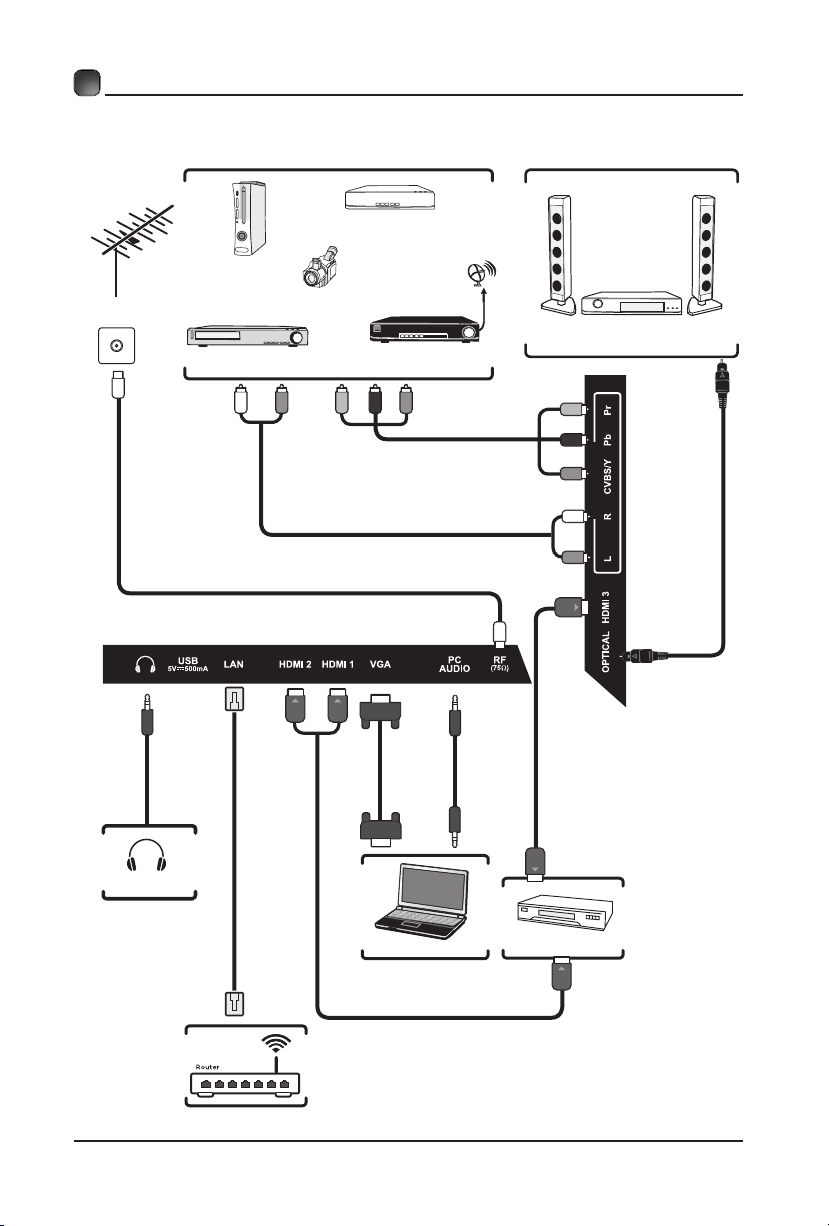
CONNECTING EXTERNAL DEVICES
RF Cable(not included)
Audio Cable
(not included)
Composite/Component Cable
(not included)
Video Camera
Game Console
Blu-ray Player/Recorder
VCR Satellite Receiver
Satellite
Antenna Cable
OR
HDMI Device
Computer
DigitalAudio System
VGACable
(not included)
Audio Cable
(not included)
Headphones
Cable
(not included)
HDMI Cable(not included)
Optical Cable
(not included)
WIFI
Network Cable
(not included)
AV IN/COMPONENT
Table of contents
Other Element LED TV manuals

Element
Element ELEFT326 User manual

Element
Element ELFW4017 User manual

Element
Element ELEFS553S User manual

Element
Element ELEFT195 User manual

Element
Element ELEFC461 User manual

Element
Element ELEFT406 User manual

Element
Element E4ST4316H User manual

Element
Element ELEFT406 User manual

Element
Element ELEFW408 User manual

Element
Element ELEFC401 User manual

Element
Element ELEFT222 User manual

Element
Element ELEFW328 User manual

Element
Element ELEFT281 User manual

Element
Element ELEFT405 User manual

Element
Element ELFJ4816H User manual

Element
Element ELEFS191 User manual

Element
Element ELEFW462 User manual

Element
Element ELEFW195 User manual

Element
Element E4STA5517 User manual

Element
Element ELEFW264 User manual