
EchoNous Uscan User manual

Stock: 250gsm satin artboard
The Uscan is for non-invasive imaging of the human body
and is intended for the following applications: Abdominal,
Musculoskeletal, Pediatric, and Small Organ. Users must
have ultrasound training for abdominal, musculoskeletal,
pediatric, and small organ imaging.
The Uscan can also be used to obtain an image of the
bladder that is used to automatically determine bladder
volume.
TABLET SETUP GUIDE
Refer to user manual before use.
Caution: Federal (USA) law restricts this
device to sale by or on the order of a
physician.
Press and hold the Power Button for about 2
seconds to turn the tablet on.
TURN THE TABLET ON
1
Follow the on-screen setup wizard to
congure the tablet.
• Select Language.
• Setup Date and Time.
• Optional (Connect to Wi-Fi). Note:
A Wi-Fi connection is required for
automatic registration and activation of
the system.
• Enter Registration Information.
FOLD AT CENTRE
CONFIGURING THE TABLET
AND REGISTRATION
2
Insert the tablet into the Mobile Stand by
aligning the Stand’s Dock Connector with
the Tablet’s Dock Connector.
Connect the Cable to the Probe and Stand.
Plug the DC Power Supply into the Mobile
Stand.
Install the DC Power Supply into the Mobile
Stand.
Plug the system into an AC socket to fully
charge.
Note: To add a wireless printer, please refer to
the User Manual.
SETUP FOR A MOBILE STAND
CONFIGURATION
4
A.
B.
C.
D.
E.
Note: If required install a multiple socket outlet
or a medical grade extension cable.
www.echonous.com
ECHONOUS, INC
P004040-002 Rev A
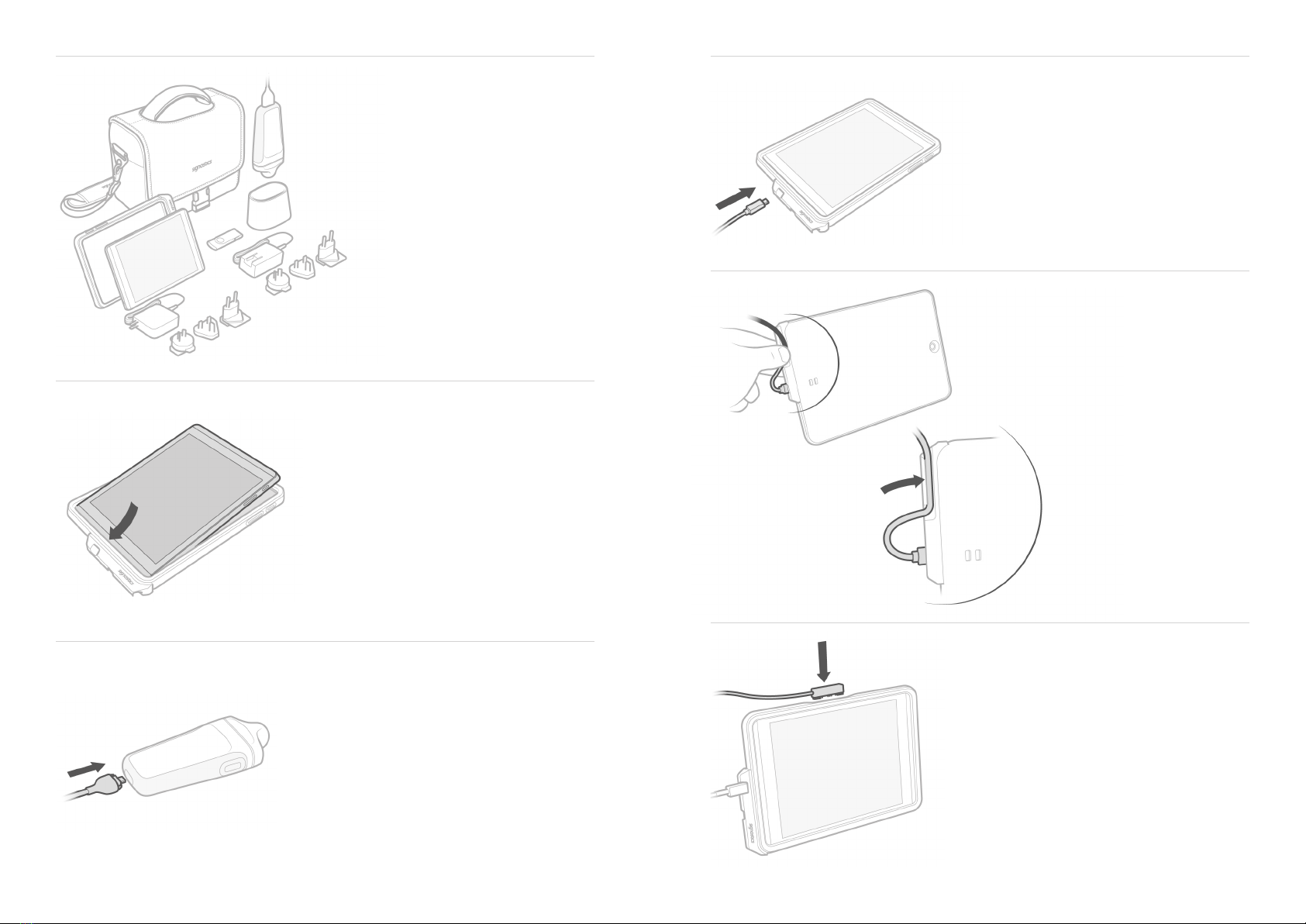
Insert the tablet into the tablet cover.A.
B.
C.
SETUP FOR A MOBILE HAND
CARRIED CONFIGURATION
3
Connect the cable to the probe.
Connect the cable from the probe to
the Tablet.
D.
E.
Route the cable through the retention clip
and press into place.
Fully charge the system by connecting the
charger to the tablet.
Other EchoNous Medical Equipment manuals

EchoNous
EchoNous Uscan User manual

EchoNous
EchoNous Kosmos Grab and Go on AI Stand User manual

EchoNous
EchoNous KOSMOS User manual

EchoNous
EchoNous KOSMOS User manual

EchoNous
EchoNous Kosmos Torso-One User manual

EchoNous
EchoNous EchoNous Bladder User manual

EchoNous
EchoNous KOSMOS User manual

EchoNous
EchoNous KOSMOS User manual

EchoNous
EchoNous Kosmos AI Station 2 User manual









