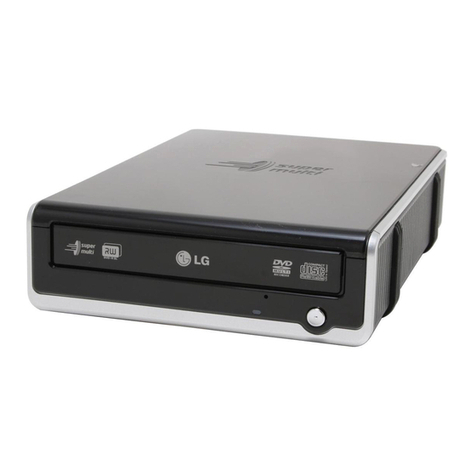
Dynex DX-DVDRW16 User manual

16x DVD±R/RW Writer
±R 16X/+R DL 4X/ +RW 8X /–RW 4X
User’s Manual

CAUTION
CLASS 3B VISIBLE AND INVISIBLE LASER RADIATION WHEN OPEN.
AVOID DIRECT EXPOSURE TO BEAM.
VORSICHT
KLASSE 3B SICHTBARE UND UNSICHTBARE LASERSTRAHLUNG WENN GEOFFNET.
NICHT IN DEN STRAHL SEHEN.
ATTENTION
RADIATION DU FAISCEAU LASER VISIBLES ET INVISIBLES DE CLASSE 3B
EN CAS D'OUVERTURE. EVITER TOUTE EXPOSITION AUX RAYONS.
Copyright Statement
It is a criminal offence, under applicable copyright laws, to make unauthorised
copies of copyright-protected material, including computer programs, films,
broadcasts and sound recordings. This equipment should not be used for such
purposes.
C L AS S 1 LAS ER P R O D U C T
AP PAR E I L A L AS E R D E C L AS S E 1
LAS E R K L AS S E 1
L U OK A N 1 L A S ER L AI T E
P R OD U I T L AS E R
C AT E G O R I E 1

FCC Compliance Statement
This d vic compli s with Part 15 of th FCC Rul s. Op ration is subj ct to th
following two conditions:
1. this d vic may not caus harmful int rf r nc , and
2. this d vic must acc pt any int rf r nc r c iv d, including int rf r nc that
may caus und sir d op ration.
FCC Warning Statement
This quipm nt has b n t st d and found to comply with th limits for a Class B
digital d vic , pursuant to Part 15 of th FCC Rul s. Th s limits ar d sign d to
provid r asonabl prot ction against harmful int rf r nc in a r sid ntial
installation. This quipm nt g n rat s, us s and can mit radio fr qu ncy n rgy
and, if not install d or us d in accordanc with th instructions, may caus
int rf r nc to radio communications. How v r, t l vision r c ption int rf r nc
can b d t rmin d by turning th quipm nt off and on. Th us r is ncourag d to
corr ct th int rf r nc by on or mor of th following m asur s:
•R ori nt or r locat th r c iving ant nna
•Incr as th s paration b tw n th quipm nt and th r c iv r
•Conn ct th quipm nt into an outl t diff r nt from that to which th r c iv r
is conn ct d
•Consult th d al r or an xp ri nc d radio/TV t chnician for h lp.
CAUTION
Chang s or modifications not xpr ssly approv d by th party r sponsibl for
complianc could void th us r’s authority to op rat th quipm nt.

Table of Co te ts
INTRODUCTION 1
SYSTEM REQUIREMENTS 2
PACKAGE CONTENTS 2
INSTALLATION 3
HOST INTERFACE CONNECTIONS 3
HARDWARE INSTALLATION 4
DRIVER INSTALLATION 5
Windows Environm nt 5
SOFTWARE PACKAGE 5
Installation Und r Windows Environm nt 6
CONNECTION & OPERATION 7
FRONT PANEL 7
REAR VIEW 8
DVD REGION CODING 9
REGION PLAYBACK CONTROL MANAGEMENT 9
REGION CODES 9
About This Driv 10
TECHNICAL DATA 11
APPENDIX 13
INTRODUCTION 1
BESOINS SYSTÈME 2
INSTALLATION 3
CONNEXIONS DE L’INTERFACE HÔTE 3
INSTALLATION DU MATÉRIEL 4
INSTALLATION DU LECTEUR 5
Environn m nt Windows 5
PROGICIEL 6
Installation sous nvironn m nt Windows 6
CONNEXION & FONCTIONNEMENT 7
PANNEAU AVANT 7
VUE ARRIÈRE 8
CODAGE RÉGIONS DVD 9

GESTION DE LA COMMANDE DE LECTURE RÉGIONALE. 9
LES CODES DE RÉGION 9
A propos d c l ct ur 10
DONNEES TECHNIQUES 11
APPENDICE 13
INTRODUCCIÓN 1
REQUISITOS DEL SISTEMA 2
INSTALACIÓN 3
CONEXIONES DE LA INTERFAZ HUÉSPED 3
INSTALACIÓN DEL HARDWARE 4
INSTALACIÓN DEL CONTROLADOR 5
Entorno Windows 5
EL PAQUETE DE SOFTWARE 5
Instalación bajo l ntorno Windows 6
CONEXIÓN Y OPERACIÓN 7
PANEL FRONTAL 7
VISTA POSTERIOR 8
CODIFICACIÓN DE LA REGIÓN DE DVD 9
ADMINISTRACIÓN DEL CONTROL DE LA REGIÓN DE REPRODUCCIÓN 9
CÓDIGOS REGIONALES 9
Sobr sta unidad 10
INFORMACIÓN TÉCNICA 11
APÉNDICE 13

DVD±R/RW Writer
INTRODUCTION
Welcome to a multimedia world of ReWritable technology with D D burning
capabilities. This multiformat recordable drive presents you more backup
choices other than acting as a CD-R/RW drive and as a D D-ROM reader.
The drive supports D D Forum’s D D-R/-RW standard as well as that of
D D+RW Alliance’s D D+R/+RW enabling excellent compatibility, simple,
quick recording of both CD/D D formats, huge capacity storage, and
theater-quality playback.
The bundled package of mastering software offers the creation fun of
video, photos, and music editing in addition to basic data backup. You can
record up to 8.5 GB, 4 hours of T shows or movies with high-quality
MPEG2 video/AC-3 sound effect, and even more appealing, author your
own D D movies – from capture to editing and burning.
Handy, easy to use with rich function, this D D±R/RW Writer is an ideal
model to enjoy the fascinating digital entertainment on your desktop and
here are some more important features:
♦16X D D+R, 16X D D-R Write, 4X D D+R Double Layer Write,
8X D D+RW, 4X D D-RW Rewrite speed, 16X D D-ROM Read
speed
♦48X CD-R, 24X CD-RW Write/Rewrite speed, 48X CD-ROM Read
speed
♦Adopts “MTKSuperLink” to prevent Buffer Underrun errors for CD &
D D writing
♦Supports writing modes of TAO, DAO, SAO and packet writing
♦Compatible with most existing D D-ROM drives and D D video
players
♦Bundled with an extensive software package
1

DVD±R/RW Writer
System Requireme ts
For IBM compatible PCs, the system requirements recommended are as
follows:
♦Pentium III, 800MHz or above with at least 256MB of memory
♦Minimum 2GB free Hard Disk space
♦IDE host interface supporting ATAPI MMC command
♦Operating system: Microsoft Windows 2000/XP
Package Co te ts
The package contains the following items:
♦D D-RW Drive
♦Audio Cable
♦Application software disc
♦A bag of screws
♦IDE Cable
2

DVD±R/RW Writer
INSTALLATION
Host I terface Co ectio s
Most current mainboards have two IDE ports (primary and secondary),
which can connect two IDE cables. Two IDE cables allow you to connect
up to four devices, but it is recommended that you separate IDE ports for
your hard drive and this writer. This will ensure that your hard drive’s
performance and speed won’t be affected by having the writer on the same
cable.
If you connect only one device on the cable, you can set the jumper as
“MASTER” or “SLA E”.
If you connect two devices (e.g. CD-ROM & CD-RW) on the same cable,
set different jumpers for each device (CD-ROM as “MASTER”, CD-RW as
“SLA E”, and vice versa.) The same rule applies to the connection of
having your hard disk and another device on the same cable.
Master
Cable
Select
Slave
Jumper
3

DVD±R/RW Writer
Hardware I stallatio
1. Turn off the power to the computer system.
2. Disconnect all cables from the back of your computer, and then
remove the cover from the computer.
3. Insert the writer into one of the vacant 5.25" drive bays and secure
it with screws to your PC.
In order to prevent interference between the writer and the computer,
please mount the writer using all four mounting screws.
4. Connect the 40-pin IDE cable from one of the IDE ports on the
mainboard to the 40-pin connector of your writer. Also, connect the
power supply cable to the back of the writer.
Make sure to align and connect the red-edge of the IDE Cable to
Pin 1 on the dri e.
5. If you have a sound card that can be connected to this writer, you
can connect the drive (as Audio-out) and the sound card (as Audio-
in) with a 4-pin audio cable.
4

DVD±R/RW Writer
If your mainboad is integrated with built-in sound system, plug the
4-pin audio cable into the CD-IN connector on the mainboard as
Audio-in.
6. Re-attach the cover of your computer, and reconnect the power
cord.
Driver I stallatio
Windows En ironment
This D D±R/RW Writer is a Plug & Play device and there is no need to
install driver. Windows 98SE/ME/2000/XP can automatically detect the
drive and load the appropriate driver.
Software Package
The bundled package combines software for 1) D D/CD recording 2)
D Ds/ CDs authoring 3) Packet Writing 4) D D playback, which gives you
the complete solution for making audio/data CDs/D Ds of different formats,
editing video and authoring D D movies. The user-friendly interface
simplifies the recording process and guides you through the creation in an
5
Table of contents
Languages:
Other Dynex DVD Drive manuals