
Duratech LINK Touch DLT10-RGB User manual
DLT10-RGB/TW
Manual
(Other languages available online www.duratech.be)

2
Table of contents
Technical specifications
Box contents
About the LinkTouchTM
Installation instructions
Control functions: pool lights
Control functions: heat pump & pool cover
Advanced control functions: pool lights
Display: Status icons
Safety information
First use
How to use the Settings Menu
Connecting to ...
Cover operation settings
Buzzer settings
Temperature units display setting
Aux setting
Factory reset
Caring for the LinkTouchTM
Troubleshooting
PLP-REM(-300) compatibility
How to upgrade the PLP-REM(-300)
control board
Resetting the LinkTouchTM
Environment / disposal of old equipment
Service & warranty
Regulatory compliance
Page 3
Page 4
Page 4
Page 5
Page 6
Page 7
Page 8
Page 9
Page 10-11
Page 11
Page 12
Page 13
Page 14
Page 15
Page 16
Page 17
Page 18
Page 19
Page 19
Page 20
Page 21
Page 22
Page 23
Page 23
Page 23

3
Technical specifications
General specifications
Input Voltage: 5 V DC 0,5A
Interface: LoRa 868 MHz
USB-C
Ambient Air Temperature: 0°C to +40°C
Humidity 10% to 90% RH - non condensing
Ingress protection rate: IP20
IEC Protection Class: Class II
Size (in mm): 89,5 (Height)
186,5 (Width)
17,5 (Depth)
Weight: 298 g

4
Box contents
About the LinkTouchTM
The LinkTouchTM is the remote of your pool control system. By using the
Link Touch, you can control the lights, the heat pump and cover of your
swimming pool. The LinkTouchTM includes an integrated Li-Ion battery which
can be charged automatically when mounted onto the wall mount.
The LinkTouchTM connects wirelessly with a compatible Link Driver PLP-
REM(-300) and with DURA-V, DURA-Vi and DURAPRO heat pumps. Please
check our website for latest information regarding compatibility with heat
pumps
The LinkTouchTM can operate in dierent modes:
-
-
-
-
When the LinkTouchTM is inserted in the wall mount, it will charge till full
battery.
When LinkTouchTM is removed from the Wall mount, it will work instantly
when touched.
When the LinkTouchTM is removed from the Wall Mount and it is not touched
for 15 seconds, it will turn into “Standby mode”. In this case the display will
be o. As soon as the touch panel is touched by the user, the display will
turn on again.
When the battery is empty, the LinkTouchTM will no longer function. To turn
on the LinkTouchTM again, it needs to be inserted into the powered wall
mount. When inserted the display will be active again and the LinkTouchTM
will start communicating with the external devices.
5
Installation instructions
1.5m
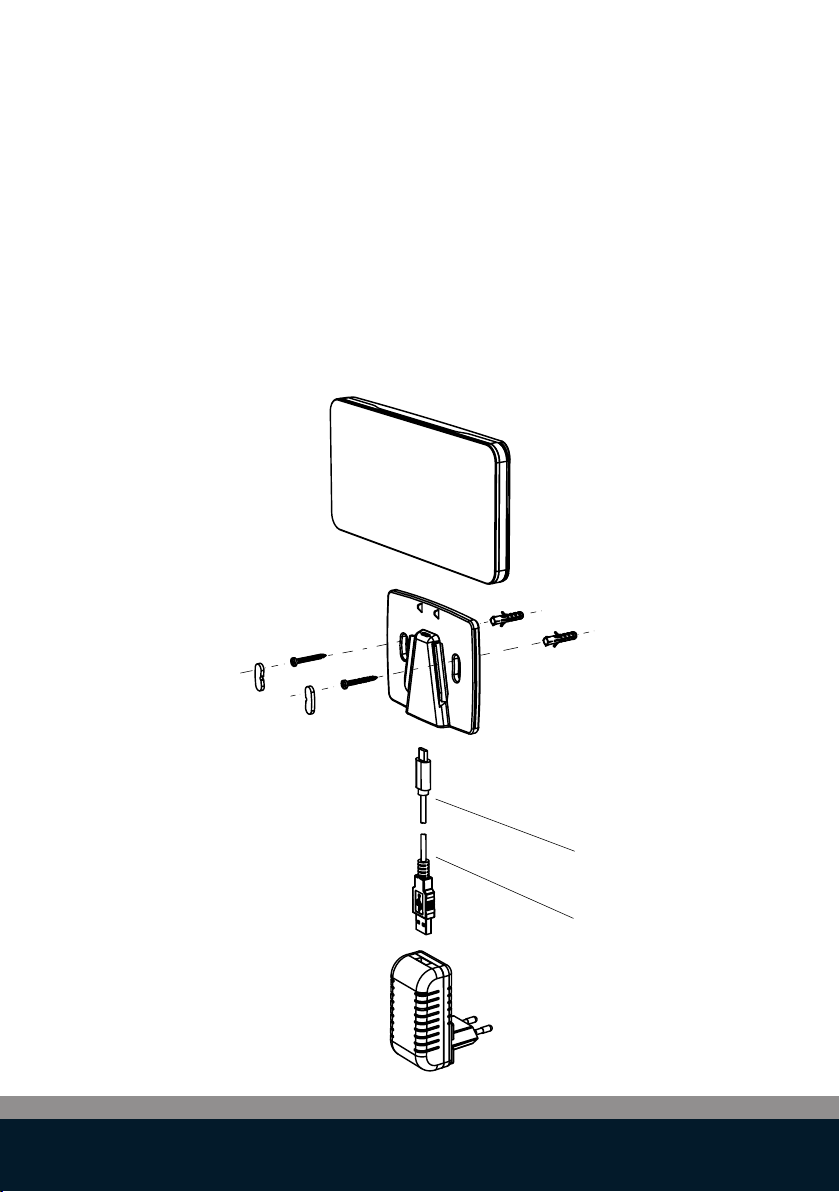
The LinkTouchTM is powered using the included AC power adapter and USB
power cord
1. Plug the USB power cord into the power adapter
2. Plug the other end of the USB power cord into the USB-C connector
of the wall mount.
3. Plug the power adapter in a power outlet.
4. Mount the Link Touch onto the wall mount.

6
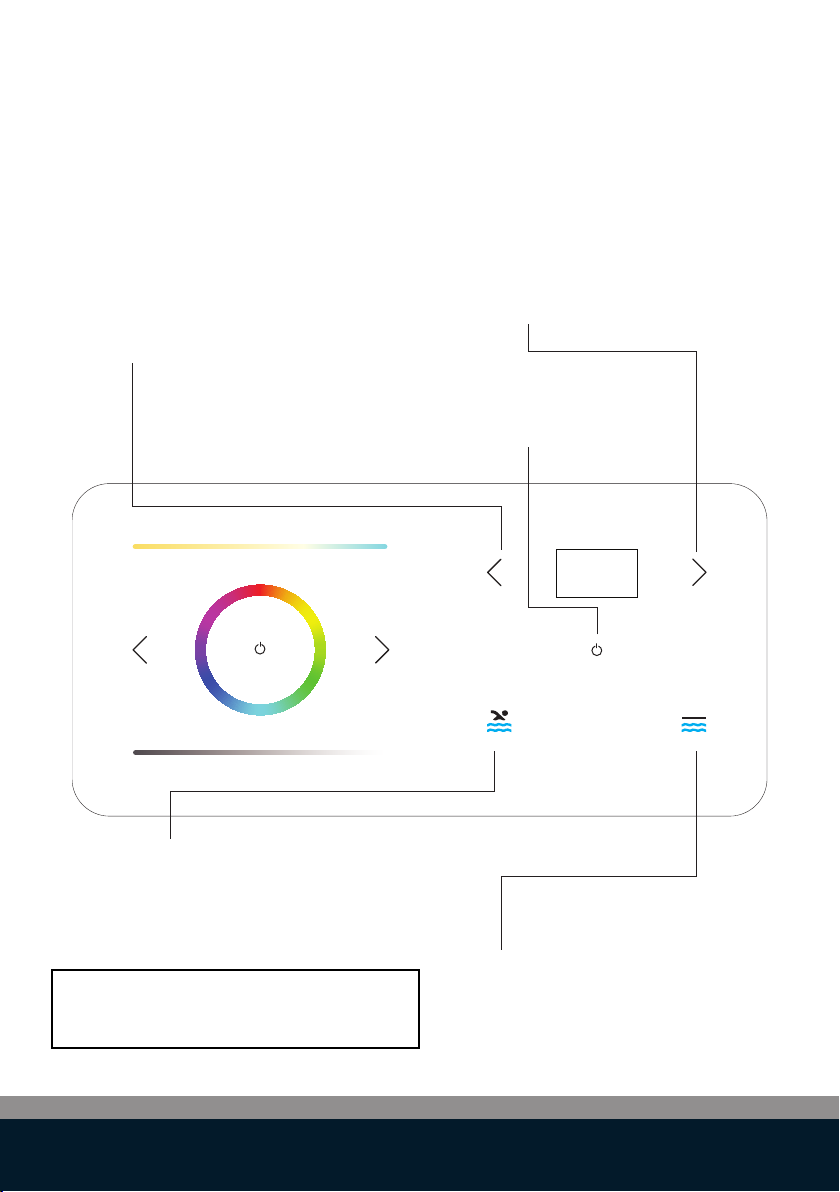
ON/OFF Lights:
Press to switch all Lights ON/OFF
Colour wheel:
Slide to change colour of Pool Lights
(only DLT10-RGB)
Colour program:
Press for previous colour program.
Colour program:
Press for next colour program.
Colour temperature:
Slide to the right to adjust the pool light
from “warm white” to “cool white”
Dimming level:
Slide to the right to increase
the brightness of the Pool Lights
Control functions: pool lights
7
Pool water Temperature UP:
Press to increase desired temperature
Pool cover OPEN:
Press and hold to open the pool cover.
When finger is removed from button
the cover will stop immediately
Pool cover CLOSE:
Press and hold to close the pool cover.
When finger is removed from the button,
the cover will stop immediately
ON/OFF heat pump:
Press to switch pool heat pump
ON/OFF
Pool water Temperature DOWN:
Press to decrease desired
temperature
NOTE:
Depending on AUX MODE, in settings
COVER OPEN/CLOSE or FUNC A/B
Control functions: heat pump & pool cover

8
ON/OFF Lights:
Press and hold for 1 second ON/OFF to see the
current settings
Activate the settings menu (*),
then use left arrow key to select the
desired setting.
Activate the settings menu (*),
then use right arrow key to select the
desired setting
(*) Touch the display for 3 seconds to
activate the settings menu.
Advanced control functions: pool lights

9
Battery:
Signal:
Heat pump:
Pool lights:
Relays A and B:
Pool cover:
Battery capacity
LinkTouchTM is communicating wirelessly
Pool heat pump is ON (idle)
Pool lights are connected
Relays A and B used, not the pool cover function
Pool cover is opening/closing
Pool cover is open
Pool heat pump is ON and heating/cooling
Pool lights are ON
There is an error with relays A and B (p.19)
Pool cover is closed
There is an error with the pool cover (p.19)
Pool heat pump has an error (p.19)
There is an error with the pool lights (p.19)
Battery is charging
Battery error (p.19)
Display: Status icons

10
Safety information
Intended use
This device has been developed as a remote control for swimming pool
accessories. The LinkTouchTM should be used only for this purpose, as
described in this user guide.
Precautions for Setup
-
-
-
-
-
-
-
-
-
Precautions for Operation
-
-
-
-
-
The LinkTouchTM can only be mounted indoor. Do not mount outdoors.
The power adapter is designed for 100 - 240V, 50/60 Hz. Verify if the
power outlet voltage is within this range before plugging in your power
adapter.
Install the device close to an accessible power outlet. Make sure the
power/USB cable can be easily disconnected from the power outlet at all
times.
Protect the power/USB cable and the power adapter from being strained
pinched or bucked.
Place the power/USB cable out of walk ways to prevent tripping over the
cable.
Use only the power adapter provided with the LinkTouchTM. Use of an
incorrect power adapter may cause overheating or fire.
Do not bend or place a heavy object on the power/USB cable as it could
damage the cable and result in risk of electric shock or fire.
Do not use the power/USB cable if damaged or frayed.
Be sure to hold only the connector end of the power/USB cable when
disconnecting. Repeated pulling on the cable will damage the cable.
Protect the LinkTouchTM from moisture and do not operate if power/USB
cable or plug are defective.
Never touch a power plug with wet hands.
Do not place anything on top of the LinkTouchTM.
Never spill liquid of any kind on the LinkTouchTM.
Do not drop or hit the LinkTouchTM.
Other manuals for LINK Touch DLT10-RGB
1
This manual suits for next models
1
Table of contents
Popular Lighting Equipment manuals by other brands


Qazqa
Qazqa Suplux SL 3 Black 103062 instruction manual

Commercial Electric
Commercial Electric 54568141 Use and care guide

CREE LIGHTING
CREE LIGHTING 304 Series installation instructions

Goobay
Goobay 49867 user manual

ECOMAN ITALIA
ECOMAN ITALIA LED T8 instruction manual

Alkalite
Alkalite Krypton KT-81 user manual


