EDGEVIS HD-S600 HARDWARE INSTALLATION GUIDE
ISSUED: 30 NOVEMBER 2017 PAGE 9
Option 1: Using the USB Configuration Application
The HD-S600 can be configured using the USB configuration application provided on the USB flash drive that is
distributed with the HD-S600 encoder. This method creates a configuration settings file on the USB flash drive profile
on a computer that is then transferred back onto the USB flash drive, before insertion into the HD-S600 to apply the
configuration settings.
Accessing the Configuration Application
Insert the USB flash drive into a PC running Microsoft Windows
XP operating system or newer.
Navigate to the flash drive using Windows Explorer, or select the
view files option if a Windows prompt appears with a list of Auto-
play actions.
Locate the configuration application file (it will appear on the
flash drive as ‘ConfigureEncoder6.x.x.exe’) and double-click to
launch the configuration app. Once it has launched, select HD-
S600 Encoder from the list of encoders.
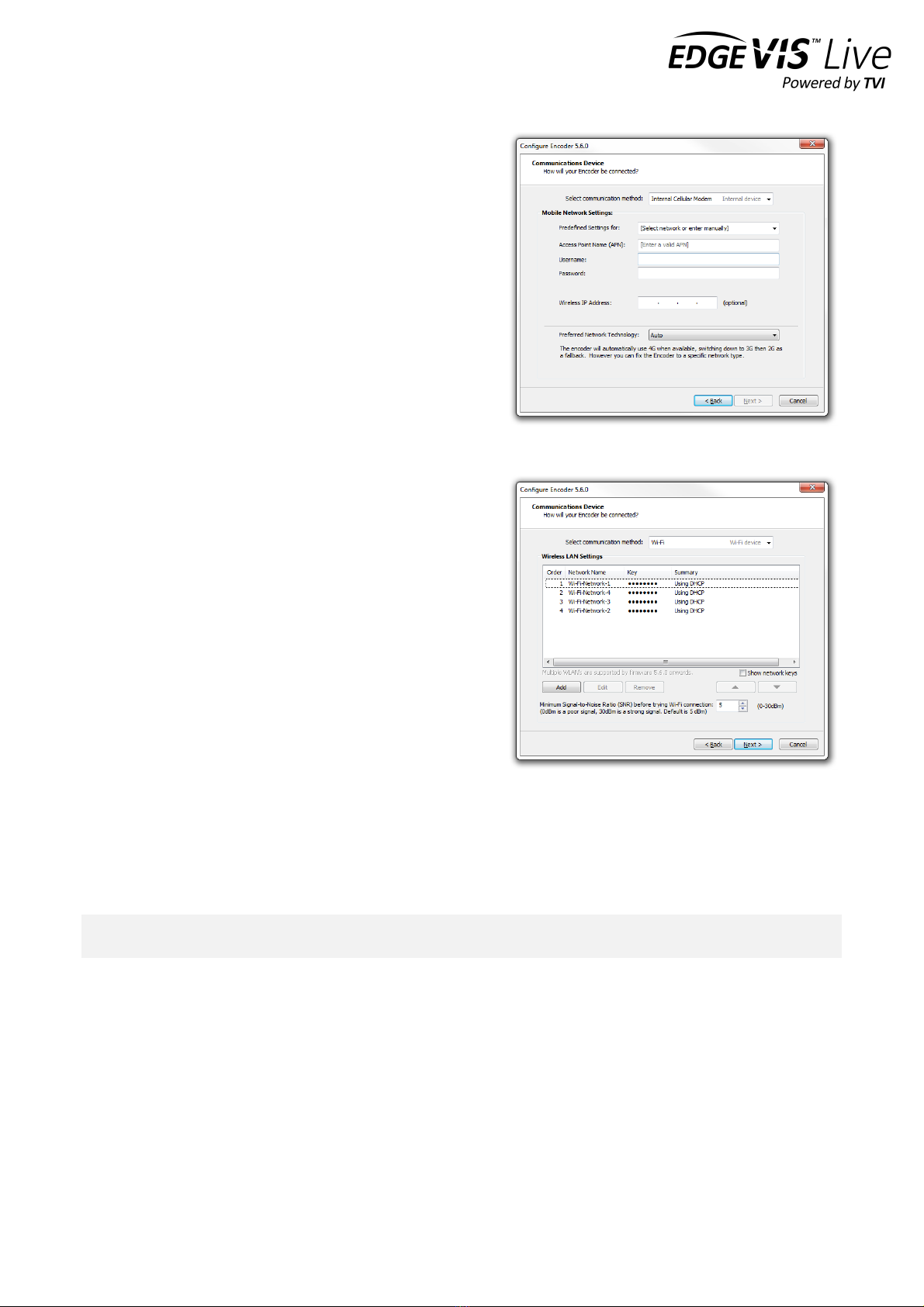
Setting up the communication method
Select the connection method that is appropriate to your
operational requirement. The lower section of the wizard will
change to reflect the configuration options for the selected
connection method:
• Standard LAN connection - the encoder will connect
to any network/device with a standard LAN interface
• Cellular Modem - the encoder has an inbuilt cellular
modem supporting HSDPA, 3G/4G, EDGE and GPRS
• Wireless LAN (Wi-Fi) - the encoder will connect to a
Wi-Fi network using the inbuilt Wi-Fi module
Connection settings for LAN based connections
If the selected connection method is LAN, it is possible to edit
the network configuration of the LAN connection. The
Communications Device dialog options allow for the
entering/editing of the IP details of the LAN connection. In
most cases, the encoder will use DHCP to obtain its network
settings automatically from the network gateway.
If the network does not provide a DHCP address to the
encoder select Use the following IP settings and enter
settings that are valid for the network that the encoder is
joining. A DNS Server and Domain is only required if the
supplied EdgeVis Server address is a resolvable host name (e.g.
video.server.com) and not an IP Address (e.g. 192.168.50.10).