Lifeguard™UserGuideV2.0 - 3 -
Contents
Forward........................................................................................................................................................................................................... 2
About This Guide.........................................................................................................................................................................................5
Icon Definitions ......................................................................................................................................................................................5
System requirements ...........................................................................................................................................................................5
Disclaimers...............................................................................................................................................................................................6
Warnings...................................................................................................................................................................................................6
Chapter 1: Product Overview .................................................................................................................................................................7
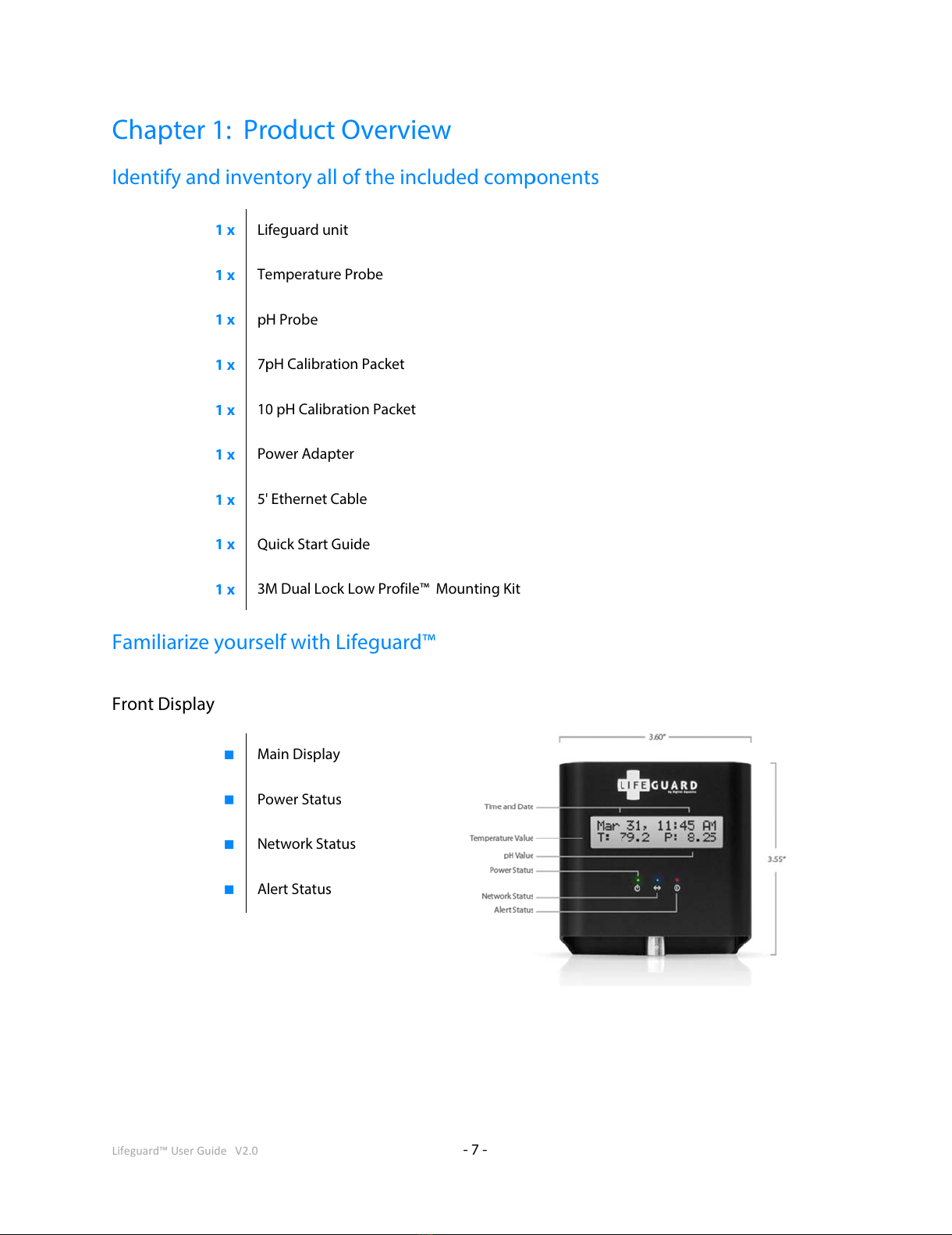
Identify and inventory all of the included components...........................................................................................................7
Familiarize yourself with Lifeguard™ ..............................................................................................................................................7
Identifying the Accessories ................................................................................................................................................................8
Chapter 2: Installation...............................................................................................................................................................................9
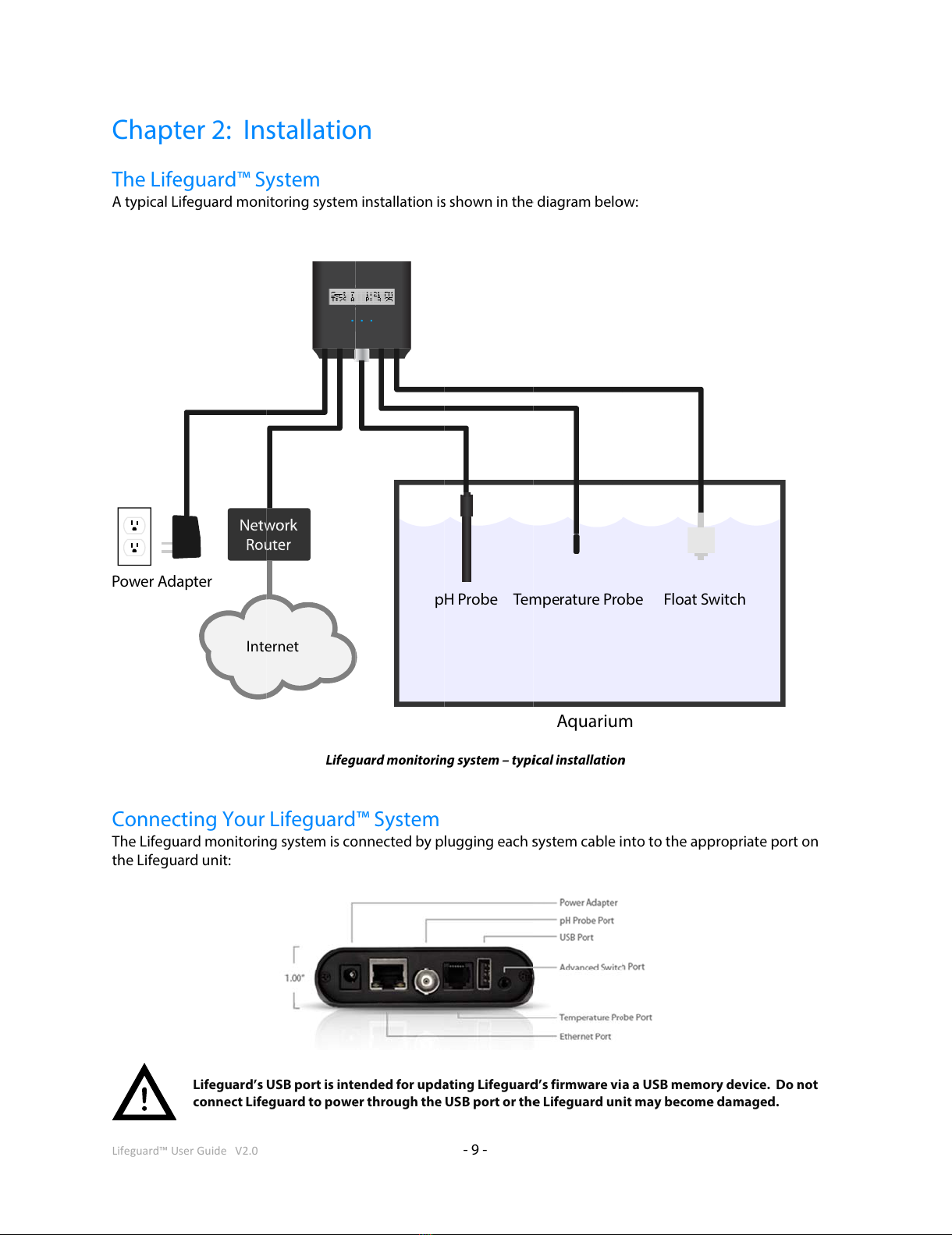
The Lifeguard™ System........................................................................................................................................................................9
Connecting Your Lifeguard™ System .............................................................................................................................................9
Mounting Lifeguard™.........................................................................................................................................................................10
Locating Lifeguard™ ...........................................................................................................................................................................12
Mounting the Probes .........................................................................................................................................................................12
Connecting the Advanced Switch Cable.....................................................................................................................................12
Cable Routing .......................................................................................................................................................................................12
Connecting Lifeguard™ to your Router........................................................................................................................................13
Chapter 3: Powering up the Lifeguard™ system............................................................................................................................14
Applying Power....................................................................................................................................................................................14
Home Screen.........................................................................................................................................................................................14
Getting Around ....................................................................................................................................................................................15
Displaying Alarm Conditions...........................................................................................................................................................16
Resetting Lifeguard™..........................................................................................................................................................................16
Chapter 4: Initial Lifeguard™ Setup ....................................................................................................................................................17
Accessing the Lifeguard™ Web Server .........................................................................................................................................17
Setting up Lifeguard™ for the first time.......................................................................................................................................18
If You Forget Your Username or Password .................................................................................................................................20
Welcome to the Lifeguard™ Dashboard!.....................................................................................................................................20
Chapter 5: Calibrating the Probes........................................................................................................................................................21
Calibrating the Temperature Probe ..............................................................................................................................................22
Canceling Temperature Calibration..............................................................................................................................................24
If Temperature Calibration Fails .....................................................................................................................................................24
Calibrating the pH Probe ..................................................................................................................................................................24
The pH Calibration Wizard................................................................................................................................................................25
Canceling pH Calibration..................................................................................................................................................................28
If pH Calibration Fails .........................................................................................................................................................................28
Chapter 6: Setting Up Lifeguard™ for Your Aquarium..................................................................................................................29
Accessing the Settings Dialog.........................................................................................................................................................29
Changing your Username and Password (General Settings Menu) ...................................................................................30
Setting Time and Units (Time and Units Menu) ........................................................................................................................31
Setting Alarm Thresholds (Sensors Menu)..................................................................................................................................32
Setting up Email Alerts (Notifications Menu).............................................................................................................................33
Changing Network Settings (Network Menu)............................................................................................................................35
Chapter 7: Using Lifeguard™..................................................................................................................................................................37
Monitoring Temperature on the Lifeguard™ Dashboard.......................................................................................................37
Monitoring pH information on the Lifeguard™ Dashboard..................................................................................................38
Monitoring the Switch Input and the Date and Time .............................................................................................................39
Alarm (Critical) and Caution Conditions ......................................................................................................................................40
Using the Advanced Graphing Features......................................................................................................................................41