
Delta Regis 600 Series User manual

‘600 Series’ 40VDC Brushless Screwdrivers
& Controllers - Operation Manual
DELTA REGIS
Tools Inc.
CAUTION - Please read, understand, and follow all
operating and safety instructions in this manual before
using the Tools and Controllers.
The 600 Series 40VDC Brushless tools are designed
for exclusive use with specic Delta Regis controllers
as dened in this manual. Do not attempt to use the
tools and/or controllers with any products other than
as specied in this manual.
If you have any questions or concerns,
please contact us at:
Delta Regis Tools, Inc.
3315 Industrial 25th St.
Ft. Pierce, FL USA 34946
Ph +1-772-465-4302
Fx +1-772-465-4368
E-mail: sales@deltaregis.com
Doc. ESL600_40VDC_Manual_R2
Copyright © 2010 Delta Regis Tools, Inc
Applies to the following Delta Regis products:
Screwdriver Models: ESL628/F/P/PF, ESL629/P
ESL629M/PM, ESL630M/PM, ESL640M/PM, ESL650M/PM
ESP620, ESP630, ESP640, ESP650
Controller Models: BECT640/E/UK

Please read and understand the operation manual and follow all safety and operation instructions.1.
Use these products in a suitable dry, indoor location. Do not use the tools and controllers in damp, wet or high2.
temperature environments. Do not use in the presence of ammable liquids or gases.
Ensure that the controller has proper ventilation. Do not expose the tools and controllers to areas subject to airborne3.
contaminants (eg. dust, metal lings).
Use only a properly grounded electrical outlet of the correct supply voltage to power the screwdriver controller.4.
Ensure that the supply outlet is overload protected and of sucient amperage capacity.5.
Use only the correct plug for the controller and outlet. Hold the plug of the power cord when connecting or6.
disconnecting. Do not pull on the cable.
Do not expose the cable, tool or controller to oil, chemicals, or heat. Ensure that the cable is routed and used in such a7.
manner as to not be subject to sharp objects that may abrade or cut the cable.
Locate the controller in a suitable, safe location on a steady surface. Do not place in a high location where there may8.
be a risk of it falling. Secure the controller in position to prevent possible movement caused by pulling on the power
or tool cables.
Do not cover the controller or stack any objects on top of or near the controller. Ensure that adequate clearance and9.
ventilation is provided around the perimeter of the controller.
The ‘BECT6’ series controllers are for use exclusively with Delta Regis brand ‘ESL6’ series screwdrivers as specied on10.
the following pages. Use of the controller (or screwdriver) with any other screwdriver (or controller) may result in
malfunction, damage, or injury.
In the event that the controller is overloaded beyond the maximum current rating, an internal fuse will disrupt11.
power. Should the controller stop functioning, or exhibit abnormal or intermittent operation, please discontinue use
immediately and send the controller to an authorized service centre for troubleshooting and repair.
Excessive duty cycle will cause the tool and/or controller to overheat. If this occurs, discontinue use until cooled down12.
and reduce cycle rate. As a general rule, do not exceed 10-15 screws/minute.
The ‘ESL6’series screwdrivers incorporate a protection circuit which stops the electric screwdriver if the tool is13.
switched from forward to reverse while running. Should this happen, the operator must release the tool trigger and
restart the fastening cycle.
Turn the main power switch o when the controller is not being used. Unplug the controller if it is not being used on a14.
regular basis.
Do not attempt to disassemble or repair the screwdriver or controller. Repairs should only be performed by qualied15.
technicians properly trained in the safe operation, troubleshooting, and repair of these devices. Please consult Delta
Regis for the location of the nearest service depot.
Use only the factory specied Delta Regis brand replacement parts and accessories with these tools and controllers.16.
Any damage to the tool and/or controller resulting from misuse, abuse, or failure to follow these guidelines will void17.
the limited product warranty.
ESL600 Series 40VDC
Operation Manual
DELTA REGIS
Tools Inc.
www.deltaregis.com
Important - Installation and Safety
Warning - Failure to understand and follow proper installation guidelines, safety requirements, and
operating instructions may result in malfunction, component damage, property damage, shock
hazard, re hazard, injury or death.
Grounding - This controller (and AC power cord) is equipped with a 3-prong electrical receptacle/plug with ground pin.
The controller must be connected to a properly grounded AC electrical outlet. Do not attempt to use this controller
without a properly functioning ground connection. Never connect a live circuit to the ground pin or internal yellow-green
ground wire.
Page 2

ESL600 Series 40VDC
Operation Manual
DELTA REGIS
Tools Inc.
www.deltaregis.com
Setting up your screwdriver and controller...
Page 3
Unpack the tool and controller from their boxes and conrm that all items have been received and are in good
condition. The controller is shipped with the appropriate grounded power cord for connection to the AC supply
receptacle. The screwdriver is shipped with a 2 metre tool cable that connects the screwdriver to the controller.
Fixtured ESL6..M/PM and ESP6 pistol housing tools also include an accessory side handle.
Select a suitable, stable location for the controller. Ensure that the location allows for the required range of motion
of the screwdriver without stressing the tool cable that connects the tool to the controller. The cable should bend
naturally and always have some play in it. Undue stress put on the cable will result in premature cable failure. If the
standard cable length is unsuitable, longer lengths are available for purchase as an option.
If the tool is being mounted in a xture or torque arm, mount the tool in the arm.‘M’ series tools incorporate an
aluminum mounting surface directly in front of the tool grip/housing nut. Please use this surface for xturing.
Fasten the tool securely to avoid it rotating in the xture due to reaction torque. An optional metal torque lock
sleeve is available for models ESL628/629 to aid in mounting in a torque arm.
We recommend that all in-line 600 series 40VDC screwdrivers be mounted in a torque arm to isolate the operator
from the reaction torque generated by tools in this torque range. If it is necessary to use an ESL6..M series in-line
tool without a reaction arm, the accessory side handle must be installed and used by the operator to react torque.
Accessory Side Handle
included with models
ESL6..M/PM and ESP6..
Always install and use for
handheld applications
to react torque.
The ESL6..M/PM and ESP6..
screwdriver housings include
a groove for installation of the
side handle. Ensure that the
notch in the handle is aligned
properly with the groove and
fasten securely.
Aluminum surface
for xture mounting
Connect the 6-pin tool cable to the screwdriver. The cable has a spring guard at one end for added protection and
durability. Plug this end of the cable into the tool. The connector is designed to be a tight t - seat the connector
rmly into the receptacle and tighten the nut securely by hand. Attach the other end of the cable to the controller
in the same manner. Ensure that the controller’s power switch is in the‘o’position. Plug the supplied power cord
from the controller into a suitable, properly grounded AC receptacle.
Screwdriver end of cable
includes spring guard for
added durability
Push cable connector rmly
into receptacle and secure
retaining nut hand-tight. Do
not overtighten.
ESL600 Series 40VDC
Operation Manual
DELTA REGIS
Tools Inc.
www.deltaregis.com Page 4
600 Series
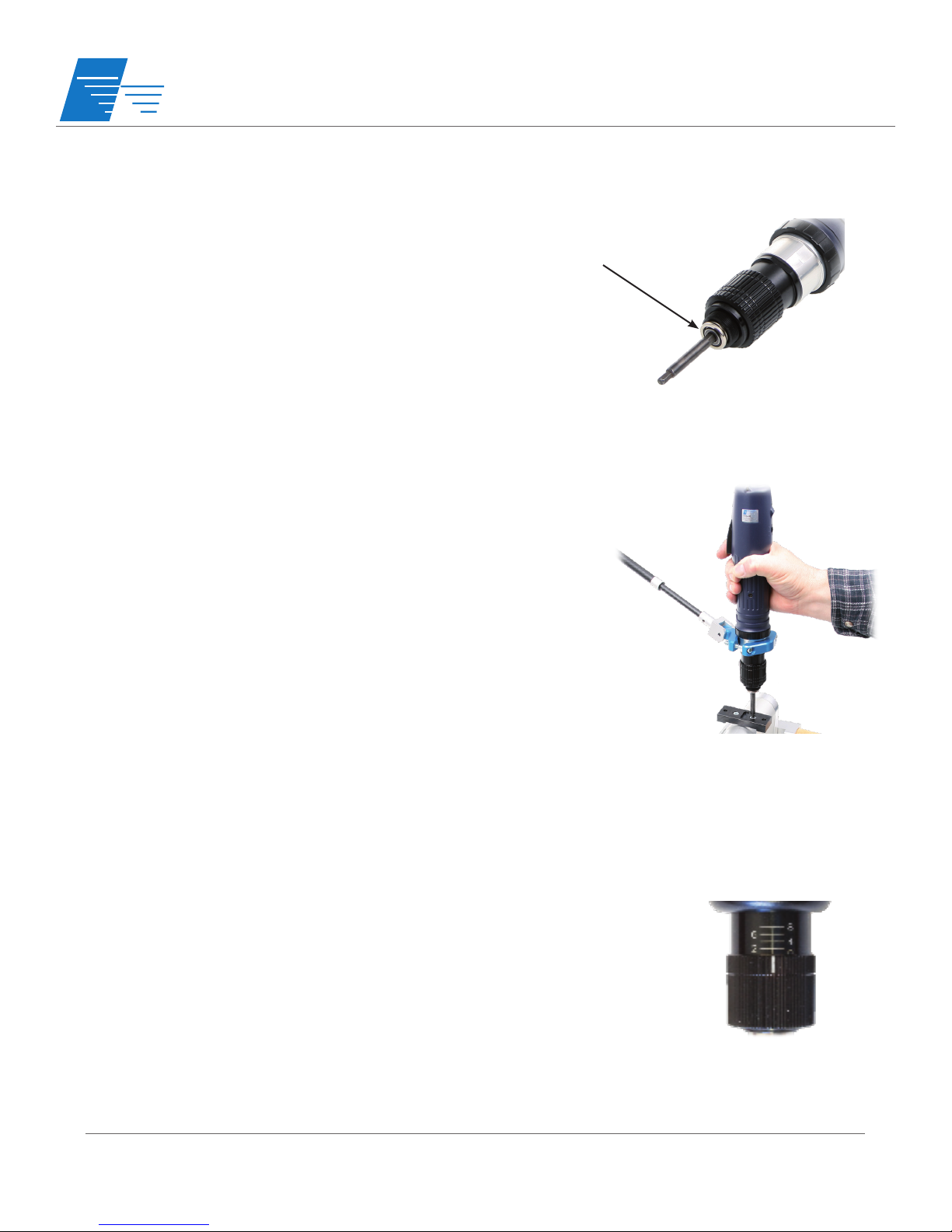
Insert the desired screwdriver bit into the bit holder of the driver. For tools
with 1/4” hex bit holders, move the bit locking collar with your ngers
(push towards the tool for ESL628/629, pull away from the tool for all other
models) and insert a power bit into the holder. Release the collar and
ensure that the bit is properly locked in place by pulling back and forth on
the bit.
Before you turn on the controller...
Make sure that the tool’s start mechanism (lever, trigger, or push-start) is
not engaged to prevent the tool from accidentally starting when turning
on the controller’s power switch.
Depending on the model of screwdriver selected, the screwdriver will have
either a start lever (ESL628/F, ESL629/F, ESL629M/630M/640M/650M), a
push-to-start mechanism (models with ‘P’ sux), or a trigger start (pistol
grip models). All models also have a forward/reverse switch.
Hold the tool grip securely in your hand so that the index nger is over the
trigger mechanism and the thumb can be used to cycle the fwd/rev switch
if necessary. If the tool has a side handle installed, grasp the side handle
rmly with the other hand. Due to the torque output capabilities of these
models, it is extremely important to use the supplied side handle in all
handheld applications and to grip the tool rmly to react the torque.
Familiarize yourself with the operation of the tool by free running the tool
before use at higher torque values.
Note - Do not switch from forward to reverse (or reverse to forward)
while the motor is running. A protection circuit will stop the tool if it is
inadvertently switched while running - if this happens, the trigger must be
released and re-activated to continue operating.
Operating the screwdriver...
An external torque adjustment nut located at the nose of the screwdriver
is used to set the output torque of the screwdriver. A reference scale
(0-8) is available as a guide - this scale is for reference only and does not
indicate actual torque values. Rotate the torque nut clockwise to increase
torque output, ccw to decrease torque output. We recommend the use
of an appropriate torque tester and static joint testing after installation to
verify proper torque settings. Lock the torque setting with the included
jam nut (ESL6..M/PM and ESP6 models) or purchase an optional torque
lock sleeve (ESL628/629 models).
Please note that the tool will clutch out in reverse (ccw). Counter-clockwise
torque is approximately 30% higher than cw torque at the same setting to
allow for the backing out of fasteners.
Setting the torque...

ESL600 Series 40VDC
Operation Manual
DELTA REGIS
Tools Inc.
www.deltaregis.com Page 5
40VDC Brushless Screwdrivers
Model Number
Start
Type
Range
(In.Lbs)
Range
(Nm)
Speed
(RPM)
Screwdriver
Bit Type
Length
(mm)
Weight
(kg)
Inline Body Style, Handheld (3)
ESL628 Lever 8.9 - 26.0 0.98 - 2.94 1000 1/4”hex 278(L) x 39.5(dia) 0.8
ESL628F Lever 8.9 - 26.0 0.98 - 2.94 2000 1/4”hex 278(L) x 39.5(dia) 0.8
ESL628P Push 8.9 - 26.0 0.98 - 2.94 1000 1/4”hex 278(L) x 39.5(dia) 0.8
ESL628PF Push 8.9 - 26.0 0.98 - 2.94 2000 1/4”hex 278(L) x 39.5(dia) 0.8
ESL629 Lever 17.4 - 43.4 1.96 - 4.90 1000 1/4”hex 278(L) x 39.5(dia) 0.8
ESL629P Push 17.4 - 43.4 1.96 - 4.90 1000 1/4”hex 278(L) x 39.5(dia) 0.8
Inline Body Style, Handheld or Fixture Mount
ESL629M Lever 17.7 - 44.3 2 - 5 1000 1/4”hex(1) 297(L) x 46.2(dia) 1.2
ESL629PM Push 17.7 - 44.3 2 - 5 1000 1/4”hex(1) 297(L) x 46.2(dia) 1.2
ESL630M Lever 26.6 - 66.4 3 - 7.5 800 1/4”hex(1) 297(L) x 46.2(dia) 1.2
ESL630PM Push 26.6 - 66.4 3 - 7.5 800 1/4”hex(1) 297(L) x 46.2(dia) 1.2
ESL640M Lever 35.4 - 88.5 4 - 10 550 1/4”hex(1) 297(L) x 46.2(dia) 1.2
ESL640PM Push 35.4 - 88.5 4 - 10 550 1/4”hex(1) 297(L) x 46.2(dia) 1.2
ESL650M Lever 53.1 - 132.8 6 - 15 350 1/4”hex(1) 297(L) x 46.2(dia) 1.2
ESL650PM Push 53.1 - 132.8 6 - 15 350 1/4”hex(1) 297(L) x 46.2(dia) 1.2
Pistol Grip Body Style
ESP620 (2) Trigger 17.7 - 44.3 2 - 5 1000 1/4”hex(1) 270(L) x 169(H) x 48(dia) 1.25
ESP630 (2) Trigger 26.6 - 66.4 3 - 7.5 800 1/4”hex(1) 270(L) x 169(H) x 48(dia) 1.25
ESP640 (2) Trigger 35.4 - 88.5 4 - 10 550 1/4”hex(1) 270(L) x 169(H) x 48(dia) 1.25
ESP650 (2) Trigger 53.1 - 132.8 6 - 15 350 1/4”hex(1) 270(L) x 169(H) x 48(dia) 1.25
(1) Standard bit holder is 1/4”hex quick change type - for optional 3/8”square drive, add sux ‘-SQ’
(2) Pistol Grip tool has cable connection in bottom of handle as standard - for top rear connection, add sux ‘-U’
(3) ESD Safe housing available - add sux‘-ESD’
The 600 Series 40VDC Brushless Screwdrivers are available in three dierent body styles as listed below. In-line
models ending in an ‘M’ sux have an aluminum front end to facilitate xture mounting. The xture mount and
pistol grip tools include an accessory side handle for operator use in reacting the torque of the screwdriver.
40VDC Brushless Power Controller
Model
Number Outlets Speeds
Tool
Connector Output Input
Dimensions
L x W x H (mm)
Weight
(kg)
BECT640 1 Single 6 pin 40VDC, 220W 100-240VAC, 6.3A, 50/60Hz 210 x 118 x 85 1.8
Power supply shipped with standard North American cordset. For EU cord, add sux ‘E’ . For UK cord, add sux ‘UK’.
The BECT640 Controller is designed specically to run Delta Regis‘600 Series’ 40VDC Brushless Screwdrivers. The
controller accepts input voltages of 100-240VAC, 50/60Hz. Output voltage to the driver is 40VDC (single speed
only). CE/RoHS/ETL Approved.

ESL600 Series 40VDC
Operation Manual
DELTA REGIS
Tools Inc.
www.deltaregis.com
The ‘BECT6’ Series Controllers are not user serviceable. Any repairs must be performed by a Delta Regis authorized service
center. Please consult Delta Regis Tools for further information and the location of the nearest authorized service center.
Repairs to ‘ESL6’ series screwdrivers must be performed by trained personnel, knowledgeable and qualied in the repair of
DC electric screwdrivers. Use only genuine Delta Regis parts when servicing these products.
Do not attempt to modify the tools or controllers.
Service
The ESL600 Series Tools and Controllers are warranted for one year from the date of purchase against defects in material
and workmanship. In addition, the brushless motor in the ESL600 Series Screwdrivers is warranted for three years from the
date of purchase against defects in material and workmanship. This warranty does not cover damage due to transportation,
abuse, misuse, or improper service. Our sole remedy is to repair or replace (at our discretion) any unit found to be defective
due to defects in material or workmanship. It is the responsibility of the user to return any product thought to be defective,
freight prepaid, to our warehouse for inspection and evaluation.
There is no warranty of merchantability or tness of purpose. In no event will Delta Regis Tools, Inc.
be liable for business interruptions, loss of prots, harm, injury, damage, personal injury, cost of delay,
or any other special, indirect, incidental, or consequential losses, costs, or damages.
Warranty
Page 6
If you require parts or accessories for your Delta Regis product, please refer to our website or contact us for further
information.
Parts and Accessories
Model ECT6-SSOB Slow Start / Output Signal Module is available as an option to plug in-line between the BECT640
Controller and the 40VDC Brushless Screwdriver. This module provides adjustable slow start and transistor outputs for tool
running, clutch tripped, and tool in reverse. Please refer to our website or contact us for further details.
Slow Start / Output Signal Module
This manual suits for next models
18
Table of contents
Other Delta Regis Power Screwdriver manuals

Delta Regis
Delta Regis ESL-XTE3 Series User manual

Delta Regis
Delta Regis BESL3 Series User manual

Delta Regis
Delta Regis 18VDC ESB6-X Series User manual

Delta Regis
Delta Regis CESPT830 User manual

Delta Regis
Delta Regis ESL210-ESD User manual

Delta Regis
Delta Regis ESB824P User manual

Delta Regis
Delta Regis BECT620C User manual

Delta Regis
Delta Regis ICESL6 User manual

Delta Regis
Delta Regis ESB824 User manual

Delta Regis
Delta Regis CESL8 Series User manual


