DeLOCK 18684 User manual
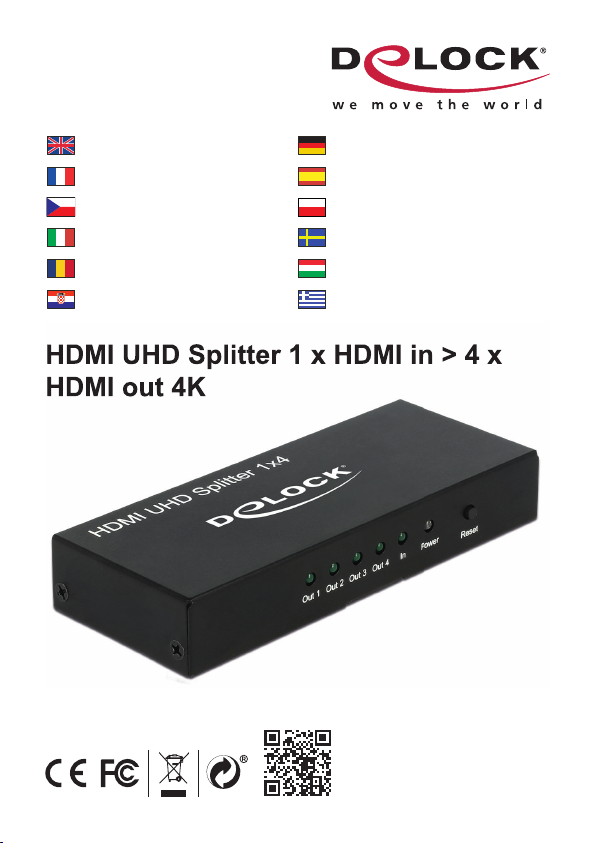
HDMI UHD Splitter 1 x HDMI in > 4 x
HDMI out 4K
Product-No:18684
User manual no:18684-a
www.delock.com
User manual
Mode d’emploi
Uživatelská příručka
Manuale utente
Manual de utilizare
Korisnički priručnik
Bedienungsanleitung
Manual del usuario
Instrukcja obsługi
Bruksanvisning
Használati utasítás
Εγχειρίδιο χρήστη
HDMI UHD Splitter 1 x HDMI in > 4 x
HDMI out 4K

-2-
English
Description
This splitter by Delock receives an HDMI signal from a PC or laptop and splits
it to four connected displays. Thereby one HDMI connection can be used to
operate four HDMI monitors.
Specifi cation
• Connectors:
Input:
1 x HDMI-A 19 pin female
1 x DC 5 V power connector
Output:
4 x HDMI-A 19 pin female
• High Speed HDMI specifi cation
• Supports 3D displays
• Supports HDCP 1.4 and 2.2
• Supports HDR
• Reset button
• LED indicator
• Resolution up to 3840 x 2160 @ 60 Hz (depending on the system and the
connected hardware)
• Video bandwidth up to 600 MHz / 6 Gbps, max. 18 Gbps
• Power consumption: max. 2.4 W
• Metal housing
• Colour: black
• Dimensions (LxWxH): ca. 123 x 51 x 20 mm
Power supply specifi cation
• Wall power supply
• Input: AC 100 ~ 240 V / 50 ~ 60 Hz / 0.3 A
• Output: 5 V / 1 A
• Ground outside, plus inside
• Dimensions:
inside: ø ca. 2.1 mm
outside: ø ca. 5.5 mm
length: ca. 9 mm
System requirements
• A free HDMI female
• HDMI cable

-3-
English
Package content
• HDMI Splitter
• USB power cable, length: ca. 0.5 m
• External power supply
• User manual
Safety instructions
• Protect the product against moisture
• Protect the product against direct sunlight
Installation
1. Connect your HDMI video source to the HDMI input of the splitter with an
optional HDMI cable.
2. Connect the outputs of the splitter to the monitors with optional HDMI cables.
3. Connect the power supply to the splitter and connect the other end to the
socket.
Operation
1. If you connect or disconnect displays during operation, you can use the
Reset button to initialize the splitter.
Support Delock
If you have further questions, please contact our customer support
You can fi nd current product information on our homepage: www.delock.com
Final clause
Information and data contained in this manual are subject to change without
notice in advance. Errors and misprints excepted.
Copyright
No part of this user manual may be reproduced, or transmitted for any purpose,
regardless in which way or by any means, electronically or mechanically, without
explicit written approval of Delock.
Stand: 07/2019

-4-
Deutsch
Kurzbeschreibung
Dieser Splitter von Delock erhält ein HDMI Signal von einem PC oder Notebook
und teilt es auf vier angeschlossene Bildschirme auf. Somit können an einem
HDMI Anschluss vier HDMI Monitore betrieben werden.
Spezifi kation
• Anschlüsse:
Eingang:
1 x HDMI-A 19 Pin Buchse
1 x DC 5 V Stromanschluss
Ausgang:
4 x HDMI-A 19 Pin Buchse
• High Speed HDMI Spezifi kation
• Unterstützt 3D Displays
• Unterstützt HDCP 1.4 und 2.2
• Unterstützt HDR
• Reset-Taste
• LED Anzeige
• Aufl ösung bis 3840 x 2160 @ 60 Hz (abhängig vom System und der
angeschlossenen Hardware)
• Videobandbreite bis 600 MHz / 6 Gbps, max. 18 Gbps
• Leistungsaufnahme: max. 2,4 W
• Metallgehäuse
• Farbe: schwarz
• Maße (LxBxH): ca. 123 x 51 x 20 mm
Netzteilspezifi kation
• Steckernetzteil
• Eingang: AC 100 ~ 240 V / 50 ~ 60 Hz / 0,3 A
• Ausgang: 5 V / 1 A
• Masse außen, Plus innen
• Maße:
innen: ø ca. 2,1 mm
außen: ø ca. 5,5 mm
Länge: ca. 9 mm
Systemvoraussetzungen
• Eine freie HDMI Buchse
• HDMI Kabel

-5-
Deutsch
Packungsinhalt
• HDMI Verteiler (Splitter)
• USB Stromkabel, Länge: ca. 0,5 m
• Externes Netzteil
• Bedienungsanleitung
Sicherheitshinweise
• Produkt vor Feuchtigkeit schützen
• Produkt vor direkter Sonneneinstrahlung schützen
Installation
1. Verbinden Sie die HDMI Videoquelle und den Eingang des HDMI Splitters
mit einem optionalen HDMI Kabel.
2. Schließen Sie den Ausgang des Splitters an die Monitore mit optionalen
HDMI Kabeln an.
3. Nun können Sie das Netzteil an den HDMI Splitter anschließen und das
andere Ende in die Steckdose stecken.
Bedienung
1. Wenn Sie im Betrieb Monitore anschließen oder trennen, können Sie die
Reset-Taste verwenden, um den Splitter neu zu initialisieren.
Support Delock
Bei weitergehenden Supportanfragen wenden Sie sich bitte an
Aktuelle Produktinformationen und Treiber Downloads fi nden Sie auch auf
unserer Homepage: www.delock.de
Schlussbestimmung
Die in diesem Handbuch enthaltenen Angaben und Daten können ohne vorherige
Ankündigung geändert werden. Irrtümer und Druckfehler vorbehalten.
Copyright
Ohne ausdrückliche schriftliche Erlaubnis von Delock darf kein Teil dieser
Bedienungsanleitung für irgendwelche Zwecke vervielfältigt oder übertragen
werden, unabhängig davon, auf welche Art und Weise oder mit welchen Mitteln,
elektronisch oder mechanisch, dies geschieht.
Stand: 07/2019

-6-
Français
Confi guration système requise
• Un port HDMI femelle libre
• Câble HDMI
Contenu de l’emballage
• Répartiteur HDMI
• Câble alimentation USB, longueur : env. 0,5 m
• Alimentation électrique externe
• Mode d’emploi
Instructions de sécurité
• Protéger le produit contre l’humidité
• Protéger le produit contre la lumière directe du soleil
Installation
1. Connectez votre source vidéo HDMI à l'entrée HDMI du répartiteur avec un
câble HDMI optionnel.
2. Connectez les sorties du répartiteur aux moniteurs avec des câbles HDMI
optionnels.
3. Branchez l'alimentation électrique au répartiteur et branchez l'autre extrémité
à la prise de courant.
Fonctionnement
1. Si vous connectez ou déconnectez des écrans pendant le fonctionnement,
vous pouvez utiliser le bouton Réinitialisation pour initialiser le répartiteur.

-7-
Español
Requisitos del sistema
• Un puerto hembra HDMI disponible
• Cable HDMI
Contenido del paquete
• Divisor HDMI
• Cable de alimentación USB, longitud del cable: aprox. 0,5 m
• Fuente de alimentación externa
• Manual del usuario
Instrucciones de seguridad
• Proteja el producto contra el polvo
• Proteja el producto contra la luz solar directa
Instalación
1. Conecte la fuente de vídeo HDMI a la entrada HDMI del divisor con un cable
HDMI opcional.
2. Conecte las salidas del divisor a los monitores con cables HDMI opcionales.
3. Conecte la fuente de alimentación al divisor y conecte el otro extremo a la
toma de corriente.
Funcionamiento
1. Si conecta o desconecta pantallas mientras están funcionando, puede
utilizar el botón Restablecer para inicializar el divisor.

-8-
České
Systémové požadavky
• Volný port HDMI samice
• HDMI kabel
Obsah balení
• HDMI rozbočovač
• USB napájecí kabel, délka: cca. 0,5 m
• Externí napájecí zdroj
• Uživatelská příručka
Bezpečnostní pokyny
• Chraňte produkt před vlhkostí
• Chraňte produkt před přímým slunečním světlem
Instalace
1. Připojte váš HDMI video zdroj ke vstupu HDMI rozbočovače volitelným
kabelem.
2. Připojte výstupy rozbočovače k monitorům volitelnými HDMI kabely.
3. Připojte napájecí zdroj k rozbočovači a druhou stranu do zásuvky el. napětí.
Operace
1. Jestliže připojíte nebo odpojíte displeje během provozu, můžete pro
opětovnou inicializaci rozbočovače použít tlačítko Reset.

-9-
Polsku
Wymagania systemowe
• Jedno wolne złącze żeńskie HDMI
• Kabel HDMI
Zawartość opakowania
• Rozdzielacz HDMI
• Kabel zasilający USB, długość: ok. 0,5 m
• Zewnętrzny zasilacz
• Instrukcja obsługi
Instrukcje bezpieczeństwa
• Produkt należy zabezpieczyć przed wilgocią
• Produkt należy zabezpieczyć przed bezpośrednim światłem słonecznym
Instalacja
1. Podłącz źródło wideo HDMI do wejścia HDMI w splitterze za pomocą
opcjonalnego przewodu HDMI.
2. Podłącz wyjścia w splitterze do monitorów za pomocą opcjonalnych
przewodów HDMI.
3. Podłącz zasilacz do splittera i podłącz drugi koniec zasilacza do gniazdka
elektrycznego.
Obsługa
1. Jeżeli podczas obsługi podłączysz lub odłączysz urządzenia wyświetlające,
możesz użyć przycisku Reset, aby zainicjować splitter.

-10-
Italiano
Requisiti di sistema
• Un porta HDMI femmina disponibile
• Cavo HDMI
Contenuto della confezione
• Splitter HDMI
• Cavo di alimentazione USB, lunghezza ca. 0,5 m
• Alimentatore esterno
• Manuale utente
Istruzioni per la sicurezza
• Proteggere il prodotto dall'umidità
• Proteggere il prodotto dalla luce solare diretta
Installazione
1. Collegare la sorgente video HDMI all'ingresso HDMI dello splitter con un
cavo HDMI opzionale.
2. Collegare le uscite dello splitter ai monitor con cavi HDMI opzionali.
3. Collegare l'alimentatore allo splitter e collegare l'altra estremità alla presa.
Funzionamento
1. Se si collega o si scollega il display durante l'utilizzo, si può utilizzare il
pulsante Reset per inizializzare lo splitter.
Table of contents
Languages:
Other DeLOCK Cables And Connectors manuals