
Dartel LJ-120 User manual

User guide
Please read these instructions
carefully before use and keep
this User Guide for future
reference!
LJ-120

1
Contents LJ-120
Contents
I. Introduction......................................................................................... 3
Telephone features............................................................................... 3
Function button index............................................................................ 5
II. Getting started................................................................................... 7
How to connect the batteries................................................................ 7
How to mount the stand…………………………………………………… 7
How to connect the handset and telephone line................................... 8
How to set the dial mode for your type of telephone exchange............ 8
Wall mounting………………………………………………………………. 8
III. Using the telephone......................................................................... 10
How to set the menu language…………………………………………… 10
How to set the display contrast............................................................. 10
How to set date and time...................................................................... 11
Ringer volume control........................................................................... 12
How to select ringer melody.................................................................. 12
2-way speaker function......................................................................... 13
How to make a call............................................................................... 13
How to receive a call............................................................................. 14
OUT memory........................................................................................ 14
How to delete the OUT number............................................................ 15
Redial function...................................................................................... 15
Auto-redial function………………………………………………………… 16
How to enter a pause............................................................................ 16
How to set a pause………………………………………………………… 17
Hold function......................................................................................... 17
Memory.......................................................................…………………. 18
Flash function........................................................................................ 20
How to lock telephone numbers............................................................ 21
Alarm function....................................................................................... 22
Anti-parallel function........................................................................….. 23
Calculator.............................................................................................. 23
IV. Clip (Caller ID) – Calling line identification presentation............. 24
How to review Clip numbers................................................................. 25
How to delete Clip numbers.................................................................. 25
VIP function.......................................................................................... 25
How to make a call from the Clip memory............................................ 26
How to set the prefix……………………………………………………….. 26
How to set the local area code.............................................................. 27

2
Contents LJ-120
V. Phone-book………………………………………………………………. 29
How to enter the name and number……………………………………... 29
How to search and review the name and number……………………… 30
How to edit the phone-book………………………………………………. 31
How to delete a name and number………………………………………. 31
How to make a call from the phone-book……………………………….. 32
VI. Connecting the headphone…………………………………………… 33
VII. Help................................................................................................... 34
Important advice.................................................................................. 35

3
I. Introduction LJ-120
I. Introduction
Important!
Please read these instructions carefully before use and
keep this User Guide for future reference.
Telephone components supplied:
telephone set (base unit + handset),
handset cord,
line cord,
stand,
user guide,
guarantee card.
Telephone features
♦ Phone-book
- maximum of 93 memory locations
- entering a name
- searching a name (number)
- deleting a number
♦ 10 languages
♦ 16-digits, blue backlit LCD display
♦ 10 two-touch number memory
♦ 8 one-touch number memory
♦ Support of memory
♦ Calculator
♦ CLIP(Caller ID) – calling line identification
presentation in European system
- telephone number review
- date and time display
- local area code enter
- prefix
- call back
- VIP function
♦ Alarm-clock
♦ Call timer
♦ Adjustable display contrast
♦ Date and time setting

4
I. Introduction LJ-120
♦ Last number redial
♦ Auto redial
♦ Out number memory
♦ Pause
♦ 2-way speaker function
♦ 2-way speaker volume rotary switch
♦ Pre-dial function
♦ Flash
♦ 16 types of ringer sound selectable
(12 melody ringers)
♦ Ringer volume control
♦ Anti-parallel function
♦ Music on hold
♦ Tone/pulse dialing
♦ Lock for long distance calls
♦ Headphone socket
♦ Wall mounting

5
I. Introduction LJ-120
Function button index
1. Handset loudspeaker
2. Hook switch
3. Hold clip
4. 9V socket for power adaptor
5. LINE OUT line socket
6. LINE IN line socket
7. Display
8. RINGER LOW/HI switch
9. MODE P/T switch
10. CAL button
11. UP/+ button
12. DOWN/- button
13. OUT/X button
14. STORE/÷
÷÷
÷ button
15. Speaker volume rotary switch
16. M1-M8 button
17. Keypad
18. */. button
19. #/= button
20. SP-PHONE button
21. Handset hole
22. Handset clip
23. Memory label
24. Base loudspeaker
25. RECALL/VIP button
26. DEL/TIME button
27. BOOK button
28. Headphone socket
29. SET/HOLD button
30. Handset microphone
31. Handset sockets
32. Lock-socket
33. BACK/ARD button
34. FLASH button
35. RD/P button
36. Base microphone
37. IN USE indicator
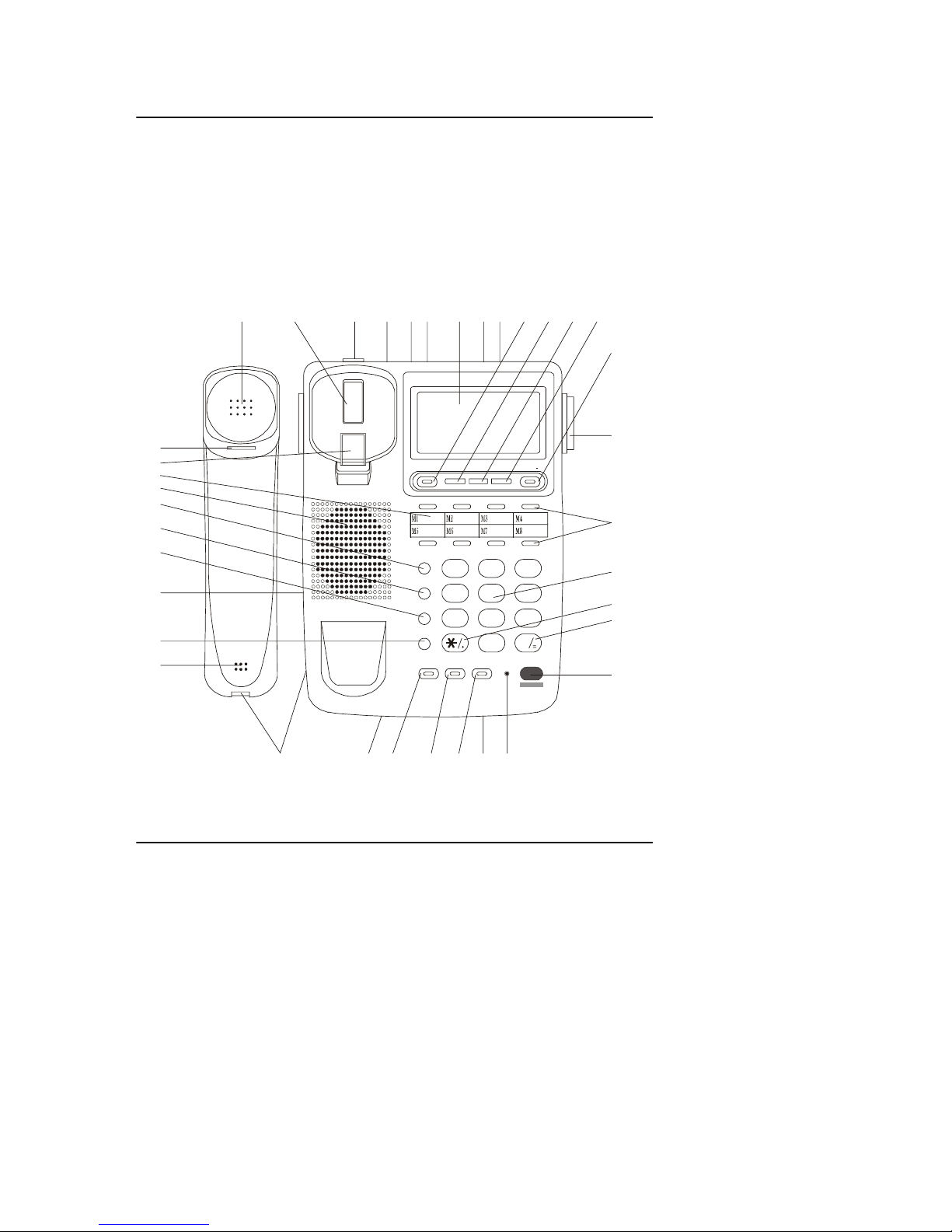
6
I. Introduction LJ-120
Note!
The line sockets LINE OUT, LINE IN, the RINGER LOW/HI switch,
the MODE P/T switch, the 9V socket, the handset socket and the
headphone socket are located on the side of the base unit. In
addition, on the bottom of the base unit, is the socket for
blocking telephone numbers.
123
456
789
0
A
BC DEF
GHI JKL MNO
PQRS TUV WXYZ
#
CAL UP/ + DOWN/- OUT/ X STO RE /
RECALL/VIP
DEL/TIME
BOOK
SET/HOLD
BACK/ ARD FLASH RD/P
IN USE
SP-PHONE
12 3456789
10 11 12 13
15
14
16
17
18
19
20
21
22
23
25
26
27
28
20
30
31 32 33 34 35 36 37
24

7
II. Getting started LJ-120
II. Getting started
How to connect the batteries
♦ Remove the cover of the battery
compartment on the underside of the base
unit.
♦ Fit three 1,5V AA batteries,
♦ Replace the battery compartment cover.
Note!
Instead of batteries, the adaptor to the 9Vsocket, which is
placed on the side of the base unit can be connected. The
parameters of the adaptor must be as follows:
inside voltage –
UIN = 230V, f =50 Hz
outside voltage–
Uout = 9V DC
current
Ioutmin = 100 mA
standard plug (
Φ
=2.1 mm)
with „-” inside.
Adaptor is not in complete!
How to mount the table stand
See below picture.

8
II. Getting started LJ-120
How to connect the handset and telephone line
Plug one end of the coiled handset cord into the handset and the
other end into the socket on the side of the telephone.
Insert the base unit’s telephone line plugs into the PTT wall socket and
telephone socket LINE IN as shown on the illustration.
Note!
The telephone is equipped with two line sockets. These sockets
are connected in parallel. It does not matter, where the
telephone line and second telephone are connected.
After connecting the telephone, the display shows the date, the clock and the
counter of the CLIP numbers. These symbols will be always displayed in the
standby mode.
How to set the dial mode for your type of telephone exchange
These are two different modes a telephone can use to communicate with the
local exchange. Modern telephone exchanges accept TONE dialing, but some
older exchanges accept only PULSE dialing. This telephone is capable of
either type of dialing- but if your local telephone exchange is a modern one
that accepts TONE dialing, this is the best type to use, because:
it gives you much faster connections,
it allows you to use special functions if they are available in your area.
To set the right dial mode:
move the MODE P/T switch to T or P position.
Note!
Special functions are available only if the relevant TP S.A.
services have been subscribed to.
If more information is required, please contact the BOK office
or your network provider.
Wall mounting
The wall mount brackets are located underneath the telephone base unit. The
telephone can be conveniently wall mounted near the PTT line socket.
To mount the base onto the wall:
drill two holes into the wall in the correct position, a distance of 89 mm
apart. Put the screws into the wall, leaving about 5 mm free to hang
the wall mounting bracket,
mount the stand (please see the below figure)
set the wall clip in the right position,
replace the handset on the base unit,
hang the telephone onto the screws.

9
II. Getting started LJ-120
YOUR TELEPHONE IS NOW READY FOR USE!!!
Table of contents
Other Dartel IP Phone manuals


